1. Introduction
Thank you for choosing the OUKITEL P1000 Plus Portable Power Station. This device is designed to provide reliable power for various applications, including home backup, outdoor activities, and emergency situations. Featuring a 1024Wh LiFePO4 battery and 1800W AC output, it offers versatile charging options and smart control via a mobile application.
2. Safety Instructions
- Do not disassemble, repair, or modify the unit.
- Keep the unit away from heat sources, fire, and water.
- Use only original or certified charging cables and accessories.
- Store the unit in a cool, dry place, away from direct sunlight.
- Ensure proper ventilation during use and charging.
- Keep out of reach of children and pets.
- If the product is left for a long time, please charge the product to 100% power every three months. When the battery level of the product is less than 20%, it is not recommended to store it for a long time.
3. Package Contents
Verify that all items are included in your package:
- 1x OUKITEL P1000 Plus Portable Power Station
- 2x 220W Solar Panel (if purchased as a bundle)
- 1x AC Charging Cable
- 1x Solar Charging Cable (MC4-XT60)
- 1x User Guide

Image: OUKITEL P1000 Plus Portable Power Station and included accessories.
4. Product Overview
The OUKITEL P1000 Plus features a robust design with multiple input and output ports for various devices. The front panel includes a clear display for monitoring status, along with various AC, DC, and USB ports.

Image: Front view of the OUKITEL P1000 Plus Portable Power Station, highlighting the display and various output ports.
4.1. Ports and Features
- AC Outlets: 4 AC outlets (1800W total, 3600W peak) for household appliances.
- USB-A Ports: 2 USB-A ports (QC 18W Max, 5V 2.4A).
- USB-C Ports: 1 USB-C PD 100W, 1 USB-C PD 20W.
- DC Outputs: 2 DC outputs (36W) and 1 120W DC car socket.
- Input Ports: AC charging input, Solar charging input (PV IN 12-50V 7A).
- LED Light: Built-in LED light with 3 modes (steady, SOS, flashing).
- Smart App Control: Bluetooth and Wi-Fi connectivity for remote monitoring and control.

Image: Detailed diagram showing the various input and output ports of the OUKITEL P1000 Plus.
5. Setup and Charging
5.1. Initial Setup
Before first use, fully charge the OUKITEL P1000 Plus. This ensures optimal battery performance and calibration.
5.2. Charging Methods
The P1000 Plus offers multiple charging options:
- AC Fast Charging: Connect the AC charging cable to a standard wall outlet. The unit can charge from 0% to 80% in approximately 45 minutes, and 0% to 100% in 70 minutes, thanks to its 1200W AC fast charging capability.
- Solar Charging: Connect compatible solar panels (up to 500W max) using the provided solar charging cable. The unit can reach full charge in approximately 2.3 hours with 500W solar input.
- Combined Charging (AC + Solar): For the fastest charging, combine AC and solar input up to 1700W. This can fully charge the unit in just 45 minutes.

Image: Visual representation of AC, solar, and combined charging methods and their respective charging times.
6. Operation
6.1. Powering On/Off
Press and hold the Power button to turn the unit on or off. The display will illuminate, showing the battery status and other relevant information.
6.2. Connecting Devices
Plug your devices into the appropriate AC, DC, or USB ports. Ensure that the total power consumption of your devices does not exceed the rated output of the power station (1800W continuous, 3600W peak).

Image: The OUKITEL P1000 Plus connected to various devices, demonstrating its 11 output ports.
6.3. Uninterruptible Power Supply (UPS) Function
The P1000 Plus can act as an Uninterruptible Power Supply (UPS). When connected to a wall outlet and devices are plugged into its AC outputs, it can seamlessly switch to battery power within 10ms during a power outage. This protects sensitive electronics like PCs, network equipment, and medical gear from data loss or interruption.

Image: The P1000 Plus providing seamless UPS backup power to a computer during a power outage.
6.4. Smart App Control
Download the OUKITEL app to monitor and control your power station remotely via Bluetooth and Wi-Fi. The app allows you to check battery status, adjust charging modes, and manage functions directly from your smartphone.

Image: A user interacting with the OUKITEL smart app to monitor and control the power station.
6.5. LED Light Modes
The built-in LED light has three modes: steady light, SOS, and flashing. These modes are useful for outdoor activities, emergency lighting, or as a signal light.

Image: The OUKITEL P1000 Plus providing illumination with its LED light during a camping trip.
7. Display Interface
The digital display provides real-time information about the power station's status. Refer to the diagram below for an explanation of each indicator:

Image: Detailed explanation of the OUKITEL P1000 Plus display interface, showing various indicators like battery level, input/output wattage, and status icons.
- Using time/charging time
- High temperature protection
- Low temperature protection
- Fan status
- Power status
- UPS mode
- PV charging mode
- Total input power
- Total output power
- Cigarette lighter (12V) output
- AC output
- DC (12V) output
- Silent mode
- Fast charging mode
- Slow charging mode
- Overload protection
- USB output
- PD output
- Frequency Switching
- WiFi/Bluetooth
8. Usage Scenarios
The OUKITEL P1000 Plus is designed for diverse applications:
8.1. Outdoor Activities
Power your devices during camping, RV trips, and other outdoor adventures. It can run laptops, electric blankets, projectors, and drones for extended periods.

Image: The OUKITEL P1000 Plus powering devices during an outdoor camping trip.
8.2. Emergency Reserve
Provides critical backup power during natural disasters and power outages, ensuring essential devices remain operational.
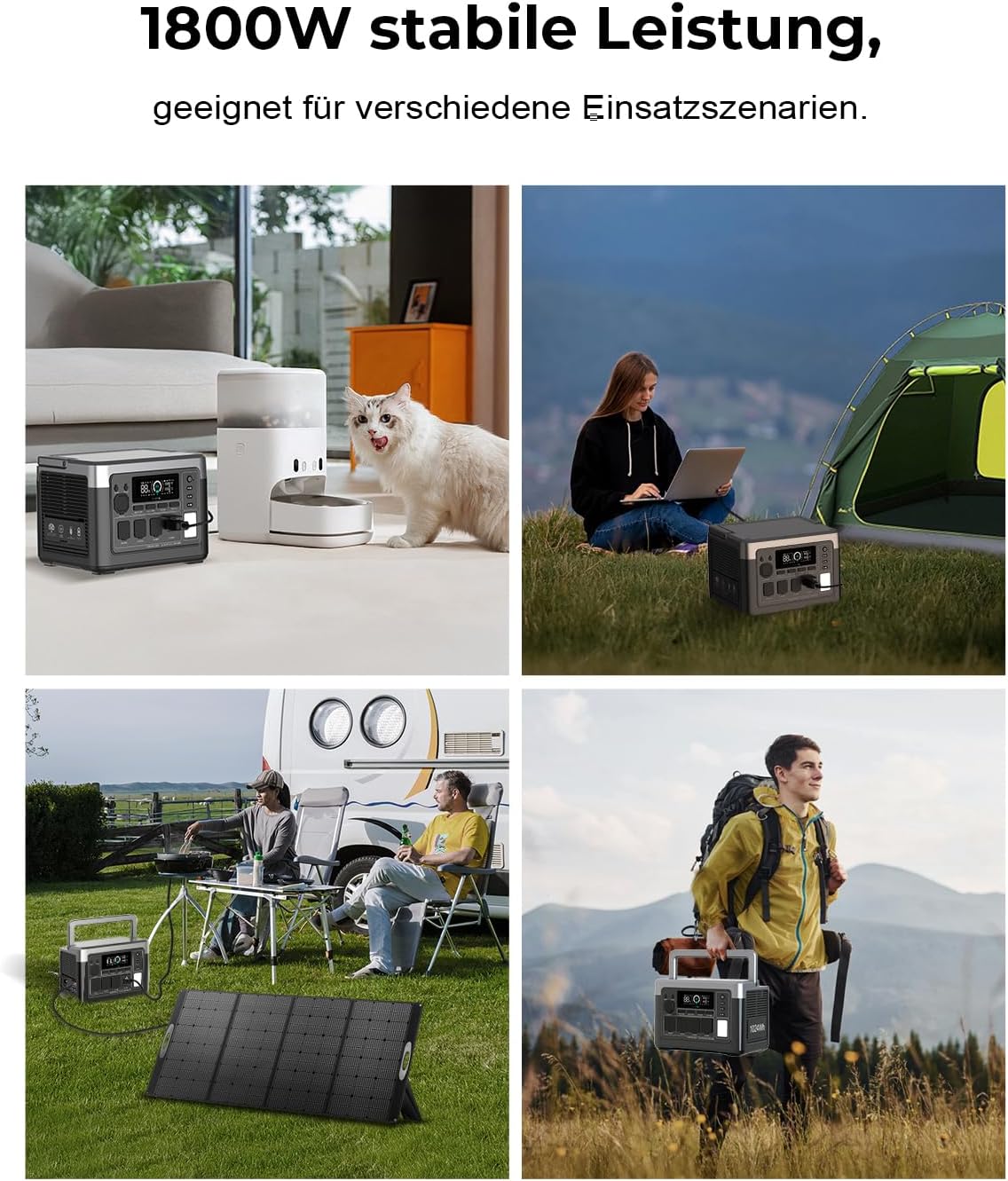
Image: The OUKITEL P1000 Plus providing power during an emergency scenario.
8.3. Daily Use
Suitable for daily power needs, such as charging phones, running TVs, mini-fridges, and hair dryers.

Image: The OUKITEL P1000 Plus powering common household appliances for daily use.
9. Maintenance
9.1. Battery Care
The P1000 Plus is equipped with a long-lasting LiFePO4 battery, offering up to 4000 charge cycles and a lifespan of up to 10 years. Its advanced Battery Management System (BMS) protects against overcurrent, overvoltage, and deep discharge. To prolong battery life, avoid completely draining the battery frequently.

Image: Internal view highlighting the LiFePO4 battery and Battery Management System (BMS) for durability and safety.
9.2. Storage
When storing the unit for extended periods, ensure it is charged to at least 50% and stored in a cool, dry environment. Recharge the unit every three months to maintain battery health.
9.3. Cleaning
Use a dry, soft cloth to clean the exterior of the power station. Do not use liquid cleaners or immerse the unit in water.
10. Troubleshooting
- Unit not turning on: Ensure the battery is charged. If not, connect to an AC outlet or solar panel.
- Devices not charging: Check if the output ports are activated. Verify that the device's power consumption does not exceed the port's or unit's maximum output.
- Overload warning: Disconnect some devices to reduce the load. The unit will automatically reset after a short period.
- Overheating: Ensure proper ventilation. If the unit overheats, it may temporarily shut down to protect components. Allow it to cool down before resuming use.
- App connectivity issues: Ensure Bluetooth and Wi-Fi are enabled on your smartphone and the power station. Restart both devices and try reconnecting.
11. Specifications
| Feature | Specification |
|---|---|
| Brand | OUKITEL |
| Model Name | P1000 Plus |
| Battery Capacity | 1024Wh LiFePO4 |
| Rated Output Power | 1800W (3600W Peak) |
| AC Charging Input | 1200W Max |
| Solar Charging Input | 500W Max (12-50V 7A) |
| Combined Charging (AC+Solar) | 1700W Max |
| AC Output Voltage | 120 Volts |
| USB-A Output | QC 18W Max, 5V 2.4A |
| USB-C Output | PD 100W, PD 20W |
| DC Output | 2x 36W, 1x 120W Car Socket |
| UPS Switching Time | 10ms |
| Dimensions (L x W x H) | 13.6" x 9" x 9.4" (34.6 x 22.8 x 23.8 cm) |
| Item Weight | 67.5 Pounds (approx. 12 kg) |
| Material | Aluminum, Plastic |
12. Warranty and Support
OUKITEL provides a 2-year warranty for the P1000 Plus Portable Power Station. For any issues or support, please contact OUKITEL Official US customer service. Free repairment is guaranteed within two years from the date of order. Water interference due to deliberate human factors is not covered under free repairment.
For further assistance, visit the OUKITEL Official Store or refer to the FAQs in your product documentation.
13. Product Videos
Watch these official videos for more information on the OUKITEL P1000 Plus:
OUKITEL P1000 Plus 1800W Solar Generator
Video: An overview of the OUKITEL P1000 Plus 1800W Solar Generator, showcasing its features and capabilities.
OUKITEL 2400W Power Station
Video: A demonstration of the OUKITEL 2400W Power Station, highlighting its power output and applications.
P2001PLUS 2400W Power Station
Video: Another look at the P2001PLUS 2400W Power Station, focusing on its design and functionality.
P2001Plus Unboxing, Power Station for Home Use
Video: An unboxing and demonstration of the P2001Plus, showcasing its suitability for home use.


