
1. Introduction
This manual provides essential instructions for the proper setup, operation, and maintenance of your SAMCOM BTEAR01 Wireless Earpiece. Please read this manual thoroughly before using the product to ensure optimal performance and longevity.
2. Product Overview
The SAMCOM BTEAR01 is a wireless earpiece designed for two-way radios, offering hands-free communication with a clear acoustic tube and a 2-pin K plug dongle. It is specifically compatible with SAMCOM FPCN10A and FPCN30A two-way radios.
2.1. Key Features
- Hands-Free Communication: Offers clear, full-bodied sound through its transparent acoustic tube, enabling hands-free use with your 2-Pin K Head radio.
- Long-Lasting Battery: Provides up to 10 hours of talk time for extended use.
- Comfortable & Discreet: Features soft in-ear earbuds for comfort and noise isolation, with a low-profile coiled tube design.
- Easy Pairing & Use: Connects automatically to compatible SAMCOM radios with simple button presses.
- Convenient Charging: Includes a 2-in-1 charging cable for simultaneous charging of the earpiece and PTT transmitter.
- Exclusive Compatibility: Designed for SAMCOM FPCN10A and FPCN30A 2-Pin K-Type two-way radios. Not compatible with Midland or Motorola walkie-talkies.
2.2. Package Contents
The package includes the following items:
- 1 x Wireless Earpiece (SAMCOM BTEAR01)
- 1 x 2-Pin K Plug Dongle Adapter
- 1 x Transparent Acoustic Coil Tube
- 2 x Replacement Eartips
- 1 x 2-in-1 USB Charging Cable
- 1 x User Manual
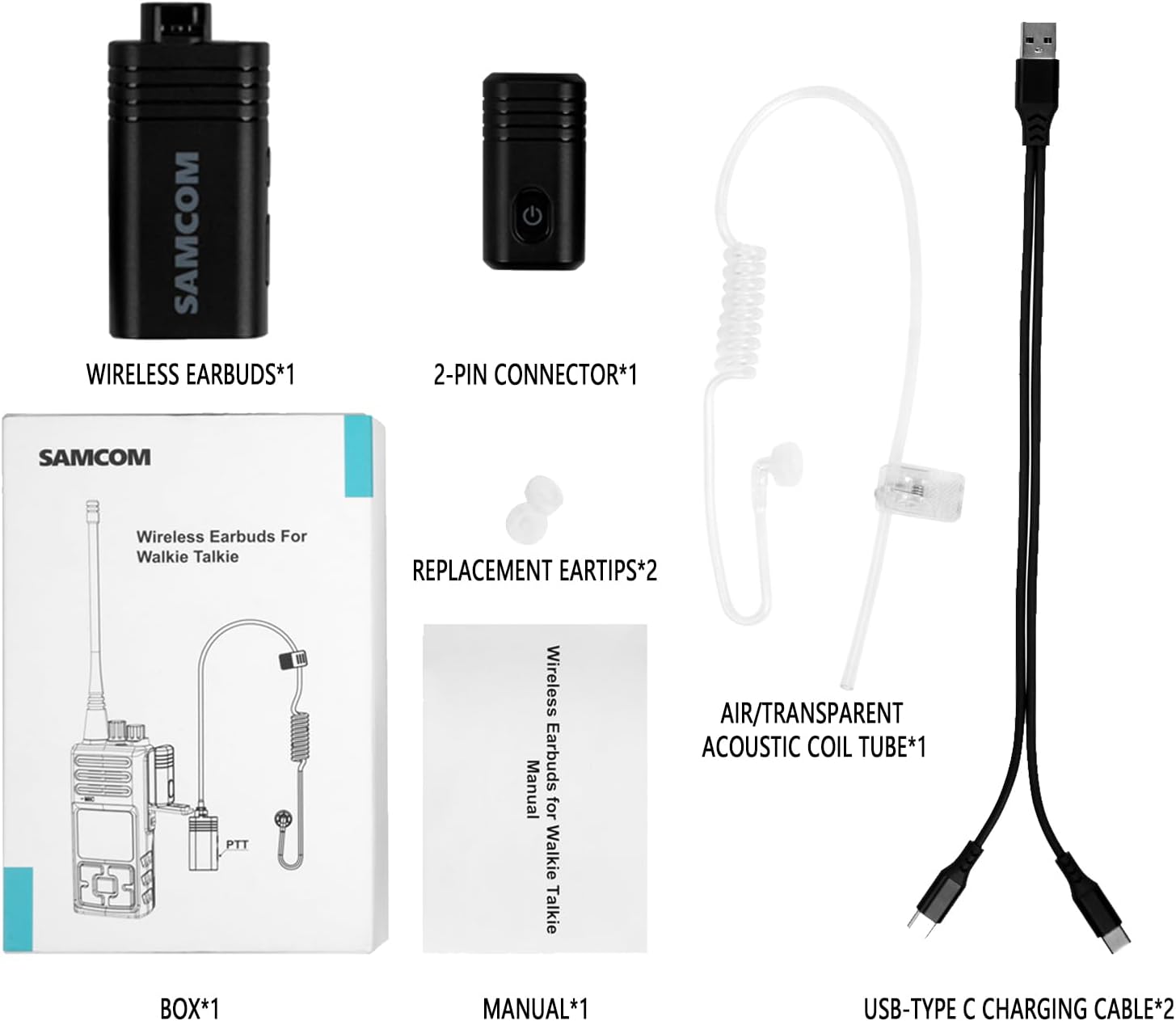
Figure 1: Package Contents of SAMCOM BTEAR01 Wireless Earpiece.
3. Setup
3.1. Charging the Earpiece and Dongle
- Connect the 2-in-1 USB charging cable to both the wireless earpiece and the 2-pin K plug dongle.
- Plug the USB end of the cable into a compatible USB power source (e.g., computer, USB wall adapter).
- The indicator lights on both devices will show charging status (refer to LED indicator section for details). A full charge typically takes approximately 2 hours.

Figure 2: Charging the Wireless Earpiece and Dongle.
3.2. Assembling the Earpiece
- Select the appropriate eartip size for your comfort and secure fit.
- Attach the transparent acoustic coil tube to the wireless earpiece by inserting and rotating until it locks securely.

Figure 3: Earpiece Assembly and Connection Steps.
4. Operating Instructions
4.1. Connecting to Your Two-Way Radio
- Ensure your SAMCOM FPCN10A or FPCN30A two-way radio is turned off.
- Plug the 2-pin K plug dongle adapter firmly into the accessory port of your two-way radio.
- Press and hold the Power On button on both the wireless earpiece and the dongle for 3 seconds until the green light illuminates for 1 second, indicating they are powered on.
- The devices will automatically enter pairing mode, indicated by flashing red and green lights. Once connected, the lights will stabilize.
- Turn on your two-way radio. The earpiece and dongle should automatically connect.
Video 1: Demonstrates the pairing process of the SAMCOM wireless headset with a 2-pin K plug radio.
4.2. Communication
- To transmit, press and hold the Push-to-Talk (PTT) button on the wireless earpiece. Speak clearly into the integrated microphone.
- Release the PTT button to listen for incoming transmissions.
- Adjust the volume using the controls on your two-way radio or the earpiece if available.

Figure 4: Hands-Free Communication with the Earpiece.
5. Maintenance
- Cleaning: Regularly clean the eartips and acoustic tube with a soft, damp cloth. Ensure no moisture enters the electronic components.
- Storage: Store the earpiece and dongle in a cool, dry place away from direct sunlight and extreme temperatures when not in use.
- Battery Care: To prolong battery life, avoid fully discharging the device frequently. Charge regularly, even if not in constant use.
- Acoustic Tube Replacement: The transparent acoustic tube is replaceable. If it becomes discolored or damaged, replace it with a new one.
6. Troubleshooting
| Problem | Possible Cause | Solution |
|---|---|---|
| No audio from earpiece. | Earpiece not powered on or paired. | Ensure earpiece and dongle are powered on and successfully paired. Check battery level. |
| Cannot transmit. | PTT button not pressed correctly or dongle not connected. | Press and hold the PTT button firmly. Ensure the 2-pin dongle is securely inserted into the radio. |
| Poor audio quality. | Loose acoustic tube, dirty eartip, or low battery. | Check acoustic tube connection. Clean eartip. Charge devices. |
| Earpiece disconnects frequently. | Out of range or interference. | Ensure devices are within operating range (approx. 30 feet). Minimize interference from other electronic devices. |
7. Specifications
| Model Number | BTEAR01 |
| Connectivity Technology | Wireless (Bluetooth) |
| Compatible Devices | SAMCOM FPCN10A, FPCN30A 2-Pin K-Type two-way radios |
| Battery Life | Up to 10 Hours Talk Time |
| Charging Time | Approx. 2 Hours (using 2-in-1 USB charger) |
| Earpiece Shape | In-ear with transparent acoustic tube |
| Special Features | Noise-Cancelling Mic with PTT, Clear Communication, Hands-free Operation, Replaceable Airtube Earpiece, Comfortable to Wear All Day, 2 Pin K Type Plug, 2-IN-1 USB Charger Cable |
| Item Weight | 5 ounces |
| Water Resistance Level | Water Resistant |
8. Warranty and Support
The SAMCOM BTEAR01 Wireless Earpiece comes with a One Year Warranty. For technical assistance or warranty claims, please contact SAMCOM customer support. US-based UT local tech support is available.
For further information, please visit the SAMCOM Store.