
1. Introduction
Thank you for choosing the Reobiux K3 1080p Outdoor/Indoor Surveillance Camera. This manual provides detailed instructions for the installation, operation, and maintenance of your new security camera. Please read this manual thoroughly before use and retain it for future reference.
2. Product Overview
2.1 Package Contents
- 1 x Reobiux K3 Outdoor/Indoor Surveillance Camera
- 1 x User Manual
- 1 x Mounting Screw Set
- 1 x 1.6m Power Cable
2.2 Key Features
- 1080p HD Resolution: Provides clear and detailed video footage.
- Color Night Vision: Equipped with 8 white LEDs for full-color night vision up to 30 meters. Supports infrared, full-color, smart, and off modes.
- Dual-Band WiFi: Supports 2.4 GHz and 5 GHz Wi-Fi for stable connectivity.
- AI Motion Detection & Active Protection: Intelligent detection with siren and flashing LEDs to deter intruders, sending real-time notifications to your smartphone.
- Two-Way Audio: Built-in microphone and speaker for communication.
- IP66 Weatherproof: Designed to withstand rain, fog, and snow for outdoor use.
- Flexible Storage: Supports Micro SD card (up to 128GB, not included) and optional cloud storage.
- Pan & Tilt Functionality: 355° horizontal pan and 90° vertical tilt for comprehensive coverage.

Image 2.2.1: Reobiux K3 Outdoor/Indoor Surveillance Camera. This image shows the white camera unit with two antennas, mounted on a wall bracket, highlighting its design and components.
3. Setup Guide
3.1 Physical Installation
- Choose a Location: Select a suitable location for mounting the camera, ensuring it has a clear view and is within range of your Wi-Fi network. The camera is IP66 rated for outdoor use.
- Mount the Camera: Use the provided mounting screw set to securely attach the camera to a wall or ceiling. Ensure the camera is stable.
- Connect Power: Plug the 1.6m power cable into the camera and then into a power outlet.

Image 3.1.1: Camera mounted on an exterior wall, demonstrating its pan (355°) and tilt (90°) capabilities, and 5x digital zoom controlled via a smartphone app.
3.2 App Download and Account Registration
- Download the App: Search for the recommended application (e.g., 'O-KAM Pro' as seen in promotional images) on the Apple App Store or Google Play Store and install it on your smartphone.
- Register an Account: Open the app and follow the on-screen instructions to register a new user account.

Image 3.2.1: Visual guide showing the steps to download the app, power on the camera, and connect to Wi-Fi via Bluetooth for initial setup.
3.3 Network Connection
- Power On and Reset: Ensure the camera is powered on. If it's a new setup or you're experiencing issues, you may need to reset the camera (refer to the app for specific reset instructions).
- Add Device: In the app, select the option to add a new device. Follow the prompts to connect the camera to your home Wi-Fi network. The camera supports both 2.4 GHz and 5 GHz bands.
- Bluetooth Pairing: The app may guide you through a Bluetooth pairing process for initial setup to simplify Wi-Fi configuration.
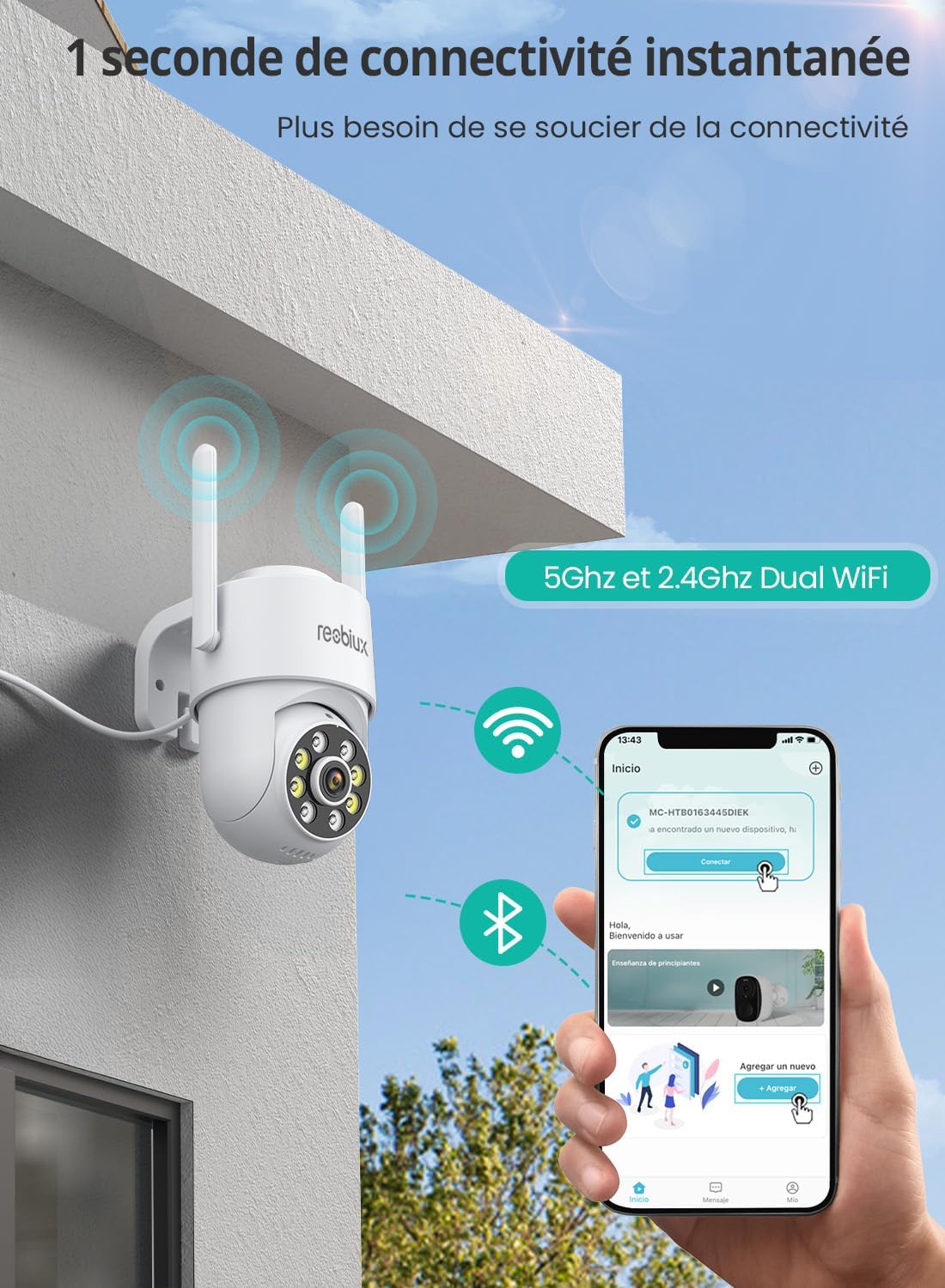
Image 3.3.1: Illustrates the camera's 5GHz and 2.4GHz Dual WiFi capability, showing a smartphone screen connecting to the camera for instant connectivity.
4. Operating Instructions
4.1 Live View and Playback
Once connected, open the app to access the live video feed from your camera. You can view recorded footage from your Micro SD card or cloud storage through the playback function.

Image 4.1.1: Demonstrates the clarity of 1080p resolution compared to 720p, highlighting the camera's ability to capture sharp details and offer 5x zoom.
4.2 Night Vision Modes
The Reobiux K3 camera offers four night vision modes:
- Full Color: Utilizes the camera's white LEDs to provide a full-color image in low-light conditions.
- Infrared: Uses infrared LEDs for black and white night vision, which is less intrusive.
- Smart: Automatically switches between infrared and full-color night vision based on detected motion or light conditions.
- Off: Disables night vision.
You can switch between these modes in the camera settings within the app.
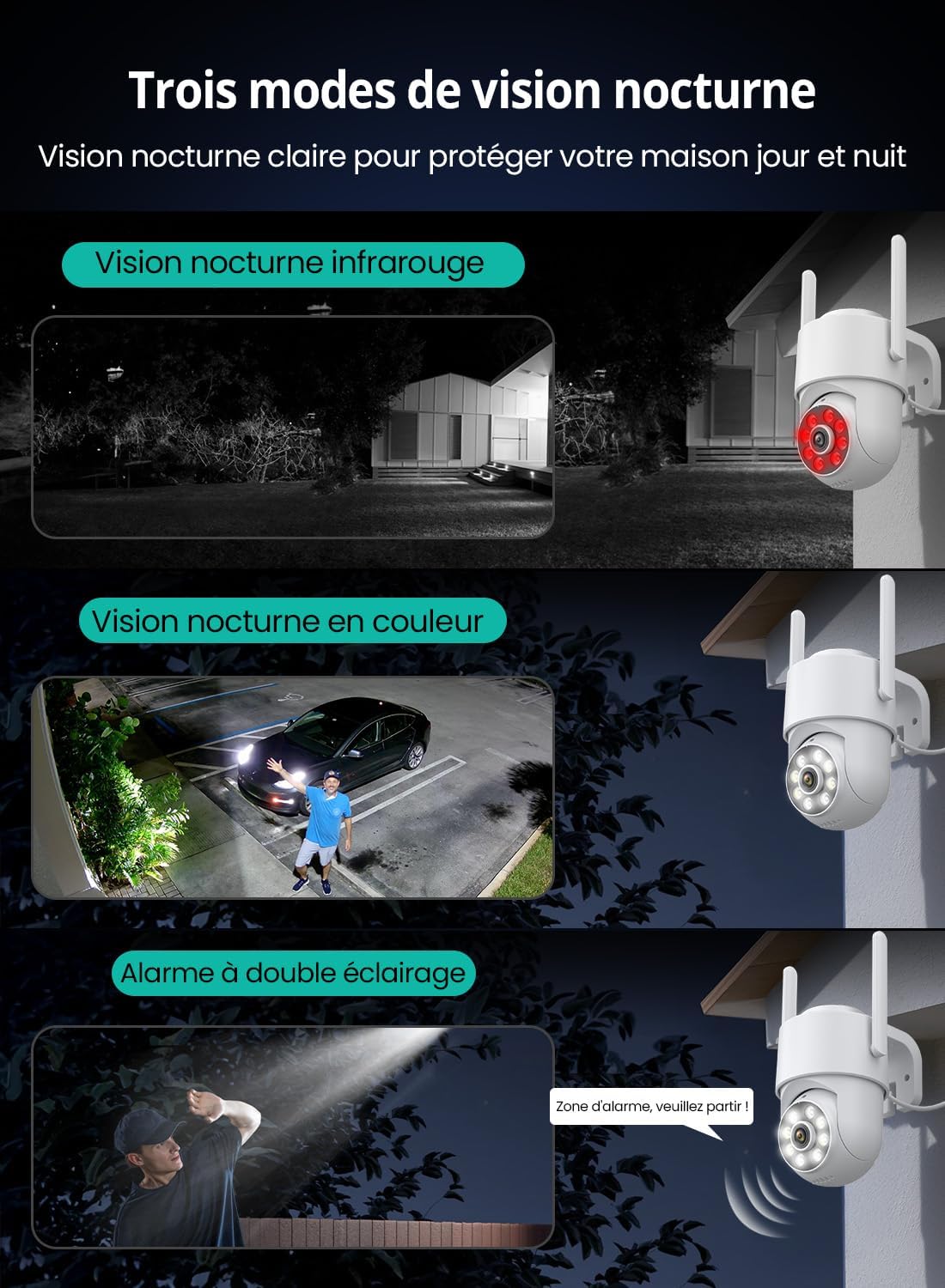
Image 4.2.1: Illustrates the three primary night vision modes: infrared night vision (black and white), full-color night vision, and alarm with dual illumination (flashing white LEDs).
4.3 Motion Detection and Alarms
The camera features AI-powered motion detection. When motion is detected, the camera can:
- Record an alarm video.
- Activate a siren and flash its white LEDs to deter intruders.
- Send real-time notifications to your smartphone.
You can customize detection zones and sensitivity settings in the app.

Image 4.3.1: Shows the camera's automatic tracking feature and real-time push notifications for detected motion, with a child running in a yard and an alert on a smartphone.
4.4 Two-Way Audio
Use the built-in microphone and speaker to communicate with visitors, family members, or pets directly through the camera via the app.

Image 4.4.1: Depicts the two-way audio feature, showing a person speaking through the camera to children outside, with speech bubbles indicating communication.
4.5 Storage Options
The camera supports two storage methods:
- Micro SD Card: Insert a Micro SD card (up to 128GB, not included) into the designated slot on the camera for local continuous recording.
- Cloud Storage: Optional cloud storage is available for secure, remote video backup. Refer to the app for subscription details or activation instructions for free cloud usage.
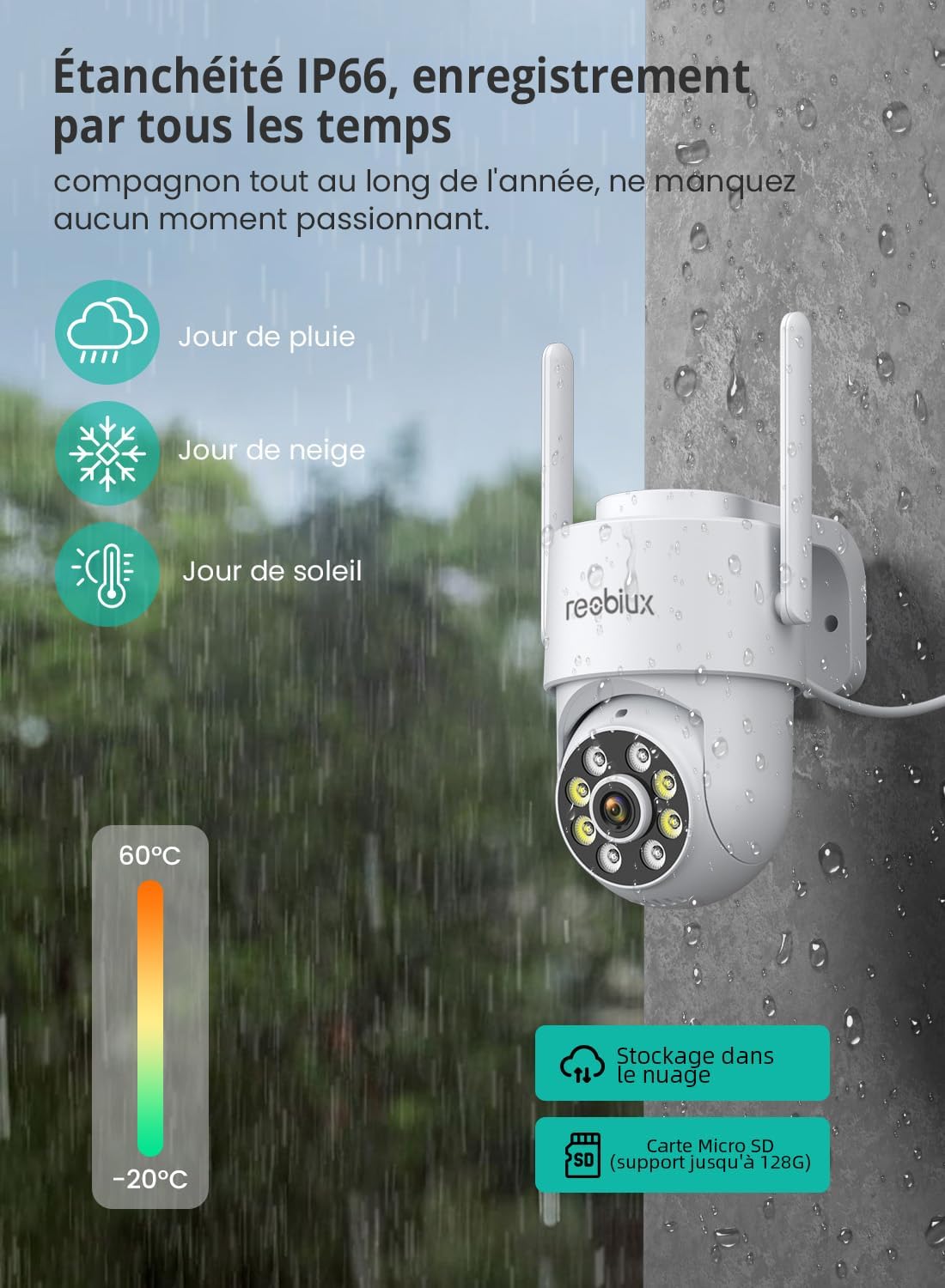
Image 4.5.1: Highlights the camera's IP66 weatherproof rating and its support for both Micro SD card storage (up to 128GB) and cloud storage.
4.6 Multi-User Sharing
You can share access to your camera's live feed and recordings with family members or trusted individuals through the app, allowing multiple users to monitor the property simultaneously.
5. Maintenance
5.1 Cleaning
Regularly clean the camera lens and housing with a soft, dry cloth to ensure optimal image quality. Avoid using harsh chemicals or abrasive materials.
5.2 Firmware Updates
Periodically check the app for available firmware updates. Keeping your camera's firmware up-to-date ensures optimal performance, security, and access to new features.
5.3 Storage Management
If using a Micro SD card, regularly review and manage stored footage to prevent the card from filling up. For cloud storage, ensure your subscription is active if applicable.
6. Troubleshooting
6.1 Connectivity Issues
- No Connection: Ensure the camera is powered on and within range of your Wi-Fi router. Check your Wi-Fi password.
- Frequent Disconnections: Verify your Wi-Fi signal strength. Consider moving the camera closer to the router or using a Wi-Fi extender. Ensure your router supports 2.4 GHz or 5 GHz bands.
6.2 Image Quality Problems
- Blurry Image: Clean the camera lens. Ensure there are no obstructions.
- Poor Night Vision: Check if the night vision mode is set correctly in the app. Ensure the white LEDs or IR LEDs are not obstructed.
6.3 Motion Detection Not Working
- No Alerts: Verify that motion detection is enabled in the app and notification permissions are granted for the app on your smartphone.
- Too Many Alerts: Adjust the motion detection sensitivity and define specific detection zones in the app to reduce false alarms.
6.4 Two-Way Audio Issues
- No Sound: Check the volume settings on your smartphone and within the app. Ensure the camera's microphone and speaker are not obstructed.
- Echo/Distortion: Adjust the distance between your phone and the camera during two-way communication.
7. Specifications
| Feature | Detail |
|---|---|
| Model Number | K3 |
| Resolution | 1080p (2MP Sensor) |
| Night Vision Range | Up to 30 meters (Color Night Vision) |
| Wi-Fi Connectivity | 2.4 GHz / 5 GHz Dual-Band |
| Viewing Angle | 110 Degrees |
| Pan/Tilt | 355° Pan, 90° Tilt |
| Frame Rate | 25 Fps |
| Water Resistance | IP66 |
| Storage Options | Micro SD (up to 128GB), Cloud Storage |
| Power Input | 5 Volts, 5 Watts |
| Dimensions (L x W x H) | 2.9 x 2.9 x 7.5 cm |
| Material | Plastic |
| Mounting Type | Wall Mount |
8. Warranty and Support
8.1 Product Warranty
The Reobiux K3 Surveillance Camera comes with a 24-month product warranty from the date of purchase. This warranty covers manufacturing defects and malfunctions under normal use. Please retain your proof of purchase for warranty claims.
8.2 Customer Support
For any technical assistance, troubleshooting, or warranty inquiries, please contact Reobiux customer service. Our support team is available to assist you.
- Online Support: Refer to the contact information provided in your product packaging or the official Reobiux website for 24-hour customer service.
- Email Support: [Insert Email Address Here, if available in original manual]
- Phone Support: [Insert Phone Number Here, if available in original manual]
Image 8.2.1: Shows a smartphone displaying a chat interface for customer support, alongside icons for downloading the app from Apple App Store and Google Play.