
HAIZHIHUI Fitdays Smart Scale & Tape Measure System
Fitdays Smart Scale & Smart Body Tape Measure User Manual
Model: Fitdays Smart Scale & Tape Measure System
1. Introduction
Thank you for choosing the Fitdays Smart Scale and Smart Body Tape Measure. This comprehensive system is designed to help you accurately track your body weight, body composition, and body circumference measurements, providing valuable insights into your health and fitness journey. By pairing with the Fitdays App via Bluetooth, you can monitor your progress, analyze data, and achieve your wellness goals.
2. Product Overview
2.1 Components
- Fitdays Smart Body Weight Scale
- Fitdays Smart Body Tape Measure
- User Manual
- Batteries (typically AAA, included or required)
2.2 Key Features
- High-Precision Sensors: The digital bathroom scale is equipped with 4 high-precision sensors for accurate weight readings up to 400lb (180kg) in 0.1lb (0.05kg) increments.
- Auto Calibration: Ensures reliable and consistent accuracy with every weigh-in.
- Smart Body Tape Measure: Records circumference data and calculates body fat percentage when used with the Fitdays App. Features an easy operating press lock and one-hand measuring design.
- Fitdays App Integration: Seamless Bluetooth connectivity for tracking weight, body composition (body fat, muscle mass, bone mass, body water), waist-to-hip ratio, and body shape analysis. Supports up to 24 users.
- All-in-one TFT Display (Scale): Displays 7 key measurements directly on the scale: Weight, Body Fat, BMI, Bone Mass, Muscle Mass, Body Water, and Heart Rate.

Image: Overview of the Fitdays Smart Scale, Smart Body Tape Measure, and associated mobile application interface, along with included batteries.

Image: The all-in-one TFT display of the Fitdays Smart Scale, illustrating how 7 different body measurements (Weight, Body Fat, BMI, Bone Mass, Muscle Mass, Body Water, Heart Rate) are clearly presented on the screen.
3. Setup
3.1 Unpacking and Battery Installation
- Carefully remove the scale and tape measure from their packaging.
- Locate the battery compartments on the underside of both the scale and the tape measure.
- Insert the provided (or required) batteries, ensuring correct polarity (+/-).
3.2 Fitdays App Download and Installation
- Scan the QR code below or visit www.fitfeel.cn/fitdays/ to download the Fitdays App.
- Alternatively, search for "Fitdays" in the Apple App Store (for iOS devices) or Google Play Store (for Android devices).
- Install the app on your smartphone or tablet.
- Open the app and follow the on-screen instructions to create your user profile.
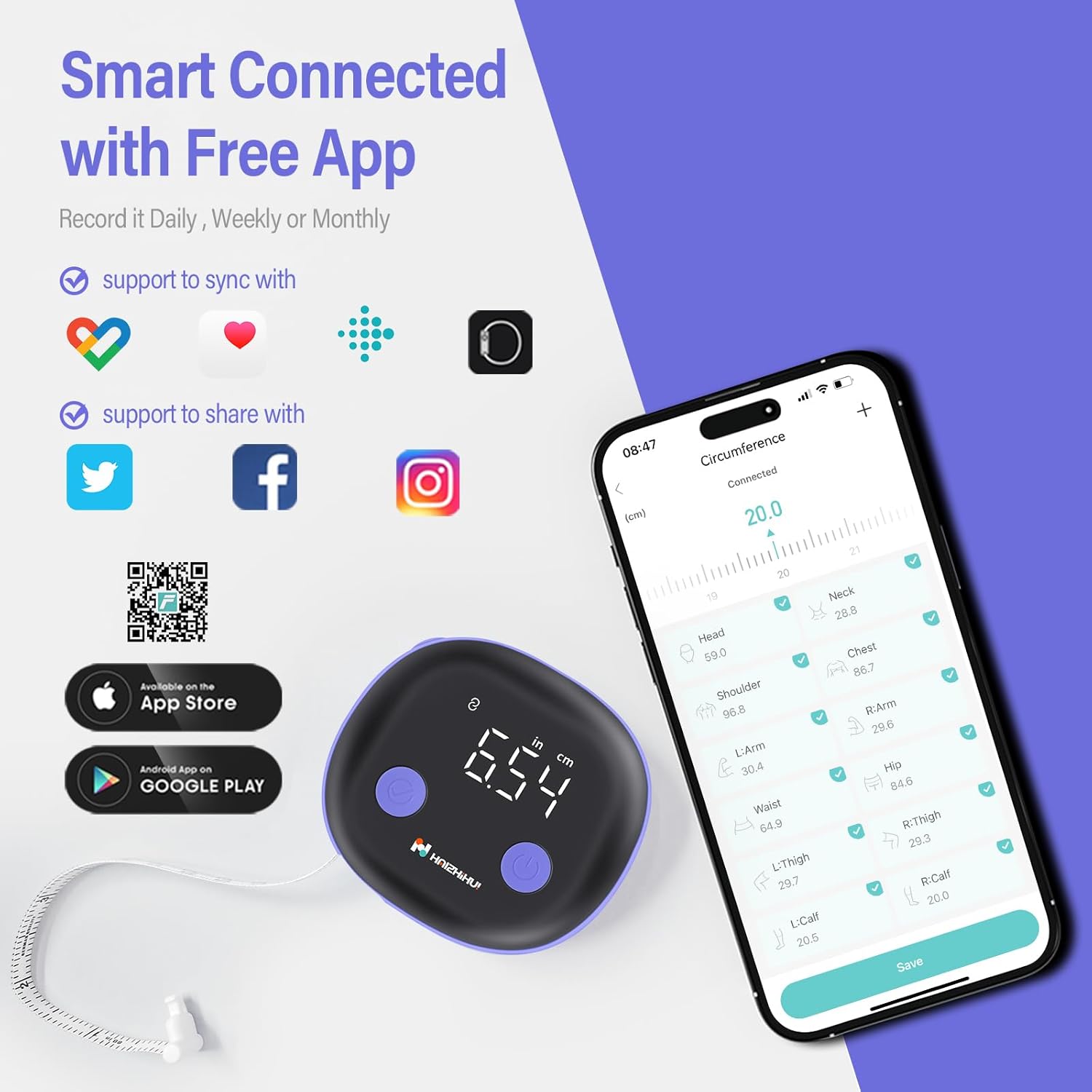
Image: Instructions for downloading the Fitdays App, showing icons for App Store and Google Play, and a QR code for direct access.
3.3 Bluetooth Pairing
- Ensure Bluetooth is enabled on your smartphone/tablet.
- Open the Fitdays App.
- For the scale: Step onto the scale briefly to activate it. The app should automatically detect and prompt you to connect.
- For the tape measure: Press the power button on the tape measure to activate it. The app should detect and prompt you to connect.
- Follow any additional prompts within the app to complete the pairing process for both devices.
4. Operating Instructions
4.1 Using the Smart Scale
- Place the scale on a hard, flat surface. Avoid carpets or uneven floors.
- Open the Fitdays App and ensure it is connected to the scale.
- Step onto the scale barefoot and stand still. The scale will automatically calibrate and display your weight.
- Your weight and other body composition data will be synced to the Fitdays App.

Image: The Fitdays Smart Scale in use, displaying weight and body composition data on the connected Fitdays App and a smartwatch.
4.2 Using the Smart Body Tape Measure
- Open the Fitdays App and ensure it is connected to the tape measure.
- Press the power button on the tape measure to turn it on.
- Extend the tape measure around the body part you wish to measure (e.g., waist, hip, arm).
- Use the easy operating press lock to secure the tape at the desired measurement.
- The measurement will be displayed on the tape measure's screen and automatically synced to the Fitdays App.
- In the app, you can record and track various circumference measurements and calculate your body fat percentage and waist-to-hip ratio.

Image: The Fitdays Smart Body Tape Measure alongside the Fitdays App, demonstrating how circumference measurements are displayed and recorded within the application.

Image: A person demonstrating the easy one-hand measuring operation of the Fitdays Smart Body Tape Measure, highlighting its user-friendly design.
4.3 Fitdays App Functions
- Data Tracking: View daily, weekly, or monthly trends for all your measurements.
- Body Composition Analysis: Get detailed insights into your body fat, muscle mass, bone mass, body water, and more.
- Waist-to-Hip Ratio: The app visualizes your waist-to-hip ratio progress through graphing.
- Body Shape Analysis: Based on your recorded data, the app helps identify your body shape and provides guidance on choosing suitable clothing.
- Multi-User Support: Add and manage up to 24 user profiles, allowing multiple family members to track their data independently.
- Goal Setting & Motivation: Track your progress towards goals and receive encouragement as you achieve milestones.
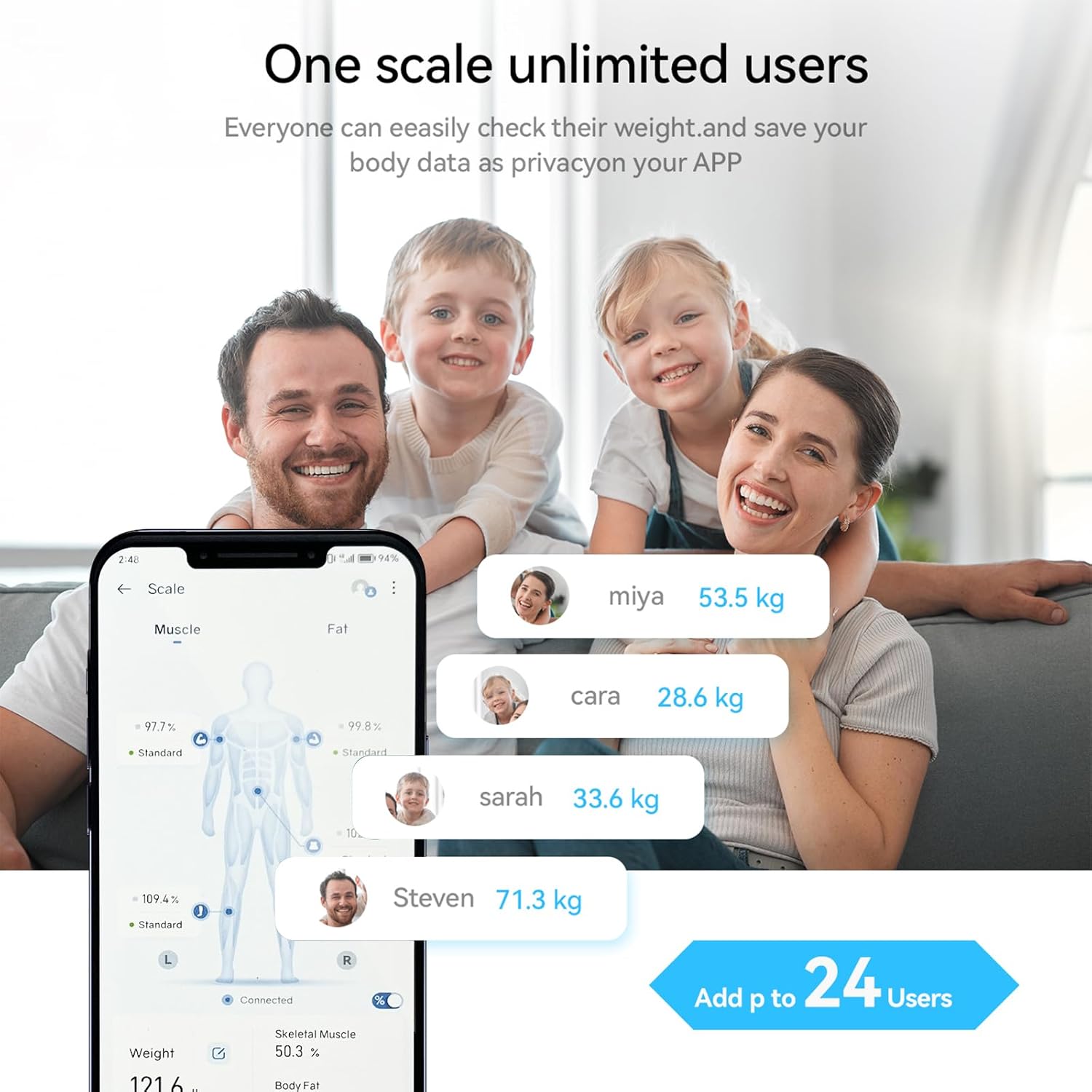
Image: The Fitdays App interface demonstrating its multi-user capability, allowing up to 24 individuals to track and save their body data privately within the application.

Image: The Fitdays App displaying its body shape analysis feature, which helps users understand their body type and choose suitable clothing sizes online based on their measurements.

Image: The Fitdays Smart Scale's TFT screen illustrating motivational features, including tracking weight changes (maintain, gain, lose) and displaying progress towards achieving set goals (e.g., 50% or 100% achieved).
5. Maintenance
- Cleaning: Wipe the surface of both the scale and tape measure with a soft, damp cloth. Do not use abrasive cleaners or immerse in water.
- Storage: Store the devices in a cool, dry place away from direct sunlight and extreme temperatures.
- Battery Replacement: If the display becomes dim or the devices do not power on, replace the batteries with new ones of the correct type and size.
6. Troubleshooting
6.1 Common Issues and Solutions
| Issue | Possible Cause | Solution |
|---|---|---|
| Scale/Tape Measure not turning on | Low or dead batteries; incorrect battery installation. | Replace batteries; ensure correct polarity. |
| Inaccurate weight readings | Scale on uneven surface; not standing still; scale not calibrated. | Place on hard, flat surface; stand still; step on briefly to auto-calibrate. |
| App not connecting via Bluetooth | Bluetooth off; device out of range; app not open; device not activated. | Ensure Bluetooth is on; bring devices closer; open Fitdays App; activate device (step on scale/press tape measure button). |
| Data not syncing to app | No Bluetooth connection; app not running in foreground. | Verify Bluetooth connection; keep app open during measurement. |
7. Specifications
- Weight Capacity: 400 lb (180 kg)
- Weight Increments: 0.1 lb (0.05 kg)
- Sensors: 4 High-Precision Sensors
- Connectivity: Bluetooth
- App Compatibility: iOS, Android (Fitdays App)
- Measurements Tracked (Scale): Weight, Body Fat, BMI, Bone Mass, Muscle Mass, Body Water, Heart Rate
- Measurements Tracked (Tape Measure): Circumference (e.g., waist, hip, arm), Body Fat Percentage, Waist-to-Hip Ratio
8. Warranty & Support
HAIZHIHUI products are manufactured with high-quality standards. For warranty information, please refer to the warranty card included with your product or contact your retailer. If you encounter any issues or require technical assistance, please contact HAIZHIHUI customer support through the contact information provided on the product packaging or the official brand website.
Ask a question about this manual
Ask about setup, troubleshooting, compatibility, parts, safety, or missing instructions. Manuals+ will review the question and use this page’s manual context to help answer it.