1. Introduction
Thank you for purchasing the Kobalt 600-Lumen LED Rechargeable Handheld Work Light. This manual provides essential information for the safe and efficient operation, maintenance, and troubleshooting of your device. Please read this manual thoroughly before use and retain it for future reference.
Safety Information
- Do not look directly into the LED light source to avoid eye injury.
- Keep the work light away from water and moisture unless specified for water resistance.
- Do not attempt to disassemble or modify the work light. This will void the warranty and may cause damage or injury.
- Use only the provided USB-C charging cable or a certified equivalent.
- Store the work light in a cool, dry place when not in use.
2. Product Overview
The Kobalt 600-Lumen LED Rechargeable Handheld Work Light is designed for versatile illumination in various work environments. It features a durable construction, multiple lighting modes, and convenient attachment options.

Figure 2.1: Front view of the Kobalt 600-Lumen LED Rechargeable Handheld Work Light. The light features a black body with a blue handle grip and a prominent LED light panel.
Key Features
- 600 Lumens: Provides bright illumination for various tasks.
- Dimmable: Offers two light modes (High and Low) for adjustable brightness.
- Pivoting Hook: Allows for hands-free hanging and directional lighting.
- Embedded Magnets: Two integrated magnets for attaching to metallic surfaces.
- Water Resistant: Designed to withstand splashes and light rain.
- 1M Impact Resistant: Built to endure drops from up to 1 meter.
- Rechargeable: Equipped with an internal battery and USB-C charging port.

Figure 2.2: Diagram illustrating the key features of the work light, including its 600-lumen output, water resistance, 1-meter impact resistance, and two dimmable light modes (High and Low).
3. Setup
Initial Charging
Before first use, fully charge the work light. Connect the included USB-C charging cable to the charging port on the work light and plug the other end into a compatible USB power source (e.g., wall adapter, computer USB port). The charging indicator light will provide feedback on the charging status (refer to the light's specific indicator behavior, usually red for charging, green for full).
4. Operating Instructions
Powering On/Off and Light Modes
- Press the power button once to turn on the light in High mode (600 lumens).
- Press the power button a second time to switch to Low mode (60 lumens).
- Press the power button a third time to turn off the light.
Using the Pivoting Hook
The work light features a pivoting hook located at the top. Extend the hook and rotate it to hang the light from various objects, such as pipes, wires, or ledges, for hands-free operation.
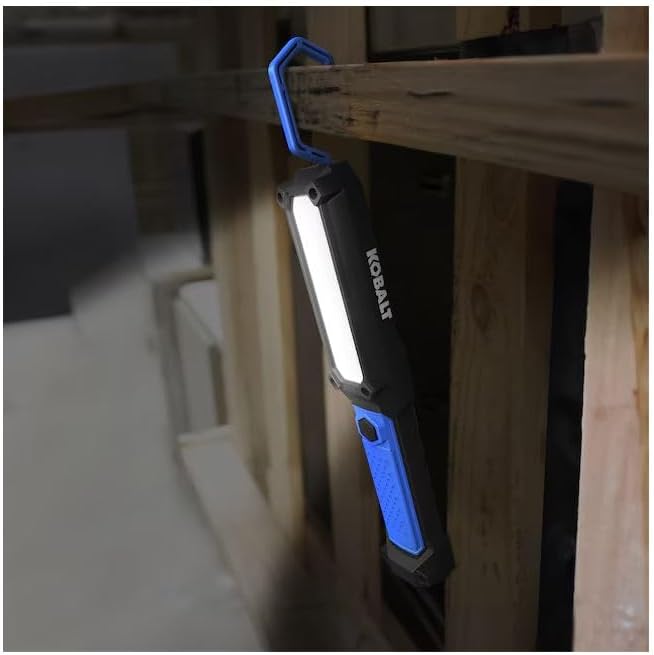
Figure 4.1: The work light demonstrating its pivoting hook feature, hanging securely from a wooden beam to illuminate a workspace.
Utilizing Embedded Magnets
Two strong magnets are embedded in the back of the work light. These allow you to securely attach the light to any ferrous metal surface, providing stable, hands-free illumination.

Figure 4.2: Diagram highlighting the embedded hook and the two embedded magnets on the rear of the work light, illustrating its versatile mounting options.

Figure 4.3: The work light in use, magnetically attached to a metal panel, providing illumination for a technician performing maintenance.
5. Charging
To charge the work light, locate the USB-C charging port, typically protected by a rubber cover to maintain water resistance. Open the cover, insert the USB-C cable, and connect it to a power source. A full charge typically takes several hours. Disconnect the cable once charging is complete and ensure the port cover is securely closed.
6. Maintenance
Cleaning
Wipe the exterior of the work light with a soft, damp cloth. Do not use abrasive cleaners or solvents, as these may damage the finish or internal components. Ensure the charging port cover is closed before cleaning.
Storage
When not in use for extended periods, store the work light in a cool, dry environment. It is recommended to charge the battery every 3-6 months to maintain battery health.
7. Troubleshooting
| Problem | Possible Cause | Solution |
|---|---|---|
| Light does not turn on. | Battery is depleted. | Charge the work light fully using the USB-C cable. |
| Light is dim or flickers. | Low battery charge. | Recharge the work light. |
| Charging indicator not working. | Cable not connected properly or faulty cable/charger. | Ensure USB-C cable is fully inserted. Try a different USB-C cable or power adapter. |
| Hook or magnets not holding. | Surface is too thick, heavy, or non-ferrous. | Ensure the hook is fully engaged or the magnetic surface is suitable and clean. |
8. Specifications
- Model Number: 5759956
- Light Output: 600 Lumens (High), 60 Lumens (Low)
- Light Source Type: LED (Light Emitting Diode)
- Power Source: Battery Powered (Rechargeable)
- Material: Plastic
- Color: Blue and Black
- Product Dimensions: 1.9"L x 4.5"W x 12.25"H
- Item Weight: 1 pound
- Impact Resistance: 1 meter
- Water Resistance: Yes
- Included Components: 1 work light, USB-C charge cord
9. Warranty and Support
For warranty information and customer support, please refer to the documentation provided at the time of purchase or contact the retailer where the product was acquired. Keep your proof of purchase for any warranty claims.


