
Product Overview
The LELO SONA 3 Cruise is a sonic massager designed for external stimulation. It incorporates advanced technologies to provide a consistent and customizable experience. This manual provides essential information for the safe and effective use of your device.
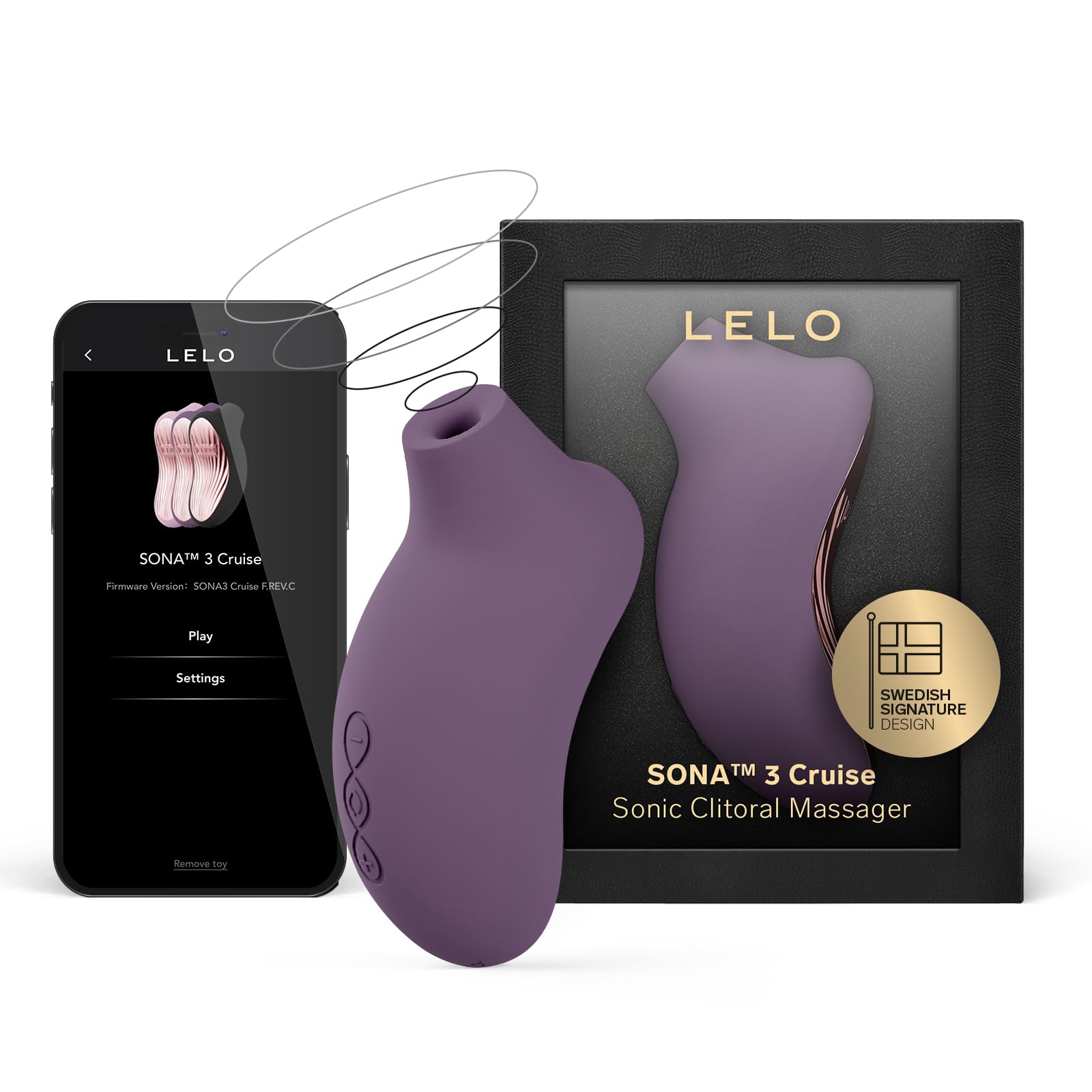
Image: LELO SONA 3 Cruise sonic massager, showcasing its ergonomic design and plum color.
Key Features:
- SENSonic & Cruise Control Technology: Delivers gentle sonic waves with a smart power boost for consistent stimulation.
- SmoothRise Technology: Ensures seamless transitions between intensity levels.
- App-Connected: Connects to the LELO app via Bluetooth to unlock additional modes and features.
- 12 Vibration Settings: Offers a wide range of intensity levels and patterns.
- Ultra-Soft Silicone: Made from body-safe silicone for comfort and easy cleaning.
- 100% Waterproof: Suitable for use in the bath or shower.

Image: Diagram highlighting the key technologies and materials of the LELO SONA 3 Cruise.
Package Contents
Upon unboxing your LELO SONA 3 Cruise, please ensure all the following items are present:
- LELO SONA 3 Cruise Sonic Massager
- USB Charging Cable
- Satin Storage Pouch
- Instruction Manual (this document)
- Warranty Registration Card
- Moisturizer Sachet (water-based lubricant)

Image: Visual representation of all items included in the LELO SONA 3 Cruise product box.
Setup
Initial Charging
Before first use, fully charge your LELO SONA 3 Cruise for 2 hours. The device uses a Lithium Polymer battery. Connect the provided USB cable to the charging port on the device and a USB power source.
App Connection
To unlock additional modes and features, download the official LELO app from your device's app store. Follow the in-app instructions to connect your SONA 3 Cruise via Bluetooth.

Image: Step 1 of how to use, showing app download and lubricant application.
Operating Instructions
Power On/Off
- To Turn On: Press the '+' button or the central power button.
- To Turn Off: Press and hold the central button.
Adjusting Settings
- Switch Between Modes: Press the central button shortly to cycle through the available modes.
- Adjust Intensity: Press the '+' or '-' buttons to increase or decrease the intensity.
Travel Lock
To activate or deactivate the travel lock, press and hold both the '+' and '-' buttons simultaneously for 3 seconds. This prevents accidental activation during travel or storage.

Image: Visual guide on operating the LELO SONA 3 Cruise, including button functions.
Usage Guidelines
Turn on the device and place the mouth of the device on the desired area. Explore different settings to find what works best for you. If the sensation feels too intense, slow down or adjust the position. Apply water-based lubricant as needed for enhanced comfort.

Image: Step 2 of how to use, demonstrating device placement.

Image: Step 3 of how to use, showing exploration of settings and continued use.
Maintenance
Cleaning
The LELO SONA 3 Cruise is 100% waterproof, making it easy to clean. After each use, wash the device with warm water and a mild, toy-safe soap or a specialized toy cleaner. Rinse thoroughly and pat dry with a lint-free cloth.
Storage
Store your device in the provided satin pouch in a clean, dry place away from direct sunlight and extreme temperatures. Avoid storing it with other toys made of different materials to prevent damage or degradation.
Troubleshooting
- Device Not Turning On or Holding Charge: Ensure the device is fully charged for the recommended 2 hours before use. If the issue persists, verify the charging cable and power source are functioning correctly. If problems continue, contact customer support.
- Unusual Noise During Operation: If you hear a 'slurping' sound, it may indicate incorrect positioning or pressure. Adjust the device's placement and apply firm but relaxed pressure to resolve this. The device is designed to be quiet when used correctly.
- Cruise Control Behavior: The Cruise Control feature automatically increases intensity when pressed firmly against the body to maintain a consistent experience. This may result in noticeable jumps in intensity. If you prefer a more constant low setting, you may need to adjust pressure or cycle through modes to reset the intensity.
- Over-sensitivity After Use: Some users may experience temporary over-sensitivity. If this occurs, allow sufficient time for your body to adjust before next use. Consider using lower intensity settings.
Specifications
| Model Number | 9837 |
| Dimensions (L x W x H) | 2.01 x 2.17 x 4.41 inches |
| Weight | 9.52 ounces (approx. 270g) |
| Material | Acrylonitrile Butadiene Styrene (ABS), Silicone |
| Battery Type | 1 Lithium Polymer battery (included) |
| Charging Time | 2 hours |
| Use Time | Up to 2 hours (depending on intensity) |
| Standby Time | 90 days |
| Waterproof | 100% Waterproof |
Official Product Video
Video: An official product video from LELO showcasing the SONA 3 device and its features. This video provides a visual demonstration of the product's design and functionality.
Warranty and Support
Warranty Information
The LELO SONA 3 Cruise typically comes with a 1-year limited warranty covering manufacturing defects. Please refer to the warranty card included in your package for specific terms and conditions, or visit the official LELO website for detailed warranty information.
Customer Support
For any questions, technical assistance, or warranty claims, please contact LELO customer support through their official website. Ensure you have your product's model number (9837) and proof of purchase available when contacting support.
You can find more information and support resources on the LELO Official Store on Amazon.


