
1. Important Safety Instructions
- Read these instructions thoroughly before operating the device.
- Keep these instructions for future reference.
- Heed all warnings on the product and in the operating instructions.
- Follow all instructions.
- Do not use this apparatus near water.
- Clean only with a dry cloth.
- Do not block any ventilation openings. Install in accordance with the manufacturer's instructions.
- Do not install near any heat sources such as radiators, heat registers, stoves, or other apparatus (including amplifiers) that produce heat.
- Protect the power cord from being walked on or pinched, particularly at plugs, convenience receptacles, and the point where they exit from the apparatus.
- Only use attachments/accessories specified by the manufacturer.
- Unplug this apparatus during lightning storms or when unused for long periods of time.
- Refer all servicing to qualified service personnel. Servicing is required when the apparatus has been damaged in any way, such as power-supply cord or plug is damaged, liquid has been spilled or objects have fallen into the apparatus, the apparatus has been exposed to rain or moisture, does not operate normally, or has been dropped.
2. Package Contents
Verify that all items listed below are included in your package:
- GOBOULT X400 Soundbar
- BoomX Subwoofer
- Remote Control
- User Manual (this document)
- Warranty Card
- Power Adapter/Cable
- Auxiliary Cable

Image: Overview of the GOBOULT X400 system components and key features.
3. Setup Guide
3.1 Placement
For optimal audio performance, place the soundbar centrally below your television. Position the BoomX subwoofer on the floor near the soundbar, ensuring it has adequate space for bass dispersion. The two satellite speakers should be placed to the left and right of your listening area for a true 5.1 surround sound experience.

Image: Recommended placement of the soundbar and subwoofer in a home environment.
3.2 Connecting the Subwoofer
Connect the wired BoomX subwoofer to the 'SUBWOOFER OUT' port on the soundbar using the provided cable.
3.3 Power Connection
Connect the power cable to the soundbar's power input and then plug it into a wall outlet. Ensure the power switch on the soundbar (if present) is in the 'ON' position.
3.4 Audio Input Connections
The GOBOULT X400 offers multiple connectivity options:
- HDMI ARC: For the best audio quality and control, connect an HDMI cable from your TV's HDMI ARC port to the soundbar's HDMI ARC port. This allows your TV remote to control the soundbar's volume.
- Optical: Connect an optical cable from your TV's optical output to the soundbar's OPTICAL input.
- AUX: Use a 3.5mm auxiliary cable to connect devices with an AUX output to the soundbar's AUX input.
- USB: Insert a USB drive into the USB port to play audio files directly.
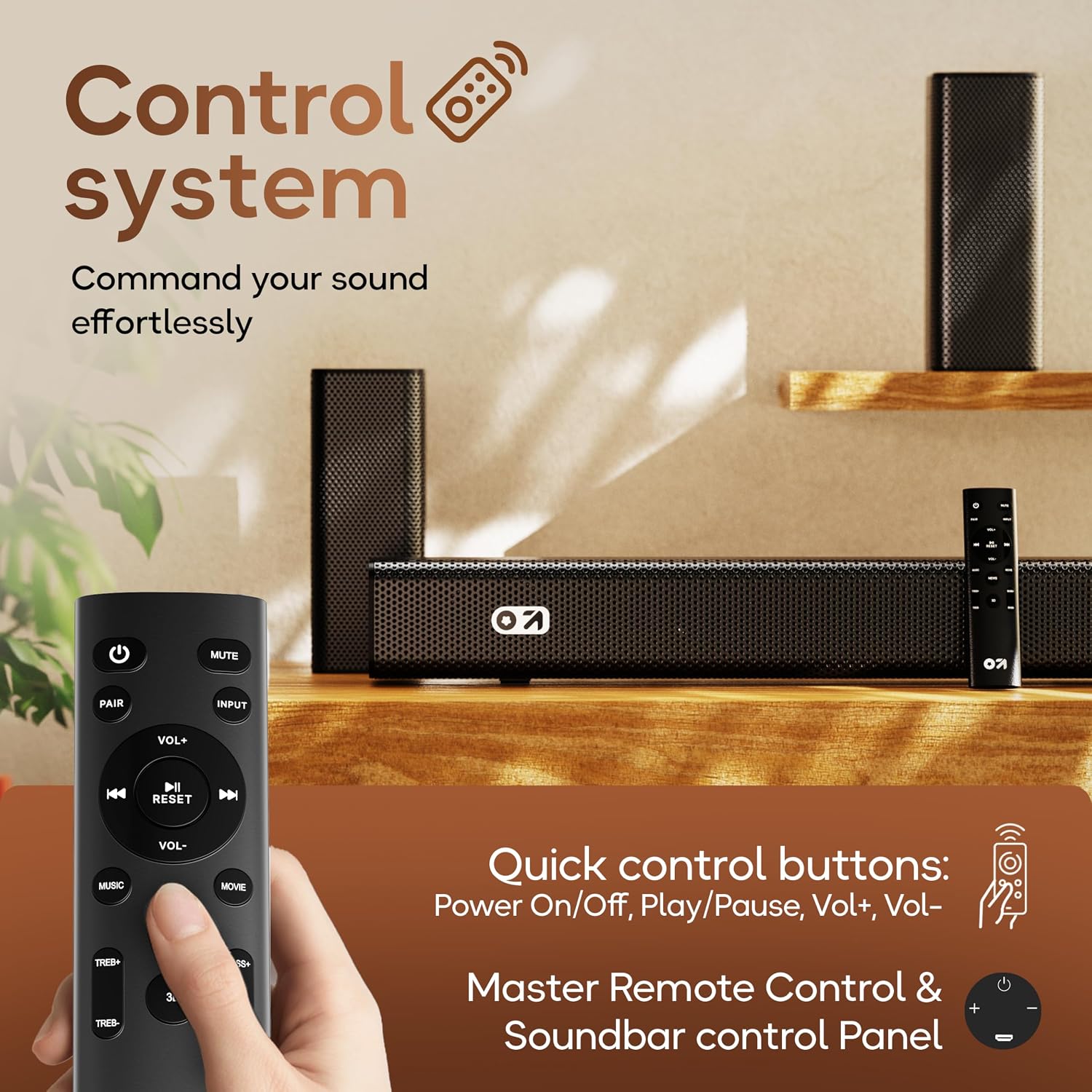
Image: Detailed view of the soundbar's input ports for various audio sources.
3.5 5.1 Channel Surround Sound Configuration
The X400 system includes a soundbar, a subwoofer, and two satellite speakers to deliver a 5.1 channel surround sound experience. Ensure the satellite speakers are connected to the soundbar and positioned appropriately to create an immersive audio field around the listener.

Image: Visual guide for setting up the 5.1 channel surround sound system.
4. Operating Instructions
4.1 Power On/Off
Press the Power button on the remote control or the soundbar to turn the unit on or off.
4.2 Input Source Selection
Press the Input button on the remote control to cycle through available input sources: Bluetooth, HDMI ARC, Optical, AUX, USB. The selected input will be displayed on the soundbar's LED panel.
4.3 Volume Control
Use the VOL+ and VOL- buttons on the remote control or the soundbar to adjust the volume level.
4.4 Bluetooth Pairing
- Select Bluetooth input mode on the soundbar. The LED display will show "BT" and flash, indicating it's in pairing mode.
- On your mobile device, enable Bluetooth and search for available devices.
- Select "GOBOULT X400" from the list. Once connected, the LED display will show a steady "BT".
4.5 EQ Modes
The GOBOULT X400 features multiple equalizer (EQ) modes to optimize your listening experience. Press the dedicated Movie, Music, or News buttons on the remote control to switch between modes.
4.6 Remote Control Functions

Image: Layout and functions of the GOBOULT X400 remote control.
- Power: Turns the soundbar on or off.
- Mute: Mutes or unmutes the sound.
- Input: Selects the audio input source.
- VOL+/VOL-: Adjusts the master volume.
- Play/Pause: Controls media playback (Bluetooth/USB modes).
- Previous/Next: Skips tracks (Bluetooth/USB modes).
- EQ Modes (Movie, Music, News): Selects preset sound profiles.
- PAIR: Initiates Bluetooth pairing.
- RESET: Resets sound settings to default.
- TREB+/TREB-: Adjusts treble levels.
- BASS+/BASS-: Adjusts bass levels.
5. Maintenance
To ensure the longevity and optimal performance of your GOBOULT X400 soundbar system, follow these maintenance guidelines:
- Cleaning: Use a soft, dry cloth to clean the surfaces of the soundbar and subwoofer. Do not use liquid cleaners, aerosols, or abrasive materials, as they may damage the finish or internal components.
- Ventilation: Ensure that the ventilation openings on the soundbar and subwoofer are not blocked. Proper airflow prevents overheating.
- Storage: If storing the unit for an extended period, unplug it from the power outlet and store it in a cool, dry place away from direct sunlight and extreme temperatures.
- Water Exposure: While the product is water-resistant, avoid direct exposure to water or high humidity to prevent damage.
6. Troubleshooting
If you encounter issues with your GOBOULT X400, refer to the following common problems and solutions:
| Problem | Possible Cause | Solution |
|---|---|---|
| No power | Power cable not connected; Power outlet not active | Ensure power cable is securely connected to the soundbar and a working power outlet. |
| No sound | Incorrect input source; Volume too low; Mute activated; Incorrect cable connection | Select the correct input source. Increase volume. Deactivate mute. Check audio cable connections. |
| Bluetooth pairing fails | Soundbar not in pairing mode; Device too far; Interference | Ensure soundbar is in Bluetooth pairing mode. Move device closer. Clear previous pairings on your device. |
| Remote control not working | Batteries depleted; Obstruction; Remote out of range | Replace remote control batteries. Remove any obstructions between remote and soundbar. Ensure remote is within operating range. |
| Subwoofer not producing bass | Subwoofer cable loose; Bass level set too low | Check the connection of the subwoofer cable to the soundbar. Increase bass level using the remote control. |
7. Specifications
Detailed technical specifications for the GOBOULT X400 Soundbar System:

Image: Internal view of the BoomX Dual Driver, highlighting its design for enhanced bass response.
| Feature | Specification |
|---|---|
| Brand | GOBOULT |
| Model Name | Bassbox X400 |
| Speaker Maximum Output Power | 400 Watts |
| Number of Audio Channels | 5.1 |
| Connectivity Technology | Auxiliary, Bluetooth, USB, HDMI ARC, Optical |
| Bluetooth Version | 5.3 |
| Bluetooth Range | 10 Metres |
| Audio Output Mode | Surround |
| Speaker Type | Soundbar with Wired Subwoofer |
| Control Method | Remote |
| Product Features | Bass Boost, LED Light, USB Port, Water Resistant |
| Power Source | Corded Electric |
| Item Dimensions (D x W x H) | 8D x 9W x 7.5H Centimeters (Soundbar) |
| Item Weight | 7.6 Kilograms |
8. Warranty and Support
8.1 Warranty Information
The GOBOULT X400 Soundbar System comes with a 1-year manufacturer's warranty from the date of purchase. This warranty covers manufacturing defects and ensures reliable operation under normal use. Please retain your purchase receipt and the warranty card for any warranty claims.
8.2 Customer Support
For technical assistance, troubleshooting, or warranty inquiries, please contact GOBOULT customer support. Refer to the contact information provided on your warranty card or visit the official GOBOULT website for support details.
