
1. Introduction
This manual provides detailed instructions for the installation, operation, and maintenance of your ZLPOWER 6000W 24V Pure Sine Wave Inverter/Charger. This device is designed to convert 24V DC battery power into 120Vac/240Vac split phase pure sine wave AC power, suitable for various applications including off-grid solar systems, RVs, and residential backup power. It also features an integrated battery charger and an automatic transfer switch.
2. Important Safety Instructions
Please read and understand all safety instructions before installing or operating this inverter/charger. Failure to follow these instructions may result in electrical shock, fire, serious injury, or death.
- Electrical Shock Hazard: This unit operates with high voltages. Installation and maintenance should only be performed by qualified personnel.
- Proper Grounding: Ensure the inverter/charger is properly grounded according to local and national electrical codes.
- Ventilation: Install the unit in a well-ventilated area to prevent overheating. Do not block ventilation openings.
- Battery Safety: Batteries can produce explosive gases. Ensure adequate ventilation when working with batteries. Do not smoke or allow sparks or flames near batteries. Wear eye protection.
- Overload Protection: Do not exceed the inverter's rated power output. Overloading can damage the unit and connected appliances.
- Water Exposure: Do not expose the inverter/charger to rain, snow, spray, or any liquids.
3. Product Features
The ZLPOWER 6000W 24V Inverter/Charger offers a robust set of features for reliable power conversion:
- High Power Output: Provides 6000W continuous power with an 18000W surge capacity for 20 seconds, suitable for demanding inductive loads.
- Pure Sine Wave Output: Delivers clean, stable power compatible with sensitive electronics.
- Split Phase Output: Supports 120Vac/240Vac output for versatile appliance compatibility.
- Integrated Battery Charger: Features a 90A battery charger with adjustable charging current (0-100%).
- Automatic Transfer Switch: Includes a 30A transfer switch for seamless switching between AC sources and battery power.
- LCD Display & Remote Control: Provides real-time operational status, battery information, and allows for remote monitoring and control.
- AC/Battery Priority: Configurable via DIP switches to prioritize either AC input or battery power.
- Automatic Generator Start (AGS): Enables automatic starting of a compatible generator when battery voltage is low.
- Low Frequency Transformer: Built-in pure copper low frequency transformer for enhanced durability and handling of inductive loads.
- Multiple Protections: Includes protection against over/low voltage, overload, short circuit, and over-temperature.
- Battery Compatibility: Supports various battery types including LiFePO4, Lithium-Ion, Flooded, AGM, Sealed Lead Acid, and GEL.

Image: Key features of the ZLPOWER 6000W 24V Inverter/Charger, including the LCD display, pure copper transformer, AC/battery priority, automatic generator start, battery temperature sensor, remote control, and multi-functional AC output sockets.
4. Setup and Installation
4.1 Unpacking and Inspection
Carefully unpack the inverter/charger and inspect it for any shipping damage. Report any damage to your dealer immediately. Ensure all components listed in the packing list are present.
4.2 Mounting Location
Select a mounting location that is:
- Dry and protected from direct sunlight, rain, and moisture.
- Well-ventilated to allow for proper heat dissipation.
- Accessible for wiring, operation, and maintenance.
- Close to the battery bank to minimize DC cable length and voltage drop.
- Away from flammable materials and corrosive substances.
4.3 Wiring Connections
All wiring must comply with local and national electrical codes. Use appropriate wire gauges for all connections to prevent overheating and ensure efficient operation.
4.3.1 DC Battery Connection
- Ensure the battery bank is 24V DC.
- Connect the positive (+) battery cable to the positive (+) terminal on the inverter.
- Connect the negative (-) battery cable to the negative (-) terminal on the inverter.
- Install appropriate DC fuses or circuit breakers as close to the battery bank as possible.
- Verify all connections are tight and secure.
4.3.2 AC Input/Output Connection
The inverter supports 240Vac input and 120Vac/240Vac split phase output.
- Connect the AC input from your utility grid or generator to the designated AC input terminals.
- Connect your AC loads (appliances) to the designated AC output terminals.
- Ensure proper grounding for all AC connections.

Image: A diagram illustrating the connection of the ZLPOWER inverter to solar panels, a solar controller, a battery bank, utility power, a generator, and home appliances, showing DC input and AC input/output points.
4.3.3 Remote Control and Battery Temperature Sensor
Connect the remote control and battery temperature sensor to their respective ports on the inverter. The battery temperature sensor helps optimize battery charging based on ambient temperature.

Image: Examples of ZLPOWER inverter installations in various settings, demonstrating wiring and mounting configurations.
5. Operating Instructions
5.1 Powering On/Off
- To Power On: Ensure all connections are secure. Turn on the DC breaker from the battery bank. Then, switch the inverter's power button to the 'ON' position. The LCD display will illuminate.
- To Power Off: Disconnect all AC loads. Switch the inverter's power button to the 'OFF' position. Turn off the DC breaker from the battery bank.
5.2 LCD Display and Controls
The LCD display provides real-time information about the inverter's status. Use the 'FUNCTION', 'SELECT', 'CONFIRM', and 'SILENT' buttons to navigate menus and adjust settings.

Image: The ZLPOWER inverter's LCD HD display showing different operational modes: AC mode, Battery inverter mode, and Power save mode, with real-time data and parameter settings.
5.3 DIP Switch Settings
The inverter features DIP switches for customizing various operational parameters. Refer to the diagram on the unit or in the full manual for specific switch functions.
- AC/Battery Priority: Set whether the inverter prioritizes AC utility power or battery power for supplying loads.
- Low Battery Trip Voltage: Adjust the voltage threshold at which the inverter will shut down to protect batteries.
- AC Input Range: Configure the acceptable voltage range for AC input.
- Output Frequency: Select between 50Hz or 60Hz output frequency.
- Power Saver Setting: Enable or disable power-saving mode to reduce idle consumption.
5.4 Battery Charging
The integrated charger can be adjusted from 0% to 100% of its rated current. The inverter is compatible with various battery types, which can be selected via a dedicated selector to ensure optimal charging profiles.

Image: The ZLPOWER inverter demonstrating compatibility with various battery types including LiFePO4, Lithium-Ion, Flooded, AGM, Sealed Lead Acid, and GEL, along with features like battery temperature sensor protection, 9 battery type selectors, and adjustable charging current.
5.5 Automatic Generator Start (AGS)
When enabled, the AGS feature will automatically start a connected generator if the battery voltage drops below a preset level, ensuring continuous power supply.
5.6 Product Demonstration Video
Video: A demonstration of the ZLPOWER Hybrid Inverter, showcasing its LCD display, various connection points, and its ability to power both inductive and conductive loads like a fan and a refrigerator, highlighting its powerful capacity and stability.
6. Maintenance
Regular maintenance ensures the longevity and optimal performance of your inverter/charger.
- Periodic Inspection: Regularly check all electrical connections for tightness and corrosion. Inspect cables for any signs of damage or wear.
- Cleaning: Keep the inverter/charger clean and free of dust and debris. Use a dry cloth to wipe down the exterior. Ensure ventilation openings are clear.
- Battery Maintenance: Follow the battery manufacturer's maintenance guidelines for your specific battery type. This may include checking electrolyte levels (for flooded batteries) and ensuring terminals are clean and tight.
- Environmental Check: Ensure the installation environment remains within the recommended temperature and humidity ranges.
7. Troubleshooting
This section provides solutions to common issues. For problems not listed here, contact technical support.
| Problem | Possible Cause | Solution |
|---|---|---|
| Inverter does not power on. | No DC input; DC breaker off; loose battery connections. | Check battery voltage; ensure DC breaker is on; tighten battery terminals. |
| No AC output. | Overload; low battery voltage; AC output breaker tripped. | Reduce load; charge batteries; reset AC output breaker. |
| Overload alarm. | Connected load exceeds inverter capacity. | Reduce the total load connected to the inverter. |
| Low battery alarm. | Battery voltage is below the low battery trip setting. | Charge batteries; check charging system. |
| Over-temperature alarm. | Insufficient ventilation; blocked fan. | Ensure adequate airflow around the unit; clean fan and vents. |
8. Technical Specifications
| Feature | Specification |
|---|---|
| Model | 6000W-24V-SP |
| Continuous Output Power | 6000 Watts |
| Peak Output Power (Surge) | 18000 Watts (20 seconds) |
| DC Input Voltage | 24 Volts DC |
| AC Input Voltage | 220-240 Vac |
| AC Output Voltage | 120Vac/240Vac Split Phase |
| Output Waveform | Pure Sine Wave |
| Output Frequency | 50Hz / 60Hz (Adjustable) |
| Battery Charger Current | 90A (Adjustable) |
| Transfer Switch Current | 30A |
| Item Weight | 81 pounds (approx. 36.7 kg) |
| Package Dimensions | 29 x 13 x 12 inches |
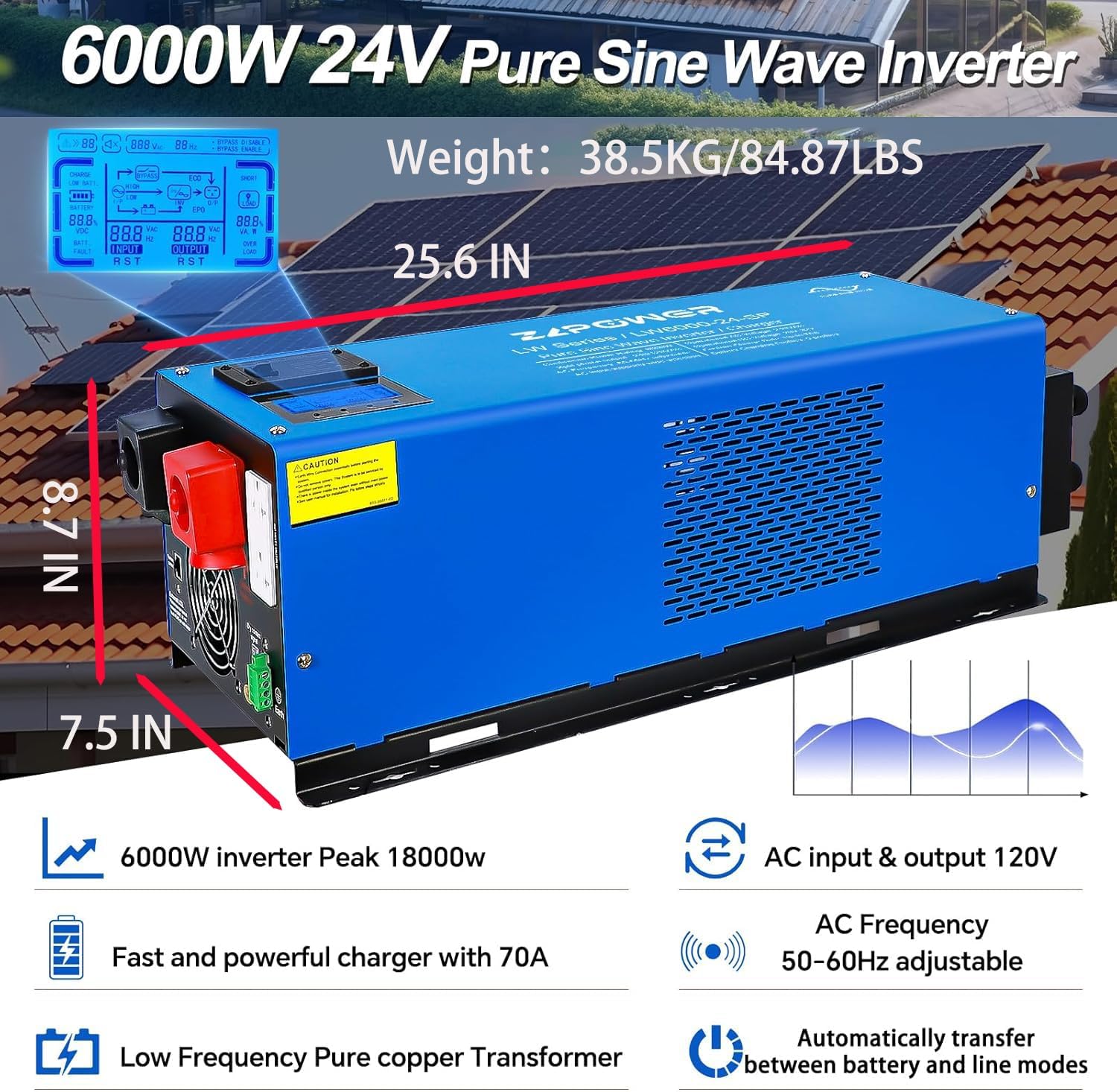
Image: The ZLPOWER 6000W 24V Pure Sine Wave Inverter, highlighting its dimensions (25.6 inches length, 8.7 inches height, 7.5 inches width) and weight (38.5 KG / 84.87 LBS), along with key specifications like 6000W peak 18000W, 70A fast charger, low frequency pure copper transformer, AC input & output 120V, AC frequency 50-60Hz adjustable, and automatic transfer between battery and line modes.
9. Warranty and Support
ZLPOWER products are manufactured to high-quality standards. This product comes with a standard manufacturer's warranty against defects in materials and workmanship. Please refer to the warranty card included with your product for specific terms and conditions, including the warranty period and coverage details.
For technical support, troubleshooting assistance, or warranty claims, please contact your authorized ZLPOWER dealer or visit the official ZLPOWER website for contact information.

