
1. Introduction
This manual provides instructions for the proper installation, operation, and maintenance of your Asuwish Wallet Case for iPhone 12 Pro (6.1 inch). Please read this manual thoroughly before use to ensure optimal performance and longevity of your product.
The package includes:
- Asuwish Wallet Case for iPhone 12 Pro
- 1x Tempered Glass Screen Protector
- 1x Detachable Wrist Strap
- 1x Detachable Crossbody Strap

Figure 1: Asuwish iPhone 12 Pro Wallet Case components.
2. Compatibility and Setup
2.1 Device Compatibility
This case is specifically designed for the iPhone 12 Pro (6.1 inch). It is not compatible with iPhone 12 (6.1 inch), iPhone 12 Mini (5.4 inch), or iPhone 12 Pro Max (6.7 inch).

Figure 2: Compatibility guide for iPhone 12 Pro.
2.2 Case Installation
- Ensure your iPhone 12 Pro is clean and free of dust.
- Gently insert the phone into the soft TPU inner shell of the wallet case, starting with one side and then pressing the other side in until the phone is securely seated.
- Verify that all buttons and ports are accessible and aligned correctly with the case cutouts.
2.3 Tempered Glass Screen Protector Application
- Clean your phone screen thoroughly using the provided cleaning wipes (if included) or a microfiber cloth to remove all dust, smudges, and fingerprints.
- Carefully peel off the protective film from the adhesive side of the tempered glass.
- Align the tempered glass with your phone screen, ensuring the cutouts for the speaker and camera are correctly positioned.
- Gently lower the tempered glass onto the screen. It will adhere automatically.
- If any bubbles appear, gently push them towards the edges of the screen using a soft cloth.

Figure 3: Case with screen protector installed and kickstand feature.
2.4 Attaching Straps
- Locate the small metal loops on the case.
- Attach the metal clasp of the wrist strap or crossbody strap to these loops.
- The crossbody strap length can be adjusted using the buckle for comfortable wear.

Figure 4: Attaching the wrist and crossbody straps to the case.
3. Operating Instructions
3.1 Using the Card Holder
The wallet case features multiple card slots and a side pocket. Gently slide your credit cards, ID cards, or cash into the designated slots. The design is intended to securely hold your items.
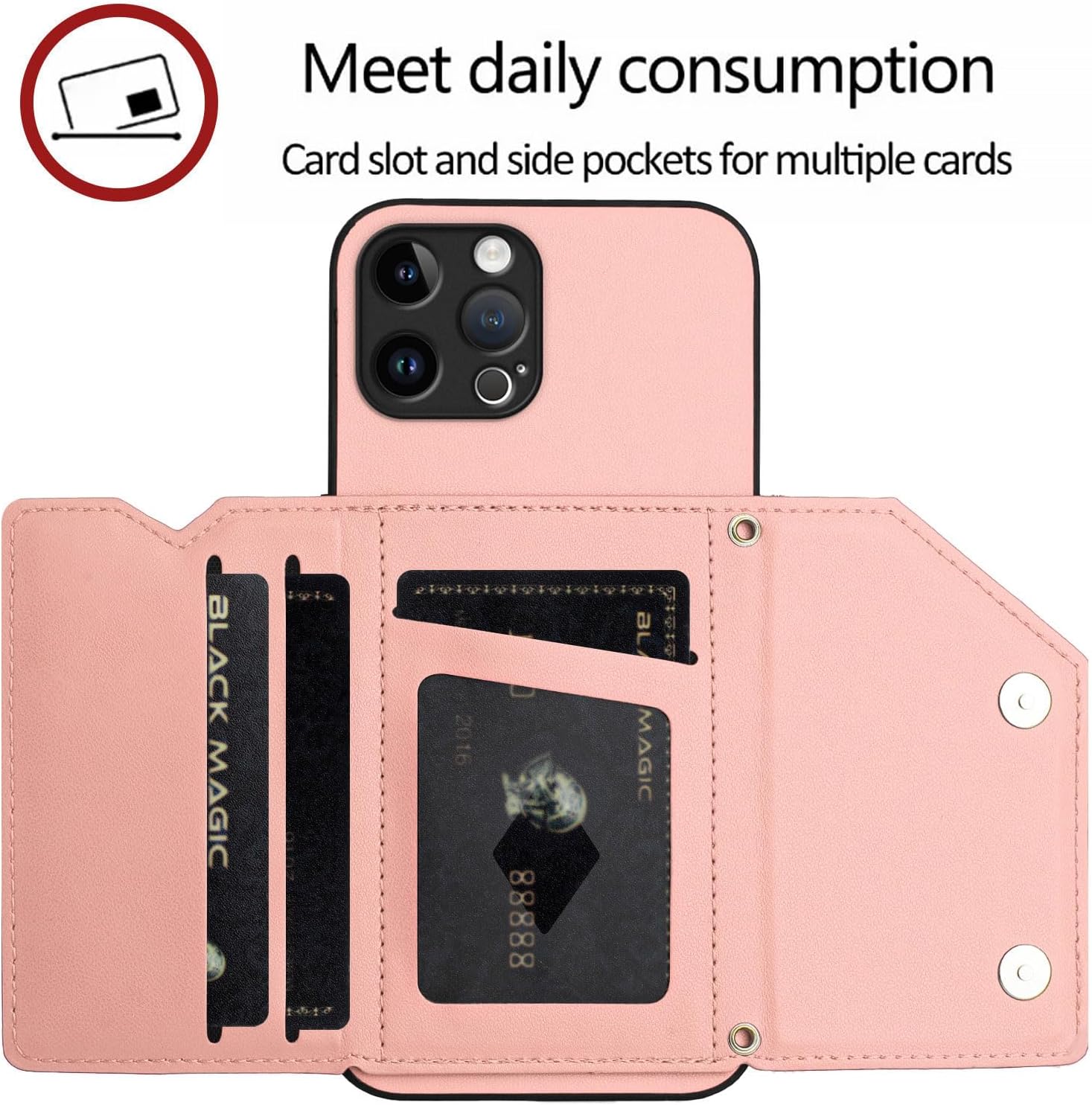
Figure 5: Utilizing the card slots for storage.
3.2 Utilizing the Kickstand Feature
The wallet flap can be folded to create a kickstand. This allows for hands-free viewing of videos or video calls in multiple angles. Simply fold the flap back and position it to support your phone.

Figure 6: Example of the kickstand feature in use.
3.3 Using the Crossbody and Wrist Straps
The detachable straps provide convenience for carrying your phone. The wrist strap offers a secure grip, while the adjustable crossbody strap allows for hands-free carrying, ideal for travel or daily activities.
4. Maintenance
4.1 Cleaning the Case
To clean the PU faux leather case, gently wipe it with a soft, damp cloth. Avoid using harsh chemicals or abrasive cleaners, as these may damage the material. Allow the case to air dry completely.
4.2 Screen Protector Care
The tempered glass screen protector can be cleaned with a microfiber cloth. For stubborn smudges, a small amount of screen cleaner designed for electronics can be applied to the cloth, not directly to the screen protector.
5. Troubleshooting
5.1 Case Fit Issues
If the case does not fit correctly, ensure you have the correct model (iPhone 12 Pro, 6.1 inch). Refer to Section 2.1 for compatibility details.
5.2 Screen Protector Bubbles
Small bubbles after installation can often be removed by gently pushing them towards the edge with a soft card or cloth. If large bubbles persist, re-application might be necessary after thoroughly cleaning the screen.
5.3 Strap Detachment
Ensure the metal clasps of the straps are fully closed and securely attached to the case's loops. Periodically check the clasps for wear or damage.
6. Specifications
| Feature | Detail |
|---|---|
| Compatible Phone Models | iPhone 12 Pro (6.1 inch) |
| Material | PU Faux Leather, Soft TPU Inner Shell |
| Special Features | Kickstand, RFID Blocking, Card Holder, Detachable Straps |
| Item Model Number | iPhone-12-Pro-FGTPKB-US |
| Item Weight | 2.82 ounces |
| Package Dimensions | 6.3 x 3.94 x 0.59 inches |
| Color | Pink |
7. Warranty and Support
7.1 Warranty Information
For information regarding warranty coverage and terms, please refer to the product packaging or contact the manufacturer directly. Keep your purchase receipt as proof of purchase.
7.2 Customer Support
If you encounter any issues or have questions not addressed in this manual, please contact Asuwish customer support through the retailer's platform or the official Asuwish website. Provide your product model number (iPhone-12-Pro-FGTPKB-US) and a detailed description of your inquiry for efficient assistance.