
1. Safety Information
Please read all instructions carefully before using your GarveeTech Portable Air Conditioner. Keep this manual for future reference. Failure to follow these instructions may result in electric shock, fire, or personal injury.
General Safety Precautions
- This appliance is for indoor use only.
- Do not operate the unit with a damaged cord or plug. If the supply cord is damaged, it must be replaced by the manufacturer, its service agent, or similarly qualified persons to avoid a hazard.
- Always ensure the unit is placed on a flat, stable surface.
- Do not block air inlets or outlets. Maintain at least 20 cm (8 inches) clearance around the unit.
- Do not insert objects into the air outlets.
- Unplug the unit from the power outlet when not in use, before cleaning, or before moving.
- Do not use the unit in wet environments such as bathrooms or laundry rooms.
- Keep children and pets away from the unit during operation.
Electrical Safety
- Connect the unit to a properly grounded electrical outlet with the correct voltage (115V).
- Do not use extension cords or adapter plugs with this unit.
- Do not operate the unit if the power cord or plug is damaged.
2. Product Overview
The GarveeTech 14,000 BTU Portable Air Conditioner is a versatile 3-in-1 unit designed to provide cooling, dehumidification, and fan functions for your living spaces. It is suitable for rooms up to 750 sq. ft. and features easy portability with built-in handles and universal wheels.

Figure 2.1: GarveeTech Portable Air Conditioner in a living room.
Key Features
- 3-in-1 Functionality: Cool, Dehumidify, and Fan modes.
- Powerful Cooling: 14,000 BTU (ASHRAE) / 10,200 BTU (SACC) cools up to 750 sq. ft.
- Quiet Operation: Operates at a low noise level of 52-54 dB.
- Easy Portability: Equipped with smooth-rolling wheels and built-in handles.
- User-Friendly Controls: LED touch panel and remote control.
- Adjustable Settings: Multiple fan speeds, 24-hour timer, sleep mode, and auto-swing.
- Washable Filter: Easy to remove and clean for improved air quality.

Figure 2.2: The unit offers Cool, Fan, and Dry (Dehumidify) modes.
Package Contents
- Portable Air Conditioner Unit
- Exhaust Hose
- Hose Connector
- Window Kit Adapter
- Adjustable Window Sealing Plate Kit
- Remote Control
- User Manual
3. Setup
Follow these steps to set up your portable air conditioner for optimal performance.
Step 1: Unpacking and Placement
- Carefully remove the unit and all accessories from the packaging.
- Place the air conditioner on a flat, stable surface near a window and a grounded electrical outlet.
- Ensure there is at least 20 cm (8 inches) of space around the unit for proper airflow.
Step 2: Exhaust Hose Assembly
- Connect the hose fitting to one end of the exhaust hose. Rotate the vent hose into the exhaust nozzle counter-clockwise until secure.
- Attach the other end of the exhaust hose connector to the exhaust air outlet on the back of the AC unit.

Figure 3.1: Visual guide for quick and easy installation.
Step 3: Window Kit Installation
- Extend the adjustable window sealing plate kit to fit your window opening. Secure it in place.
- Insert the exhaust hose adapter into the opening of the window kit. Ensure a tight seal to prevent hot air from entering the room.

Figure 3.2: The window kit is compatible with various window types.
Step 4: Power Connection
Plug the power cord into a grounded 115V electrical outlet. The unit is now ready for operation.

Video 3.1: Watch this video for a visual guide on setting up the portable air conditioner, including hose and window kit installation.
4. Operating Instructions
Your GarveeTech Portable Air Conditioner can be controlled using the LED touch panel on the unit or the included remote control.
Control Panel Overview
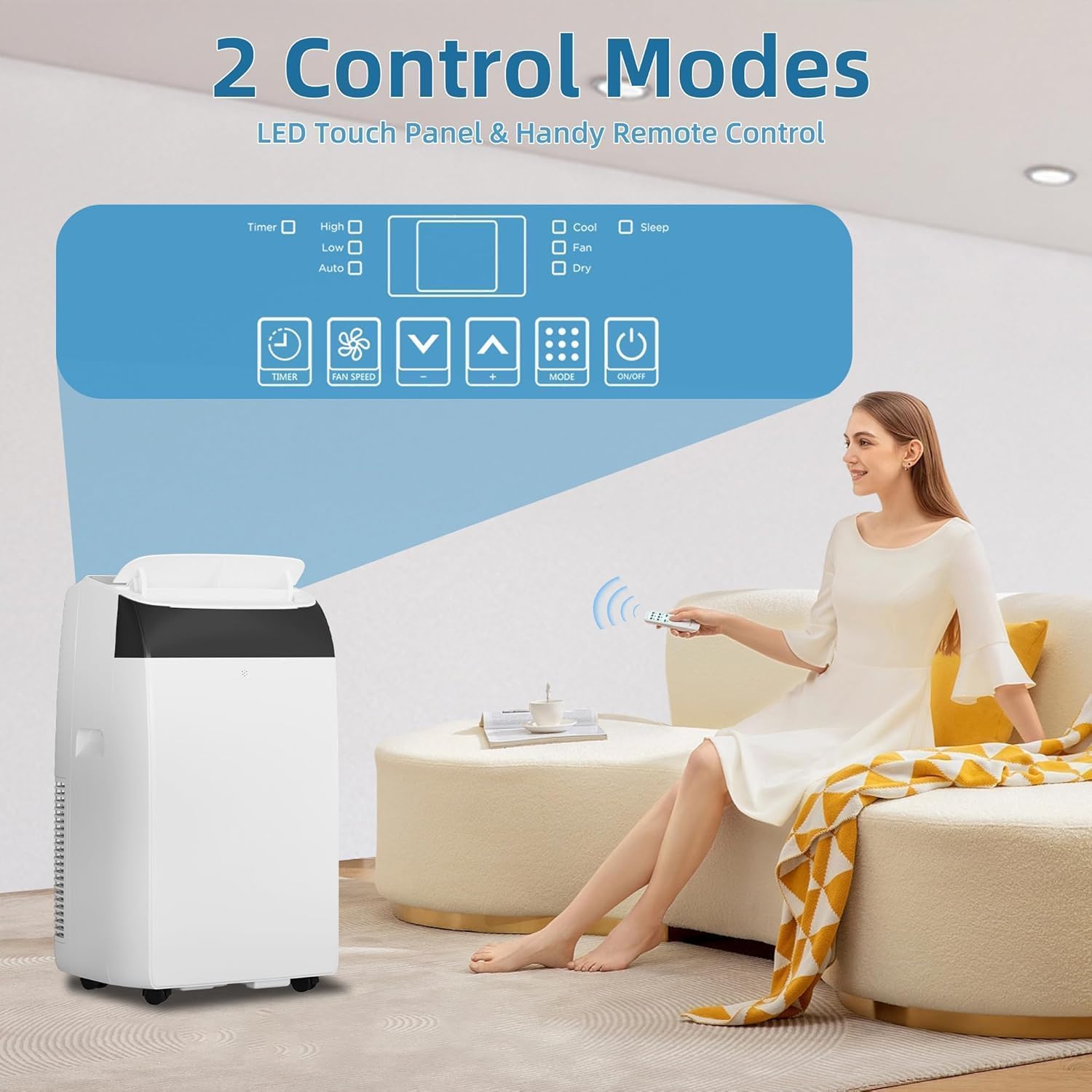
Figure 4.1: The unit features both an LED touch panel and a remote control for easy operation.
Remote Control Functions
The remote control allows you to adjust settings from a distance. It includes a 'Follow-Me' function that adjusts the temperature based on the remote's location.
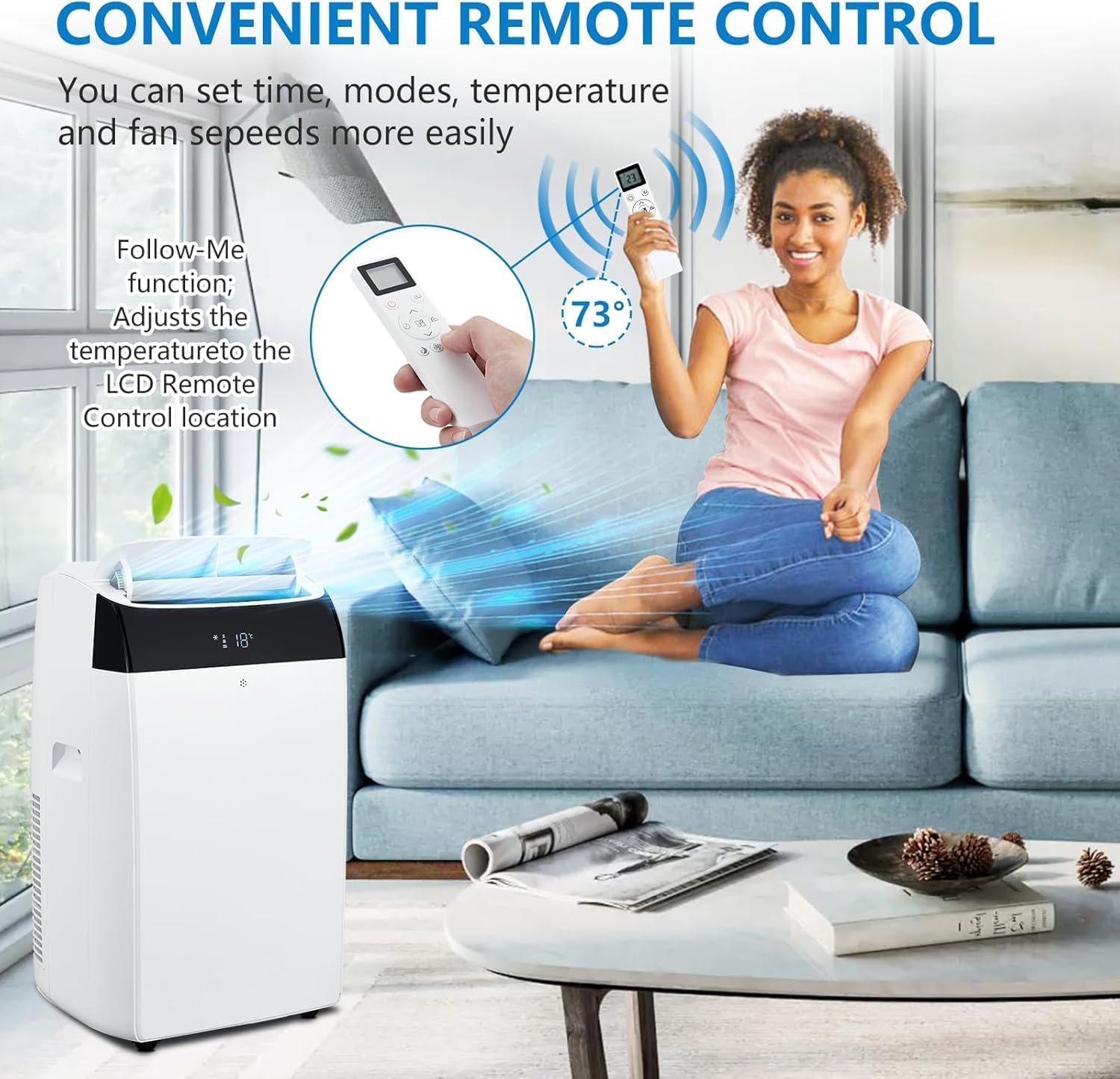
Figure 4.2: Convenient remote control with 'Follow-Me' function for precise temperature management.
Operating Modes
- Cool Mode: Provides powerful cooling. Set your desired temperature between 18-32℃ (64-90℉).
- Dehumidify Mode (Dry): Reduces humidity in the room. The unit will operate as a dehumidifier.
- Fan Mode: Circulates air without cooling. Choose from multiple fan speeds (High, Low, or Auto).
Additional Functions
- Fan Speed: Adjust the fan speed to High, Low, or Auto.
- Timer: Set the unit to turn on or off automatically within a 24-hour period.
- Sleep Mode: Optimizes cooling for quiet nighttime operation, gradually increasing the temperature to save energy and ensure comfort.
- Auto Swing: Activates the automatic swing function of the air louvers for even air distribution.

Figure 4.3: Enjoy quiet operation with Sleep Mode, ideal for bedrooms.
5. Maintenance
Regular maintenance ensures the longevity and efficiency of your air conditioner.
Cleaning the Air Filter
The air filter should be cleaned every two weeks or more frequently depending on usage and air quality.
- Unplug the air conditioner from the power outlet.
- Locate the air filter on the back or side of the unit. Gently slide it out.
- Wash the filter under running water (warm, soapy water if heavily soiled).
- Allow the filter to air dry completely before reinserting it into the unit. Do not expose to direct sunlight.

Figure 5.1: The removable and washable filter helps maintain air quality.
Draining Water
During dehumidification or prolonged cooling, water may accumulate in the internal reservoir. The unit has an indicator to alert you when it needs to be drained.
- Place a shallow pan or tray under the drain port located at the bottom rear of the unit.
- Remove the drain plug to allow water to flow out.
- Once drained, replace the drain plug securely.
Storage
If storing the unit for an extended period:
- Drain all accumulated water.
- Clean the air filter.
- Unplug the power cord and coil it neatly.
- Store the unit in a cool, dry place, preferably in its original packaging.
6. Troubleshooting
Before contacting customer support, please refer to the following troubleshooting guide for common issues.
| Problem | Possible Cause | Solution |
|---|---|---|
| Unit does not turn on | No power supply | Ensure the power cord is securely plugged into a grounded outlet. Check the circuit breaker. |
| Water tank full | Drain the water from the unit. | |
| Unit not cooling effectively | Air filter is dirty | Clean the air filter. |
| Exhaust hose not properly installed | Ensure the exhaust hose is securely connected and sealed to the window kit. | |
| Room size too large | Ensure the unit's cooling capacity matches the room size (up to 750 sq. ft.). | |
| Doors or windows open | Close all doors and windows in the room to be cooled. | |
| Unit is noisy | Unit not on a level surface | Place the unit on a flat, stable surface. |
| Obstruction in fan/air outlet | Check for and remove any obstructions. |
7. Specifications
Technical specifications for the GarveeTech 14,000 BTU Portable Air Conditioner.
| Feature | Specification |
|---|---|
| Brand | GarveeTech |
| Model Number | TAC-10CPD/DM7 |
| Cooling Power (ASHRAE) | 14,000 BTU |
| Cooling Power (SACC) | 10,200 BTU |
| Coverage Area | Up to 750 sq. ft. |
| Functions | Cool, Dehumidify, Fan |
| Noise Level | 52-54 Decibels |
| Voltage | 115V |
| Wattage | 1200 Watts |
| Item Weight | 71.5 pounds |
| Product Dimensions | 17.72"D x 33.86"W x 15.55"H |
| Dehumidification Capacity | 6.5 Pints |
| Seasonal Energy Efficiency Ratio (CEER) | 7.83 |
| Special Features | Filter Light Reminder, Auto Swing, Sleep Mode, 24-Hour Timer |
8. Warranty and Support
GarveeTech products are designed for reliability and performance. This product comes with a standard manufacturer's warranty. Please refer to the warranty card included in your package for specific terms and conditions.
Customer Support
If you have any questions, require technical assistance, or need to claim warranty service, please contact GarveeTech customer support:
- Website: Visit the GarveeTech Store on Amazon
- Email: support@garveetech.com (example email, actual email not provided)
- Phone: 1-800-XXX-XXXX (example phone, actual phone not provided)
Please have your model number (TAC-10CPD/DM7) and purchase date ready when contacting support.