
Lemorele Wireless USB-C to HDMI Extender Kit
Contents
Lemorele Wireless USB-C to HDMI Extender Kit User Manual
Model: Wireless USB-C to HDMI Extender Kit
Brand: Lemorele
1. Introduction
The Lemorele Wireless USB-C Transmitter and HDMI Receiver Kit provides a seamless, plug-and-play solution for wirelessly extending video and audio from your USB-C enabled devices to an HDMI display. This kit eliminates the need for complex cable setups, offering a clean and efficient way to share content in various environments, from home entertainment to professional presentations. It supports high-definition 1080P@60Hz output and operates on a 5G transmission protocol for stable, long-range connectivity.
2. Product Overview
The kit includes a USB-C transmitter (TX) and an HDMI receiver (RX), designed for ease of use and portability.

Image: Overview of the Lemorele Wireless USB-C Transmitter and HDMI Receiver Kit, showcasing multiple transmitters and a single receiver unit.

Image: Detailed view of the package contents, including the transmitter, receiver, USB-C power cable, and HDMI cable, along with their compact dimensions.
Package Contents:
- 1 x Lemorele Wireless USB-C Transmitter (TX)
- 1 x Lemorele HDMI Receiver (RX)
- 1 x USB-C Power Cable (approx. 39.37 inches)
- 1 x HDMI Cable (approx. 5.9 inches)
- User Manual (this document)
Key Features:
- Plug and Play: No software, network, or drivers required.
- Wireless Transmission: Up to 164 feet (50 meters) in open environments using 5G protocol.
- High Definition Output: Supports up to 1080P@60Hz Ultra HD.
- Wide Compatibility: Works with USB-C devices supporting DisplayPort Alt Mode (laptops, phones, tablets) and HDMI displays (HDTVs, projectors, monitors). Compatible with Windows, macOS, Android, and iOS.
- Multi-Transmitter Support: One receiver can support up to 8 transmitters (USB-C or HDMI, purchased separately).
- PD Fast Charging: USB-C transmitter can provide up to 45W PD fast charging to connected devices.
3. Setup Instructions
Follow these steps to set up your Lemorele Wireless Extender Kit:
- Connect the Receiver (RX): Plug the HDMI receiver into an HDMI input port on your display device (HDTV, projector, monitor).
- Power the Receiver (RX): Connect the provided USB-C power cable to the RX unit and plug the other end into a 5V/2A power source (e.g., a USB wall adapter, not included). Ensure stable power for optimal performance.
- Connect the Transmitter (TX): Plug the USB-C transmitter into the USB-C port of your source device (laptop, smartphone, tablet). Ensure your device's USB-C port supports DisplayPort Alternate Mode.
- Pairing (if necessary): The units are factory-paired. If you are using additional transmitters or need to re-pair, follow these steps:
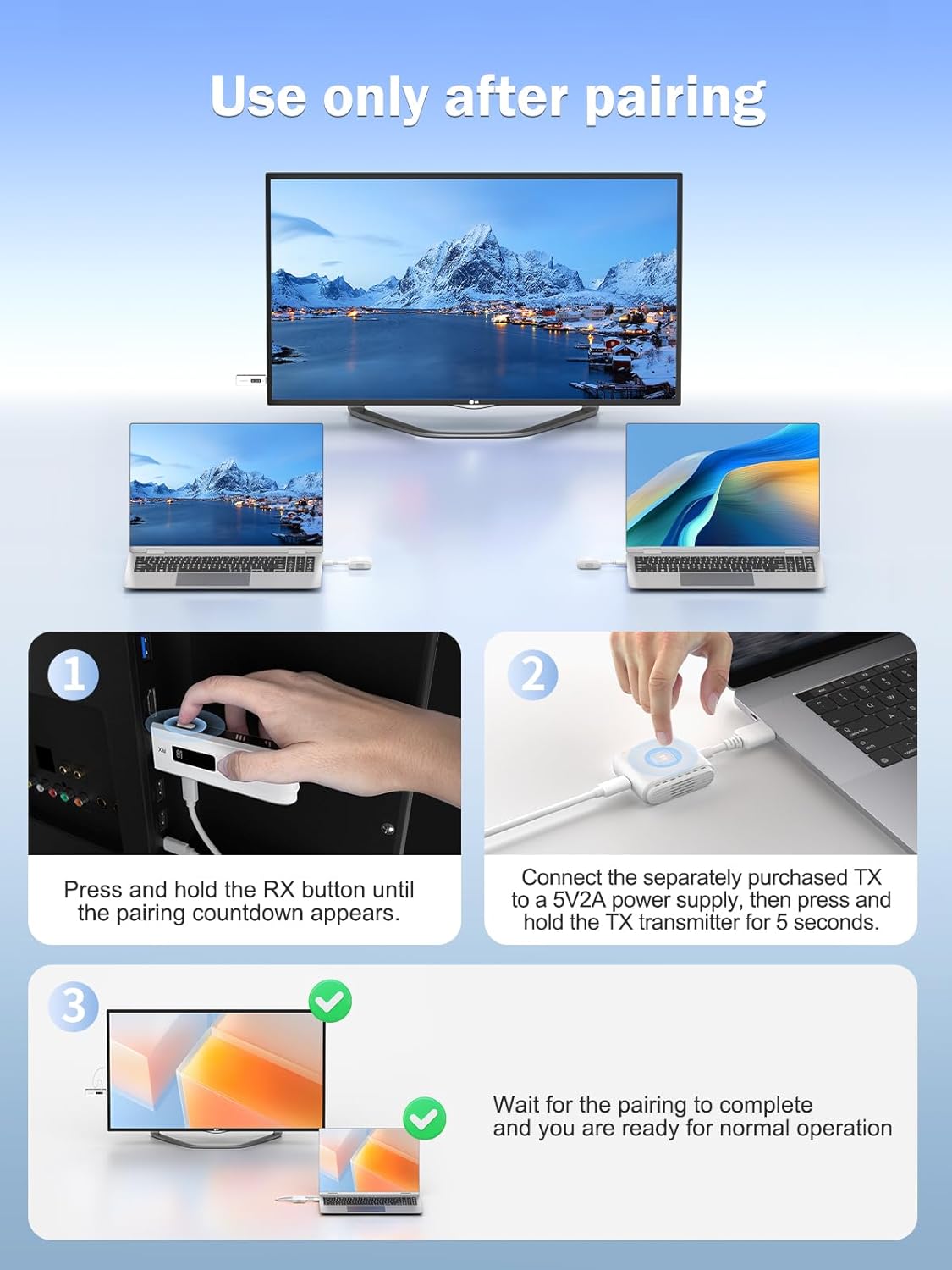
Image: Step-by-step visual guide for pairing the transmitter and receiver units.
- Press and hold the RX button on the receiver until a pairing countdown appears on the display.
- Connect the TX to a 5V/2A power supply (if not already connected to a powered device) and then press and hold the TX button for 5 seconds.
- Wait for the pairing process to complete. Once successful, the devices are ready for operation.
- Display Content: Once connected and paired, your device's screen should automatically mirror or extend to the connected display.
4. Operating Instructions
The Lemorele Wireless Extender Kit is designed for simple, intuitive operation.
4.1 Basic Operation (Plug & Play)
After initial setup and pairing, simply plug the USB-C transmitter into your source device and ensure the HDMI receiver is powered and connected to your display. The system will automatically establish a wireless connection and project your content.
4.2 Wireless Transmission Range
The kit offers a robust wireless transmission range of up to 164 feet (50 meters) in open environments. For optimal performance, minimize obstacles like walls or furniture between the transmitter and receiver.

Image: Illustration demonstrating the 164-foot wireless transmission capability of the device in a meeting room scenario.
4.3 Multi-Transmitter Support
The HDMI receiver can support connections from up to 8 different transmitters (USB-C or HDMI, sold separately). This allows multiple users to share content on a single display by simply switching between active transmitters.

Image: Visual representation of how one receiver can connect to and switch between up to eight different transmitters, ideal for collaborative environments.
4.4 Usage Scenarios and Compatibility
This kit is versatile and suitable for various applications, including:
- Home Entertainment: Stream movies, videos, and photos from your phone or laptop to your HDTV.
- Business Meetings: Project presentations wirelessly from laptops to large screens or projectors.
- Education: Share educational content from various devices in classrooms.
- Gaming: Mirror mobile gaming to a larger display.

Image: A family enjoying streaming content mirrored from an iPhone to a large TV screen, demonstrating entertainment use.

Image: An illustration highlighting the broad compatibility of the system with different source devices (laptops, mobile phones, tablets, gaming handhelds) and display types (HDTVs, monitors, projectors).
4.5 Power Delivery (PD) Fast Charging
The USB-C transmitter supports PD 45W fast charging, allowing it to charge your connected laptop, smartphone, or tablet while simultaneously transmitting video and audio, preventing battery drain during use.

Image: A smartphone connected to the USB-C transmitter, which is simultaneously charging the phone and transmitting content to a large display, illustrating the PD fast charging feature.
5. Maintenance
To ensure the longevity and optimal performance of your Lemorele Wireless Extender Kit, follow these simple maintenance guidelines:
- Cleaning: Gently wipe the devices with a soft, dry cloth. Avoid using liquid cleaners or abrasive materials.
- Storage: Store the kit in a cool, dry place away from direct sunlight and extreme temperatures.
- Handling: Handle the transmitter and receiver with care. Avoid dropping them or subjecting them to strong impacts.
- Connectivity: Ensure all cables are connected securely but do not force them.
6. Troubleshooting
If you encounter issues with your Lemorele Wireless Extender Kit, refer to the following common questions and solutions:

Image: A section from the product's A+ content detailing frequently asked questions and precautions.
- Q: What devices are supported?
A: The transmitter supports source devices with USB-C ports that support DisplayPort Alt Mode, such as laptops, smartphones, and tablets. The receiver supports displays with HDMI inputs, including HDTVs, projectors, and monitors. It is compatible with Windows, macOS, Android, and iOS. - Q: How many watts of power can the Type-C female port of the transmitter provide to a computer?
A: The PD Fast Charger feature of the transmitter supports up to 45W of power for charging a compatible computer or smartphone. - Q: What is the wireless transmission range?
A: Lab data shows a transmission distance of up to 164 feet (50 meters) in open environments. Actual distances may vary and are mainly affected by obstacles like walls or other environmental factors. For best results, use in as open a space as possible. - Q: Do I need to make any settings?
A: The factory default pairing is successful, making it plug and play. If you purchase additional transmitters, they must be paired with the receiver as described in the Setup section. - Q: Does the receiver require a power supply?
A: Yes, the receiver must be powered by a 5V/2A power supply via its USB-C port. - Q: Do I need a network connection?
A: No, a network connection is not required for the kit to function. It operates as a direct wireless link between the transmitter and receiver.
7. Specifications
| Feature | Specification |
|---|---|
| Product Name | Lemorele Wireless USB-C to HDMI Extender Kit |
| Model | Wireless USB-C 4 Transmitter and HDMI Receiver Kit |
| Wireless Protocol | 5G Transmission Protocol |
| Transmission Range | Up to 164 feet (50 meters) in open environments |
| Video Output Resolution | Up to 1080P@60Hz Ultra HD |
| Receiver Power Input | 5V/2A via USB-C |
| Transmitter Power Output (PD) | Up to 45W (for connected device) |
| Transmitter Input | USB-C (requires DisplayPort Alt Mode support) |
| Receiver Output | HDMI |
| Compatibility | Windows, macOS, Android, iOS |
| Transmitter (TX) Dimensions | 4.25in x 1.73in x 0.66in |
| Receiver (RX) Dimensions | 3.97in x 1.10in x 0.49in |
8. Warranty and Support
Lemorele stands behind the quality of its products. This Wireless USB-C to HDMI Extender Kit comes with a one-year product warranty from the date of purchase.
For any questions, technical assistance, or warranty claims, please contact Lemorele customer service. We offer 24/7 customer service to ensure you receive the best possible support.
You can visit the official Lemorele store on Amazon for more information and support: Lemorele Store
Ask a question about this manual
Ask about setup, troubleshooting, compatibility, parts, safety, or missing instructions. Manuals+ will review the question and use this page’s manual context to help answer it.