1. Introduction
This manual provides essential information for the safe and efficient use of your Samsung 65 Inch QLED TV Q7F (Model QA65Q7FAAUXSA). Please read it thoroughly before operating the device and retain it for future reference.

Image 1.1: Front view of the Samsung 65 Inch QLED TV Q7F, showcasing its slim design and vibrant display.
2. Safety Information
Always follow basic safety precautions when using this television to reduce the risk of fire, electric shock, and injury.
- Do not expose the TV to rain or moisture.
- Do not block ventilation openings.
- Ensure proper grounding for the power cord.
- Keep the TV away from direct sunlight, heat sources, and extreme temperatures.
- Use only specified attachments and accessories.
- Unplug the TV during lightning storms or when unused for long periods.
3. Package Contents
Verify that all items are present in the box:
- Samsung 65 Inch QLED TV Q7F
- User Manual (this document)
- Remote Control
- Power Cable
- TV Stand Components (if included)

Image 3.1: The included remote control, featuring voice command, Bluetooth connectivity, and solar cell charging.
4. Setup
4.1 Unpacking
- Carefully remove the TV from its packaging.
- Place the TV face down on a soft, flat surface to prevent screen damage.
4.2 Stand Installation (Optional)
If you choose to use the included stand:
- Attach the stand base to the TV following the instructions in the separate stand assembly guide.
- Ensure all screws are securely tightened.
4.3 Wall Mounting (Optional)
For wall mounting, use a VESA-compliant wall mount kit (sold separately). Refer to the wall mount kit's instructions for proper installation.
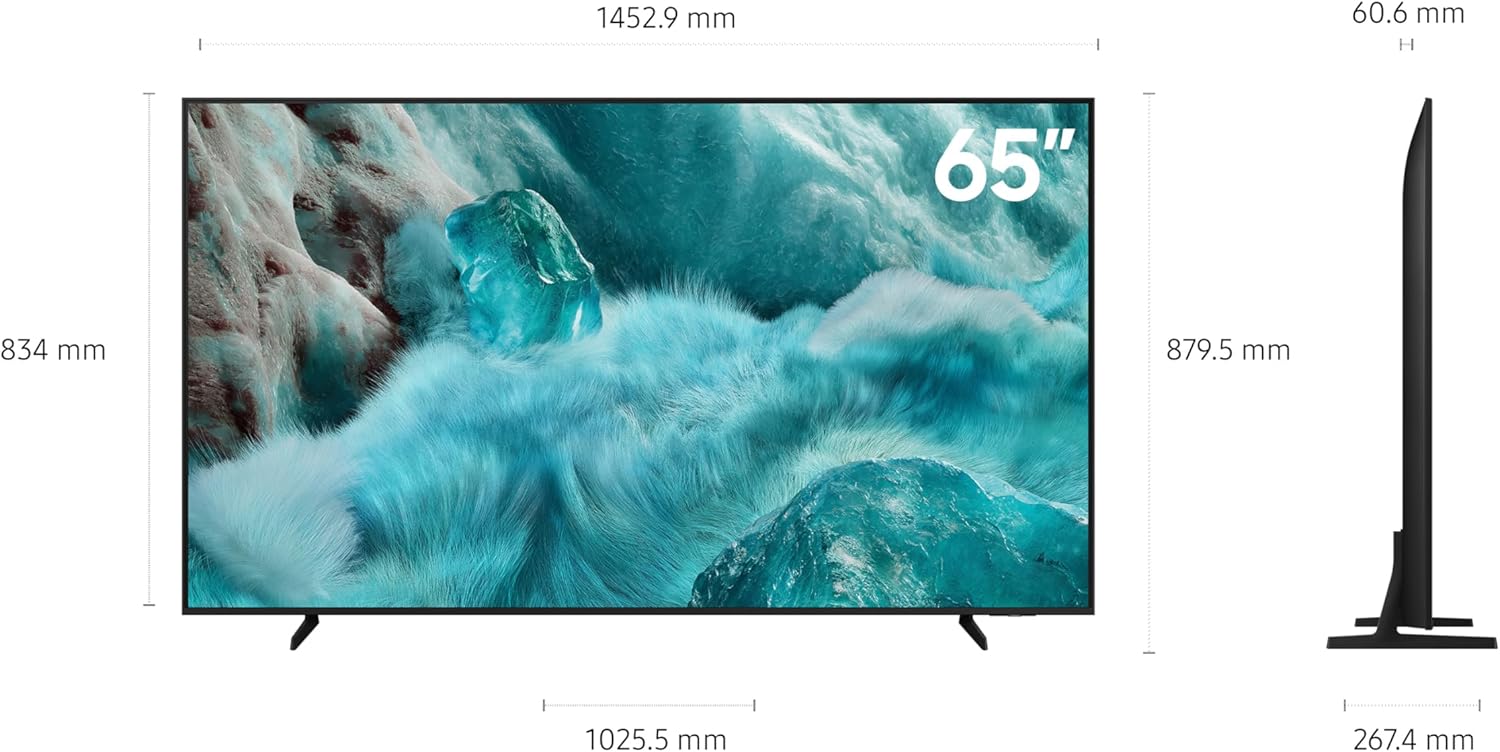
Image 4.1: Product dimensions for planning installation. The TV measures approximately 145.29 cm in width, 83.4 cm in height (without stand), and 6.06 cm in depth.
4.4 Connecting Peripherals
- Power: Connect the power cable to the TV and then to a wall outlet.
- HDMI Devices: Connect external devices (e.g., Blu-ray player, game console) to the HDMI ports.
- Network: For internet access, connect an Ethernet cable to the LAN port or connect wirelessly via Wi-Fi during initial setup.
4.5 Initial Power On & First-Time Setup
- Press the power button on the remote control or the TV.
- Follow the on-screen instructions to select your language, country, and connect to your Wi-Fi network.
- Complete the Smart Hub setup and channel scanning.
5. Operating Your TV
5.1 Remote Control Functions
Familiarize yourself with the remote control buttons for basic operations like power, volume, channel selection, and Smart Hub navigation.
5.2 Smart TV Features
- Q4 AI Processor: The integrated Q4 AI Processor optimizes viewing and sound experiences for 4K content. It enhances picture quality by analyzing and upscaling content to near-4K resolution.
- 100% Color Volume with Quantum Dot: Quantum Dot technology delivers a wide spectrum of colors, maintaining accuracy at various brightness levels.
- Samsung Knox Security: Your TV is secured by Samsung Knox, protecting sensitive data, monitoring IoT devices, and blocking malicious apps and sites. Regular updates ensure ongoing security.
- Endless Free Content: Access a variety of free channels, including Samsung TV Plus, offering news, sports, movies, and more.
- Slim Look: The TV features a slim design that integrates seamlessly into your living space.
- SmartThings: Connect and manage compatible smart home devices directly from your TV using the built-in SmartThings hub.
- 7 Years OS Upgrade: Enjoy up to 7 years of new TV experiences with free OS upgrades for products released in 2025.
- Quantum HDR: Experience enhanced detail and contrast with Quantum HDR, which provides dynamic tone mapping for deeper blacks and more vibrant imagery.
- 4K Upscaling: The TV's powerful 4K upscaling technology converts lower-resolution content to near-4K quality.
- AI Energy Mode: This mode intelligently analyzes light levels and usage patterns to adjust brightness, helping to manage energy consumption.
- AI Auto Game Mode: The TV can detect the type of game being played and automatically optimize settings for an enhanced gaming experience.

Image 5.1: The Q4 AI Processor, designed to enhance picture and sound quality for 4K TVs.

Image 5.2: Visual representation of 100% Color Volume with Quantum Dot, showing vibrant and accurate colors.

Image 5.3: Samsung Knox Security feature, emphasizing data protection and device monitoring.

Image 5.4: A visual showing the wide range of free content available through Samsung TV Plus.

Image 5.5: The slim profile of the TV, designed to blend with modern decor.

Image 5.6: The SmartThings interface on the TV, demonstrating control over various smart home devices.

Image 5.7: A graphic highlighting the 7-year OS upgrade policy for enhanced TV experiences.

Image 5.8: A visual comparison illustrating the wider range of contrast provided by Quantum HDR compared to SDR.

Image 5.9: An image depicting a user enjoying content, highlighting the benefit of 4K upscaling.

Image 5.10: The AI Energy Mode interface, showing adaptive brightness settings for energy saving.

Image 5.11: The AI Auto Game Mode interface, displaying optimized settings for gaming.
6. Maintenance
6.1 Cleaning Your TV
- Always unplug the TV before cleaning.
- Use a soft, dry microfiber cloth to gently wipe the screen and exterior surfaces.
- Do not use abrasive cleaners, waxes, or solvents.
6.2 Software Updates
Ensure your TV's software is up to date for optimal performance and security. You can usually check for updates via the TV's settings menu (e.g., Settings > Support > Software Update).
7. Troubleshooting
If you encounter issues with your TV, refer to the following common solutions:
| Problem | Possible Solution |
|---|---|
| No power | Check if the power cord is securely connected to the TV and the wall outlet. Ensure the outlet is functional. |
| No picture, but sound is present | Verify the correct input source is selected. Check HDMI cable connections. |
| No sound, but picture is present | Check volume levels and mute settings. Ensure audio cables are connected correctly. |
| Remote control not working | Check remote battery charge (for solar remote, ensure exposure to light). Ensure no obstructions between remote and TV. |
| Cannot connect to Wi-Fi | Restart your router and TV. Re-enter Wi-Fi password. Ensure TV is within range of the router. |
For more complex issues, consult the full e-Manual accessible via your TV's settings or contact Samsung customer support.
8. Specifications
| Feature | Detail |
|---|---|
| Brand | Samsung |
| Model Number | QA65Q7FAAUXSA |
| Screen Size | 65 Inches / 166 cm |
| Display Technology | QLED |
| Resolution | 4K |
| Refresh Rate | 50Hz (Up to 60Hz) |
| Processor | Q4 AI Processor |
| Special Features | 100% Color Volume with Quantum Dot, Samsung Knox Security, SmartThings |
| Connectivity Technology | Bluetooth, HDMI, Wi-Fi |
| Product Dimensions (D x W x H) | 6.1 x 145.3 x 83.4 cm |
| Item Weight | 23.8 kg |
| Included Components | TV, User Manual, Remote Control |
| Country of Origin | Egypt |
| First Available Date | 22 May 2025 |
9. Warranty and Support
Your Samsung TV comes with a manufacturer's warranty. For specific warranty terms and conditions, please refer to the warranty card included with your product or visit the official Samsung website for your region.
For technical support, service requests, or further assistance, please contact Samsung customer service. Contact details can typically be found on the Samsung website or in the documentation provided with your TV.


