
1. Important Safety Information
Before operating your Ruitoo M5 Pro Electric Scooter, please read this manual thoroughly and retain it for future reference. Adherence to safety guidelines is crucial for preventing accidents and ensuring a long product life.
- Always wear a helmet and appropriate protective gear (knee pads, elbow pads) when riding.
- Familiarize yourself with and obey all local traffic laws and regulations regarding electric scooters.
- Perform a pre-ride check: ensure brakes are functional, tires are properly inflated, and all quick-release mechanisms are secured.
- Do not exceed the maximum weight capacity of 120 kg.
- Avoid riding in heavy rain or through deep puddles. The scooter has an IPX4 water resistance rating, meaning it is protected against splashing water from any direction, but it is not waterproof.
- Maintain a safe speed and always be aware of your surroundings, pedestrians, and other vehicles.
- Do not allow children under the age of 16 to operate the scooter.
- Avoid riding under the influence of alcohol or drugs.
2. Product Overview
The Ruitoo M5 Pro is a foldable electric scooter designed for urban commuting and recreational riding. It features a powerful motor, long-range battery, and all-terrain tires for a versatile riding experience.
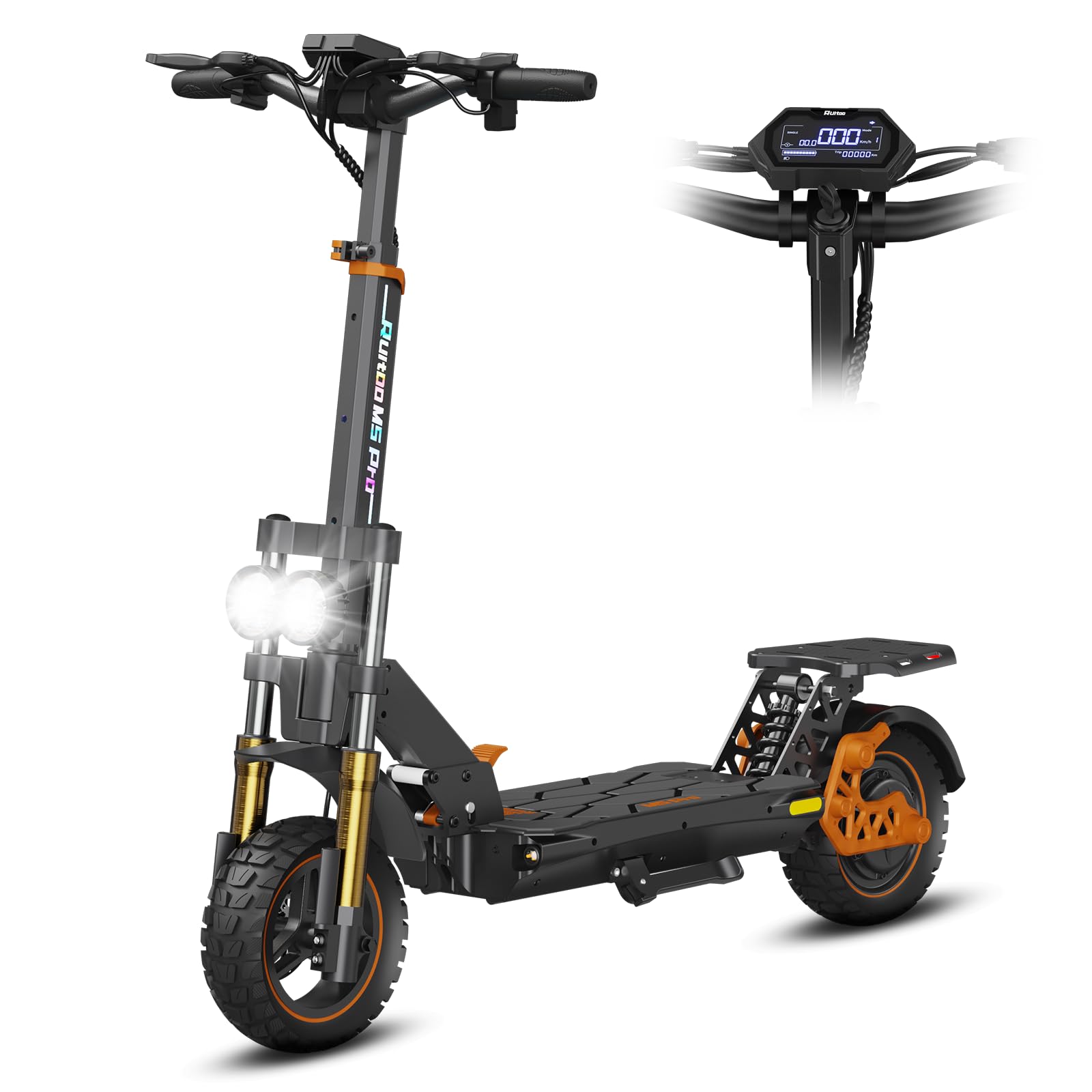
Image: The Ruitoo M5 Pro Electric Scooter, showcasing its robust design and all-terrain tires.

Image: A rider on the Ruitoo M5 Pro Electric Scooter, demonstrating its use in an outdoor setting.
3. Setup and Assembly
3.1 Unboxing and Initial Inspection
Carefully remove all components from the packaging. Inspect the scooter for any signs of damage during transit. Ensure all parts listed in the packing list are present.
3.2 Handlebar Assembly and Adjustment
The handlebar may need to be unfolded and secured. The Ruitoo M5 Pro features an adjustable handlebar. To adjust the height, locate the quick-release lever or adjustment mechanism on the stem. Loosen it, set the handlebar to a comfortable height, and then securely fasten the mechanism.

Image: Diagram illustrating the adjustable handlebar mechanism, allowing riders to customize height for comfort and safety.
3.3 Initial Battery Charging
Before first use, fully charge the scooter's 48V/20.8Ah lithium-ion battery. The charging time is approximately 7 hours. Connect the charger to the scooter's charging port and then to a power outlet. The indicator light on the charger will typically change color when charging is complete.

Image: A visual representation of the scooter's battery capacity (48V/20.8Ah) and maximum range (70-80km).
3.4 Tire Inflation
Ensure the 11-inch all-terrain tires are inflated to the recommended pressure, which can usually be found on the tire sidewall. Proper tire pressure is essential for safety, performance, and battery efficiency.

Image: Close-up of the 11-inch all-terrain tires, highlighting their robust design for various surfaces.
4. Operating Instructions
4.1 Powering On/Off and Display Functions
To power on the scooter, press and hold the power button on the intelligent display. The LCD screen will show real-time data such as speed, battery level, and current riding mode. Press and hold the power button again to turn off the scooter.

Image: Detailed view of the handlebar controls, including the intelligent LED display, brake lever, acceleration control, headlight switch, turn signal switch, and horn button.
4.2 Speed Modes and Acceleration
The M5 Pro offers 3 adjustable speed modes (low, medium, high). Use the mode button on the display to cycle through these settings. To accelerate, gently press the acceleration lever. Release the lever to reduce speed.
4.3 Braking System
The scooter is equipped with a dual braking system for enhanced safety. Apply the brake levers gradually to slow down or stop. Avoid sudden, harsh braking, especially at high speeds, to prevent loss of control.

Image: Illustration of the dual braking system and dual hydraulic suspension, emphasizing safety and ride comfort.
4.4 Lighting and Signaling
The scooter features front headlights (white or yellow), rear red lights, and turn signals for visibility. Use the dedicated switches on the handlebar to activate these lights as needed, especially during low-light conditions or when signaling turns.

Image: Visual representation of the scooter's safety light system, including headlights, brake lights, and turn indicators.
4.5 Folding Mechanism
The M5 Pro is designed to be foldable for easy transport and storage. Locate the folding mechanism on the scooter's stem. Follow the instructions to safely fold and unfold the scooter. Ensure it is securely locked in both the folded and unfolded positions before use or transport.

Image: Diagram illustrating the scooter's folding design and its dimensions in both unfolded and folded states, showing its portability for transport in a car, bus, or subway.
5. Maintenance
5.1 Battery Care
- Charge the battery regularly, even if the scooter is not in use, to maintain its health.
- Avoid completely draining the battery before recharging.
- Store the scooter in a cool, dry place away from direct sunlight and extreme temperatures.
5.2 Tire and Brake Inspection
- Regularly check tire pressure and inflate as needed.
- Inspect tires for wear, punctures, or damage.
- Test the brakes before each ride to ensure they are responsive and effective. Adjust if necessary.
5.3 Cleaning and Storage
- Clean the scooter with a damp cloth. Do not use high-pressure water jets or immerse the scooter in water.
- Ensure the scooter is dry before charging or storing.
- Store in a secure location to prevent theft.

Image: Action shot demonstrating the scooter's IPX4 water resistance, showing it can withstand splashes.
6. Troubleshooting
If you encounter any issues with your Ruitoo M5 Pro Electric Scooter, please refer to the following common troubleshooting steps:
- Scooter not turning on: Check if the battery is charged. Ensure all connections are secure.
- Reduced range: This can be affected by rider weight, terrain, speed mode, tire pressure, and ambient temperature. Ensure tires are properly inflated and the battery is fully charged.
- Braking issues: Inspect brake pads and cables for wear or damage. Adjust brake tension if necessary.
- Unusual noises: Stop riding immediately and inspect the scooter for loose parts, debris, or damage to wheels, motor, or suspension.
For persistent issues or problems not listed here, please contact Ruitoo customer support.
7. Specifications
| Brand | Ruitoo |
| Model Name | M5 Pro |
| Battery | 48V/20.8Ah Lithium-ion |
| Max Range | 70-80 km (depending on conditions) |
| Motor Type | Brushless |
| Tire Size | 11-inch All-Terrain Pneumatic |
| Max Weight Capacity | 120 kg |
| Charging Time | 7 hours |
| Product Dimensions (L x W x H) | 128L x 60W x 126H cm |
| Braking System | Dual Disc Brakes |
| Suspension Type | Dual Hydraulic Suspension |
| Water Resistance Rating | IPX4 |
| Special Features | Adjustable handlebar height, Digital display, Dual braking system, Wide pedal, Foldable |
8. Warranty and Support
8.1 Product Warranty
The Ruitoo M5 Pro Electric Scooter comes with a 2-year warranty from the date of purchase. This warranty covers manufacturing defects under normal use. Please retain your proof of purchase for warranty claims. The warranty does not cover damage caused by misuse, accidents, unauthorized modifications, or normal wear and tear.
8.2 Customer Support
For technical assistance, warranty claims, or any questions regarding your Ruitoo M5 Pro Electric Scooter, please contact the seller or manufacturer directly. Refer to your purchase documentation for contact details.
