
1. Safety Information
Please read this manual carefully before operating the dehumidifier and retain it for future reference. Always follow basic safety precautions to reduce the risk of fire, electric shock, and injury.
- Ensure the power supply voltage matches the rating label on the unit.
- Do not operate the unit with a damaged power cord or plug.
- Keep the unit away from heat sources, flammable materials, and water.
- Do not insert objects into the air inlet or outlet.
- Always unplug the unit before cleaning or performing maintenance.
- This appliance is not intended for use by persons (including children) with reduced physical, sensory or mental capabilities, or lack of experience and knowledge, unless they have been given supervision or instruction concerning use of the appliance by a person responsible for their safety.
- Close doors and windows when operating the dehumidifier for optimal performance.
- Do not use the dehumidifier in temperatures below 5°C, as performance will be significantly reduced and the unit may stop operating.
2. Product Overview
The ZAFRO Compressor Dehumidifier is designed to efficiently remove excess moisture from your indoor environment, helping to prevent mold, mildew, and unpleasant odors. It also features an air purification function for improved air quality.

Image: ZAFRO Dehumidifier Key Features. This image shows three white ZAFRO dehumidifiers, emphasizing their powerful dehumidification capacity, suitability for large rooms, and quiet operation.
Key Features:
- Powerful Dehumidification: Compressor-type dehumidifier with a maximum capacity of 22 liters per day (at 30°C, 80% RH).
- Wide Coverage: Effective for areas up to 30 tatami mats (steel frame) or 20 tatami mats (wood).
- Multi-functional Modes: Includes automatic dehumidification, continuous dehumidification, swing function, 2-speed fan adjustment, sleep mode, and a 1-24 hour timer.
- Air Purification: Equipped with an ion purification function to improve air quality.
- Quiet Operation: Operates at a low noise level of approximately 36 dB, suitable for use during sleep or work.
- Large Water Tank: Features a 4.5-liter water tank, reducing the frequency of emptying.
- Automatic Shut-off: The unit automatically stops when the water tank is full, with an LED indicator and alert sound (silent in sleep mode).
- Energy Efficient: Designed for low power consumption, costing approximately 6-8 yen per hour (based on 36 yen/kWh max power consumption).
- Compact Design: Space-saving and easy to integrate into any room.
- Child Lock: Prevents accidental changes to settings.

Image: Super Dehumidification Power & Electricity Bill Savings. This graphic illustrates the dehumidifier's ability to remove a significant amount of water daily and its low operating cost.
3. Product Components
Please check that all components are present upon unboxing:
- ZAFRO Dehumidifier Unit
- Power Cord
- Continuous Drainage Hose
- User Manual (this document)
4. Setup
4.1 Placement
- Place the dehumidifier on a firm, level surface.
- Ensure there is at least 20 cm of space around the unit for proper airflow.
- Avoid placing the unit near walls, furniture, or curtains that may obstruct air circulation.
- The unit is equipped with casters for easy movement.

Image: Dehumidifier Features and Dimensions. This image highlights the unit's compact dimensions (31.3cm width, 51cm height, 23.6cm depth), hidden handle for portability, casters for easy movement, and the continuous drainage pipe.
4.2 Power Connection
- Plug the power cord into a grounded electrical outlet.
- Ensure the outlet meets the power requirements of the unit (100V~ 50/60Hz).
4.3 Continuous Drainage Setup (Optional)
For continuous operation without needing to empty the water tank, you can set up continuous drainage:
- Locate the drainage outlet on the back of the unit.
- Connect the provided continuous drainage hose to the outlet.
- Ensure the hose is routed downwards to a suitable drain (e.g., floor drain, large bucket) to allow gravity drainage. Avoid kinks or blockages in the hose.

Image: Convenient Dehumidification Function. This graphic demonstrates how to remove the water tank for manual emptying and how to connect the hose for continuous drainage.
5. Operating Instructions
The control panel provides access to all functions. Refer to the detailed diagram below for button identification.

Image: Multi-functional Display and Controls. This image provides a close-up of the control panel, showing icons for various functions like ion purification, child lock, fan speed, timer, display, humidity setting, mode, and power.
5.1 Power On/Off
- Press the Power button (
 ) to turn the unit on or off.
5.2 Mode Selection
- Press the Mode button () to cycle through available modes:
- Automatic Dehumidification: The unit automatically adjusts operation based on the ambient humidity.
- Continuous Dehumidification: The unit operates continuously to remove moisture.
- Sleep Mode: Operates quietly with reduced fan speed and dimmed display. Full water tank alerts will be silent.
5.3 Fan Speed Adjustment
- Press the Fan Speed button () to select between two fan speeds.
5.4 Timer Setting
- Press the Timer button () to set the operating time from 1 to 24 hours. The unit will automatically turn off after the set time.
5.5 Ion Purification
- Press the Ion button (
 ) to activate or deactivate the ion purification function. This helps to clean the air.
5.6 Child Lock
- Press and hold the Child Lock button () for a few seconds to activate or deactivate the child lock. This prevents accidental changes to settings.
5.7 Swing Function
- Press the Swing button () to activate the air outlet swing function, distributing dehumidified air more evenly.
6. Maintenance
6.1 Emptying the Water Tank
When the water tank is full, the unit will automatically stop, and the 'Full Water' LED will illuminate with an alert sound (silent in sleep mode).
- Turn off the unit and unplug it from the power outlet.
- Carefully pull out the water tank from the unit.
- Empty the collected water.
- Slide the empty water tank back into the unit until it clicks into place.
- Plug in the unit and turn it on to resume operation.

Image: Water Tank Full Indicator and Capacity. This image shows the control panel displaying 'FL' when the 4.5L water tank is full, and a hand removing the tank for emptying.
6.2 Cleaning the Air Filter
Regular cleaning of the air filter is essential for maintaining optimal performance and air quality.
- Turn off the unit and unplug it.
- Locate the air filter cover (usually on the back or side of the unit).
- Remove the filter.
- Clean the filter with a vacuum cleaner or wash it gently with warm, soapy water. Rinse thoroughly.
- Allow the filter to air dry completely before reinstalling it.
- Replace the filter cover.
6.3 Storage
If the unit will not be used for an extended period:
- Empty the water tank and ensure it is clean and dry.
- Clean the air filter.
- Unplug the power cord and coil it neatly.
- Store the unit in a cool, dry place, away from direct sunlight and extreme temperatures.
7. Troubleshooting
If you encounter any issues with your dehumidifier, please refer to the following common problems and solutions:
| Problem | Possible Cause | Solution |
|---|---|---|
| Unit does not turn on | No power; Power cord not plugged in; Water tank full or not properly installed. | Check power connection; Empty and re-install water tank correctly. |
| No dehumidification or low efficiency | Doors/windows open; Room temperature too low; Air filter clogged; Unit size too small for room. | Close doors/windows; Ensure room temperature is above 5°C; Clean air filter; Consider a larger unit for bigger spaces. |
| Unit is noisy | Unit not on a level surface; Air filter clogged; Internal components vibrating. | Place on a level surface; Clean air filter; If noise persists, contact customer support. |
| Water leaks | Water tank not properly installed; Continuous drainage hose loose or blocked. | Re-install water tank; Check continuous drainage hose for proper connection and clear any blockages. |
If the problem persists after trying these solutions, please contact ZAFRO customer support.
8. Specifications
Technical specifications for the ZAFRO Dehumidifier Model J0D4221:
| Feature | Specification |
|---|---|
| Brand | ZAFRO |
| Model Number | J0D4221 |
| Dehumidification Capacity (30°C, 80% RH) | 22 L/Day |
| Applicable Area (Steel Frame) | Up to 30 Tatami Mats |
| Applicable Area (Wood) | Up to 20 Tatami Mats |
| Rated Power Consumption (30°C, 80% RH) | 185W (50Hz), 225W (60Hz) |
| Operating Noise Level | Approx. 36 dB |
| Water Tank Capacity | 4.5 Liters |
| Power Supply Voltage | 100V~ 50/60Hz |
| Product Dimensions (D x W x H) | 23.6 x 31.3 x 51 cm |
| Package Dimensions | 55.7 x 36.5 x 28.8 cm |
| Package Weight | 13.73 kg |
| Color | White |
| Included Components | Power Cord |
| Other Functions | Overflow prevention, Child lock, Automatic water removal, Continuous drainage, Quiet operation |
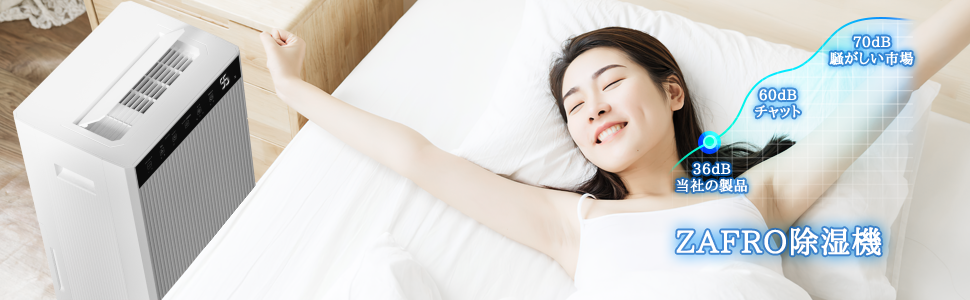
Image: Noise Level Comparison. This graphic illustrates the ZAFRO dehumidifier's quiet operation at 36dB compared to common noise levels.
9. Warranty and Support
ZAFRO products are manufactured to high-quality standards. For warranty information or technical support, please refer to the warranty card included with your purchase or contact ZAFRO customer service through the retailer where you purchased the product. Please have your model number (J0D4221) and purchase date ready when contacting support.