
Kobalt 1074663
Contents
Kobalt 1500-Lumen LED Rechargeable Clamped Work Light User Manual
Model: 1074663
1. Introduction
Thank you for choosing the Kobalt 1500-Lumen LED Rechargeable Clamped Work Light. This manual provides essential information for the safe and efficient operation, maintenance, and troubleshooting of your new work light. Please read this manual thoroughly before use and retain it for future reference.
This versatile work light features 1500 lumens of bright LED illumination, a 360° pivoting head, and a sturdy integrated clamp for secure attachment. It can also convert into a free-standing light. The unit is USB rechargeable and constructed from rugged aluminum and ABS plastic for durability.
2. Safety Information
Always observe the following safety precautions to reduce the risk of injury or damage:
- Do not look directly into the LED light source when illuminated, as it can cause eye damage.
- Keep the work light away from flammable materials.
- Do not immerse the work light in water. While water-resistant, it is not waterproof.
- Do not attempt to disassemble or modify the work light. This will void the warranty and may cause damage or injury.
- Use only the specified charging cable and power source.
- Keep out of reach of children.
- Ensure the clamp is securely fastened before releasing your grip on the light.
3. Package Contents
Verify that all items are present in the package:
- Kobalt 1500-Lumen LED Rechargeable Clamped Work Light (Model: 1074663)
- USB Charging Cable
- User Manual (this document)
4. Setup
4.1 Initial Charge
Before first use, fully charge the work light. Refer to the "Charging the Work Light" section for detailed instructions.
4.2 Clamping the Work Light
The integrated clamp allows for secure attachment to various surfaces:
- Open the clamp by pressing the release mechanism or spreading the jaws.
- Position the clamp onto a stable surface such as a pipe, door, or wood framing.
- Ensure the non-marring feet are properly seated to prevent scratching.
- Verify the clamp is securely holding the light before use.

Figure 1: Kobalt Work Light in clamped configuration.
4.3 Converting to Free-Standing Mode
When clamping is not required, the light can be used as a free-standing unit:
- Locate the legs integrated into the clamp mechanism.
- Lock the legs open to create a stable base for the work light.
- Place the light on a flat, stable surface.
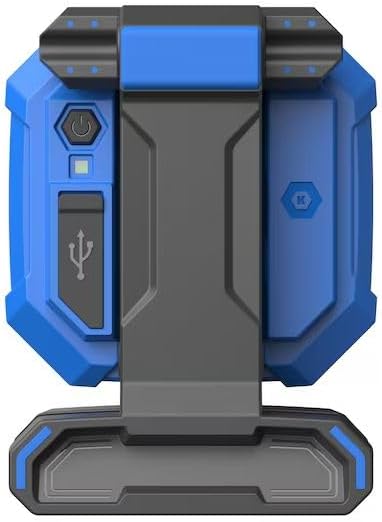
Figure 2: Work light with legs extended for free-standing operation.
5. Operating Instructions
5.1 Power On/Off and Brightness Adjustment
The work light features a power button for control:
- To turn the light ON, press the power button once.
- To adjust brightness (dimming), press and hold the power button. The light will cycle between high (1500 lumens) and low (50 lumens) settings. Release the button at the desired brightness.
- To turn the light OFF, press the power button again when the light is on.

Figure 3: Location of Power Button and USB Charger Port.
5.2 Pivoting Light Head
The light head can pivot a full 360° to direct illumination precisely where needed. Gently rotate the light head to adjust its angle.

Figure 4: 360° Pivoting Light Feature.
6. Charging the Work Light
The work light is equipped with a USB rechargeable battery.
- Locate the USB charger port on the side of the work light (refer to Figure 3).
- Connect the provided USB charging cable to the port.
- Connect the other end of the USB cable to a compatible USB power source (e.g., wall adapter, computer USB port).
- Monitor the charge indicator lights:
- Red Light: Charging in progress.
- Yellow Light: Battery needs charge.
- Green Light: Fully charged.
- A full charge typically takes approximately 6 hours.
Figure 5: Charge Indicator Status.
7. Maintenance
7.1 Cleaning
To clean the work light, wipe it with a soft, damp cloth. Do not use abrasive cleaners or solvents, as these may damage the finish or internal components.
7.2 Storage
When not in use, store the work light in a cool, dry place, away from direct sunlight and extreme temperatures. The clamp mechanism can be locked closed for compact storage.
8. Troubleshooting
| Problem | Possible Cause | Solution |
|---|---|---|
| Light does not turn on. | Battery is depleted. | Charge the work light fully (refer to Section 6). |
| Light is dim or flickers. | Low battery charge. | Recharge the work light. |
| Light does not charge. | Faulty USB cable or power source. | Try a different USB cable or power adapter. Ensure connections are secure. |
| Clamp does not hold securely. | Surface is too thick or unstable. | Ensure the clamping surface is within the clamp's capacity and is stable. |
9. Specifications
| Model Number | 1074663 |
| Brightness | 1500 Lumens (High), 50 Lumens (Low) |
| Light Source | LED (COB Technology) |
| Power Source | Rechargeable Lithium-Ion Battery (1 included) |
| Charging Time | Approx. 6 hours |
| Run Time | 3 hours (High), 24 hours (Low) |
| Beam Angle | 360 Degrees (Pivoting Head) |
| Material | Aluminum, ABS Plastic |
| Dimensions (L x W x H) | 4" x 5" x 7" |
| Weight | 1.5 pounds |
| Color | Blue |
10. Warranty and Support
Specific warranty information for this product is not provided in the available data. For warranty claims or technical support, please contact the retailer or manufacturer directly. Keep your purchase receipt as proof of purchase.
Manufacturer: Kobalt
Documents and downloads
Ask a question about this manual
Ask about setup, troubleshooting, compatibility, parts, safety, or missing instructions. Manuals+ will review the question and use this page’s manual context to help answer it.