1. Important Safety Information
Please read this manual thoroughly before operating the Proscenic F20A Cordless Wet Dry Vacuum Cleaner. Keep these instructions for future reference.
- Ensure the appliance is fully assembled before use.
- Use only the provided power adapter for charging.
- Do not immerse the main unit in water.
- Keep hair, loose clothing, fingers, and all body parts away from openings and moving parts.
- Do not use to pick up flammable or combustible liquids, or anything that is burning or smoking.
- Always turn off the appliance before performing any maintenance or cleaning.
2. Product Overview and Components
Familiarize yourself with the components of your Proscenic F20A vacuum cleaner.
Figure 2.1: Included Components
This image displays all items included in the package: the main unit (with floor brush, roller brush, sponge), battery, handle, charging base, power adapter, cleaning brush, user manual, and after-sales service card.
2.1 Main Components:
- Main Unit: Contains the motor, dirty water tank, and clean water tank.
- Handle: Ergonomic handle with control buttons.
- Floor Brush Head: Equipped with a roller brush for cleaning.
- Clean Water Tank (1L): For fresh water and cleaning solution.
- Dirty Water Tank (1L): Collects dirty water and debris.
- Charging Base: For charging, storage, and self-cleaning.
- Power Adapter: For charging the battery.
- Cleaning Brush: For manual cleaning of components.
3. Setup
3.1 Assembly
- Insert the handle into the main unit until it clicks into place.
- Ensure the clean and dirty water tanks are correctly seated.
3.2 Initial Charging
Before first use, fully charge the vacuum cleaner.
- Place the main unit onto the charging base.
- Connect the power adapter to the charging base and a power outlet.
- The LED display will indicate charging status. A full charge takes approximately 4-5 hours.
3.3 Filling the Clean Water Tank
- Remove the clean water tank from the main unit.
- Open the tank cap and fill with clean water. You may add a small amount of non-foaming cleaning solution suitable for wet dry vacuums. Do not exceed the MAX fill line.
- Close the cap securely and reinsert the tank into the main unit.
4. Operating Instructions
4.1 Power On/Off
Press the power button on the handle to turn the appliance on or off.
4.2 Mode Selection
The Proscenic F20A offers three cleaning modes:
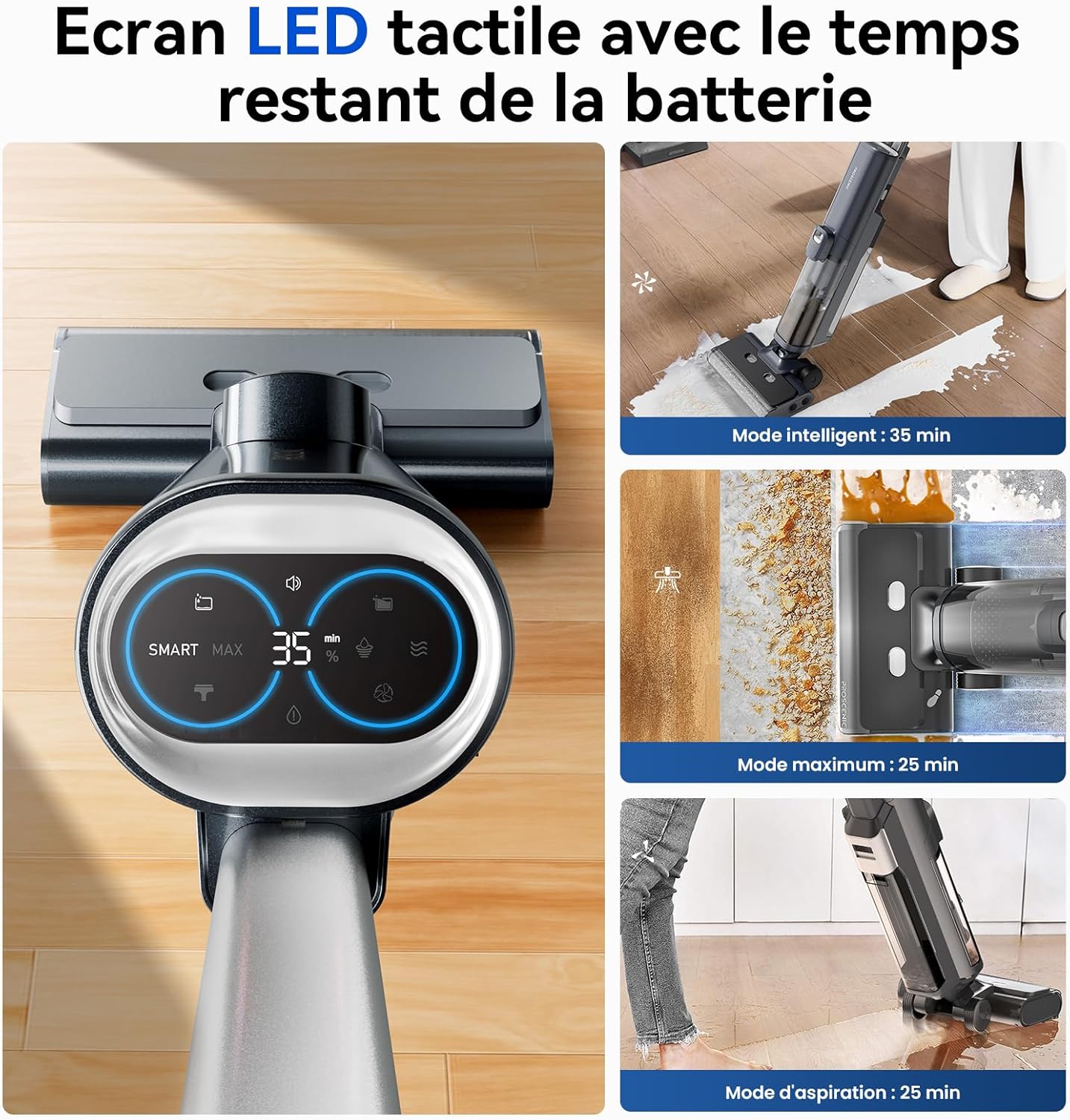
Figure 4.1: LED Display and Modes
The LED screen provides real-time information on battery life, current cleaning mode, and maintenance alerts. Touch the screen to switch between modes.
- Smart Mode: For general cleaning tasks. The vacuum automatically adjusts suction power and water volume based on detected dirt levels. (Approx. 35 minutes runtime)
- Max Mode: Provides maximum suction and water for stubborn stains and heavily soiled areas. (Approx. 25 minutes runtime)
- Vacuum Mode: Designed for vacuuming liquids only, without dispensing water. (Approx. 25 minutes runtime)
Switch between modes by touching the corresponding icon on the LED display.
4.3 Self-Propulsion
The vacuum cleaner features a self-propulsion system, making it easier to maneuver across floors. Guide the unit gently; it will assist in forward movement.

Figure 4.2: Self-Propelled Cleaning
The self-propulsion system reduces effort during cleaning, allowing for easy movement across various floor types.
4.4 Edge Cleaning
The specialized brush head is designed to clean close to edges and baseboards, reaching within 0.7 cm for thorough cleaning.

Figure 4.3: Edge Cleaning Capability
The vacuum's design allows for effective cleaning along walls and into corners, minimizing uncleaned areas.
4.5 Voice Guidance
The vacuum provides helpful voice prompts for operational status, battery alerts, and maintenance reminders. You can adjust or disable voice prompts via the settings.
5. Maintenance
Regular maintenance ensures optimal performance and extends the lifespan of your Proscenic F20A.
5.1 Automated Self-Cleaning
After each use, it is recommended to run the self-cleaning cycle:
- Place the vacuum cleaner on its charging base.
- Ensure there is sufficient clean water in the clean water tank.
- Press the self-cleaning button (usually indicated on the handle or LED screen).
- The vacuum will automatically clean the roller brush and internal air ducts.
- After self-cleaning, the system will initiate cold air drying to prevent odors and bacterial growth.

Figure 5.1: Self-Cleaning and Air Drying
The vacuum automatically cleans its roller brush and dries it with cold air when placed on the charging base and the self-clean function is activated.
5.2 Emptying and Cleaning the Dirty Water Tank
The vacuum will alert you when the dirty water tank is full. Empty and clean it after each use or when prompted.
- Remove the dirty water tank from the main unit.
- Open the tank and dispose of the dirty water and solid debris. The solid-liquid separation filter makes this process hygienic.
- Rinse the tank and filter thoroughly with clean water.
- Ensure all parts are dry before reassembling and reinserting the tank.
Figure 5.2: Solid-Liquid Separation
The dirty water tank features a filter to separate solid debris from liquids, simplifying disposal and cleaning.
5.3 Roller Brush Maintenance
Periodically inspect and manually clean the roller brush for tangled hair or debris not removed by the self-cleaning function.
- Turn off the vacuum and remove the brush cover.
- Remove the roller brush.
- Use the provided cleaning brush to remove any hair or debris.
- Rinse the roller brush under running water if necessary and allow it to air dry completely before reinstallation.
5.4 HEPA Filter Cleaning
The HEPA filter should be cleaned regularly to maintain suction performance. Rinse it with water and allow it to air dry completely before reinstallation. Do not use the vacuum without a dry filter.
6. Troubleshooting
Refer to this section for common issues and their solutions.
| Problem | Possible Cause | Solution |
|---|---|---|
| Vacuum does not turn on. | Battery is low or depleted. | Charge the vacuum fully. |
| Poor suction performance. | Dirty water tank is full; roller brush is clogged; HEPA filter is dirty. | Empty and clean the dirty water tank. Clean the roller brush. Clean or replace the HEPA filter. |
| Water streaks on floor. | Roller brush is too wet or dirty. | Run the self-cleaning cycle. Manually clean the roller brush if necessary. |
| Voice prompts are too loud/quiet or in wrong language. | Voice settings need adjustment. | Refer to the LED display or user interface for voice setting adjustments. |
| Vacuum stops working when upright. | Safety feature activated. | This is a normal safety feature. Tilt the vacuum back to resume operation. |
If the problem persists, please contact customer support.
7. Specifications
| Feature | Detail |
|---|---|
| Brand | Proscenic |
| Model Number | F20A |
| Color | Galaxy Grey |
| Dimensions (L x W x H) | 30 x 35 x 100 cm |
| Item Weight | 8.32 kg |
| Clean Water Tank Capacity | 1 Liter |
| Dirty Water Tank Capacity | 1 Liter |
| Number of Speeds | 3 (Smart, Max, Vacuum) |
| Noise Level | 62 dB |
| Runtime | Up to 35 minutes |
| Power | 300 Watts |
| Voltage | 28.8 Volts |
| Filter Type | HEPA Filter |
| Surface Recommendation | Hard floors (concrete, wood, ceramic tiles) |
| Special Features | 3-in-1 (Vacuum, Mop, Wash), Self-cleaning, Self-propulsion, LED Display, Voice Guidance, Solid/Liquid Waste Separation, Cordless. |
8. Warranty and Support
For warranty information and customer support, please refer to the "After-sales card" included in your package or visit the official Proscenic website. Keep your purchase receipt as proof of purchase.
Proscenic Official Website: www.proscenic.com


