
GODOX IT30PRO-N
GODOX IT30Pro TTL Mini Camera Flash Light User Manual
Model: IT30Pro-N (for Nikon)
1. Introduction
Thank you for purchasing the GODOX IT30Pro TTL Mini Camera Flash Light. This compact and versatile flash is designed to provide optimal lighting for your photography needs, featuring TTL auto-exposure, high-speed sync, and a built-in 2.4GHz wireless system. This manual provides detailed instructions for the safe and effective use of your flash unit.

Image 1.1: GODOX IT30Pro Flash Light, USB-C charging cable, and protective pouch.
Key Features:
- Compact and Portable: Weighing only 120g, designed for easy transport.
- TTL Auto-Exposure: Provides accurate and consistent flash output.
- 2.8" Full-Color Touchscreen: Intuitive interface for settings adjustment.
- Integrated 2.4GHz X System: Supports both Master and Receiver modes for wireless control.
- High-Speed Sync (HSS): Up to 1/8000s for freezing motion or balancing ambient light.
- Built-in Diffuser: For softer, more even lighting without external modifiers.
- Quick Mount, Quick Release Foot: For fast attachment and detachment from your camera.
- Rechargeable Lithium Battery: Offers up to 560 full-power flashes per charge with USB-C fast charging.
2. Safety Information
Please read and understand all safety precautions before using this product. Improper use may result in electric shock, fire, or other hazards.
- Do not disassemble or modify the flash unit.
- Keep the unit dry. Do not expose to rain or moisture.
- Do not touch the flash tube immediately after firing, as it may be hot.
- Avoid direct eye exposure to the flash, especially at close range, as it may impair vision.
- Keep out of reach of children.
- Use only the specified charging cable and power adapter.
- Do not operate in the presence of flammable gases or liquids.
3. Package Contents
Verify that all items are included in your package:
- GODOX IT30Pro TTL Mini Camera Flash Light
- USB-C Charging Cable
- Protective Pouch
- User Manual (this document)
4. Product Overview
Familiarize yourself with the components of your GODOX IT30Pro flash unit.

Image 4.1: Side view of the GODOX IT30Pro, highlighting the USB-C port and control layout.

Image 4.2: Front view of the GODOX IT30Pro, showing the flash head and built-in diffuser.
Component Identification:
- Flash Head: Emits light.
- Built-in Diffuser: Slides out for softer light.
- 2.8" Full-Color Touchscreen: Displays settings and allows interaction.
- Rotary Dial: For fine-tuning flash output.
- SET Button: Confirms selections.
- MENU Button: Accesses menu options.
- Power Button: Turns the unit on/off.
- Hot Shoe: For mounting onto a camera.
- Quick Release Foot: Secures the flash to the camera hot shoe.
- USB-C Port: For charging the internal battery.
5. Setup
5.1 Charging the Battery
The GODOX IT30Pro features a built-in lithium battery. Before first use, fully charge the unit.
- Connect the supplied USB-C cable to the flash unit's USB-C port.
- Connect the other end of the USB-C cable to a compatible USB power adapter (not included) or a computer's USB port.
- The charging indicator on the screen will show the charging status. A full charge typically takes approximately 1.5 hours.

Image 5.1: Charging the IT30Pro via USB-C.
5.2 Mounting to Camera
The IT30Pro is designed for quick and secure attachment to your camera's hot shoe.
- Ensure your camera is powered off.
- Slide the flash unit's hot shoe onto your camera's hot shoe.
- Press the quick-release button on the flash foot to lock it securely in place.
- To remove, press the quick-release button and slide the flash off.

Image 5.2: IT30Pro mounted on a camera.

Image 5.3: Detail of the quick-release foot for mounting.
6. Operating Instructions
6.1 Power On/Off
Press and hold the Power button (ⓘ) for approximately 2 seconds to turn the flash unit on or off.
6.2 Using the Touchscreen Interface
The 2.8" full-color touchscreen allows for intuitive control of all flash settings. Tap icons or swipe to navigate menus. The rotary dial can be used for precise adjustments.

Image 6.1: The IT30Pro's full-color touchscreen interface.
6.3 Flash Modes
The IT30Pro supports various flash modes to suit different shooting scenarios:
- TTL (Through-The-Lens) Auto-Exposure: The flash automatically meters light through your camera's lens to determine optimal flash output.
- Manual Mode (M): Allows you to manually set the flash power output.
- Multi Mode: Fires a series of rapid flashes during a single exposure to capture multiple movements of a subject.
6.4 Advanced Flash Functions
- High-Speed Sync (HSS): Enables flash synchronization at shutter speeds up to 1/8000s, useful for overpowering ambient light or using wide apertures in bright conditions.
- Front/Rear-Curtain Sync: Controls whether the flash fires at the beginning or end of the exposure.
- Flash Exposure Compensation (FEC): Adjusts the flash output relative to the camera's metered exposure.
6.5 Wireless Operation (2.4GHz X System)
The IT30Pro can function as both a Master and Receiver unit within the Godox 2.4GHz X wireless system, allowing for flexible multi-light setups.
- Access the wireless settings via the touchscreen menu.
- Select Master or Receiver mode as required.
- Set the channel and group to match other Godox 2.4GHz X system devices (e.g., X3 trigger).
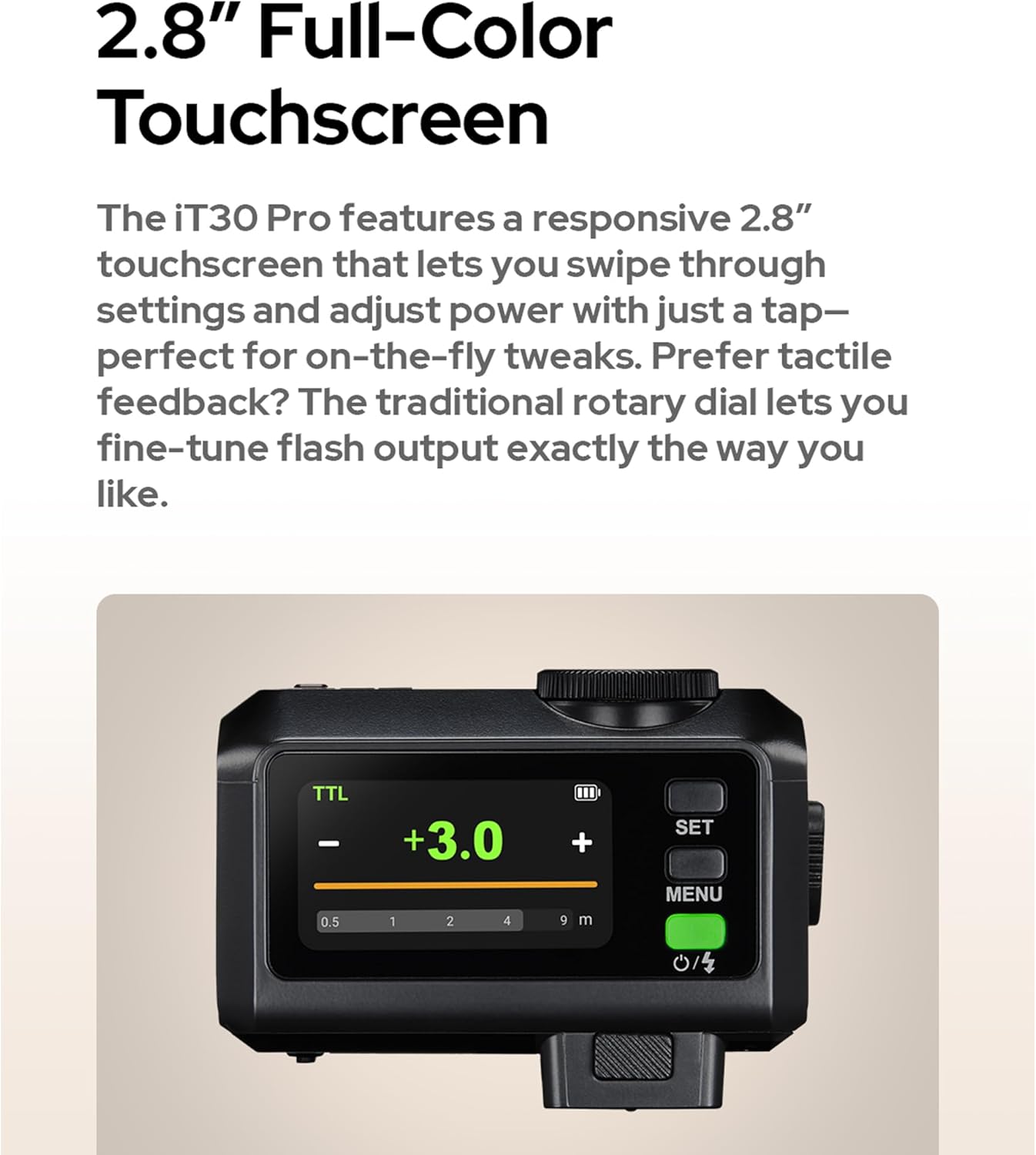
Image 6.2: Example of the IT30Pro in a wireless multi-light setup.
6.6 Using the Built-in Diffuser
For softer, more diffused light, slide out the built-in diffuser located on the front of the flash head.

Image 6.3: Built-in diffuser in action (N. Diffuser Off vs. W. Diffuser On).
7. Maintenance
7.1 Cleaning
- Use a soft, dry cloth to clean the flash unit.
- For stubborn dirt, use a cloth lightly dampened with water or a mild cleaning solution, then wipe dry immediately.
- Do not use strong detergents, solvents, or abrasive cleaners.
- Keep the hot shoe contacts clean and free of debris.
7.2 Storage
- Store the flash unit in a cool, dry place, away from direct sunlight and extreme temperatures.
- If storing for an extended period, ensure the battery is partially charged (around 50%) and recharge it every few months to maintain battery health.
- Use the provided protective pouch to prevent scratches and dust accumulation.
8. Troubleshooting
If you encounter issues with your GODOX IT30Pro, refer to the following common problems and solutions:
| Problem | Possible Cause | Solution |
|---|---|---|
| Flash does not fire. |
|
|
| Flash output is too dark/bright. |
|
|
| Wireless trigger not working. |
|
|
| Touchscreen unresponsive. |
|
|
9. Specifications
| Feature | Detail |
|---|---|
| Brand | GODOX |
| Model Number | IT30Pro-N |
| Compatible Mountings | For Nikon camera (Note: May not fit in a camera cage due to hot shoe obstruction) |
| Flash Sync Speed | 1/8000s (High-Speed Sync) |
| Camera Flash Type | Hotshoe |
| Item Weight | 6.7 ounces (approx. 190g) |
| Package Dimensions | 3.5 x 3.03 x 2.76 inches |
| Batteries | Internal rechargeable lithium battery (USB-C charged) |
| Battery Life (Estimated) | Up to 560 full-power flashes per charge; estimated overall lifespan 5 years. |
| Date First Available | May 22, 2025 |
10. Warranty and Support
For warranty information, technical support, or service inquiries, please visit the official GODOX website or contact your authorized GODOX dealer.
GODOX Official Website: www.godox.com
Please retain your proof of purchase for warranty claims.
Ask a question about this manual
Ask about setup, troubleshooting, compatibility, parts, safety, or missing instructions. Manuals+ will review the question and use this page’s manual context to help answer it.