
Introduction
This manual provides detailed instructions for the MEGATEK Portable CD Player, Model CP28BR. Please read this manual thoroughly before using the device to ensure proper operation and to maximize your listening experience. Keep this manual for future reference.
Safety Information
To ensure safe operation and prevent damage, please observe the following precautions:
- Do not expose the unit to rain or moisture.
- Do not disassemble the unit. Refer all servicing to qualified personnel.
- Avoid placing the unit near heat sources or in direct sunlight.
- Use only the provided power adapter.
- Keep out of reach of children.
- Do not insert foreign objects into the CD compartment or any ports.
Package Contents
Verify that all items are included in your package:
- Desktop CD Player
- USB-C Power Cable (6.5 ft)
- 5V/2A USB Power Adapter (100–240V AC, 50/60Hz)
- Full-Function Remote Control (2 AAA batteries not included)
- User Manual

Image: Contents of the MEGATEK Portable CD Player CP28BR package, including the player, remote, power cable, adapter, and user manual.
Product Overview
Familiarize yourself with the components and controls of your MEGATEK CD Player.

Image: The MEGATEK CP28BR CD player showing its compact desktop design, front display, CD lid, and various ports and controls on the side and top. A remote control is also pictured.
Front Panel
- LED Display: Shows current mode, track number, time, and FM frequency.
- CD Lid: Opens to insert or remove CDs.
Side Panel
- Headphone/Line Out/AUX-IN Jack: Connect headphones for private listening or external audio devices.
- USB Port: For USB flash drive playback.
- USB-C DC 5V Input: Power connection port.
- Power Switch: Turns the unit on or off.
Top Controls
- MODE Button: Switches between CD, Bluetooth RX, Bluetooth TX, FM Radio, and USB modes.
- Skip Buttons (Previous/Next): Navigates tracks or FM stations.
- Volume Buttons (+/-): Adjusts playback volume.
- Play/Pause Button: Starts or pauses playback.
Setup
- Power Connection:
Connect the provided USB-C power cable to the "USB-C DC 5V Input" port on the side of the CD player. Plug the other end of the cable into the 5V/2A USB power adapter, then plug the adapter into a standard wall outlet.

Image: The MEGATEK CP28BR CD player connected to its USB-C power adapter and cable.
- Power On:
Slide the Power switch on the side of the unit to the "ON" position. The LED display will light up.
Operating Instructions
1. CD Playback
- Insert CD: Gently open the CD lid and place a CD (Audio CD, CD-R, CD-RW, CD-G, MP3 CD, audiobook CD) onto the spindle with the label side facing up. Close the lid securely.
- Select CD Mode: Press the MODE button until "CD" appears on the display. The player will begin reading the disc.
- Playback Controls:
- Press Play/Pause to start or pause playback.
- Press Skip Forward or Skip Backward to change tracks.
- Press and hold Skip Forward or Skip Backward for fast forward/rewind.
- Adjust volume using the Volume +/- buttons.
- Playback Options:
- Shuffle: Randomly plays tracks.
- Repeat: Repeats current track or all tracks.
- Resume Playback: Continues from where it left off (if supported by the disc).

Image: The MEGATEK CP28BR CD player with a CD inserted, displaying playback information. Various CD types are shown below the player.
Video: An unboxing and introduction to the MEGATEK CP28BR Desktop CD Player, demonstrating its features and design.
2. Bluetooth Receiver (RX) Mode
Use this mode to stream audio from your smartphone, tablet, or other Bluetooth-enabled device to the CD player's speakers.
- Select BT-RX Mode: Press the MODE button until "BT-RX" appears on the display. The player will enter pairing mode, indicated by a flashing Bluetooth icon.
- Pair Device: On your external device (smartphone, tablet), enable Bluetooth and search for "MEGATEK CP28BR". Select it to pair.
- Start Playback: Once paired, the Bluetooth icon will stop flashing. You can now play audio from your device, and it will output through the CD player's speakers.
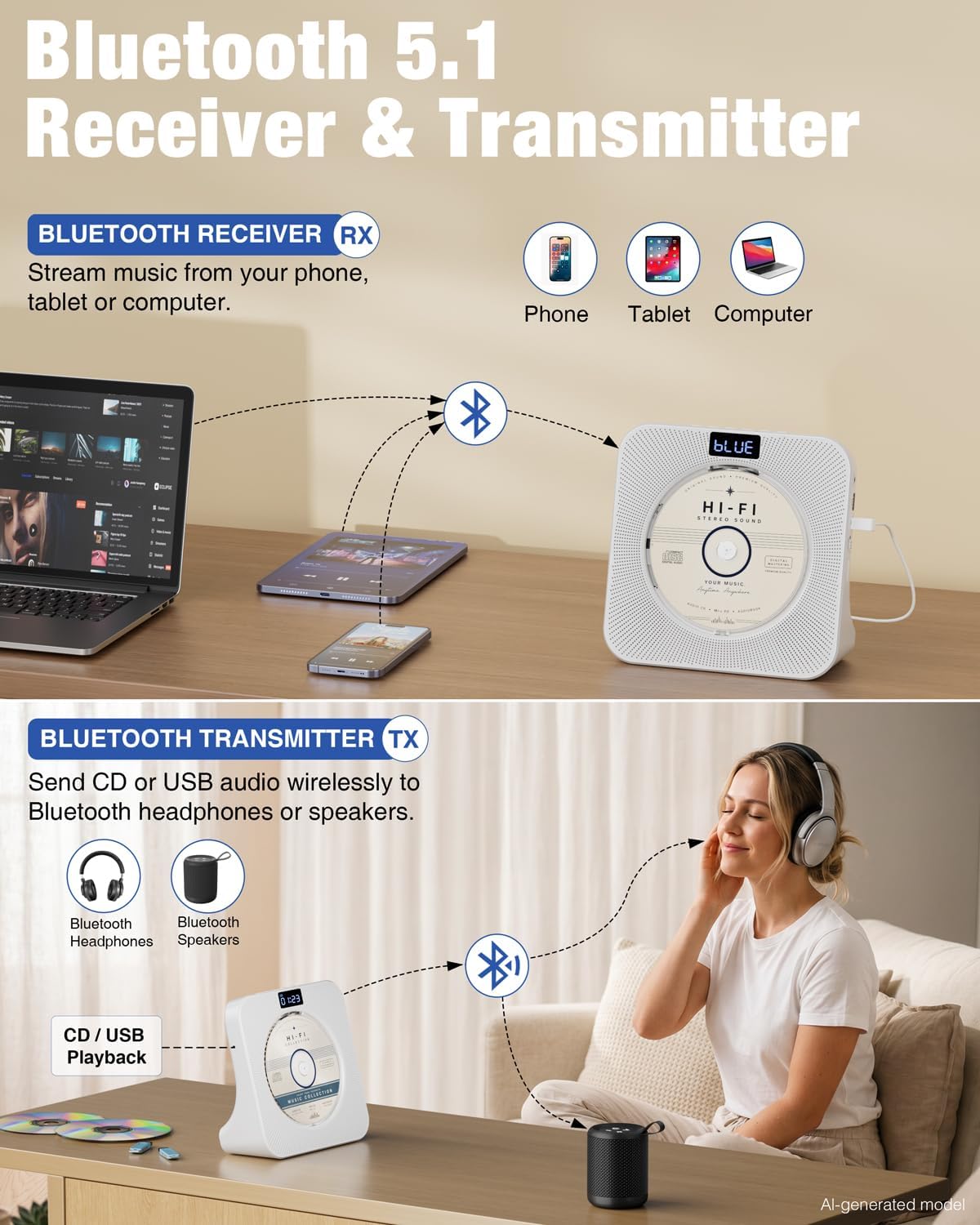
Image: Diagram illustrating the Bluetooth Receiver (RX) and Transmitter (TX) functions of the MEGATEK CP28BR. The RX mode shows streaming from a phone, tablet, or computer to the player.
3. Bluetooth Transmitter (TX) Mode
Use this mode to transmit audio from the CD player (CD or USB playback) to Bluetooth headphones or speakers.
- Select BT-TX Mode: Press the MODE button until "BT-TX" appears on the display. The player will enter pairing mode.
- Prepare Receiving Device: Put your Bluetooth headphones or speaker into pairing mode.
- Pair Devices: The CD player will automatically search for and connect to nearby Bluetooth audio devices in pairing mode. Once connected, audio from the CD player will transmit to your headphones/speaker.
Video: A demonstration on how to use the Bluetooth Transmitter (BT-TX) function on the Megatek CP28BR, showing pairing with external Bluetooth devices.
4. FM Radio
- Select FM Mode: Press the MODE button until "FM" appears on the display, showing the current frequency.
- Auto Scan: Press and hold the Play/Pause button to automatically scan and save available FM stations.
- Tune Stations: Use the Skip Forward or Skip Backward buttons to navigate through saved stations.

Image: The MEGATEK CP28BR CD player displaying FM radio frequency and showing a USB flash drive inserted for playback.
5. USB Playback
Play MP3, WMA, and WAV audio files from a USB flash drive (up to 128GB, FAT32 format).
- Insert USB Drive: Insert your USB flash drive into the USB port on the side of the player.
- Select USB Mode: Press the MODE button until "USB" appears on the display. The player will automatically detect and begin playing audio files.
- Playback Controls: Use the Play/Pause and Skip buttons to control playback, similar to CD mode.
6. AUX Input/Output
The 3.5mm jack functions as both an AUX input and a line output.
- AUX Input: Connect an external audio source (e.g., smartphone, MP3 player) using a 3.5mm audio cable. Select "AUX" mode using the MODE button. Audio from the external device will play through the CD player's speakers.
- Line Output: Connect the CD player to external powered speakers or a home audio system using a 3.5mm audio cable for enhanced sound.

Image: The MEGATEK CP28BR CD player with a smartphone connected via the AUX input jack, demonstrating external audio playback.

Image: The MEGATEK CP28BR CD player connected to an external powered speaker system via its Line Out jack.
7. Headphone Jack
For private listening, plug 3.5mm headphones into the Headphone/Line Out/AUX-IN jack.

Image: A person listening to the MEGATEK CP28BR CD player with headphones connected to the unit.
8. Remote Control
The included remote control provides full functionality for convenient operation from a distance. Insert 2 AAA batteries (not included) into the remote before use.

Image: A hand holding the remote control for the MEGATEK CP28BR CD player, with the player visible in the background.
Key remote functions include:
- POWER: Turns the unit on/off.
- MODE: Selects playback mode (CD, BT-RX, BT-TX, FM, USB, AUX).
- VOL +/-: Adjusts volume.
- SKIP/SEARCH: Navigates tracks/stations or fast forward/rewind.
- PLAY/PAUSE: Starts/pauses playback.
- STOP: Stops playback.
- REPEAT: Cycles through repeat options (one, all, folder).
- SHUFFLE: Toggles random playback.
- SLEEP: Sets sleep timer.
- Numeric Buttons (0-9): Direct track selection (CD/USB).
Maintenance
- Cleaning: Use a soft, dry cloth to clean the exterior of the unit. Do not use abrasive cleaners or solvents.
- CD Care: Handle CDs by their edges. Clean dirty CDs with a soft, lint-free cloth, wiping from the center outwards.
- Storage: When not in use for extended periods, disconnect the power adapter and store the unit in a cool, dry place.
Troubleshooting
| Problem | Possible Cause | Solution |
|---|---|---|
| No power | Power adapter not connected; Power switch off. | Ensure power adapter is securely plugged in. Turn the Power switch to "ON". |
| CD not playing / "NO DISC" error | CD inserted incorrectly; CD is dirty or scratched; Unsupported disc format. | Reinsert CD with label side up. Clean the CD. Try a different, supported CD. |
| No sound | Volume too low; Mute activated; Incorrect mode selected; Headphones connected. | Increase volume. Check if mute is active. Ensure correct mode (CD, BT-RX, FM, USB, AUX) is selected. Disconnect headphones if using speakers. |
| Bluetooth pairing issues (RX/TX) | Device not in pairing mode; Too far from player; Interference; Already paired to another device. | Ensure both devices are in pairing mode. Keep devices within 10 meters. Turn off Bluetooth on other nearby devices. If previously paired, try unpairing and re-pairing. |
| FM radio static/poor reception | Weak signal; Antenna not extended. | Adjust the position of the unit. Extend the FM antenna fully. Try auto-scanning again. |
| USB not playing | Unsupported file format; USB drive not formatted to FAT32; USB drive capacity too large. | Ensure files are MP3, WMA, or WAV. Format USB drive to FAT32. Use a USB drive up to 128GB. |
| Remote control not working | Batteries dead or inserted incorrectly; Obstruction between remote and player. | Replace AAA batteries, ensuring correct polarity. Remove any obstructions. Point remote directly at the player. |
Specifications
| Feature | Detail |
|---|---|
| Brand | MEGATEK |
| Model Number | CP28BR |
| Color | White |
| Connectivity Technology | Auxiliary, Bluetooth, USB |
| Special Features | Bluetooth RX/TX, Front LED Display, HiFi Stereo Speakers, Sleep Timer, USB-C Powered |
| Supported Audio Formats | Audio CD, MP3, WAV, WMA |
| Compatible Devices | Headphone, Laptop, Smartphone, Speaker, Tablet |
| Item Dimensions (L x W x H) | 7.44"L x 2.72"W x 7.44"H |
| Item Weight | 1.4 pounds |
| Power Input | USB-C DC 5V |
Warranty Information
The MEGATEK Portable CD Player CP28BR comes with a 12 Months Limited Warranty, covering both labor and parts. Please retain your proof of purchase for warranty claims.
Customer Support
For further assistance, technical support, or warranty inquiries, please visit the official MEGATEK store or contact customer service through the retailer where you purchased the product.
MEGATEK Store: https://www.amazon.com/stores/MEGATEK/page/511C7A42-DAC5-4E31-9772-A58DD19507CB


