
1. Introduction
This manual provides essential information for setting up, operating, and maintaining your HUAWEI Watch FIT4 Pro Smart Watch. Please read this manual thoroughly to ensure proper usage and to maximize your device's capabilities.
2. Safety Information
To prevent injury to yourself or others, and to avoid damage to your device, read the following safety information before using the product:
- Do not attempt to disassemble, repair, or modify the device.
- Keep the device away from extreme temperatures, direct sunlight, and moisture.
- Avoid exposing the device to strong impacts or sharp objects.
- Consult a medical professional before starting any new exercise regimen or if you have pre-existing health conditions.
- The device is not a medical instrument and should not be used for medical diagnosis or treatment.
3. Getting Started (Setup)
3.1 Charging Your Watch
Before first use, fully charge your HUAWEI Watch FIT4 Pro. The watch features a 2nd-gen HUAWEI WATCH Wireless SuperCharger, providing up to 10 days of battery life on a full charge, and a full day of power from just 10 minutes of charging.

The watch charges via a magnetic charging cable. A 10-minute charge provides up to a full day of power.

The watch offers up to 10 days of maximum battery life, with typical usage providing 7 days. A full charge takes approximately 60 minutes.
3.2 Powering On/Off
- To Power On: Press and hold the side button until the HUAWEI logo appears.
- To Power Off: Press and hold the side button, then select 'Power Off' from the options.
3.3 Pairing with Your Smartphone
The HUAWEI Watch FIT4 Pro is compatible with both iOS and Android devices. To pair your watch:
- Download the Huawei Health app from your smartphone's app store (App Store for iOS, Google Play Store or Huawei AppGallery for Android).
- Open the Huawei Health app and follow the on-screen instructions to create an account or log in.
- Navigate to the 'Devices' section in the app and select 'Add device'.
- Select your HUAWEI Watch FIT4 Pro from the list of available devices.
- Confirm the pairing request on both your smartphone and the watch.
The HUAWEI Watch FIT4 Pro is compatible with both iOS and Android devices. Download the Huawei Health app to pair your watch and manage its features.
4. Operating Your Watch
4.1 Display and Navigation
Your HUAWEI Watch FIT4 Pro features a 1.82-inch Sapphire Screen and a Titanium Alloy Bezel, offering both durability and a clear visual experience. Navigation is intuitive, combining touchscreen gestures with physical buttons.

The HUAWEI Watch FIT4 Pro features a vibrant 1.82-inch display for clear visibility and easy interaction.

Constructed with Sapphire Glass and a Titanium Alloy Bezel, the watch offers enhanced durability and scratch resistance.
- Touchscreen: Swipe up, down, left, or right to navigate through menus and notifications. Tap to select items.
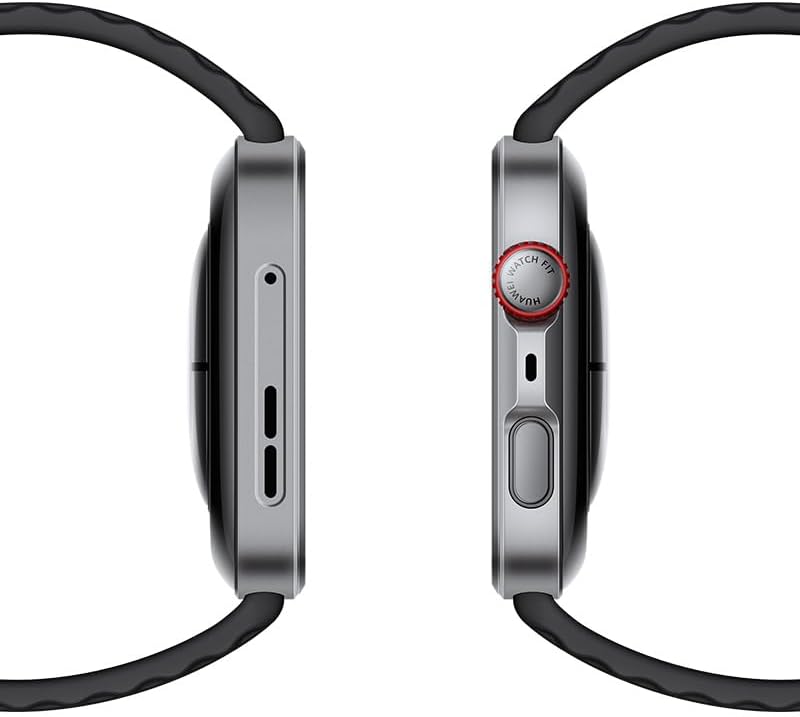
- Side Button (Crown): Press to access the app list or return to the home screen. Rotate to scroll through lists or adjust settings.
- Function Button: Customizable for quick access to your favorite features or workouts.
4.2 Workout Modes
The watch supports over 100 workout modes, providing comprehensive data tracking and analysis to help you achieve your fitness goals. Specialized modes include trail running, 40-meter freediving, and golf.

Access over 100 workout modes, including specialized tracking for activities like trail running, 40m freediving, and golf, with detailed performance metrics.
To start a workout:
- Press the side button to open the app list.
- Tap 'Workout' and select your desired activity.
- Follow the on-screen prompts to begin tracking.
4.3 Health Monitoring
The HUAWEI Watch FIT4 Pro offers advanced health monitoring features, including heart rate tracking, SpO2 measurement, sleep analysis, and stress level monitoring. These features utilize a cutting-edge optical architecture and ultra-precision glass technology for enhanced accuracy.

Monitor key health metrics such as heart rate, blood oxygen saturation (SpO2), sleep patterns, and stress levels with advanced sensors.
- Heart Rate: Continuous monitoring and alerts for abnormal readings.
- SpO2: On-demand or continuous blood oxygen saturation measurement.
- Sleep Tracking: Detailed analysis of sleep stages and quality.
- Stress Monitoring: Tracks stress levels throughout the day and offers breathing exercises.
- Cycle Tracking: Helps women track their menstrual cycles.
4.4 Notifications and Smart Features
Stay connected with smart notifications and convenient features:
- Call and Message Notifications: Receive alerts for incoming calls and messages directly on your wrist.
- Quick Replies: Send pre-set quick replies to messages (Android only).
- Bluetooth Calling: Make and receive calls directly from your watch when connected to your phone.
- Remote Shutter: Control your phone's camera remotely.
- Voice Notepad: Record voice memos on the go.
5. Maintenance and Care
Proper care ensures the longevity and optimal performance of your HUAWEI Watch FIT4 Pro.
- Cleaning: Regularly clean the watch body and strap with a soft, damp cloth. Avoid harsh chemicals or abrasive materials.
- Water Resistance: The watch is designed for water resistance up to 40 meters for freediving. However, avoid exposing it to hot water, steam, or high-velocity water jets. Rinse with fresh water after use in saltwater.
- Strap Care: If your strap is leather, avoid prolonged exposure to water. Silicone or fabric straps can be cleaned with mild soap and water.
- Storage: Store the watch in a cool, dry place when not in use.
6. Troubleshooting
If you encounter issues with your HUAWEI Watch FIT4 Pro, refer to the following common solutions:
- Watch Not Powering On: Ensure the watch is sufficiently charged. Connect it to the charger for at least 10 minutes.
- Connectivity Issues: Ensure Bluetooth is enabled on your smartphone and the watch is within range. Restart both devices and try pairing again via the Huawei Health app.
- Unresponsive Screen/Buttons: Try restarting the watch by pressing and holding the side button for approximately 10-15 seconds until it reboots.
- Inaccurate Health Data: Ensure the watch is worn snugly on your wrist, not too tight or too loose. Clean the sensors on the back of the watch.
- Regional Feature Limitations: Some advanced features like ECG, specific payment functions, or golf course maps may be subject to regional availability and regulatory restrictions. Check the Huawei support website for details specific to your region.
- Battery Draining Quickly: Reduce screen brightness, disable always-on display, limit background app refresh, and ensure no apps are running excessively in the background.
7. Specifications
| Feature | Specification |
|---|---|
| Model Name | WATCH FIT 4 Pro |
| Model Number | Seiya-B29F |
| Display Size | 1.82 Inches |
| Display Type | AMOLED |
| Screen Resolution | 390 x 390 |
| Operating System | HarmonyOS |
| Memory Storage Capacity | 32 GB |
| Battery Capacity | 400 Milliamp Hours |
| Battery Life | Up to 10 days |
| Charging Time | 10 minutes for a full day of power |
| Connectivity | Bluetooth |
| Special Features | Activity Tracker, Always On Display, Cycle Tracking, GPS, Notifications |
| GPS | Built-in GPS |
| Dimensions | 13 x 11.9 x 6.7 cm; 30 g (Parcel Dimensions) |
8. Warranty and Support
Your HUAWEI Watch FIT4 Pro is covered by a manufacturer's warranty. For detailed warranty information, terms, and conditions, please refer to the warranty card included with your product or visit the official HUAWEI support website.
For technical assistance, troubleshooting, or further inquiries, please contact HUAWEI customer support:
- Online Support: https://consumer.huawei.com/ca/support/
- Refer to your product packaging for local contact numbers.


