
Introduction
This manual provides comprehensive instructions for the installation, operation, and maintenance of your Fantini Cosmi CH180WIFIRL IntelliComfort Wall-Mounted Multi-zone Chronothermostat. Please read this manual carefully before using the device to ensure proper functionality and safety.
Safety Information
- Electrical Safety: Installation should only be performed by qualified personnel in accordance with local electrical codes. Ensure power is disconnected before installation or maintenance.
- Placement: Install the thermostat away from direct sunlight, drafts, and heat sources to ensure accurate temperature readings.
- Cleaning: Use a soft, dry cloth for cleaning. Do not use abrasive cleaners or solvents.
- Disposal: Dispose of the device and its components according to local environmental regulations.
Product Overview
The Fantini Cosmi CH180WIFIRL is an advanced wall-mounted chronothermostat designed for multi-zone heating and cooling systems. It features WiFi and LoRa radio connectivity for remote control and integration into smart home systems. The device provides a clear temperature display and intuitive controls for programming and adjustment.

Image 1: Front view of the Fantini Cosmi CH180WIFIRL chronothermostat, highlighting its digital display and connectivity features.
Key Features:
- Wall-mounted design
- Multi-zone control capability
- WiFi and LoRa radio connectivity
- 230V power supply
- Clear digital temperature display
- Programmable settings for optimal comfort and energy saving
Dimensions
Refer to the diagram below for the physical dimensions of the chronothermostat.
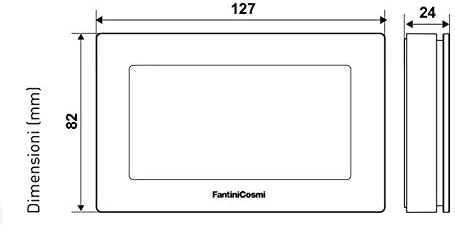
Image 2: Dimensional drawing of the chronothermostat, indicating its width, height, and depth for installation planning.
Setup and Installation
Installation should be carried out by a qualified electrician. Ensure the main power supply is turned off before beginning installation.
- Mounting: Choose a suitable wall location, away from direct heat sources, drafts, or direct sunlight. Mount the backplate securely to the wall.
- Wiring: Connect the 230V power supply wires to the designated terminals on the backplate. Connect the heating/cooling system wires as per your system's requirements and the wiring diagram provided in the full installation guide (not included in this manual).
- Attach Thermostat: Carefully attach the chronothermostat unit to the mounted backplate.
- Power On: Restore power to the system. The thermostat display should light up.
- Initial Setup: Follow the on-screen prompts to set the current date and time.
Operating Instructions
The chronothermostat offers various modes and settings to manage your home's climate efficiently.
Basic Operation:
- Temperature Display: The main screen displays the current room temperature.
- Setting Temperature: Use the up/down arrows on the device to manually adjust the desired temperature.
- Mode Selection: Press the 'MODE' button to cycle through available operating modes (e.g., Auto, Manual, Off).
Programming Schedules:
The device comes with pre-set weekly programs. You can customize these programs to fit your lifestyle.
- Access Program Menu: Press the 'PROG' button to enter the programming menu.
- Select Day: Use the navigation buttons to select the day of the week you wish to program (Day 1 typically corresponds to Monday).
- Set Hourly Temperatures: For each hour of the day, assign one of the three available temperature levels (T1, T2, T3) according to your preference.
- Save: Confirm your settings to save the custom program.
Connectivity: WiFi and LoRa
The CH180WIFIRL supports both WiFi and LoRa radio connectivity, allowing for advanced control and integration.
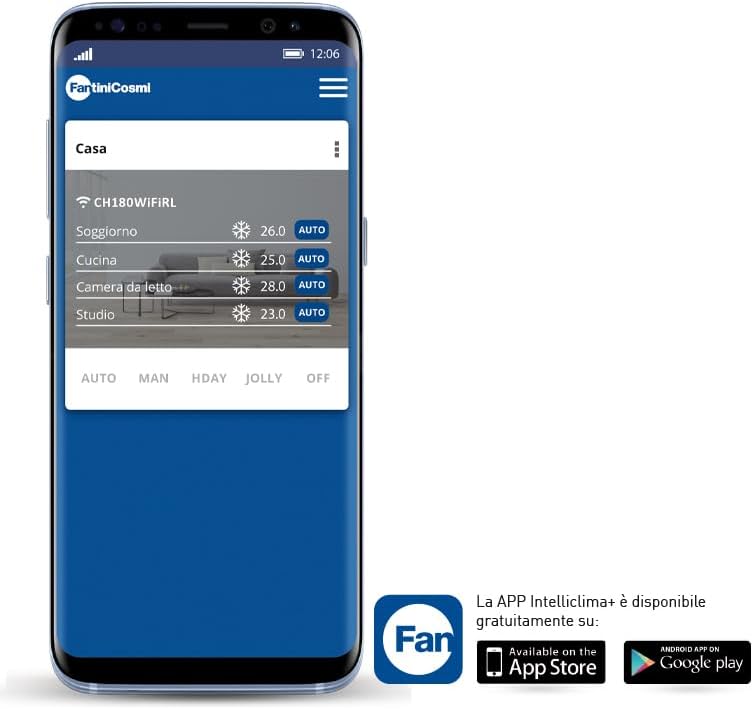
Image 3: The IntelliClima+ mobile application interface, showing multi-zone temperature management.
WiFi Connection:
- Refer to the dedicated Fantini Cosmi IntelliClima+ app manual for detailed instructions on connecting your thermostat to your home WiFi network.
- The app allows remote control, advanced programming, and monitoring of multiple zones.
LoRa Radio Connectivity:
- LoRa provides long-range, low-power communication for robust multi-zone setups.
- Consult your system integrator or the full technical manual for LoRa network configuration.

Image 4: Overview of the Fantini Cosmi smart heating ecosystem, including the chronothermostat, smart valve, and mobile app.
Maintenance
- Cleaning: Regularly wipe the display and casing with a soft, dry cloth. Avoid using liquids or sprays directly on the device.
- Firmware Updates: Ensure your device's firmware is up to date through the IntelliClima+ app for optimal performance and new features.
- Battery Replacement (if applicable): If your model uses backup batteries, replace them annually or when a low battery indicator appears.
Troubleshooting
| Problem | Possible Cause | Solution |
|---|---|---|
| Display is blank | No power supply or loose connection. | Check power supply to the thermostat. Ensure all wiring is secure. If battery-powered, replace batteries. |
| Incorrect temperature reading | Thermostat placed near heat source/draft, or sensor issue. | Relocate thermostat if possible. Ensure no obstructions. Contact support if issue persists. |
| Cannot connect to WiFi | Incorrect WiFi password, weak signal, or router issue. | Verify WiFi password. Move thermostat closer to router. Restart router. Follow app's connection guide. |
| Heating/Cooling not responding | Wiring issue, system fault, or incorrect mode. | Check thermostat mode. Verify wiring connections. Consult a qualified technician for system inspection. |
Specifications
| Brand | Fantini Cosmi |
| Model Name | Intellicomfort CH180WIFIRL |
| Color | White |
| Product Dimensions | 2.4 x 12.7 x 8.2 cm |
| Item Weight | 280 grams |
| Wattage | 5 watts |
| Voltage | 230 Volt |
| Material | Plastic |
| Special Features | Temperature display, Multi-zone, WiFi, LoRa |
Warranty and Support
For warranty information and technical support, please refer to the official Fantini Cosmi website or contact their customer service directly. Keep your purchase receipt as proof of purchase.


