
GarveeTech NPLD3-05C/X1E
Contents
GarveeTech 8000 BTU Portable Air Conditioner User Manual
Model: NPLD3-05C/X1E
1. Introduction
Thank you for choosing the GarveeTech 8000 BTU Portable Air Conditioner. This manual provides essential information for the safe and efficient operation, installation, and maintenance of your unit. Please read it thoroughly before use and retain it for future reference.
Important Safety Instructions
- Always connect the unit to a grounded power outlet with the correct voltage (110 Volts).
- Do not operate the unit with a damaged power cord or plug.
- Keep the air intake and exhaust vents clear of obstructions.
- Do not insert objects into the air vents.
- Ensure the unit is placed on a flat, stable surface.
- Unplug the unit before cleaning or performing any maintenance.
- This appliance is not intended for use by persons (including children) with reduced physical, sensory or mental capabilities, or lack of experience and knowledge, unless they have been given supervision or instruction concerning use of the appliance by a person responsible for their safety.
2. Product Overview
The GarveeTech 8000 BTU Portable Air Conditioner is designed to provide efficient cooling, dehumidification, and fan functions for rooms up to 350 sq ft. Its compact design and portability make it suitable for various living spaces.
Key Features:
- 8000 BTU Cooling Capacity: Effectively cools areas up to 350 sq ft.
- 3-in-1 Functionality: Offers Cooling, Dehumidifying, and Fan modes.
- Quiet Operation: Engineered with noise-reducing foam, operating at approximately 50-54 dB.
- Minimal Drainage: Features a built-in condenser and water pump to reduce frequent draining, though occasional draining may be needed in high-humidity environments.
- Adjustable Window Kit: Fits most windows from 16 to 47 inches for easy installation.
Unit Components:

Image: The GarveeTech portable air conditioner unit in white and grey, shown with its accompanying remote control. The unit features a front grille for air output and wheels for portability.

Image: An illustrative banner highlighting the portable air conditioner's features: 3-in-1 functionality, 8000 BTU cooling, sleep mode, dehumidification, timer, and low noise operation.
3. Setup and Installation
Follow these steps to properly set up your portable air conditioner for optimal performance.
Window Kit Installation:
- Connect Hose Connector: Attach one end of the exhaust hose to the hose connector.
- Connect Window Kit Adapter: Attach the other end of the exhaust hose to the window kit adapter.
- Attach Hose to A/C: Securely attach the hose connector to the exhaust air outlet on the back of the air conditioner unit.
- Adjust Window Kit: Extend the adjustable window panels to fit your window opening. Tighten the nuts to secure the panels in place.
- Install Window Partitions: Insert the window kit partitions into the window opening (suitable for horizontal or vertical slide windows).
- Insert Exhaust Hose: Insert the exhaust hose adapter into the opening in the window kit, ensuring a tight seal to prevent air leakage.

Image: A visual guide demonstrating the six steps for installing the exhaust hose and window kit, from connecting the hose to the unit and window panel.
Window Type Compatibility:
The adjustable window kit is designed to fit most standard horizontal or vertical sliding windows between 16 and 47 inches in width/height. Ensure the window type allows for proper sealing of the exhaust hose.

Image: An illustration depicting two window types. One shows a suitable vertical sliding window with the exhaust hose installed, while the other shows an unsuitable casement window.
4. Operation
Your GarveeTech portable air conditioner offers multiple modes and settings for personalized comfort.
Control Panel and Remote Control:
The unit can be operated using the touch panel on top of the unit or the included remote control. Both offer access to all functions.
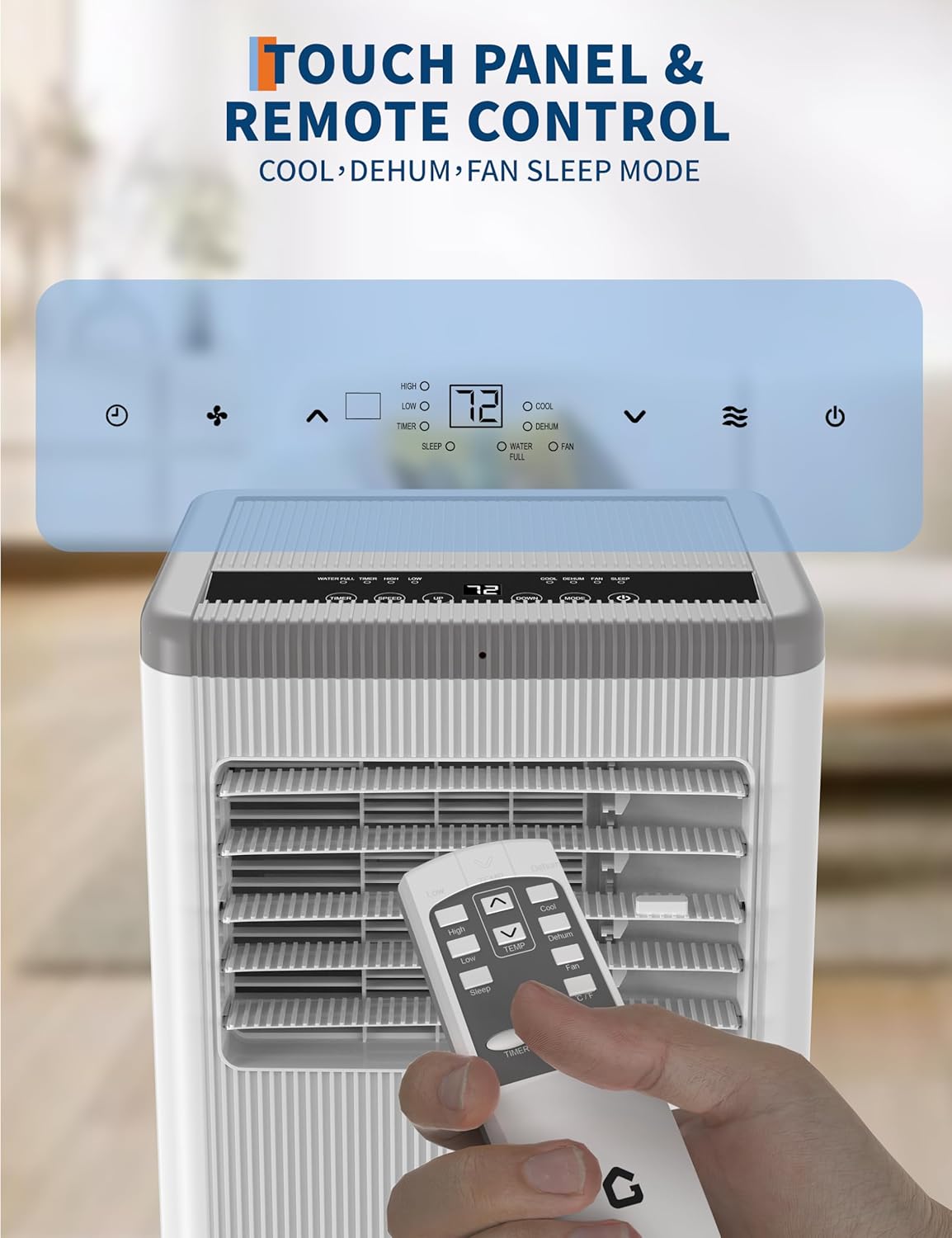
Image: A hand holding the remote control, pointing towards the unit's touch panel display, which shows temperature and mode settings.
Operating Modes:
- Cooling Mode: Provides powerful cooling. Adjust temperature between 65°F and 86°F (18°C and 30°C).
- Dehumidifying Mode (Dry): Reduces humidity in the room, removing up to 50 pints (1.2 liters/hour) of moisture per day.
- Fan Mode: Circulates air without cooling. Offers multiple fan speeds (e.g., High, Low).
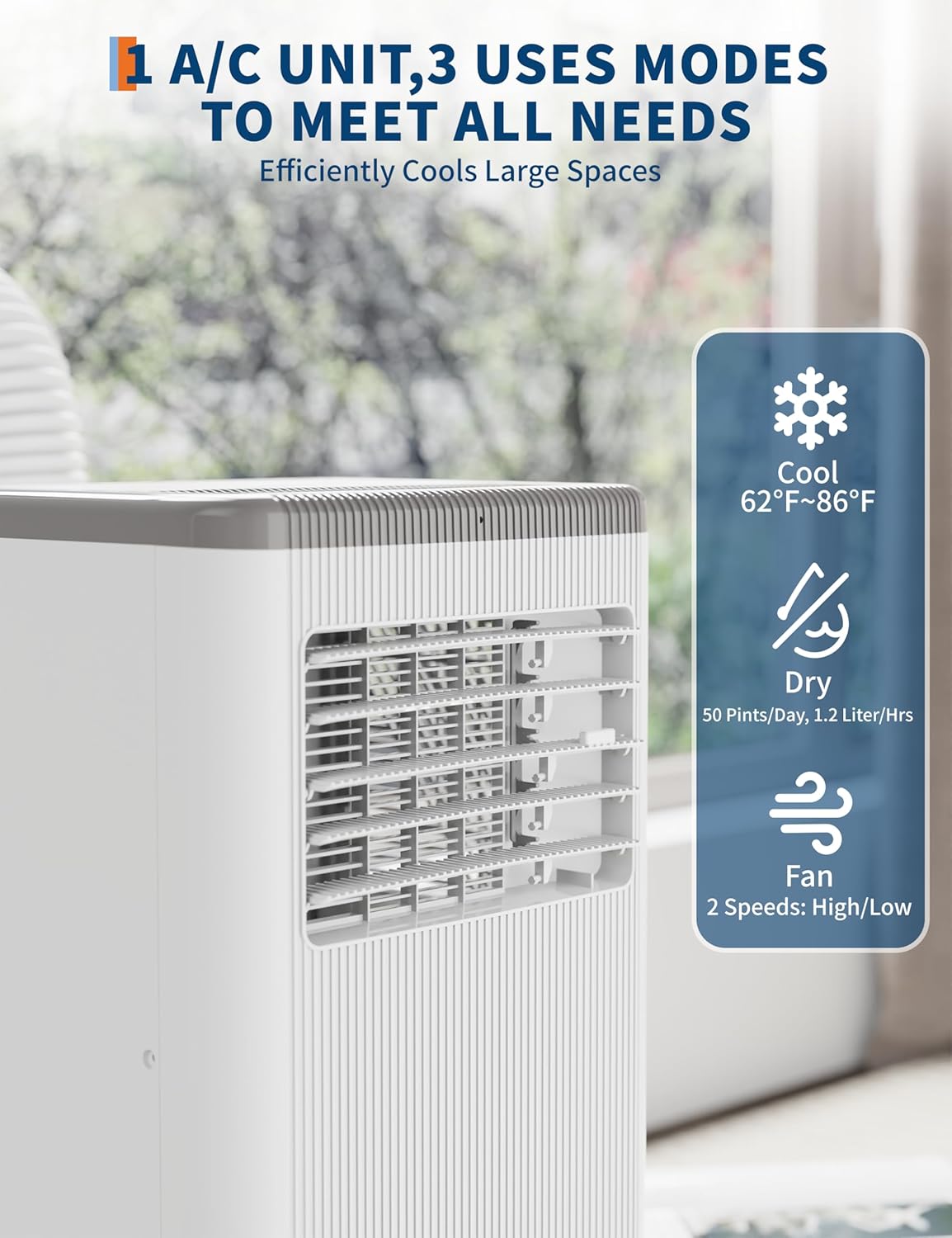
Image: A close-up of the air conditioner's grille with icons representing the three modes: snowflake for Cool (62°F-86°F), water drop for Dry (50 Pints/Day), and fan blades for Fan (2 Speeds: High/Low).
Additional Functions:
- Sleep Mode: Optimizes cooling and fan speed for quiet operation during sleep, gradually increasing the temperature slightly over time.
- Timer Function: Set the unit to turn on or off automatically after a specified period.

Image: A bedroom scene at night with a person sleeping, and the portable AC unit running quietly. An overlay graphic highlights 'Quiet Cooling & Sleep Mode' and '48dB' noise level.
5. Maintenance
Regular maintenance ensures the longevity and efficient operation of your air conditioner.
Cleaning the Air Filter:
The air filter should be cleaned regularly (every two weeks or more often depending on usage) to maintain air quality and cooling efficiency.
- Unplug the air conditioner from the power outlet.
- Locate and remove the air filter from the back or side of the unit.
- Wash the filter with warm, soapy water. Rinse thoroughly.
- Allow the filter to air dry completely before reinserting it into the unit. Do not use the unit without a dry filter.
Draining the Unit:
While the unit features minimal drainage due to its self-evaporation system, in high humidity conditions or when operating in Dehumidifying mode, the internal water tank may fill up. When this occurs, the unit will stop operating and display an error code (refer to troubleshooting section).
- Turn off and unplug the unit.
- Place a shallow pan or tray under the drainage port (usually located at the bottom rear of the unit).
- Remove the drain plug/cap.
- Allow all accumulated water to drain out.
- Replace the drain plug/cap securely.

Image: A cutaway diagram showing the internal mechanism of the air conditioner, illustrating how moisture evaporates, passes through the condenser, and how excess water is transferred, indicating a self-evaporation system.
Storage:
If storing the unit for an extended period:
- Drain all water from the unit completely.
- Clean the air filter.
- Run the unit in Fan mode for a few hours to dry the internal components.
- Unplug the power cord and wrap it neatly.
- Store the unit in a cool, dry place, preferably in its original packaging.
6. Troubleshooting
Before contacting customer support, please refer to the following common issues and solutions:
| Problem | Possible Cause | Solution |
|---|---|---|
| Unit does not turn on | No power; Power cord not plugged in; Circuit breaker tripped. | Check power connection; Reset circuit breaker. |
| Unit does not cool effectively | Air filter dirty; Room too large; Exhaust hose not properly installed; Doors/windows open. | Clean air filter; Ensure room size is within specifications; Check exhaust hose for leaks/proper seal; Close all doors and windows. |
| Unit is noisy | Unit not on a flat surface; Obstruction in fan. | Place on a flat, stable surface; Check for and remove any obstructions. |
| Water leakage | Drain plug loose; Unit tilted; Internal water tank full. | Ensure drain plug is secure; Place unit on a level surface; Drain the unit if tank is full. |
| Remote control not working | Batteries dead; Obstruction between remote and unit. | Replace batteries; Remove obstructions. |
7. Specifications
| Feature | Detail |
|---|---|
| Model Number | NPLD3-05C/X1E |
| Brand | GarveeTech |
| Cooling Power | 8000 British Thermal Units (BTU) |
| Coverage Area | Up to 250-350 sq ft |
| Product Dimensions | 13"D x 13"W x 35"H (33 x 33 x 89 cm) |
| Item Weight | 50 pounds (22.7 kg) |
| Voltage | 110 Volts |
| Noise Level | 50-54 Decibels |
| Seasonal Energy Efficiency Ratio (SEER) | 10 |
| Included Components | Air Conditioner, Remote Control, Window Kit, Exhaust Hose |
| Color | White+Grey |
| Batteries Required | No (for unit), Yes (for remote control, typically AAA) |

Image: A guide table titled 'How to Choose' showing ASHRAE BTU ratings (8K, 10K, 12K, 14K) and their corresponding minimum and maximum square footage coverage. An explanation notes that BTU capacity meets ASHRAE standards and factors like room occupancy, sunlight, and insulation affect requirements.
8. Warranty and Support
Warranty Information:
This GarveeTech Portable Air Conditioner comes with a 2-year warranty from the date of purchase. This warranty covers manufacturing defects and malfunctions under normal use. It does not cover damage caused by misuse, accident, unauthorized repair, or improper installation.
Customer Support:
For technical assistance, warranty claims, or any questions regarding your product, please contact GarveeTech customer support. Refer to your purchase documentation or the official GarveeTech website for the most current contact information.
When contacting support, please have your model number (NPLD3-05C/X1E) and proof of purchase readily available.
Documents and downloads
Ask a question about this manual
Ask about setup, troubleshooting, compatibility, parts, safety, or missing instructions. Manuals+ will review the question and use this page’s manual context to help answer it.