
1. Product Overview
The MOOER F15i is a 15W intelligent guitar amplifier designed for both guitarists and bassists. It features advanced modeling technology, a wide range of effects, and smart connectivity options for an enhanced practice and performance experience. This manual provides detailed instructions for its setup, operation, and maintenance.
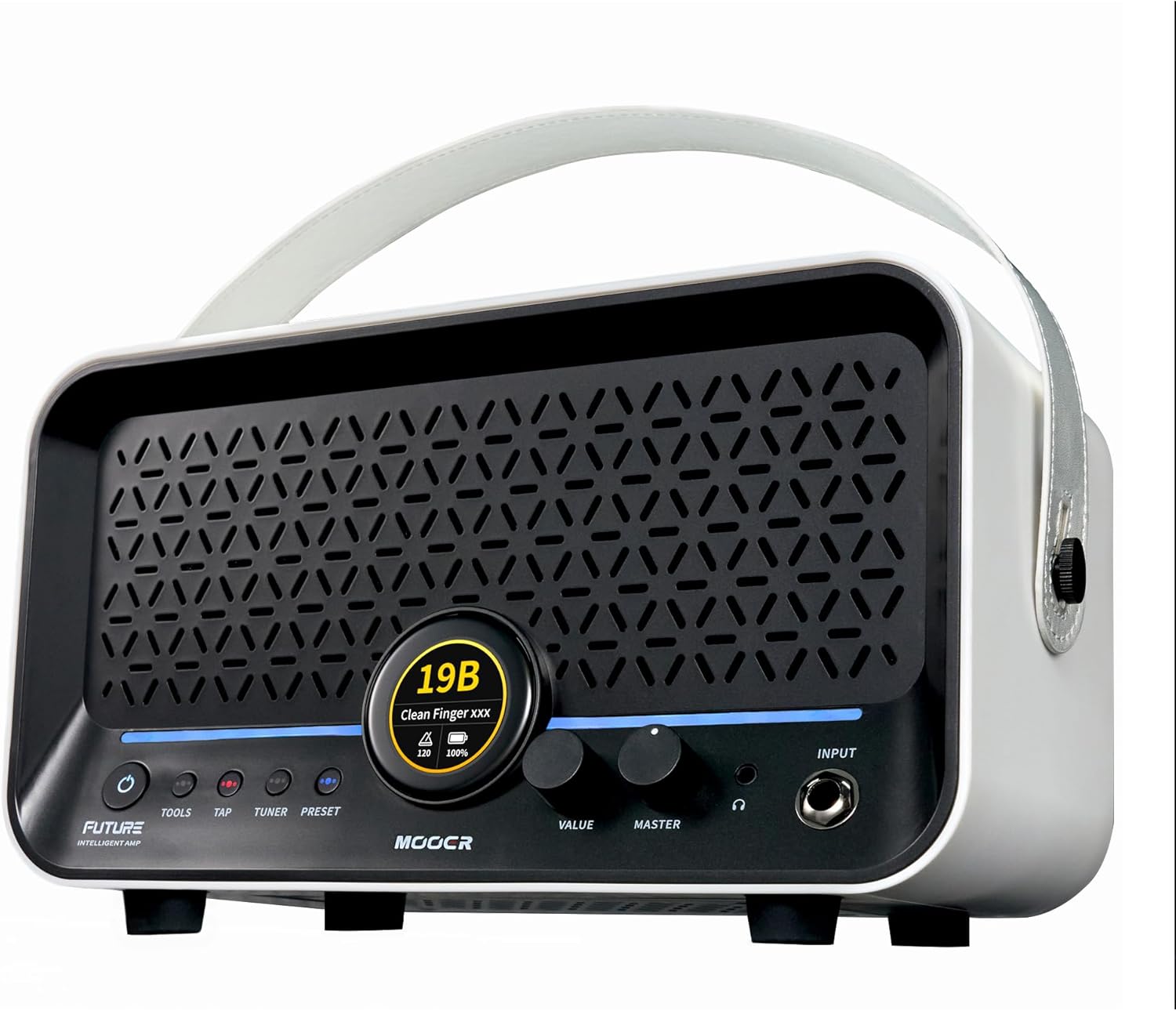
Image: Front view of the MOOER F15i Intelligent Guitar Amp, showcasing its compact design and central display screen.
Key Features:
- Touch Screen Interface: 1.3-inch touch screen for direct access to Bluetooth, wireless footswitch, drum machines, and tuner.
- Extensive Effects: 55 amplifier models and 69 effect types (delay, modulation, reverb, dynamic processing) powered by MOOER's MNRS nonlinear modeling technology.
- Preset Management: 80 preset saving slots for custom tone configurations.
- Integrated Tools: Drum machine with 60 grooves and 10 metronome variations, plus a 60-second synchronizable looper.
- Connectivity: Stereo output, headphone output, USB-C for recording, and Bluetooth for app control and audio streaming.
- Portable Power: Integrated lithium battery providing up to 6 hours of operation.
- Dynamic Spatial Enhancement (DPE): Bass diaphragm for optimized audio and enhanced spatial layering.
- iAMP Cloud Sharing: Platform for uploading and downloading tones.
2. Setup Guide
2.1 Unpacking and Initial Inspection
Carefully remove the F15i amplifier from its packaging. Inspect the unit for any signs of damage. Ensure all components are present.
2.2 Charging the Battery
The F15i features an integrated lithium battery. Before first use, it is recommended to fully charge the device. Connect the provided USB-C cable to the USB-C interface on the amplifier and to a compatible power adapter (not included) or a computer USB port.
2.3 Connecting Your Instrument
Connect your guitar or bass to the 6.35mm Instrument Input jack on the front panel of the amplifier.
2.4 Powering On/Off
Long press the POWER BUTTON (1) located on the front panel to turn the device on or off. The backlit button indicates power status.

Image: Detailed diagram of the MOOER F15i's front and rear panels, labeling all buttons, knobs, and input/output jacks for easy identification.
2.5 Connecting Headphones or External Audio
- For private practice, insert headphones into the 3.5mm Headphone Output (9). This will mute the device's internal speakers.
- For connecting to external sound reinforcement equipment or a mixing console, use the two 6.35mm Output (12) connectors on the rear panel.

Image: Diagram illustrating the rear panel connections of the MOOER F15i, showing how to connect to an interface/monitor, phone/laptop, and power input.
2.6 App Connection (Bluetooth)
The F15i can be controlled via a dedicated mobile application. Activate Bluetooth on your mobile device and select the F15i. Ensure you connect to the correct Bluetooth option, typically labeled 'F15i Audio', for proper app functionality and audio streaming.
3. Operating Instructions
3.1 Navigating the Touch Screen
The 1.3-inch touch screen (6) provides direct access to various functions. You can quickly select Bluetooth, presets, tuner, and drum machines. When streaming music via Bluetooth, the screen also allows for play/pause control.

Image: Close-up of the MOOER F15i's touch screen displaying various menu options and settings, including Bluetooth, presets, tuner, and drum machine controls.
3.2 Adjusting Volume
Rotate the MASTER KNOB (8) to adjust the overall output volume of the amplifier.
3.3 Using Presets and Effects
- Press the PRESET BUTTON (5) to enter the preset list or switch between the four presets within the same group.
- The F15i comes with 55 pre-installed amplifier models and 69 effect types (delay, modulation, reverb, dynamic processing). These are based on MOOER's MNRS nonlinear modeling technology.
- You can save up to 80 custom presets.
- Use the VALUE ENCODER (7) to switch between presets or adjust parameters within the drum machine.

Image: The MOOER F15i amplifier with an overlay highlighting its capabilities: 80 preset slots, 55 amp modeling options, and 69 effect types, suitable for guitarists and bassists.
3.4 Utilizing the Drum Machine and Looper
- The drum machine offers 60 different grooves and 10 variations of metronome.
- The 60-second looper can be synchronized with the drum machine for practice and composition.
- Press the TAP BUTTON (3) to set the tempo for the drum machine or looper. The button will flash at the current BPM.
3.5 Using the Tuner
Press the TUNER BUTTON (4) to enter or exit the built-in high-precision tuner software. This allows you to tune your instrument without external devices.
3.6 Smart APP Control
The MOOER iAmp app provides comprehensive control over effects, reusable effect modules, IR loading, and firmware updates. Connect the amplifier to your mobile device via Bluetooth to access these features.

Image: A MOOER F15i amplifier on a table with a smartphone displaying the MOOER iAmp app interface, demonstrating remote control over effects and settings.
3.7 USB-C Recording
The USB-C interface (13) can be used for OTG digital audio recording and playback from mobile smart devices. It also supports video and audio synchronization for recording performances.

Image: A person playing a guitar with the MOOER F15i amplifier connected via USB-C to a smartphone on a tripod, illustrating the recording and video synchronization feature.
3.8 Ambient Light Customization
The AMBIENT LIGHT (10) feature allows you to customize the color and behavior of the light strip. The light strip can react to parameter value changes, providing visual feedback.
4. Maintenance
To ensure the longevity and optimal performance of your MOOER F15i amplifier, follow these maintenance guidelines:
- Cleaning: Use a soft, dry cloth to clean the exterior of the amplifier. Avoid using abrasive cleaners or solvents, which can damage the finish.
- Storage: Store the amplifier in a cool, dry place away from direct sunlight, extreme temperatures, and high humidity.
- Battery Care: For extended periods of non-use, it is recommended to charge the battery to approximately 50% and store the unit. Avoid completely draining the battery for long durations.
- Handling: Handle the amplifier with care to prevent physical damage. Avoid dropping or subjecting it to strong impacts.
5. Troubleshooting
If you encounter issues with your MOOER F15i, refer to the following common troubleshooting tips:
- No Power: Ensure the battery is charged. Connect the USB-C cable and try powering on again. Verify the power button is pressed and held sufficiently.
- No Sound: Check that your instrument is properly connected to the input. Verify the Master Volume knob is turned up. If headphones are connected, ensure they are working and properly seated. If using external outputs, check connections and external equipment settings.
- App Connectivity Issues: When connecting via Bluetooth, ensure you select the 'F15i Audio' option on your mobile device for proper app functionality. If issues persist, try restarting both the amplifier and your mobile device.
- Drum Machine Volume Low: If the drum machine volume appears low relative to your guitar sound, try reducing the preset volume to balance the mix.
- Looper/Drum Machine Lag: In some instances, using the looper and drum machine simultaneously may introduce slight latency. Ensure your firmware is up to date via the iAmp app.
- Unexpected Behavior: If the unit behaves unexpectedly, try performing a factory reset (refer to the app or MOOER support for specific instructions) or contact customer support.
6. Specifications
| Feature | Specification |
|---|---|
| Model | F15i |
| Output Wattage | 15 Watts |
| Item Weight | 4.27 pounds |
| Package Dimensions | 10.67 x 7.17 x 5.47 inches |
| Batteries | 1 Lithium Ion battery (included) |
| Battery Life | Up to 6 hours |
| Compatible Devices | Guitar, Bass |
| Connector Types | 3.5mm Jack, 6.35mm Jack, USB-C |
| Material Type | Metal |
| Color (this variant) | White |
7. Warranty and Support
For warranty information, product registration, or technical support, please visit the official MOOER website or contact their customer service department. Keep your proof of purchase for warranty claims.
MOOER Official Website: Visit the MOOER Store on Amazon