
1. Product Overview
The WALI Floating TV Shelf (CS303B) and TV Top Shelf (TSH004) combination provides versatile storage solutions for your entertainment setup. The CS303B is a wall-mounted glass shelf system designed to hold media devices, while the TSH004 is a top-of-TV shelf for smaller accessories and organization.

Image 1.1: Overview of the WALI Floating TV Shelf (bottom) and TV Top Shelf (top).

Image 1.2: The WALI shelves installed, holding various media devices and accessories.
2. Safety Information
Please read all instructions carefully before installation and use. Failure to follow these instructions may result in property damage, serious injury, or death.
- Ensure the wall structure can support the combined weight of the shelf and all intended devices.
- Do not exceed the maximum weight capacity for each shelf.
- Use appropriate mounting hardware for your wall type (wood stud, concrete, brick).
- Keep children and pets away during installation.
- Periodically check all connections and hardware for tightness.
- Do not place heavy objects on the very edge of the shelves.
3. Parts List
3.1. CS303B Floating TV Shelf Components

Image 3.1: All components included for the CS303B Floating TV Shelf.
| Component | Quantity | Description |
|---|---|---|
| Glass Shelf | 3 | Tempered glass shelves for devices. |
| Wall Plate | 2 | Main mounting brackets for the wall. |
| Glass Holder | 3 | Brackets that support the glass shelves. |
| Connect Piece | 3 | Connects glass holders to wall plates. |
| Plastic Cover | 6 | Covers for screws/bolts. |
| Plastic Bush | 3 | Used with glass shelves. |
| M5X6 Bolt | 1 | Small bolt. |
| M5X12 Bolt | 9 | Medium bolts. |
| Decorative Cover | 4 | Covers for aesthetic finish. |
| ST5.5x50 Screw | 6 | Screws for wall mounting. |
| 3mm Allen Key | 1 | Tool for assembly. |
| Concrete Anchor | 6 | Anchors for concrete/brick walls. |
3.2. TSH004 TV Top Shelf Components

Image 3.2: The TSH004 TV Top Shelf components, showing the two shelf sections and storage boxes.
- TV Top Shelf Sections: 2 units (each 17.33 inches long)
- Storage Boxes: 2 units
- Mounting Screws (for connecting sections): Quantity as needed
4. Setup and Installation
4.1. CS303B Floating TV Shelf Installation
Tools Required: Pencil, Level, Drill, Phillips Head Screwdriver, Hammer (for concrete anchors).
- Determine Mounting Location: Choose a suitable wall location, ensuring it is structurally sound and free of electrical wires or plumbing. Mark the desired height for the top wall plate.
- Mount Wall Plates: Hold one wall plate against the wall at the marked height. Use a level to ensure it is straight. Mark the drill holes. Drill pilot holes. If mounting into wood studs, use the ST5.5x50 screws directly. If mounting into concrete or brick, insert concrete anchors into the drilled holes before screwing. Secure the first wall plate. Repeat for the second wall plate, ensuring it is level with the first and at the desired horizontal distance.
- Assemble Glass Holders: Attach the connect pieces to the glass holders using the M5X12 bolts.
- Attach Glass Holders to Wall Plates: Slide the assembled glass holders onto the wall plates. The height of each shelf can be adjusted by positioning the glass holders at different points along the wall plate's vertical track. Secure them with the M5X12 bolts using the 3mm Allen key.
- Install Glass Shelves: Place the plastic bushes into the holes on the glass shelves. Carefully slide the glass shelves onto the glass holders. Ensure they are seated securely.
- Apply Decorative Covers: Snap the decorative covers over the exposed screws and mounting points for a clean finish.

Image 4.1: Dimensions of the CS303B Floating TV Shelf, showing shelf size and overall height.
4.2. TSH004 TV Top Shelf Installation
The TSH004 TV Top Shelf is designed for easy, tool-free installation on top of most flat-panel TVs or monitors. It is not suitable for curved panel displays.
- Assemble Shelf Sections (if applicable): The TSH004 comes as two 17.33-inch brackets. If a longer shelf is desired (up to 34.8 inches), connect the two sections using the provided screws.
- Position on TV: Place the shelf on top of your TV or monitor. The adjustable legs/brackets should rest against the back of the TV, providing stability.
- Adjust for Stability: Gently push the shelf back until the front edge is stable on the top of the TV and the rear supports are firmly against the back of the TV. The anti-slip pads on the shelf's feet help secure it.
- Add Storage Boxes: Insert the two storage boxes into the designated slots on the shelf for organizing small items.

Image 4.2: Illustration of the screw connection mounting for the TSH004 TV Top Shelf, showing how the two sections can be joined.
Image 4.3: Dimensions of the TSH004 TV Top Shelf, showing length and height measurements.
5. Operating Instructions
5.1. Using the CS303B Floating TV Shelf
Once installed, the CS303B shelf provides a stable platform for your media components. Place devices such as game consoles, media players, or soundbars on the tempered glass shelves. Ensure even weight distribution and do not exceed the maximum weight capacity per shelf.
5.2. Using the TSH004 TV Top Shelf
The TSH004 is ideal for organizing smaller items on top of your TV. Use it for remote controls, media boxes, small speakers, or decorative items. The integrated storage boxes are perfect for pens, scissors, or other desk accessories. The ventilated design helps prevent heat buildup from devices placed on it.
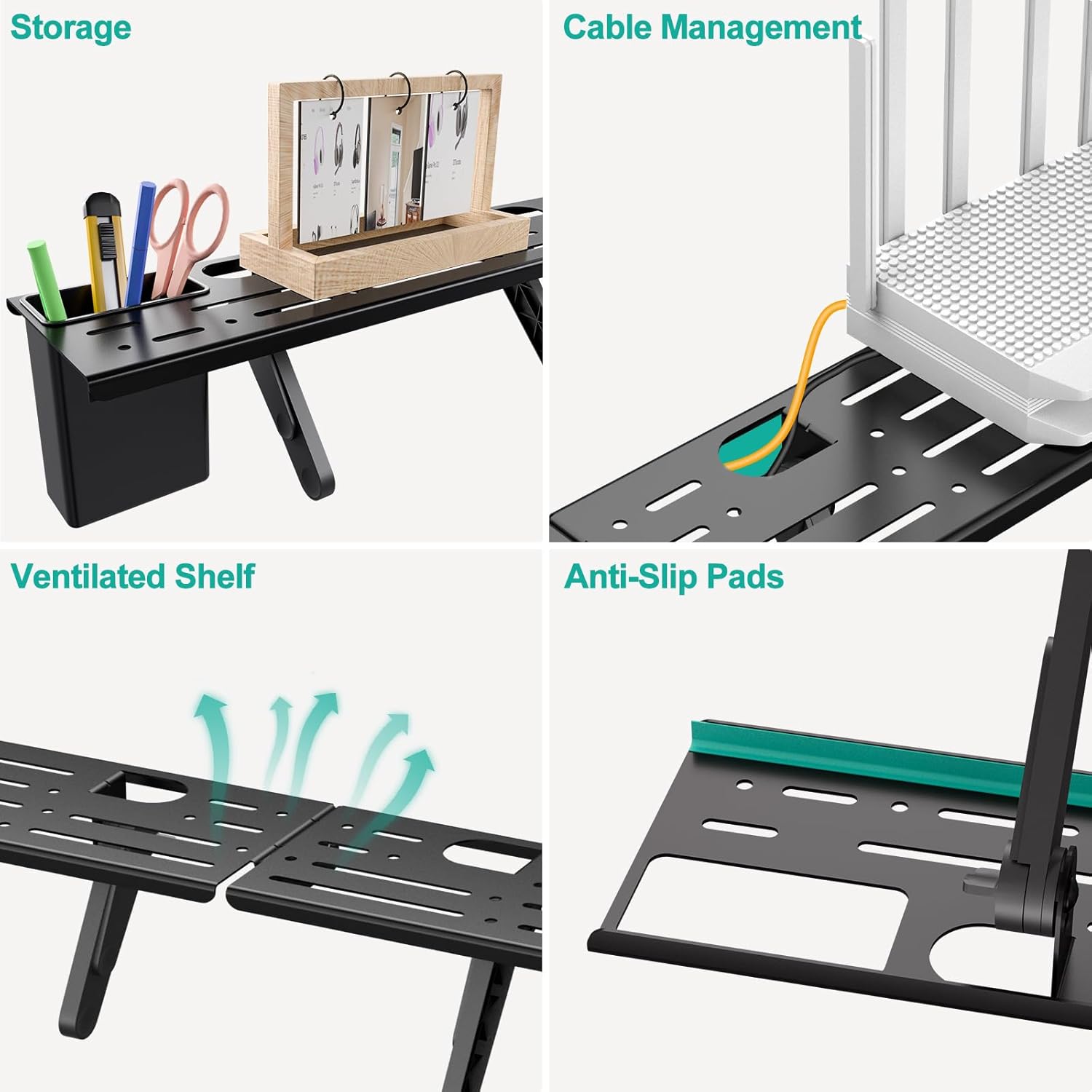
Image 5.1: Key features of the TSH004 TV Top Shelf, highlighting storage, cable management, ventilation, and anti-slip pads.
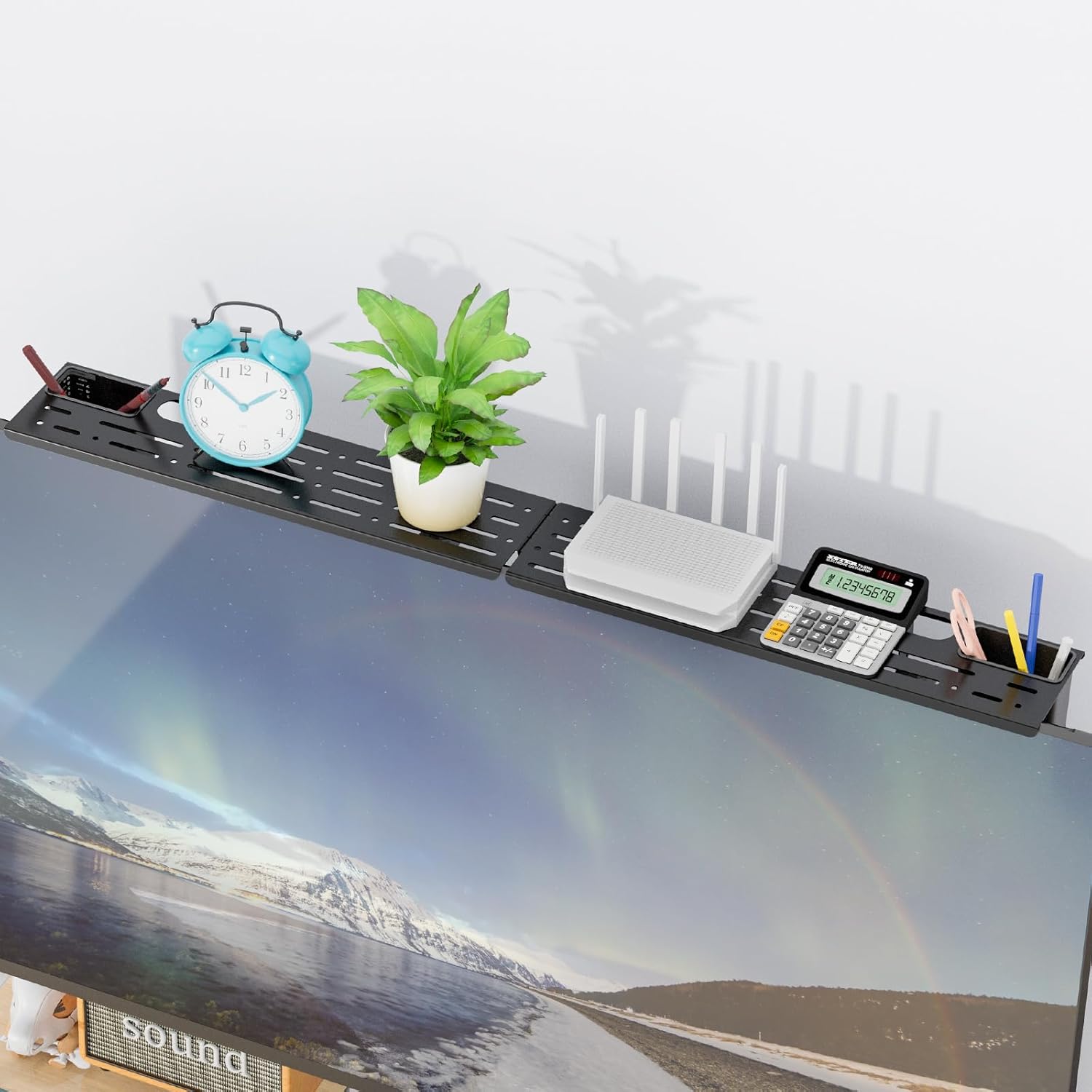
Image 5.2: The TSH004 TV Top Shelf holding a router, calculator, and other small items on top of a TV.
6. Maintenance
- Cleaning: Use a soft, damp cloth to clean the glass shelves and carbon steel components. Avoid abrasive cleaners or harsh chemicals that could damage the finish.
- Check Connections: Periodically (e.g., every 6 months) check all screws and bolts for tightness, especially for the wall-mounted CS303B shelf. Retighten if necessary to ensure stability.
- Weight Distribution: Always ensure that weight is evenly distributed on the shelves to prevent undue stress on the mounting points.
7. Troubleshooting
- Shelf is not level (CS303B): Ensure the wall plates are mounted perfectly level. Adjust the height of the glass holders on the wall plates if needed to compensate for minor discrepancies.
- Shelf feels wobbly (CS303B): Check all mounting screws and bolts for tightness. Ensure the wall anchors (if used) are properly seated. Verify that the wall structure is adequate for the load.
- TSH004 shelf slides on TV: Ensure the anti-slip pads are clean and properly positioned. Adjust the rear supports to create a firmer grip against the back of the TV. This shelf is not suitable for curved panel displays.
- Missing parts: Refer to the parts list in Section 3. If any components are missing, contact WALI customer support immediately.
8. Specifications
8.1. CS303B Floating TV Shelf
- Shelf Material: Strengthened Tempered Glass
- Number of Shelves: 3
- Each Glass Shelf Dimensions: 15 inches (width) x 11 inches (depth)
- Maximum Weight Capacity per Shelf: 8 kg (17.6 lbs)
- Adjustable Height: Yes
8.2. TSH004 TV Top Shelf
- Material: Carbon Steel
- Height: 4.1 inches
- Adjustable Length: Up to 34.8 inches (composed of two 17.33-inch brackets)
- Features: 2 Storage Boxes, Cable Management, Ventilated Shelf, Anti-Slip Pads
- Maximum Weight Capacity: 5.5 lbs (as per image 71I0He3UouL)
- Compatibility: Flat-panel displays (Not suitable for curved panel displays)

Image 8.1: The TSH004 TV Top Shelf demonstrating its load-bearing capacity of 5.5 lbs.
9. Warranty and Customer Support
WALI products are designed for durability and performance. For specific warranty details, please refer to the documentation included with your product or visit the official WALI website.
WALI offers experienced and friendly US-based customer support, available to assist 7 days a week. If you have any questions, require assistance with installation, or need to report missing/damaged parts, please contact them directly.
Contact Information: Please refer to the packaging or the official WALI website for the most current contact details.


