
Marsail TZESD8N-N1-US
Marsail 55x24 Electric Standing Desk User Manual
Model: TZESD8N-N1-US
Introduction
Thank you for choosing the Marsail 55x24 Electric Standing Desk. This manual provides detailed instructions for the assembly, operation, and maintenance of your new adjustable height desk. Please read this manual thoroughly before use to ensure proper function and safety.
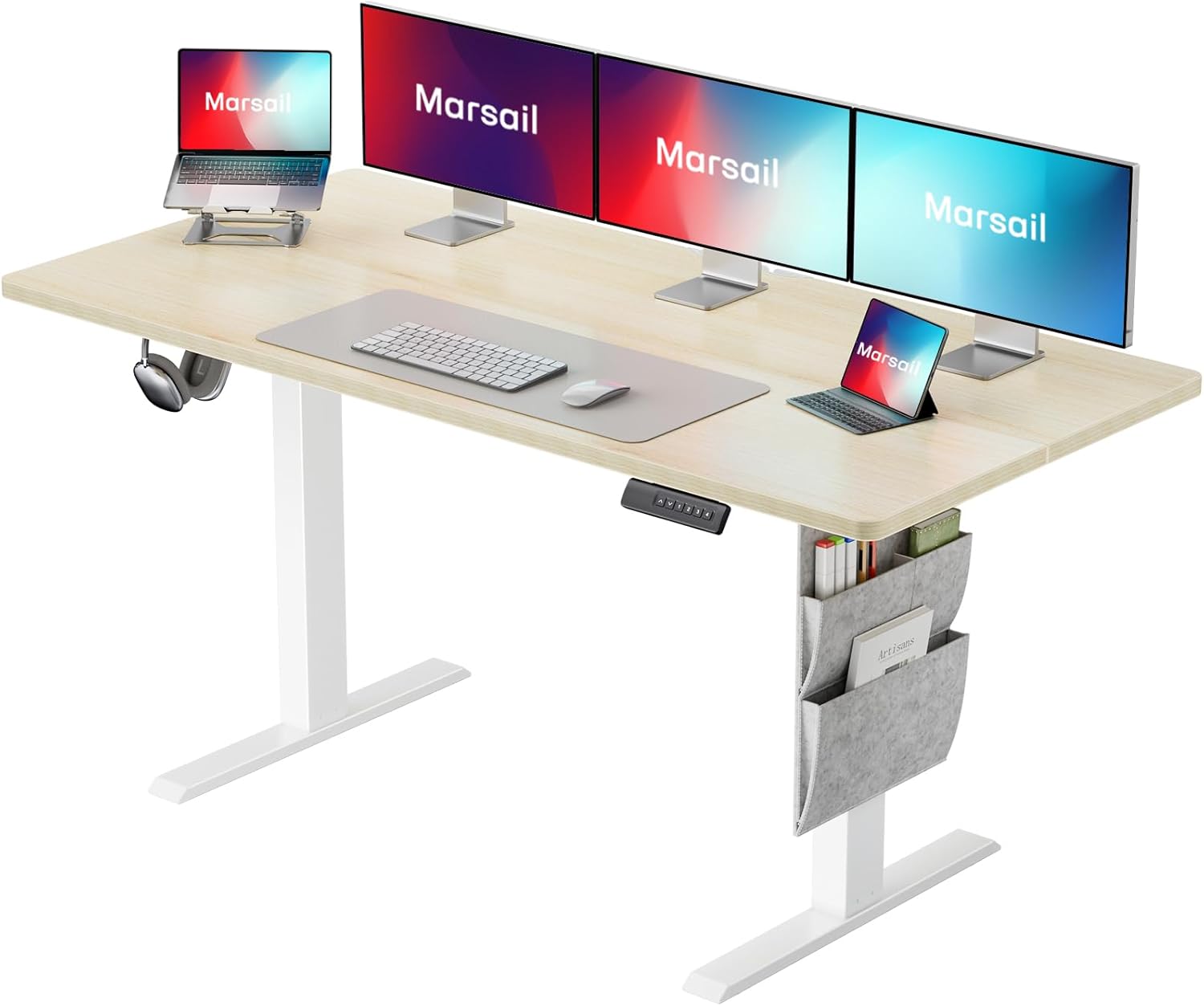
Image: The Marsail 55x24 Electric Standing Desk, showcasing its spacious maple desktop, white frame, and integrated storage pocket, equipped with multiple monitors and a laptop for a complete workstation setup.
Safety Information
Your safety is paramount. Please adhere to the following safety guidelines:
- Always ensure the desk area is clear of obstructions before adjusting the height.
- Do not adjust the desk while in use or in the presence of others to prevent injury.
- Always follow the assembly instructions carefully to ensure the desk is stable and secure.
- Keep children and pets away from the desk during operation.
- Do not overload the desk beyond its specified weight capacity.
- Ensure all cables are properly managed to prevent snagging during height adjustments.

Image: Visual representation of the desk's anti-collision system, showing the desktop retracting upon encountering an obstacle, alongside an icon indicating the use of recycled wood in its construction.
Assembly Instructions
The Marsail Electric Standing Desk is designed for quick and straightforward assembly. It is recommended that two people assemble the desk for optimal ease and safety.
Required Tools (Not Included):
- Phillips head screwdriver
- Allen wrench (usually included with hardware)
Assembly Steps:
- Unpack Components: Carefully remove all parts from the packaging and lay them out on a clean, soft surface to prevent scratches. Verify all components listed in the packing list are present.
- Attach Legs to Desktop: Securely fasten the desk legs to the underside of the desktop using the provided screws and the appropriate tools. Ensure the legs are oriented correctly.
- Install Control Box and Motor: Mount the control box and motor assembly to the designated locations under the desktop. Connect all necessary cables according to the wiring diagram.
- Attach Feet: Secure the foot supports to the bottom of each leg.
- Install Accessories: Attach the headphone hook and side storage pocket as desired.
- Cable Management: Use the included cable management solutions to organize and secure all power and control cables.
- Initial Power-Up: Plug the desk into a power outlet. The desk may perform an initial calibration cycle.

Image: A person is shown on the floor, actively assembling the base of the Marsail electric standing desk, emphasizing the quick and user-friendly assembly process.
Operating Instructions
Your Marsail Electric Standing Desk offers intuitive controls for seamless height adjustment and personalized settings.
Control Panel Overview:

Image: A detailed view of the desk's control panel, featuring a digital display for current height, up and down adjustment buttons, and four programmable memory preset buttons.
- Up/Down Buttons (▲ / ▼): Press and hold to manually adjust the desk height. Release to stop at your desired position.
- Memory Presets (1, 2, 3, 4): These buttons allow you to save and recall preferred desk heights.
Setting Memory Presets:
- Adjust the desk to your desired height using the Up/Down buttons.
- Press the 'M' or 'Set' button (if available, otherwise proceed to next step).
- Press the desired number button (1, 2, 3, or 4) within 3 seconds. The display will show 'S-' followed by the number, indicating the height is saved.
Recalling Memory Presets:
- Simply press the desired number button (1, 2, 3, or 4). The desk will automatically move to the saved height.
Anti-Collision System:
The desk is equipped with an anti-collision system. If the desk encounters an obstruction during height adjustment, it will automatically stop and reverse slightly to prevent damage or injury.

Image: A visual guide illustrating the ergonomic benefits of the desk, showing a person comfortably standing at 46.7 inches and another sitting at 27.5 inches, highlighting the adjustable height range for optimal posture.

Image: An illustration emphasizing the desk's robust construction and motor, indicating it has undergone 50,000 cycles of rigorous testing to ensure long-term durability and smooth operation.
Maintenance
Regular maintenance will ensure the longevity and optimal performance of your Marsail Electric Standing Desk.
- Cleaning: Wipe the desktop and frame with a soft, damp cloth. Avoid harsh chemicals or abrasive cleaners that may damage the finish.
- Cable Management: Periodically check and reorganize cables to prevent tangling or damage during height adjustments.
- Motor Inspection: Ensure the motor and moving parts are free from dust and debris. Do not attempt to lubricate internal motor components.
- Tighten Screws: Occasionally check all screws and bolts to ensure they are tight. Retighten if necessary.
Troubleshooting
If you encounter issues with your Marsail Electric Standing Desk, refer to the following common problems and solutions:
| Problem | Possible Cause | Solution |
|---|---|---|
| Desk does not move. | Power cable disconnected; Overload; Motor error. | Check power connection. Reduce weight on desk. Unplug for 10 seconds, then plug back in to reset. |
| Desk moves unevenly or makes unusual noise. | Loose screws; Obstruction; Uneven weight distribution. | Check and tighten all screws. Clear any obstructions. Redistribute weight evenly on the desktop. |
| Height presets not working. | Presets not saved correctly. | Re-save the memory presets following the operating instructions. |
| Anti-collision system frequently triggers. | Sensitivity too high; Obstruction. | Ensure no objects are in the path of the desk's movement. Refer to manufacturer's website for sensitivity adjustment if available. |
If the problem persists after attempting these solutions, please contact Marsail customer support for further assistance.
Specifications
Key specifications for the Marsail 55x24 Electric Standing Desk (Model: TZESD8N-N1-US):
| Feature | Detail |
|---|---|
| Model Number | TZESD8N-N1-US |
| Product Dimensions | 24"D x 55"W x 46.7"H |
| Height Adjustment Range | 27.5" - 46.7" |
| Desktop Material | Engineered Wood (Laminated, Maple finish) |
| Frame Material | Carbon Steel |
| Motor Noise Level | <50dB |
| Special Features | Adjustable Height, Anti-Collision System, Electric, Ergonomic, One-Touch Lifting, Memory Presets, Side Storage Pocket, Headphone Hook |
| Assembly Required | Yes (Recommended 2 people) |
| UPC | 840478826944 |

Image: A detailed diagram illustrating the overall dimensions of the Marsail 55x24 Electric Standing Desk, including its length, width, and adjustable height range, providing a clear understanding of its physical footprint.
Warranty and Support
The Marsail 55x24 Electric Standing Desk comes with a limited warranty. For specific warranty terms and conditions, please refer to the documentation included with your product or visit the official Marsail website.
For technical support, troubleshooting assistance, or warranty claims, please contact Marsail customer service:
- Website: Visit the Marsail Store on Amazon (for general inquiries and product information)
- Email/Phone: Refer to your product packaging or the Marsail website for direct contact information.
Related documentsTZESD8N-N1-US


Ask a question about this manual
Ask about setup, troubleshooting, compatibility, parts, safety, or missing instructions. Manuals+ will review the question and use this page’s manual context to help answer it.