
1. Product Overview
The VASTEND VS-7BC is a solar-powered wireless reversing camera designed for compatibility with the VS-7B monitor (monitor not included). This camera provides a clear, wide-angle view to assist with vehicle maneuvering and parking. It features a robust design suitable for various vehicle types and weather conditions.
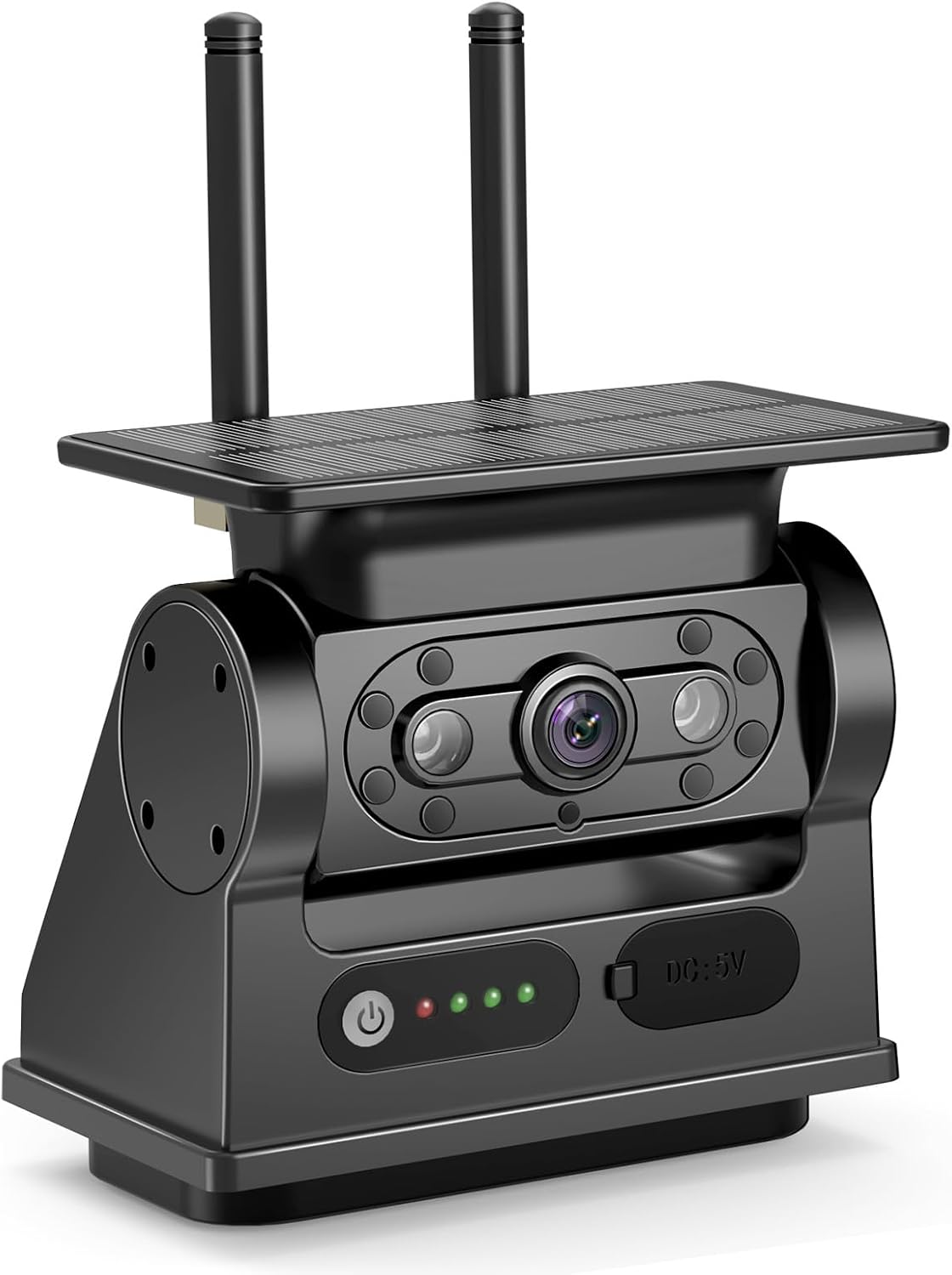
Image: The VASTEND VS-7BC Solar Reversing Camera, a standalone unit designed for wireless operation.
2. Safety Information
- Ensure the camera is securely mounted to prevent detachment during vehicle operation.
- Do not obstruct the camera's view or the solar panel.
- Always check your surroundings manually in addition to using the camera feed. The camera is an aid, not a substitute for safe driving practices.
- Keep the camera lens clean for optimal image clarity.
- Avoid exposing the camera to extreme temperatures outside its operating range.
3. Package Contents
Please verify that all items are present in your package:
- 1 x VASTEND VS-7BC Solar Reversing Camera
- 1 x USB-C Charging Cable
- Mounting Hardware (e.g., magnetic base, screws, adhesive pad)
- User Manual (this document)
4. Setup
4.1 Initial Charging
Before first use, fully charge the camera's internal battery using the provided USB-C cable. Connect the cable to the camera's USB-C port and a standard USB power adapter (not included). The charging indicator will show the charging status.
4.2 Mounting the Camera
The VS-7BC camera features a strong magnetic base for easy attachment to suitable metal surfaces on your vehicle. For non-magnetic surfaces or enhanced security, use the included mounting hardware (screws or adhesive pad) to secure the camera bracket.
- Choose a location at the rear of your vehicle that provides a clear, unobstructed view for reversing. Ensure the solar panel faces upwards to receive sunlight.
- Clean the mounting surface thoroughly to ensure optimal adhesion for magnetic or adhesive mounting.
- Attach the camera securely. If using screws, pre-drill pilot holes as necessary.
4.3 Pairing with Monitor (VS-7B)
This camera is designed to be compatible with the VASTEND VS-7B monitor. Refer to your VS-7B monitor's instruction manual for specific pairing procedures. Generally, the camera will automatically connect to a compatible monitor when both devices are powered on and within range. If manual pairing is required, follow the instructions provided with your VS-7B monitor.
5. Operating Instructions
5.1 Powering On/Off
The camera typically powers on automatically when it detects motion or when the paired VS-7B monitor is activated. It will enter a low-power standby mode when not in use to conserve battery. The solar panel continuously charges the internal battery during daylight hours.
5.2 Viewing the Feed
Once paired, the camera's video feed will be displayed on your compatible VS-7B monitor. The camera provides a 150-degree wide-angle view, enhancing your rear visibility. It also features CMOS Infrared technology for improved performance in low-light conditions.
5.3 Solar Charging
The integrated solar panel helps maintain the camera's battery charge. For optimal performance, ensure the solar panel is exposed to direct sunlight whenever possible. Regular USB-C charging may still be required, especially during periods of low sunlight or frequent use.
6. Maintenance
- Cleaning the Lens and Solar Panel: Regularly wipe the camera lens and solar panel with a soft, damp cloth to remove dirt, dust, or water spots. This ensures clear image quality and efficient solar charging.
- Battery Care: While the solar panel assists with charging, periodically connect the camera to a USB-C power source for a full charge, especially if the vehicle is stored indoors or used infrequently in low light.
- Mounting Check: Periodically inspect the camera's mounting to ensure it remains secure. Tighten any screws or re-apply adhesive if necessary.
7. Troubleshooting
| Problem | Possible Cause | Solution |
|---|---|---|
| No image on monitor | Camera not powered on; Not paired; Out of range; Low battery | Ensure camera is charged and powered on. Re-pair with monitor. Move camera closer to monitor. Charge camera via USB-C. |
| Poor image quality | Dirty lens; Obstruction; Low light; Interference | Clean the camera lens. Remove any obstructions. Ensure adequate lighting or rely on infrared. Reduce wireless interference. |
| Battery not charging | Solar panel obstructed/dirty; Faulty USB-C cable/adapter | Clean solar panel and ensure it receives direct sunlight. Try a different USB-C cable and power adapter. |
| Camera detaches from vehicle | Insufficient magnetic contact; Improper mounting | Ensure mounting surface is clean and flat. Use additional mounting hardware (screws/adhesive) for enhanced security. |
8. Specifications
- Brand: VASTEND
- Model Number: VS-7BC
- Product Dimensions: 20L x 9.5W x 30H centimetres (approximate, for camera unit)
- Compatible Devices: VASTEND VS-7B monitor
- Voltage: 12 Volts (internal battery)
- Optical Sensor Technology: CMOS Infrared
- Lens Type: Wide Angle
- Real Angle of View: 150 Degrees
- Connector Type: RCA (for monitor, not directly on camera)
- Video Capture Resolution: 720p
- Installation Type: Surface Mount (Magnetic)
- Item Weight: 0.7 Kilograms (approximate)
9. Warranty and Support
This VASTEND VS-7BC Solar Reversing Camera comes with a 2-year product warranty from the date of purchase. This warranty covers manufacturing defects and malfunctions under normal use.
For technical support, warranty claims, or any questions regarding your product, please contact VASTEND customer service through the retailer where the product was purchased or visit the official VASTEND website for contact information.