
GODOX GD-iT30Pro F-MIC
GODOX iT30 Pro F Mini TTL Wireless Camera Flash User Manual
Model: GD-iT30Pro F-MIC
1. Product Overview
The GODOX iT30 Pro F mini TTL Wireless Camera Flash is a compact and powerful lighting solution designed for Fuji cameras. It features a 2.4G wireless touchscreen for intuitive control, a built-in lithium battery for extended use, and advanced functionalities like TTL auto-exposure and high-speed sync. Its portable design makes it ideal for on-location photography, providing professional results in a small package.
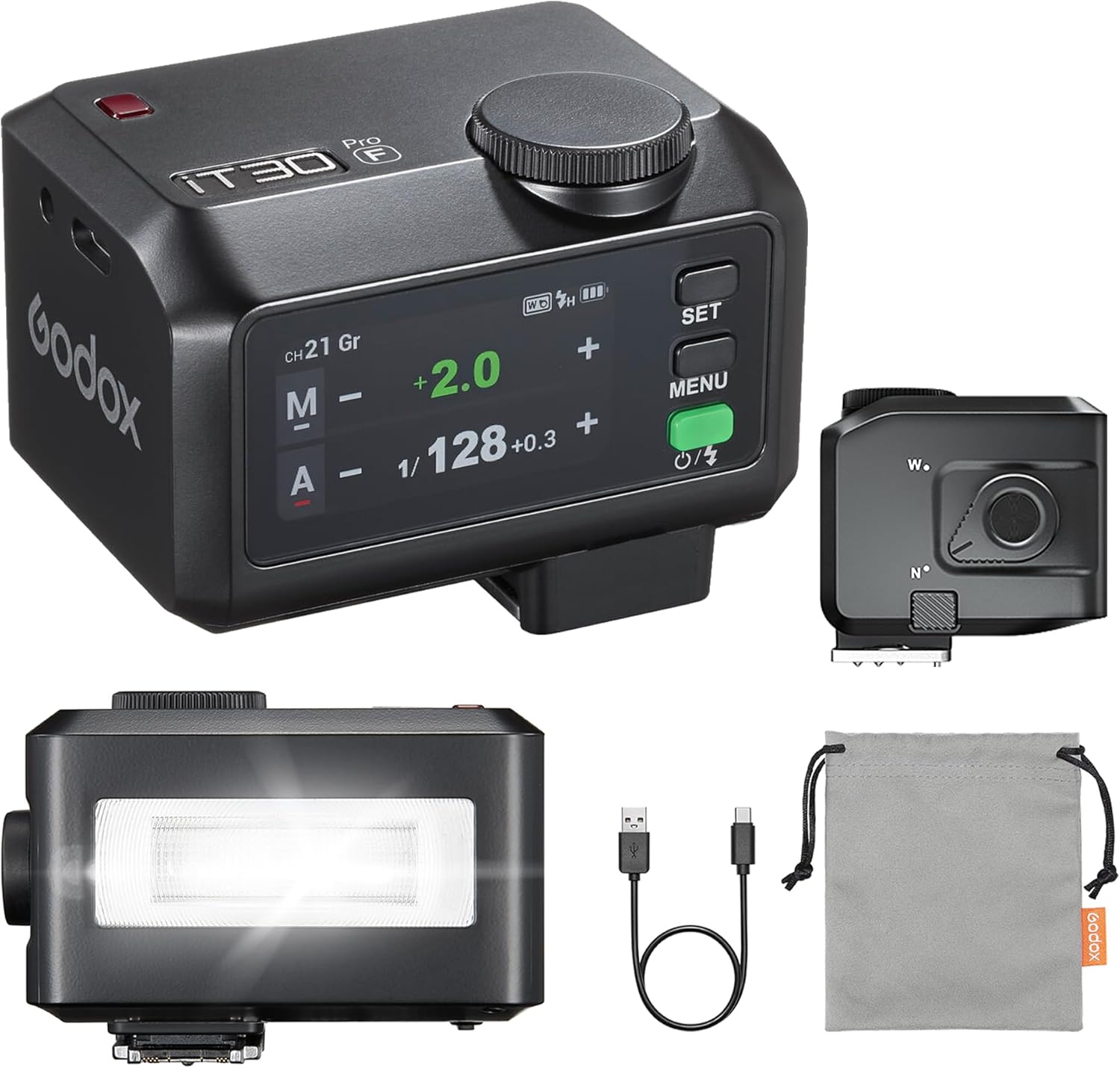
Figure 1.1: GODOX iT30 Pro F Flash with included accessories.
2. What's in the Box
Upon opening the package, please ensure all the following items are present:
- Light Body x1
- USB-C Charging Cable x1
- Storage Bag x1

Figure 2.1: All components included in the GODOX iT30 Pro F package.
3. Setup
3.1 Charging the Battery
The iT30 Pro F comes with a built-in lithium battery. Before first use, or when the battery indicator shows low charge, connect the flash to a power source using the provided USB-C charging cable. The flash supports USB-C fast charging.

Figure 3.1: Charging the iT30 Pro F via USB-C.
3.2 Attaching to Camera
The iT30 Pro F features a redesigned quick-release foot for easy attachment and removal from your camera's hot shoe mount.
- Align the flash's hot shoe mount with your camera's hot shoe.
- Slide the flash into the hot shoe until it clicks into place. The quick-release mechanism will secure it automatically.
- To remove, press the quick-release button (located on the side for C/N/F/O versions) and slide the flash off.

Figure 3.2: Attaching the flash to a camera using the quick-release foot.
4. Operating the Flash
4.1 Power On/Off and Screen Unlock
Press and hold the power button to turn the flash on or off. The 2.8" full-color touchscreen will display the interface. To unlock the screen, slide right or rotate the dial as indicated on the display.

Figure 4.1: The 2.8" Full-Color Touchscreen.
4.2 Adjusting Flash Output (Manual Mode)
In Manual (M) mode, you can precisely control the flash output. Use the rotary dial or swipe on the touchscreen to adjust the power from 1/1 (full power) down to 1/128, with fine adjustments in 0.3 stop increments.
4.3 TTL Auto-Exposure
The TTL (Through-The-Lens) mode automatically meters the light through your camera's lens and calculates the optimal flash output for perfectly exposed images. This mode is ideal for quick and consistent results in varying lighting conditions.

Figure 4.2: TTL Auto-Exposure in action.
4.4 Wireless Master & Receiver Modes
The iT30 Pro F features a built-in Godox 2.4GHz X system, allowing it to function as both a Master and Receiver. This enables flexible multi-light setups. Pair it with an X3 trigger or other Godox 2.4GHz wireless flashes for advanced control.

Figure 4.3: Wireless Master & Receiver setup.
4.5 Advanced Features
The iT30 Pro F supports a range of advanced features for professional control:
- **High-Speed Sync (HSS)**: Supports shutter speeds up to 1/8000s, allowing you to use wider apertures in bright conditions. (Note: The 'S' version adds global-shutter flash sync up to 1/80000s on Sony cameras.)
- **Front/Rear-Curtain Sync**: Synchronizes the flash with either the beginning or end of the shutter exposure.
- **Multi Mode**: Allows for multiple flashes during a single exposure, useful for capturing motion.
- **Flash Exposure Compensation (FEC)**: Adjust the flash output relative to the camera's metered exposure.

Figure 4.4: Advanced features for professional control.
4.6 Built-In Diffuser
For softer, more even lighting, the iT30 Pro F includes a built-in diffuser. Simply flick the lever to deploy the diffuser, which helps to spread the light and reduce harsh shadows, flattering subjects without additional modifiers.

Figure 4.5: Built-in diffuser for softer light.
5. Maintenance
5.1 Cleaning
To maintain the performance and appearance of your flash, regularly clean its exterior with a soft, dry cloth. For the touchscreen, use a microfiber cloth specifically designed for electronics. Avoid using harsh chemicals or abrasive materials.
5.2 Storage
When not in use for extended periods, store the flash in its provided storage bag in a cool, dry place away from direct sunlight and extreme temperatures. Ensure the battery is partially charged (around 50%) before long-term storage to preserve battery health.
6. Troubleshooting
If you encounter issues with your GODOX iT30 Pro F flash, please refer to the following common troubleshooting steps:
- **Flash not firing**:
- Check if the flash is securely mounted on the camera's hot shoe.
- Ensure the flash is powered on and the screen is unlocked.
- Verify battery charge level.
- Check camera flash settings and ensure external flash is enabled.
- **Screen unresponsive**:
- Attempt to unlock the screen by sliding right or rotating the dial.
- Power off and restart the flash.
- **Wireless connection issues**:
- Ensure both the flash and the trigger (if used) are set to the same channel and ID.
- Check for obstructions between the flash and trigger.
- Verify that the flash is in the correct Master or Receiver mode.
- **Flash not recycling quickly**:
- Ensure the battery is fully charged.
- Recycle time is 1.5 seconds at full power. Lower power settings will recycle faster.
If the issue persists after trying these steps, please contact GODOX customer support for further assistance.
7. Specifications
| Brand | GODOX |
| Model Number | GD-iT30Pro F-MIC |
| Package Dimensions | 3.5 x 3.03 x 2.76 inches |
| Item Weight | 6.7 ounces |
| Compatible Mountings | Hot Shoe Mount |
| Flash Sync Speed | 1/80000 (S version), 1/8000s (Standard) |
| Recycle Time | 1.5 seconds (full power) |
| Flashes per Charge | Up to 560 (full power) |
| Screen Type | 2.8" Full-Color Touchscreen |
| Wireless System | Godox 2.4GHz X system |
8. Warranty and Support
For warranty information and customer support, please refer to the documentation included with your product or visit the official GODOX website. Keep your proof of purchase for any warranty claims.
You can also visit the GODOX Store on Amazon for more product information and support resources.
Related Documents - GD-iT30Pro F-MIC
 |
Godox iT30Pro iFlash 相机闪光灯使用手册 神牛 iT30Pro iFlash 相机闪光灯的官方使用手册,包含产品功能介绍、操作指南、安全提示、规格参数及故障排除等详细信息。 |
 |
Flashpoint iT30Pro TTL Portable iFlash: User Manual & Features Explore the Flashpoint iT30Pro TTL Portable iFlash, a compact and powerful lighting tool for professional photographers. Learn about its TTL auto flash, wireless control, and versatile shooting modes. |
 |
Godox iT30Pro Camera Flash User Manual and Specifications Comprehensive user manual for the Godox iT30Pro camera flash, covering features, operation, compatibility, technical specifications, and warranty information. This guide provides detailed instructions for photographers using the iT30Pro flash with various camera systems. |
 |
Godox iT30Pro S iFlash Camera Flash Instruction Manual Explore the capabilities of the Godox iT30Pro S iFlash Camera Flash, a compact and powerful lighting tool for photographers. This official instruction manual details its advanced features, including TTL auto flash, 2.4G wireless transmission, and global shutter sync, designed to enhance your photographic workflow. Engineered for compatibility with Sony cameras, the iT30Pro S delivers professional-grade performance and flexibility. This guide covers setup, operational modes, wireless settings, safety precautions, technical data, and troubleshooting. For the latest firmware updates and product information, visit the Godox website. |
 |
Flashpoint iT30Pro TTL Portable iFlash Instruction Manual Comprehensive instruction manual for the Flashpoint iT30Pro TTL Portable iFlash, covering setup, operation, features, safety, and troubleshooting. |
 |
Godox iT30Pro iFlash クリップオンフラッシュ取扱説明書 Godox iT30Pro iFlash クリップオンフラッシュの取扱説明書。製品の警告、機能、操作方法、技術仕様、保証情報などを解説します。 |
Ask a question about this manual
Ask about setup, troubleshooting, compatibility, parts, safety, or missing instructions. Manuals+ will review the question and use this page’s manual context to help answer it.