
ULTIMEA U392B
Contents
ULTIMEA Skywave F30 Boom 3.1.2ch Sound Bar User Manual
Model: U392B
Introduction
This manual provides detailed instructions for the setup, operation, and maintenance of your ULTIMEA Skywave F30 Boom 3.1.2ch Sound Bar with Dolby Atmos and 6.5-inch Subwoofer. Please read this manual thoroughly before using the product to ensure proper functionality and to maximize your audio experience.

Figure 1: ULTIMEA Skywave F30 Boom Sound Bar, Subwoofer, and mobile app interface.
What's in the Box
Verify that all components are present in the packaging:
- 1 x ULTIMEA Skywave F30 Boom Sound Bar
- 1 x 6.5-inch Wireless Subwoofer
- 1 x Power Adapter for Sound Bar
- 1 x Power Cable for Subwoofer
- 1 x Remote Control
- 1 x HDMI Cable (for eARC/ARC connection)
- 1 x Optical Cable
- 1 x Wall Mounting Kit (screws, anchors, template)
- 1 x User Manual (this document)
Key Features
- 3.1.2ch Surround Sound System: Features front-firing drivers, up-firing speakers, and a 6.5-inch subwoofer for multidimensional audio. Supports Dolby Atmos for immersive sound experiences.
- Up-Firing Drivers with Neodymium Core: Equipped with neodymium internal magnets and 18-core large voice coils for enhanced height precision and vertical sound projection.
- BassMX Technology: The 6.5-inch subwoofer includes a 25mm voice coil, 18mm excursion, and a 7.2L wooden cabinet for powerful, resonant low frequencies down to 38Hz.
- Lossless Audio Transmission and CEC Function: HDMI eARC support provides up to 37Mbps bandwidth for lossless 3.1.2-channel audio. CEC allows synchronized control with your TV.
- Advanced App Control: The Ultimea App offers a 10-band graphic EQ and 121 preset sound settings, along with OTA updates for new features.
Product Overview
Soundbar Components

Figure 2: Internal components of the soundbar and subwoofer, highlighting the 6.5-inch subwoofer, left and right up-firing channels, and left, center, and right main channels.
Up-Firing Channels

Figure 3: Detailed view of the up-firing drivers, designed for precise vertical sound projection.
Soundbar Controls and Ports

Figure 4: Top panel controls of the soundbar, including power, volume, and input selection.

Figure 5: Rear panel connections, including HDMI to TV (eARC), Optical, USB, Sub Out, and DC In.
Setup and Installation
Soundbar Assembly
The soundbar consists of two separable parts for flexible placement. To assemble, slide the two halves together until they click into place. To separate, gently pull them apart.

Figure 6: Instructions for assembling and disassembling the modular soundbar unit.
Connecting to Your TV
For optimal audio quality and Dolby Atmos support, use the HDMI eARC/ARC connection. If your TV does not support eARC/ARC, use the Optical connection.
HDMI eARC/ARC Connection
- Connect one end of the provided HDMI cable to the "HDMI to TV (eARC)" port on the soundbar.
- Connect the other end of the HDMI cable to the HDMI port labeled "eARC" or "ARC" on your TV.
- Ensure CEC is enabled on your TV for synchronized power and volume control.
- Select the eARC input on the soundbar using the remote or soundbar controls.

Figure 7: Connecting the soundbar to a TV via HDMI eARC/ARC for lossless audio transmission.
Optical Connection
- Connect one end of the provided Optical cable to the "OPTICAL" port on the soundbar.
- Connect the other end of the Optical cable to the Digital Audio Out (Optical) port on your TV.
- Select the OPT input on the soundbar using the remote or soundbar controls.

Figure 8: Connecting the soundbar to a TV via Optical cable.
Subwoofer Pairing
The subwoofer is designed to pair wirelessly with the soundbar. Typically, they will pair automatically upon powering on. If manual pairing is required, refer to the troubleshooting section.

Figure 9: Wireless connection setup between the soundbar and the subwoofer.
Operating Instructions
Power On/Off
Press the power button on the soundbar or remote control to turn the unit on or off. The soundbar will enter standby mode when not in use.
Input Selection
Use the "Source" button on the remote or the input button on the soundbar to cycle through available inputs: eARC, Optical, USB, Bluetooth.
Volume Control
Adjust the volume using the volume up (+) and volume down (-) buttons on the soundbar or remote control.
Using the Remote Control

Figure 10: The included remote control for convenient operation of the soundbar.
The remote control provides full functionality, including power, input selection, volume, bass/treble adjustment, sound modes, and more. Refer to the remote control diagram for specific button functions.
Bluetooth Connection
- Press the Bluetooth button on the remote or soundbar to enter Bluetooth pairing mode. The indicator light will flash.
- On your device (smartphone, tablet), search for "ULTIMEA Skywave F30 Boom" in the Bluetooth settings and select it to pair.
- Once connected, the indicator light will become solid.

Figure 11: Establishing a Bluetooth 5.4 connection with the soundbar for wireless audio streaming.
Using the ULTIMEA App
Download the ULTIMEA App from your device's app store for advanced control and customization options.
- Sound Modes: Select from various preset sound modes (e.g., Movie, Music, Voice, Sport, Game, Night).
- Equalizer (EQ): Customize audio frequencies with the 10-band graphic EQ.
- Firmware Updates: Receive Over-The-Air (OTA) updates to enhance performance and unlock new features.
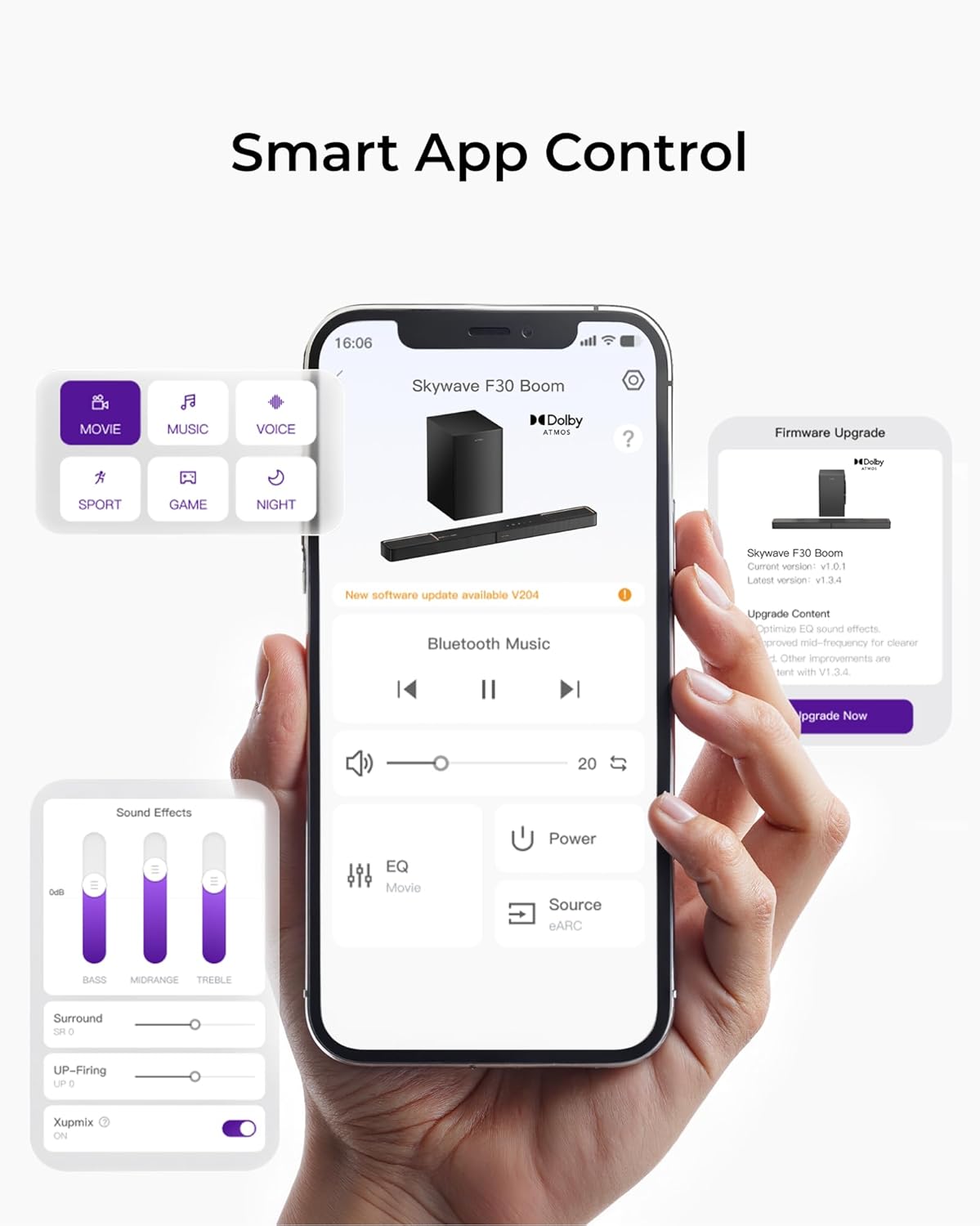
Figure 12: The ULTIMEA app interface showing sound mode selection, EQ settings, and firmware update options.
Maintenance
- Cleaning: Use a soft, dry cloth to clean the surfaces of the soundbar and subwoofer. Do not use liquid cleaners or abrasive materials.
- Ventilation: Ensure adequate ventilation around the soundbar and subwoofer to prevent overheating. Do not block any ventilation openings.
- Placement: Avoid placing the unit in direct sunlight, near heat sources, or in areas with high humidity or dust.
- Power Cord: Regularly check the power cords for any damage. If damaged, discontinue use and contact customer support.
Troubleshooting
| Problem | Possible Cause | Solution |
|---|---|---|
| No sound from soundbar. |
|
|
| No sound from subwoofer. |
|
|
| Dolby Atmos not working. |
|
|
| Remote control not working. |
|
|
Specifications
| Feature | Detail |
|---|---|
| Model Name | Skywave F30 Boom |
| Item Model Number | U392B |
| Speaker Type | 3.1.2ch Soundbar with Wireless Subwoofer |
| Subwoofer Size | 6.5 inches |
| Speaker Maximum Output Power | 360 Watts |
| Connectivity Technology | HDMI eARC/ARC, Optical, USB, Bluetooth 5.4, Auxiliary |
| Product Dimensions (Soundbar) | Approx. 31.5"D x 18.11"W x 35.44"H (Combined) |
| Item Weight | 17.64 pounds (Total) |
| Manufacturer | ULTIMEA |
Warranty and Support
For warranty information and technical support, please visit the official ULTIMEA website or contact their customer service. Keep your purchase receipt as proof of purchase for warranty claims.
ULTIMEA Official Store: https://www.amazon.com/stores/ULTIMEA/page/A530CFE3-D394-4643-9D47-1AA0E9F06490
Ask a question about this manual
Ask about setup, troubleshooting, compatibility, parts, safety, or missing instructions. Manuals+ will review the question and use this page’s manual context to help answer it.