
1. Product Overview
The FancyBean 2-Pack 12800mAh Portable Charger, Model M7, provides a convenient and reliable power solution for multiple electronic devices. Each power bank features a 12800mAh battery capacity, designed to offer extended charging capabilities for smartphones, tablets, and other USB-powered gadgets. Its compact design includes integrated charging cables and multiple output ports, making it suitable for travel and daily use.

Image: Two FancyBean M7 portable chargers, one black and one white, showcasing their compact form factor and digital display.
2. Key Features
- High Capacity: Each power bank offers a 12800mAh battery, providing multiple charges for most smartphones.
- Integrated Cables: Equipped with built-in Lightning and USB-C output cables, eliminating the need to carry extra cords for compatible devices.
- Multiple Output Ports: In addition to built-in cables, two USB-A output ports are available for charging other devices.
- Dual Input Options: The power bank can be recharged via its built-in USB-A input cable or a dedicated USB-C input port.
- Digital LED Display: An intuitive LED screen displays the remaining battery percentage, allowing for precise power monitoring.
- Compact and Portable: Designed to be slim and lightweight, fitting easily into pockets or bags, and is airline approved.
- Advanced Safety Features: Incorporates 10 cryogenic IC ice cores and multiple protection systems against overcharge, overdischarge, short circuit, and high temperature.

Image: Visual representation of the power bank's core features, including capacity, cable types, LED display, safety, and weight.
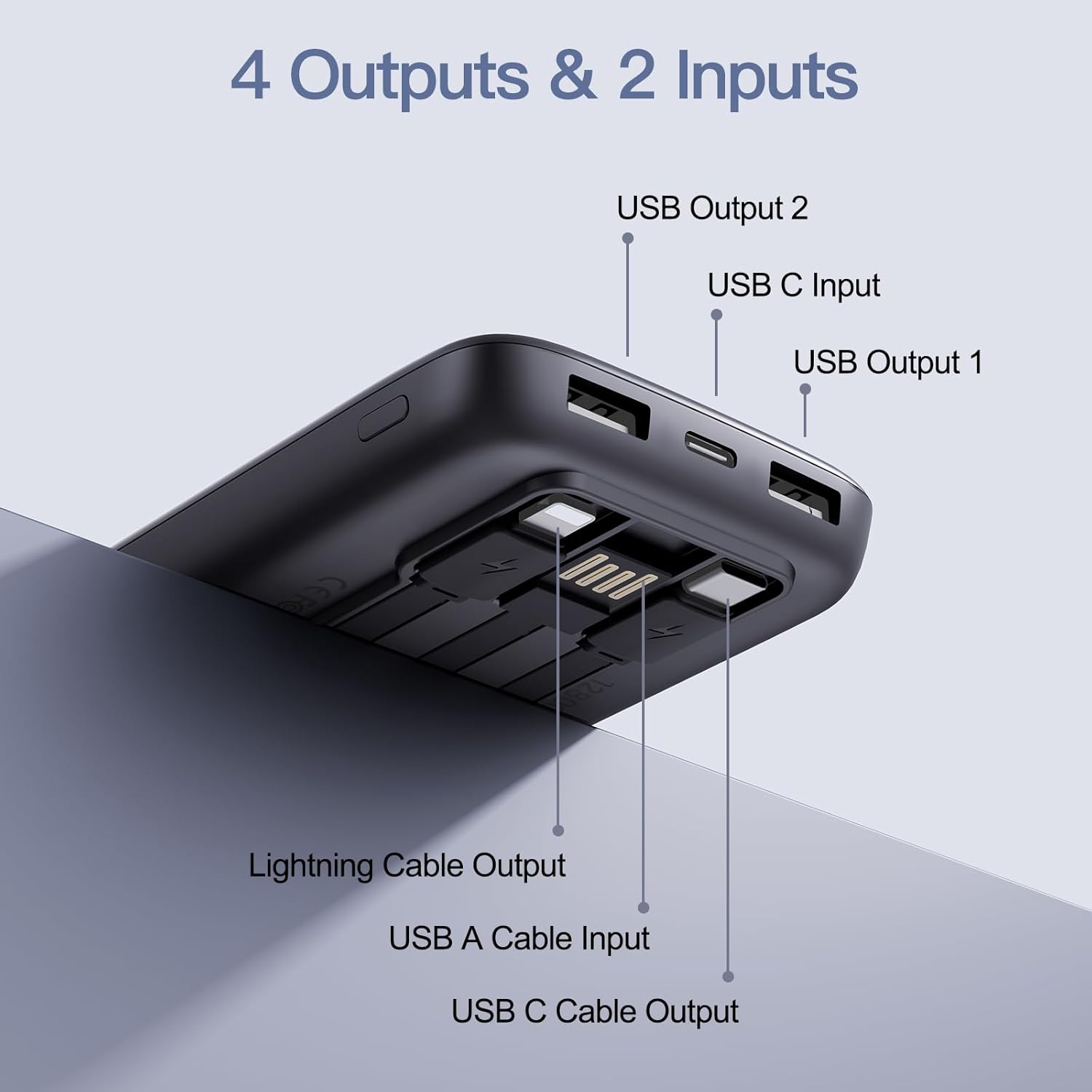
Image: Detailed view of the power bank's ports, labeling Lightning Cable Output, USB-A Cable Input, USB-C Cable Output, USB Output 1, USB Output 2, and USB-C Input.
3. Setup
3.1 Initial Charging of the Power Bank
Before first use, fully charge your FancyBean M7 Portable Charger. This ensures optimal battery performance.
- Locate the built-in USB-A input cable or the USB-C input port on the power bank.
- Connect the power bank to a compatible USB wall adapter (not included) or a computer's USB port using either the built-in USB-A cable or an external USB-C cable.
- The digital LED display will show the charging progress. The percentage will increase until it reaches 100%, indicating a full charge.
3.2 Identifying Ports
Familiarize yourself with the various input and output options:
- Built-in Lightning Cable: For Apple devices (iPhones, iPads with Lightning port).
- Built-in USB-C Cable: For Android devices (Samsung, Pixel, etc.) and other USB-C compatible devices.
- Built-in USB-A Input Cable: Used to recharge the power bank itself.
- USB-A Output Ports (x2): For charging devices using your own USB-A to device cables.
- USB-C Input Port: Alternative port to recharge the power bank using an external USB-C cable.
4. Operating Instructions
4.1 Charging Devices
The FancyBean M7 can charge up to four devices simultaneously.
- Using Built-in Cables: Pull out the appropriate built-in Lightning or USB-C cable and connect it directly to your device.
- Using External Cables: Connect your device's charging cable to one of the two USB-A output ports or the USB-C output cable (if not used for input) on the power bank, then connect the other end to your device.
- The power bank will automatically begin charging your device(s). The digital display will show the power bank's remaining charge.

Image: The power bank simultaneously charging a laptop, two smartphones, and wireless earbuds, demonstrating its multi-device charging capability.
4.2 Checking Battery Level
Press the power button located on the side of the power bank. The digital LED display will illuminate, showing the current battery percentage.
Video: An official product introduction for the FancyBean M7, demonstrating its features and usage, including the built-in cables and charging capabilities.
5. Maintenance
- Storage: Store the power bank in a cool, dry place away from direct sunlight and extreme temperatures.
- Cleaning: Use a soft, dry cloth to clean the exterior of the power bank. Avoid using harsh chemicals or abrasive materials.
- Battery Care: To prolong battery life, avoid fully discharging the power bank regularly. Recharge it when the battery level is low.
- Avoid Physical Damage: Do not drop, puncture, or disassemble the power bank.
6. Troubleshooting
- Device Not Charging:
- Ensure the power bank has sufficient charge.
- Verify that the charging cable is securely connected to both the power bank and your device.
- Try a different cable or output port.
- Power Bank Not Recharging:
- Ensure the built-in USB-A input cable or external USB-C cable is properly connected to a power source.
- Check if the wall adapter or USB port is functional.
- Try a different power source or cable.
- Slow Charging:
- Ensure you are using a compatible charging cable and adapter.
- Charging multiple devices simultaneously may reduce the charging speed for individual devices.
- Digital Display Not Working:
- Press the power button firmly.
- If the power bank is completely discharged, the display may not light up until it receives some charge.
7. Specifications
| Model Number | M7 |
| Battery Capacity | 12800 Milliamp Hours (mAh) |
| Product Dimensions | 5.83 x 2.68 x 0.63 inches |
| Item Weight | 1.17 pounds |
| Input (USB-C) | 5V=2A |
| Input (Built-in USB-A) | 5V=2A |
| Output (Built-in Lightning Cable) | 5V=2A |
| Output (Built-in USB-C Cable) | 5V=2A |
| Output (USB-A Ports x2) | 5V=2A (each) |
| Special Features | Built-in Cables, Digital LED Display, Multi-Protection |
8. Warranty and Support
FancyBean offers a 3-Year Replacement Promise for the Model M7 Portable Charger. For warranty claims, technical assistance, or any product-related inquiries, please contact FancyBean customer support through the retailer where the product was purchased or visit the official FancyBean website for contact information.

Image: The FancyBean M7 power bank and its packaging, highlighting the 3-Year Replacement Promise.