
1. Introduction
The ToolkitRC M8AC is a versatile 600W 20A smart charger designed for a wide range of battery types. It features both AC and DC input capabilities, making it suitable for various charging environments. The charger supports LiPo, LiHV, LiFe, Li-Ion, LTO (1-8S), NiMH (1-20S), and Pb (1-12S) batteries. Its 2.4-inch IPS LCD provides clear and easy navigation through its functions, while the 1000mA balance charging capability helps optimize battery health and longevity.
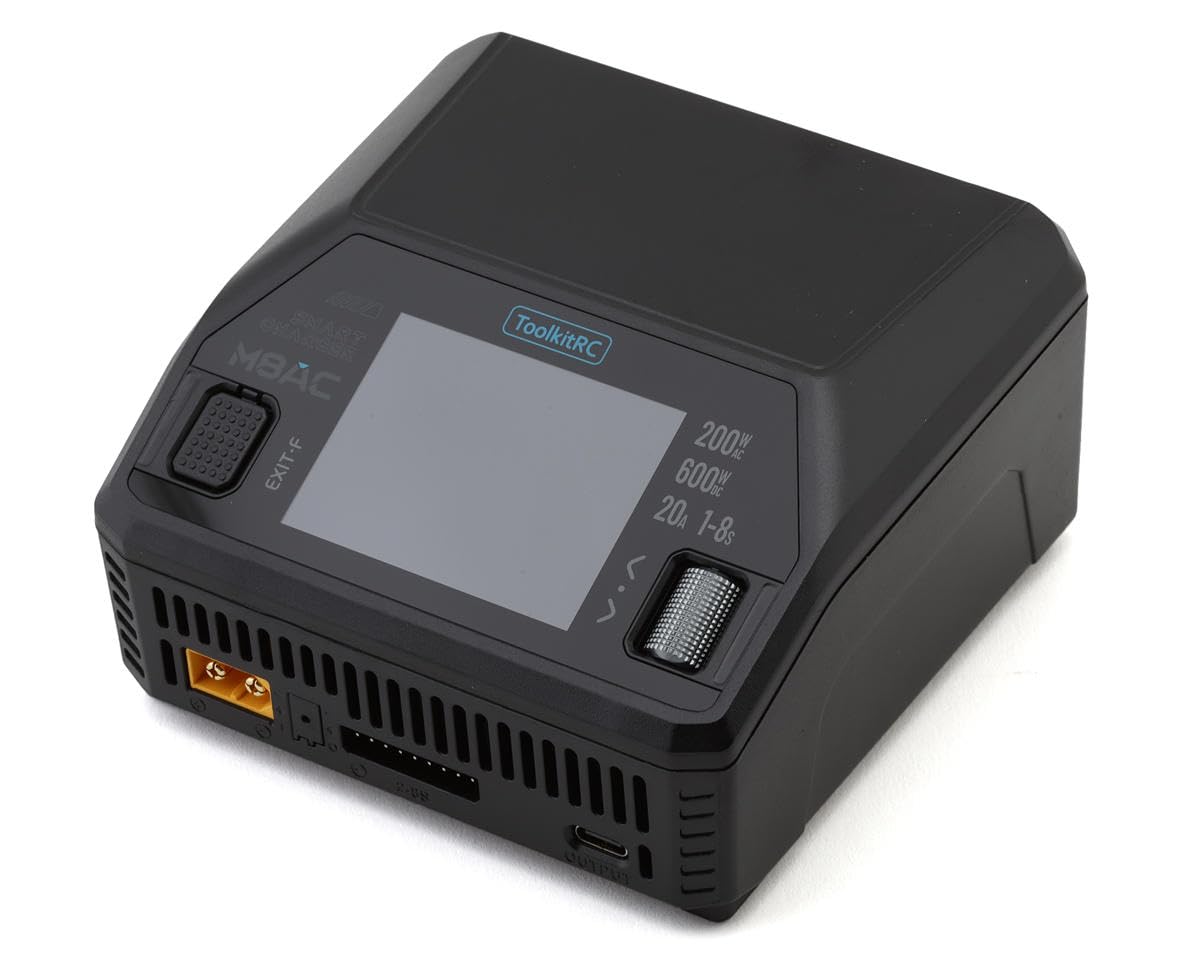
Image: The ToolkitRC M8AC Smart Charger, a compact device with a digital display and multiple ports for battery connections, including XT60-2.5.
2. Setup
- Power Connection: Connect the charger to a suitable power source. Use the AC input for wall outlets or the DC input for external power supplies (e.g., a power bank or car battery). Ensure the power source meets the charger's voltage and current requirements.
- Battery Connection: Connect your battery to the appropriate charging port on the M8AC. For LiPo and similar batteries, ensure both the main power connector (e.g., XT60) and the balance lead are securely connected to their respective ports on the charger.
- Initial Power On: Once connected, the charger's IPS LCD will power on, displaying the main interface.
3. Operating Instructions
The M8AC offers various operating modes for different battery management needs. Use the navigation buttons to select and confirm options on the display.
- Charge Mode: Select this mode to charge your battery. The charger will automatically detect the battery type and cell count. You can adjust the charging current (Amps) as needed. Always refer to your battery's specifications for safe charging rates.
- Discharge Mode: Use this mode to safely discharge your battery to a lower voltage. This is often used for storage or to prepare batteries for disposal.
- Storage Mode: This mode charges or discharges the battery to a specific voltage level recommended for long-term storage, which helps preserve battery health.
- Balance Charge: This is the recommended charging method for multi-cell LiPo batteries. It ensures that all cells within the battery pack are charged to the same voltage, preventing imbalances that can degrade battery performance and safety.
- Battery Types: The M8AC supports LiPo, LiHV, LiFe, Li-Ion, LTO (1-8S), NiMH (1-20S), and Pb (1-12S) batteries. Ensure the correct battery type is selected in the charger settings to prevent damage.
4. Maintenance
- Regular Cleaning: Keep the charger clean and free from dust and debris. Use a soft, dry cloth for cleaning.
- Ventilation: Ensure the charger has adequate ventilation during operation to prevent overheating. Do not block the cooling vents.
- Battery Storage: Always store LiPo batteries at their recommended storage voltage (typically 3.8V-3.85V per cell) using the charger's storage mode. This prevents cell degradation and swelling.
- Cable Inspection: Periodically inspect all charging cables and connectors for signs of wear or damage. Replace any damaged cables immediately.
5. Troubleshooting
- Charger Not Powering On: Check the power cable connection and ensure the power source is active.
- Battery Not Detected: Verify that both the main power connector and the balance lead are securely connected to the charger. Ensure the battery is not severely over-discharged.
- Charging Error Message: Refer to the specific error code displayed on the screen. Common issues include incorrect battery type selection, imbalanced cells, or faulty connections.
- Overheating: Ensure proper ventilation around the charger. Reduce the charging current if the charger consistently overheats.
6. Specifications
- Item Weight: 1.44 Pounds
- Brand: ToolkitRC
- Manufacturer: ToolkitRC
- Color: Black
- Recommended Age: 14 years and up
7. Warranty and Support
Specific warranty details and support contact information are not provided in the available product data. Please refer to the product packaging or the manufacturer's official website for comprehensive warranty terms and customer support resources.


