Introduction
The JOYROOM Qi2 Certified 4-in-1 MagSafe Charging Station (Model JR-W23) is designed to efficiently charge multiple Apple devices simultaneously. This station features Qi2.0 certified 15W fast wireless charging for compatible iPhones, a 3W fast wireless charging spot for Apple Watch series, and a 5W fast wireless charging base for AirPods. Additionally, it includes an innovative smart interactive night light with adjustable warm/cold illumination.
What's in the Box
- JOYROOM Qi2 Certified 4-in-1 MagSafe Charging Station
- 30W Fast-Charging Adapter
- Type-C Cable

Image: The JOYROOM 4-in-1 MagSafe Charging Station, showcasing the main unit, 30W fast-charging adapter, and Type-C cable.
Video: An overview of the JOYROOM 4-in-1 Qi2 Fast Wireless Charging Station for Apple, demonstrating its components and basic functionality.
Setup
- Connect the provided Type-C cable to the Type-C input port located on the back of the charging station.
- Plug the other end of the Type-C cable into the 30W Fast-Charging Adapter.
- Insert the 30W Fast-Charging Adapter into a standard wall power outlet. The charging station is now ready for use.
Image: The charging station connected to its power adapter and cable, ready for device placement.
Operating Instructions
Charging Devices
- For iPhone (Qi2/MagSafe Compatible): Place your iPhone on the magnetic charging area. The powerful magnets ensure perfect alignment. The MagSafe charger can be adjusted up to 45° for optimal viewing in both landscape and portrait modes.
- For Apple Watch: Place your Apple Watch on the dedicated 3W wireless charging spot.
- For AirPods: Place your AirPods (with wireless charging case) on the 5W wireless charging base located at the bottom of the station.

Image: The adjustable MagSafe charging pad, demonstrating its 45-degree tilt capability for flexible viewing angles.
Night Light Function
The charging station features a smart interactive night light. To operate:
- Gently touch the base button (indicated by a light icon) to activate the cold illumination. A soft vibration confirms activation.
- Tap the button again to switch to warm light.
- Tap once more to turn the light off.
- Press and hold the button to seamlessly adjust the brightness levels of the active light mode.

Image: The charging station demonstrating its interactive night light with various modes including sleep, warm, and cold light settings.
Compatibility
The JOYROOM 4-in-1 MagSafe Charging Station is universally compatible with a wide range of modern Apple devices and other Qi2-enabled devices:
- iPhone: iPhone 17/17 Pro/17 Pro Max, iPhone 16/16 Plus/16 Pro/16 Pro Max, iPhone 15/15 Plus/15 Pro/15 Pro Max, iPhone 14/14 Plus/14 Pro/14 Pro Max, iPhone 13/13 mini/13 Pro/13 Pro Max, iPhone 12/12 mini/12 Pro/12 Pro Max. (Incompatible with iPhone 7/8/earlier & non-Qi devices).
- Samsung Galaxy: S25/S24/S23 Series (achieves Qi2 fast charging with MagSafe cases).
- Google Pixel: 10 Series.
- AirPods: AirPods Pro 4/3/2, AirPods 2/3/4 (with Wireless Charging Case).
- Apple Watch: Apple Watch Ultra/Ultra 2, Apple Watch Series 10/9/8/7/SE/6/5/4/3/2.
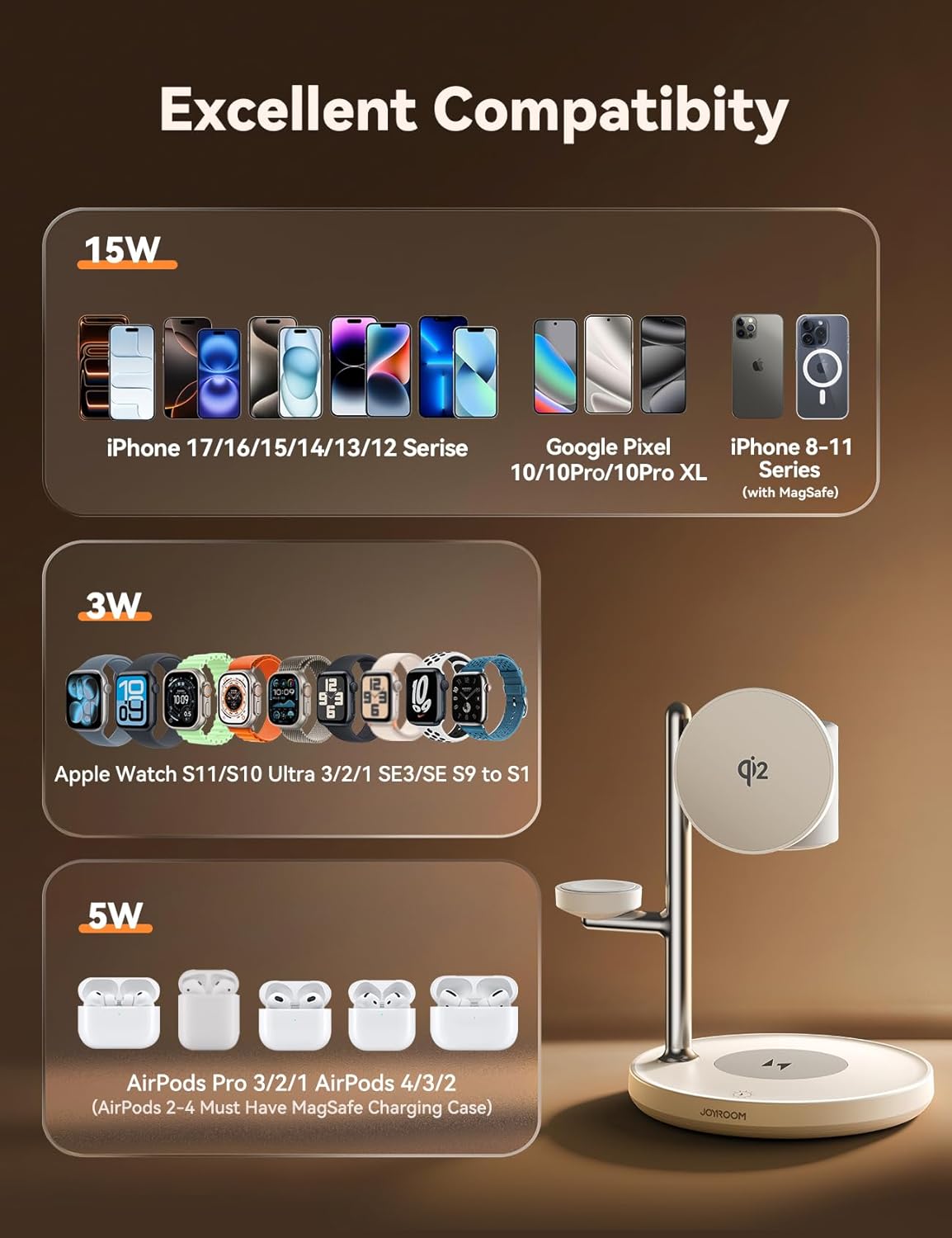
Image: A visual guide detailing the extensive compatibility of the charging station with various iPhone, Apple Watch, and AirPods models.
Maintenance
- Keep the charging station clean by wiping it with a soft, dry cloth. Avoid using harsh chemicals or abrasive materials.
- Ensure the charging surfaces are free from dust and debris for optimal performance.
- Avoid exposing the device to extreme temperatures, direct sunlight, or moisture.
- Handle the charging station with care to prevent physical damage.
Troubleshooting
- Device not charging:
- Ensure the charging station is properly connected to the 30W adapter and a working power outlet.
- Verify that your device is correctly aligned on the respective charging area.
- Remove any thick or metallic cases from your phone, Apple Watch, or AirPods that may interfere with wireless charging. For optimal MagSafe charging with a case, use OEM or certified MagSafe cases (less than 3mm thick).
- Check if the device itself supports wireless charging.
- Night light not working:
- Ensure the charging station is powered on.
- Gently tap the touch control button on the base.

Image: Important usage norms for the charging station, highlighting the need to remove cases for AirPods and Apple Watch, and to use a power adapter greater than 30W.
Specifications
| Brand | JOYROOM |
| Model Number | JR-W23 |
| Package Dimensions | 6.69 x 5.51 x 4.69 inches |
| Item Weight | 15.9 ounces |
| Connector Type | USB Type C |
| Input Voltage | 9 Volts |
| Amperage | 3A |
| Total USB Ports | 1 |
| Wattage | 30 watts (with included adapter) |
| Special Features | 4-IN-1 Charging, Interactive Warm/Cold Night-Lamp, Magnetic Wireless Charger, Qi2 MagSafe Fast Charge |
Warranty and Support
For warranty information, technical support, or customer service inquiries, please refer to the warranty card included with your product or visit the official JOYROOM website. Contact details for customer support are typically available on the product packaging or the manufacturer's website.


