1. Introduction
The JOYO JMT-9005B is a versatile 3-in-1 device combining a chromatic tuner, a metronome, and a tone generator. Designed for musicians, it offers precise tuning and rhythm assistance for various instruments, including guitar, bass, and violin. Its compact design, bright backlight, and clip-on pickup make it suitable for diverse practice environments.
2. Package Contents
- JOYO JMT-9005B Main Unit
- Clip-on Pickup
- 2 x AAA Batteries
- User Manual (this document)
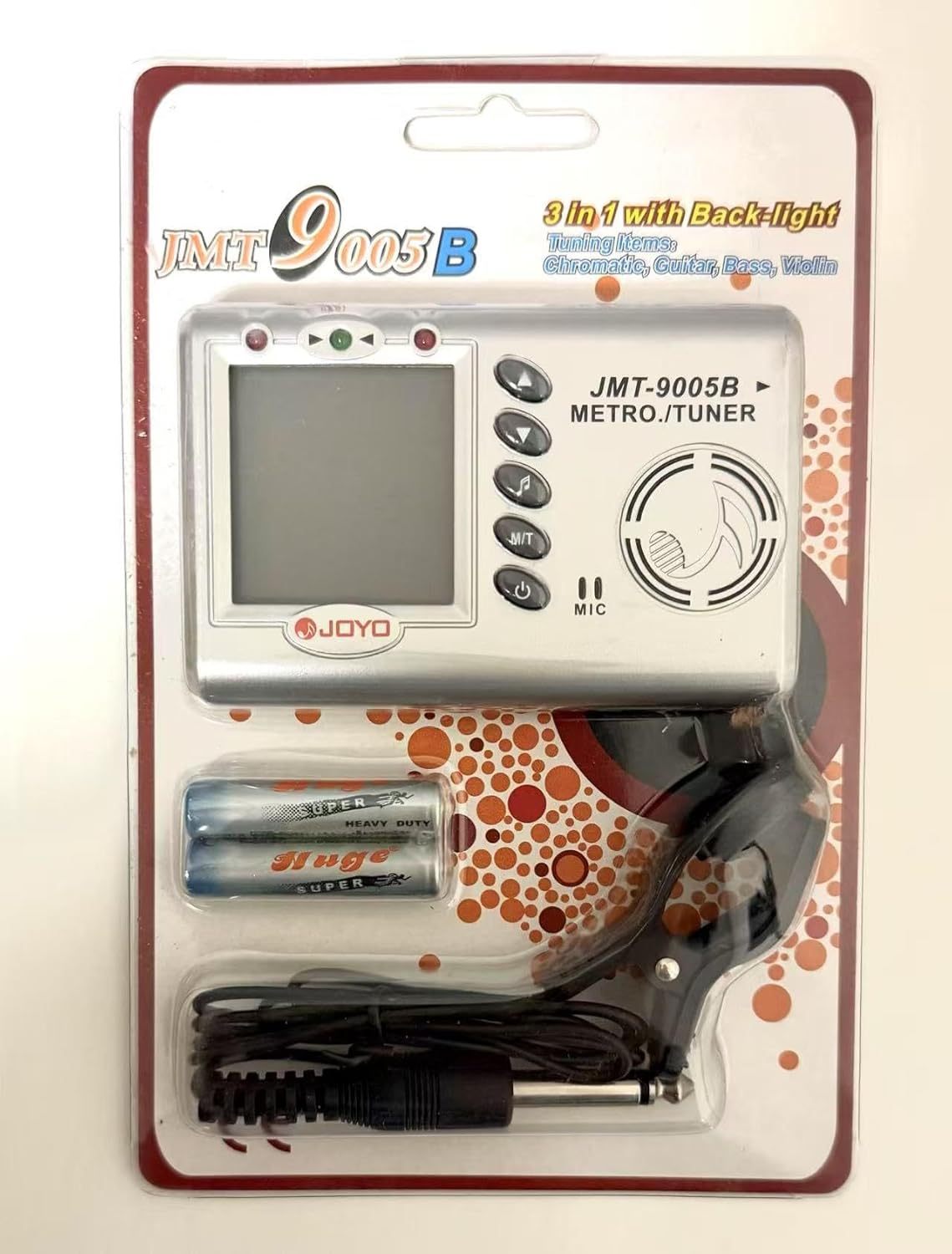
Figure 2.1: Contents of the JOYO JMT-9005B package.
3. Product Overview
Familiarize yourself with the main components and controls of your JMT-9005B device.
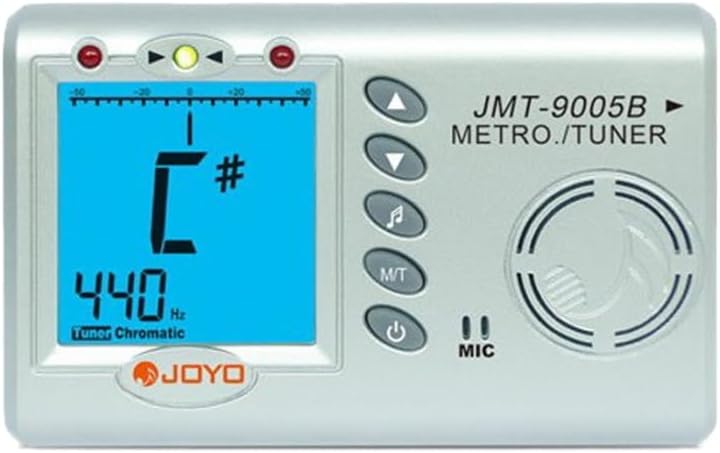
Figure 3.1: Front view of the JOYO JMT-9005B device.
Key Features:
- Chromatic Tuner: Supports Guitar, Bass, Violin, and Ukulele.
- Metronome: Adjustable tempo (30-250 bpm) and beat settings (0-9).
- Tone Generator: Produces reference tones from 4C to 4B.
- Backlight: For clear visibility in low-light conditions.
- Clip-on Pickup: For vibration-based tuning in noisy environments.
- Auto Shut-down: Conserves battery life if no signal is received for several minutes.
4. Setup
4.1 Battery Installation
- Locate the battery compartment on the back of the device.
- Slide open the battery cover.
- Insert the two AAA batteries, ensuring correct polarity (+/-).
- Close the battery cover securely.
4.2 Powering On/Off
- Press and hold the Power button to turn the device on or off.
4.3 Using the Clip-on Pickup
For tuning in noisy environments or for instruments where the built-in microphone may not pick up sound clearly, use the included clip-on pickup.
- Plug the clip-on pickup into the MIC input jack on the side of the device.
- Attach the clip to the headstock of your guitar/bass, or the bridge of your violin.
- The device will now detect vibrations directly from the instrument for tuning.
5. Operating Instructions
5.1 Switching Modes (Metronome / Tuner / Tone Generator)
Press the M/T button to cycle through the Metronome, Tuner, and Tone Generator modes.
5.2 Metronome Mode
In Metronome mode, the display will show tempo and beat settings. The device will emit audible clicks.
- Use the Up button and Down button to adjust the tempo (30-250 bpm).
- Press the Beat button to change the beat pattern (0, 1, 2, 3, 4, 5, 6, 7, 8, 9).
- The volume of the metronome click can be adjusted using the rotary dial.
5.3 Tuner Mode
In Tuner mode, the display will show the detected note, pitch deviation, and frequency. The device supports Chromatic, Guitar, Bass, Violin, and Ukulele tuning.
- Press the Instrument button (often combined with the Beat button or a dedicated button, refer to device markings) to select the desired instrument mode (Chromatic, Guitar, Bass, Violin, Ukulele).
- Play a single note on your instrument. The display will indicate the note name and whether it is sharp, flat, or in tune.
- Adjust your instrument's tuning pegs until the display shows the correct note and the indicator is centered.
5.4 Tone Generator Mode
In Tone Generator mode, the device produces a continuous reference tone for manual tuning by ear.
- Use the Up button and Down button to select the desired reference note (4C - 4B).
- Match the pitch of your instrument to the tone produced by the device.
- The volume of the tone can be adjusted using the rotary dial.
6. Maintenance
- Keep the device clean by wiping it with a soft, dry cloth.
- Avoid exposing the device to extreme temperatures, humidity, or direct sunlight.
- Remove batteries if the device will not be used for an extended period to prevent leakage.
- Do not attempt to disassemble or repair the device yourself. Refer to qualified service personnel.
7. Troubleshooting
| Problem | Possible Cause | Solution |
|---|---|---|
| Device does not power on. | Low or dead batteries; incorrect battery polarity. | Replace batteries; ensure correct polarity. |
| Tuner not detecting sound. | Microphone blocked; noisy environment; clip-on pickup not connected or faulty. | Ensure microphone is clear; use clip-on pickup; check pickup connection. |
| Metronome click is too quiet/loud. | Volume dial setting. | Adjust the rotary volume dial. |
| Auto shut-down occurs too quickly. | No input signal detected for several minutes. | This is a power-saving feature. Resume playing or press a button to reactivate. |
8. Specifications
| Feature | Detail |
|---|---|
| Model Number | JMT-9005B |
| Functions | Metronome, Tuner, Tone Generator |
| Tuning Range | 0A-8C |
| Tone Generator Range | 4C - 4B |
| Tuning Modes | Chromatic, Guitar, Bass, Violin, Ukulele |
| Tempo Range (Metronome) | 30 - 250 bpm |
| Beat Settings (Metronome) | 0, 1, 2, 3, 4, 5, 6, 7, 8, 9 |
| Power Supply | 2 x AAA Batteries |
| Display | Backlit LCD |
| Special Features | Clip-on pickup, Auto shut-down |
9. Warranty and Support
For warranty information and technical support, please refer to the official JOYO website or contact your local distributor. Keep your purchase receipt as proof of purchase.


