
COOLGEEK VS-01
COOLGEEK Upright Vinyl Turntable User Manual
Model: VS-01
1. Product Overview
The COOLGEEK Upright Vinyl Turntable (Model VS-01) offers a unique vertical design, allowing for an unobstructed view of your vinyl records while playing. This innovative design also helps minimize dust accumulation on the record surface, contributing to a purer audio experience.
Equipped with a built-in 5W hybrid mid/tweeter driver and a powerful 30W heavy bass unit, the VS-01 delivers rich, immersive sound across all frequencies. The integrated subwoofer enhances low-frequency sound waves, creating a robust bass effect. An in-built HIFI amplifier with RIAA curve equalization ensures balanced playback frequencies, providing a high-fidelity audio experience.
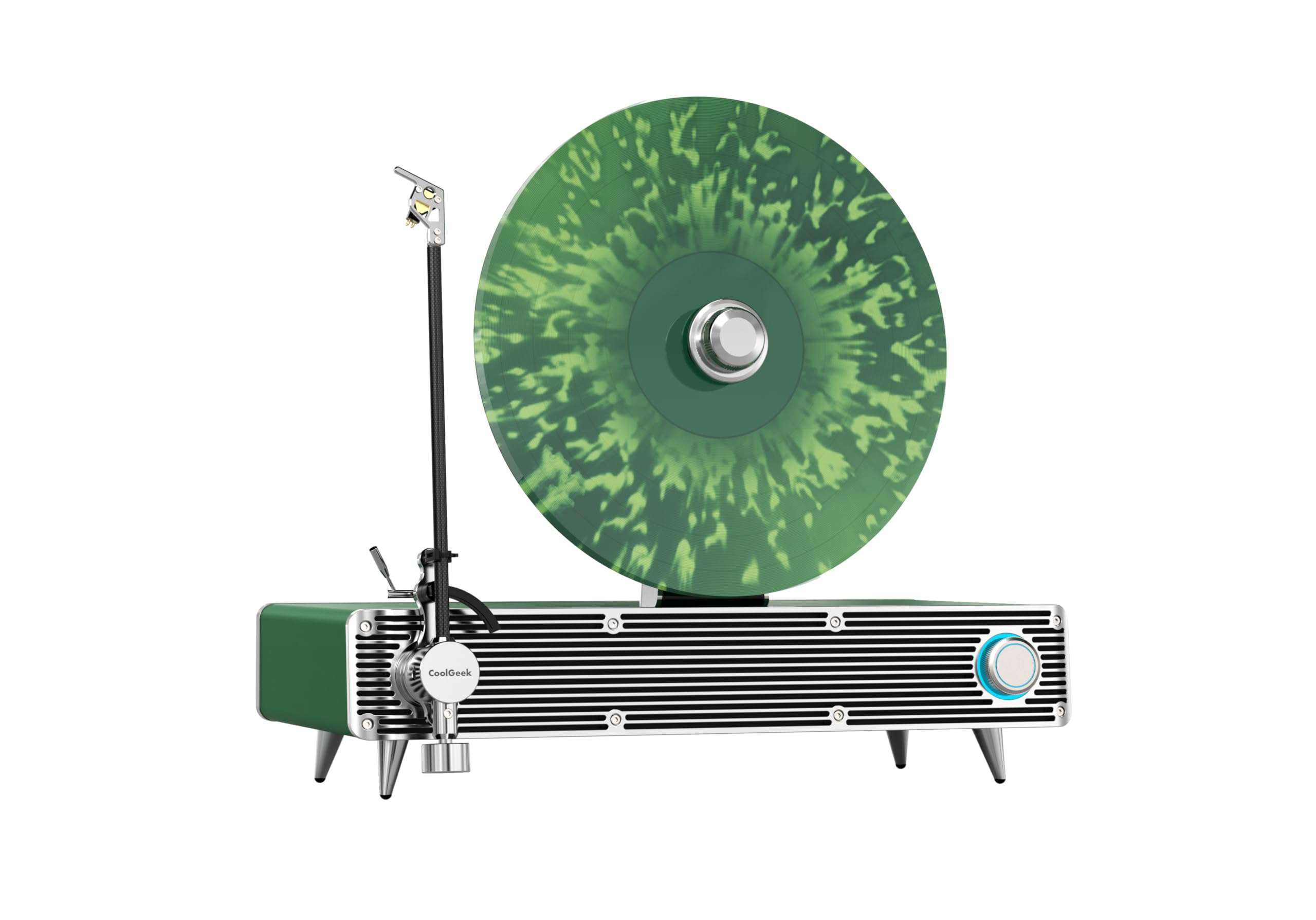
Image 1.1: The COOLGEEK Upright Vinyl Turntable, featuring its distinctive vertical record playback design. The turntable is green with silver accents, and a green vinyl record is mounted vertically on the platter.
Key Features:
- Vertical Record Playback: Unique upright design for visual appeal and reduced dust accumulation.
- High-Fidelity Audio: Features a 5W hybrid mid/tweeter driver and a 30W heavy bass unit for comprehensive sound.
- Enhanced Bass: Bottom subwoofer with precisely calculated inverted tube structure for shocking heavy bass.
- Integrated HIFI Amplifier: Includes RIAA curve equalization for balanced frequency playback.
- Bluetooth Connectivity: Seamlessly stream audio from compatible devices.
- AT-3600L Stylus Head: Equipped with a quality stylus for accurate tracking and sound reproduction.
2. Setup Guide
Follow these steps to set up your COOLGEEK Upright Vinyl Turntable:
- Unpacking: Carefully remove all components from the packaging. Ensure all items listed in the "What's in the Box" section are present.
- Placement: Place the turntable on a stable, level surface away from direct sunlight, heat sources, and excessive vibration. Ensure adequate ventilation around the unit.
- Power Connection: Connect the power adapter to the DC input port on the back of the turntable, then plug the adapter into a wall outlet.
- Stylus Protection Removal: Gently remove the clear plastic stylus protector from the AT-3600L stylus head. Be careful not to bend the stylus.
- Record Placement: The turntable is designed for vertical record playback. Carefully align your vinyl record with the central spindle and the support mechanism, ensuring it sits securely and upright on the platter.
- Tonearm Preparation: Release the tonearm lock. The tonearm is designed to move freely.
3. Operation
3.1 Playing a Vinyl Record
- Power On: Turn the power/volume knob clockwise to power on the unit. The indicator light will illuminate.
- Select Mode: Ensure the turntable is in Phono mode (if a mode selector is present).
- Place Record: Carefully place your vinyl record onto the vertical platter, ensuring it is centered and stable.
- Start Platter Rotation: The platter should begin to rotate automatically once a record is detected or the tonearm is moved.
- Position Tonearm: Gently lift the tonearm using the cueing lever (if available) or by hand. Carefully position the stylus over the desired starting groove of the record.
- Lower Tonearm: Slowly lower the tonearm onto the record. The music will begin to play.
- Adjust Volume: Use the volume knob to adjust the audio output to your desired level.
- End of Playback: At the end of the record, the tonearm may automatically lift and return to its rest, or you may need to manually lift it and return it to the tonearm rest. Secure the tonearm with the lock.
3.2 Bluetooth Operation
The COOLGEEK Upright Vinyl Turntable can also function as a Bluetooth speaker, allowing you to stream music wirelessly from your compatible devices.
- Power On: Turn the power/volume knob clockwise to power on the unit.
- Select Bluetooth Mode: Switch the turntable to Bluetooth mode. An audible prompt or indicator light will confirm Bluetooth pairing mode is active.
- Enable Bluetooth on Device: On your smartphone, tablet, or other Bluetooth-enabled device, go to the Bluetooth settings and ensure Bluetooth is enabled.
- Pairing: Search for available devices. You should see "COOLGEEK VS-01" or a similar name appear in the list. Select it to pair.
- Connection Confirmation: Once successfully paired, an audible confirmation will sound from the turntable.
- Play Music: You can now play music from your device, and the audio will be streamed through the turntable's speakers.
- Adjust Volume: Control the volume using both your device's volume controls and the turntable's volume knob.
4. Maintenance
Proper maintenance ensures the longevity and optimal performance of your turntable.
- Cleaning the Stylus: The stylus (needle) is delicate. Use a soft brush designed for stylus cleaning, brushing gently from back to front. Clean the stylus regularly to prevent dust buildup, which can affect sound quality and damage records.
- Cleaning the Turntable: Wipe the surface of the turntable with a soft, dry, lint-free cloth. For stubborn marks, slightly dampen the cloth with water. Avoid using harsh chemicals or abrasive cleaners.
- Record Care: Always handle records by their edges. Store them vertically in their sleeves to prevent warping and dust accumulation. Clean records with a dedicated record brush before each play.
- Dust Cover: While this vertical design minimizes dust, consider a custom dust cover if available or keep the area clean to protect the exposed components.
- Stylus Replacement: The AT-3600L stylus has a finite lifespan (typically 300-500 hours of play). If you notice a degradation in sound quality or skipping, it may be time to replace the stylus. Consult the manufacturer for compatible replacement styli.
5. Troubleshooting
If you encounter issues with your turntable, refer to the following common problems and solutions:
| Problem | Possible Cause | Solution |
|---|---|---|
| No power | Power cord not connected; Power outlet not active; Power knob off. | Ensure power cord is securely plugged in. Test outlet with another device. Turn power knob clockwise to ON. |
| No sound or low sound | Volume too low; Stylus protector still on; Stylus damaged or dirty; Incorrect mode selected. | Increase volume. Remove stylus protector. Clean or replace stylus. Ensure correct mode (Phono/Bluetooth) is selected. |
| Skipping or distorted sound | Dirty record; Dirty or damaged stylus; Turntable not level; Excessive vibration. | Clean record. Clean or replace stylus. Place turntable on a stable, level surface. Avoid placing near speakers or vibrating objects. |
| Bluetooth not connecting | Turntable not in pairing mode; Device Bluetooth off; Device too far. | Ensure turntable is in Bluetooth pairing mode. Turn Bluetooth on your device. Move device closer to the turntable (within 10 meters). |
| Record not spinning | Power off; Drive belt dislodged (unlikely for vertical design but possible); Sensor issue. | Check power. If issue persists, contact customer support. |
6. Specifications
| Feature | Detail |
|---|---|
| Brand | COOLGEEK |
| Model | VS-01 (Upright Vinyl Turntable) |
| ASIN | B0F9B1ZZ2H |
| Material | Metal |
| Audio Output | Built-in 5W hybrid mid/tweeter driver, 30W heavy bass unit |
| Stylus | AT-3600L Stylus Head |
| Connectivity | Bluetooth, Vinyl Playback |
| Amplifier | In-built HIFI amplifier with RIAA curve |
| Number of Items (in box) | 5 (including record player) |
| UPC | 726634646031 |
| Manufacturer | COOLGEEK |
| Date First Available | May 20, 2025 |
7. Warranty & Support
COOLGEEK products are manufactured to the highest quality standards. For specific warranty details regarding your Upright Vinyl Turntable (Model VS-01), please refer to the warranty card included with your product or visit the official COOLGEEK website.
For technical support, troubleshooting assistance, or inquiries about replacement parts (such as the AT-3600L stylus), please contact COOLGEEK customer service. You can often find support contact information on the brand's official store page or through the retailer where you purchased the product.
Online Support: Visit the COOLGEEK Store on Amazon for more information and potential contact options.
Please have your product model (VS-01) and ASIN (B0F9B1ZZ2H) ready when contacting support.
Related documentsVS-01

Ask a question about this manual
Ask about setup, troubleshooting, compatibility, parts, safety, or missing instructions. Manuals+ will review the question and use this page’s manual context to help answer it.