
Introduction
Thank you for choosing the TCL QLED 55 Inch 55P7K 4K Google TV. This manual provides essential information for the safe and efficient use of your television. Please read these instructions thoroughly before operating the device and retain them for future reference.
Important Safety Information
Always follow basic safety precautions when using this television to reduce the risk of fire, electric shock, and injury. Keep the television away from moisture and heat sources. Do not block ventilation openings. Refer to the full safety guidelines in the packaging for comprehensive details.
What's in the Box
Upon unpacking, ensure all items are present and undamaged:
- TCL QLED 55 Inch 55P7K 4K UHD Google TV
- Remote Control
- 1 AAAA Battery (for remote control)
- Power Cord
- TV Stands (2 pieces)
- Screws for TV Stands
- User Manual (this document)
Setup
1. Stand Installation
If you plan to place the TV on a table, attach the included stands. Place the TV face down on a soft, flat surface to prevent screen damage. Align each stand with the corresponding slots on the bottom of the TV and secure them with the provided screws.
2. Wall Mounting
For wall mounting, remove the stands. This TV supports a VESA mount standard of 200 x 200 mm. Use a compatible wall mount bracket (sold separately) and follow its instructions carefully. Ensure the wall can support the weight of the TV (approximately 10.5 Kilograms) and the mount.
3. Connecting Peripherals
The back of the TV features various ports for connecting external devices. Refer to the image below for port locations.
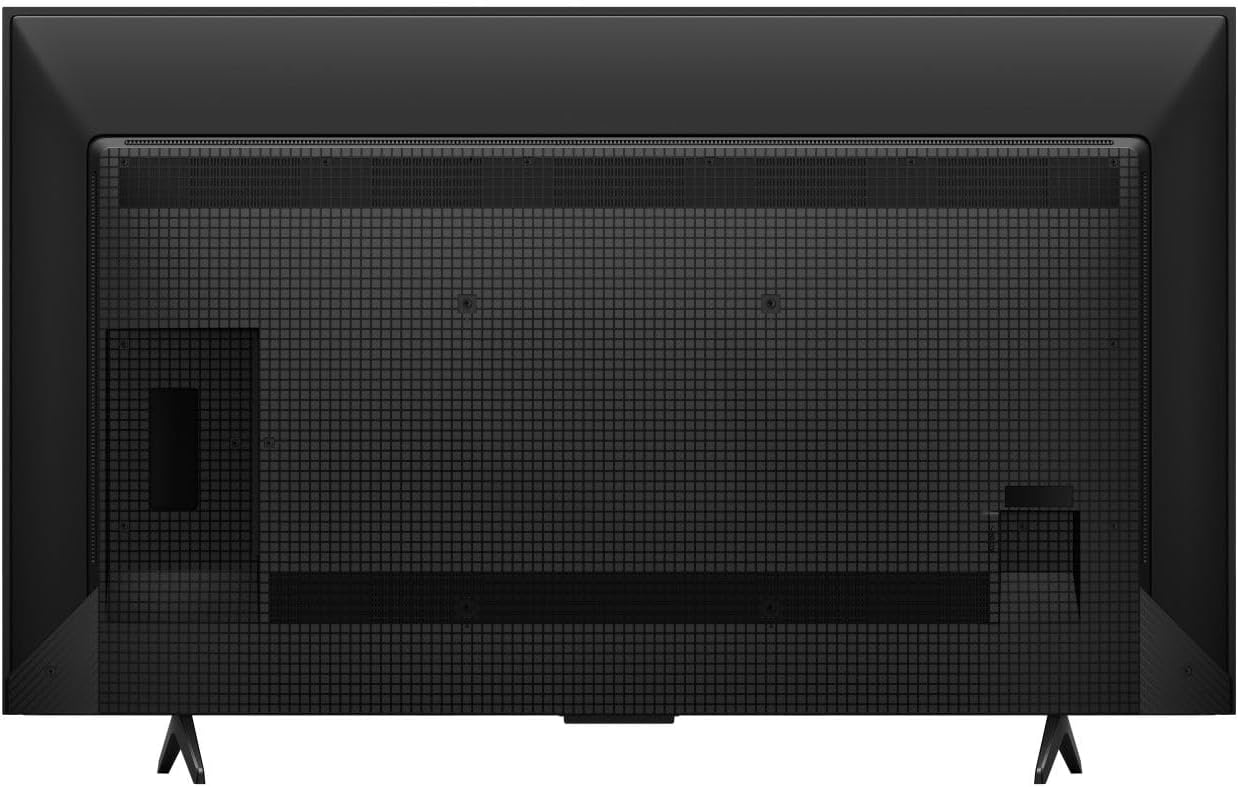
Image: Rear view of the TCL 55P7K television, illustrating the layout of connectivity ports (HDMI, USB, Ethernet) and the VESA mounting screw holes. The stand attachment points are also visible at the bottom.
- HDMI Ports: Connect Blu-ray players, game consoles, and other HDMI-enabled devices.
- USB Ports: Connect USB storage devices for media playback.
- Ethernet Port: For a wired internet connection.
- Antenna/Cable Input: For connecting an antenna or cable TV.
4. Initial Power On and Google TV Setup
After connecting all necessary cables, plug the power cord into an electrical outlet (100-240 VAC, 50-60 Hz). Press the power button on the remote control or the TV. Follow the on-screen instructions to complete the initial setup, including network connection (Wi-Fi or Ethernet), Google account login, and channel scanning.
Operating Your TV
1. Remote Control
The included remote control allows you to navigate the Google TV interface, adjust settings, and control playback. Insert the provided AAAA battery into the remote. The remote supports voice control for convenient operation.
2. Google TV Interface
Your TCL 55P7K runs on Google TV, providing access to a wide range of streaming services and apps. Supported internet services include Netflix, Hulu, Amazon Prime Video, Disney+, YouTube, and many others available through the Google Play Store.
3. Picture Settings
The QLED display technology delivers vibrant colors and excellent contrast. You can customize picture settings to your preference:
- Resolution: Native 4K UHD (3840 x 2160 pixels).
- Refresh Rate: 120 Hz for smooth motion.
- HDR Support: HDR10 for enhanced contrast and color.
- Brightness: Up to 500 Nit peak brightness.
- Adjust modes like Standard, Movie, Sport, or customize settings for brightness, contrast, color, and sharpness.
4. Audio Settings
Experience immersive sound with Dolby Atmos and 5.1 channel audio support. Access audio settings to adjust volume, sound modes (e.g., Standard, Music, Movie), and equalizer settings.
5. Connectivity
The TV offers flexible connectivity options:
- Wi-Fi: Connect wirelessly to your home network.
- Ethernet: For a stable wired internet connection.
- HDMI: Multiple ports for various devices.
- USB: For media playback from external drives.
6. Special Features
The TV includes a Sleep Timer feature, allowing you to set a time for the TV to automatically turn off.
Maintenance
1. Cleaning Your TV
Before cleaning, unplug the power cord. Use a soft, dry cloth to wipe the screen and cabinet. For stubborn marks, lightly dampen the cloth with water or a mild, non-abrasive screen cleaner. Never spray cleaner directly onto the screen or allow liquids to enter the TV's openings.
2. Software Updates
Your TV may receive periodic software updates to improve performance and add new features. Ensure your TV is connected to the internet to receive these updates. You can usually check for updates in the TV's settings menu.
Troubleshooting
If you encounter issues with your TV, refer to the following common solutions:
- No Power: Ensure the power cord is securely plugged into both the TV and a working electrical outlet. Try a different outlet.
- No Picture/Sound: Check that the correct input source is selected. Verify all cables (HDMI, antenna) are properly connected.
- Poor Picture Quality: Adjust picture settings (brightness, contrast, sharpness). Ensure the input source is providing a high-quality signal.
- No Internet Connection: Check your Wi-Fi router or Ethernet cable. Reconnect to the network in the TV's settings.
- Remote Control Not Working: Replace the AAAA battery. Ensure there are no obstructions between the remote and the TV.
For more complex issues, please contact TCL customer support.
Specifications
| Feature | Detail |
|---|---|
| Model Name | 55P7K |
| Brand | TCL |
| Screen Size | 55 Inches |
| Display Technology | QLED |
| Resolution | 4K UHD (3840 x 2160) |
| Refresh Rate | 120 Hz |
| HDR Format Supported | HDR10 |
| Maximum Display Brightness | 500 Nit |
| Integrated Surround Sound Format | Dolby Atmos, 5.1 channel |
| Supported Internet Services | Netflix, Hulu, Amazon Prime Video, Disney+, YouTube, Google TV |
| Connectivity Technology | Ethernet, HDMI, USB, Wi-Fi |
| Hardware Interface | Ethernet, HDMI, USB |
| Total USB 3.0 Ports | 1 |
| Control Method | Remote, Voice |
| Mounting Type | Table Mount, Wall Mount |
| VESA Mount Standard | 200 x 200 mm |
| Item Weight | 10.5 Kilograms |
| Line Voltage | 100-240 VAC 50-60 Hz |
| Included Components | TV, Remote, 1 AAAA battery |
| Special Feature | Sleep Timer |
Warranty Information
This TCL 55P7K television comes with a Limited Warranty. Please refer to the warranty card included in your product packaging or visit the official TCL website for detailed terms and conditions, including coverage period and service procedures.
Customer Support
For technical assistance, troubleshooting, or service inquiries, please contact TCL Customer Support. You can find contact information on the official TCL website or in your product documentation.
Manufacturer: TCL


