
1. Introduction
The CountureMode AK700 is a state-of-the-art multi-functional detector designed to safeguard your privacy and security. Utilizing advanced AI chips, infrared light, and sensor technologies, this device accurately identifies and locates hidden cameras, RF signals, listening devices, recording devices, and GPS trackers. It is an essential tool for ensuring personal safety in various environments, including travel accommodations, hotels, offices, and personal vehicles.

Image 1.1: The CountureMode AK700 Detector, showcasing its main unit, antenna, and flexible magnetic probe.
2. Product Overview and Key Features
The AK700 detector offers comprehensive protection against various surveillance threats. Its design focuses on ease of use combined with powerful detection capabilities.
2.1 Core Capabilities
- Comprehensive Detection: Capable of detecting hidden spy cameras, RF signals, listening devices, recording devices, and GPS trackers.
- Wide Frequency Range: Detects signals from 1MHz to 10GHz, covering a broad spectrum of wireless devices.
- Extended Detection Range: Identifies hidden devices from 5cm up to 15 meters away.
- High-Speed Scanning: Scans up to 2,000 times per second for rapid and accurate threat identification.
- AI Chip Technology: Enhanced detection accuracy and efficiency through integrated artificial intelligence.
2.2 Design and Components
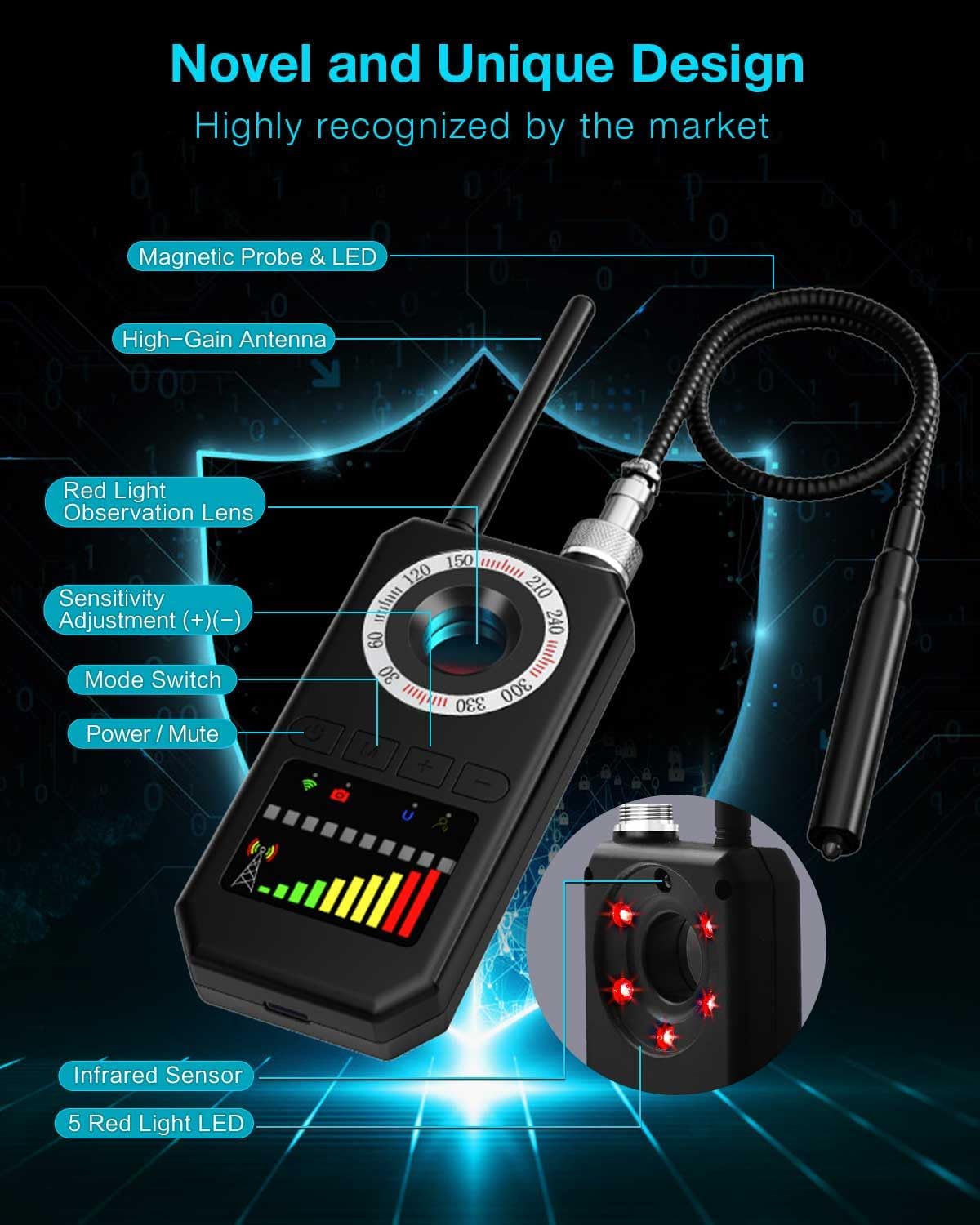
Image 2.1: Detailed view of the AK700 detector with key components labeled for identification.
- High-Gain Antenna: Improves signal reception for wireless detection.
- Red Light Observation Lens: Used for visual detection of hidden camera lenses.
- Freely Bendable Magnetic Probe: Essential for detecting magnetic GPS trackers and other magnetic devices in hard-to-reach areas.
- Infrared Sensor: For detecting infrared night vision cameras.
- Visual Panel: Clear, real-time display for data and signal strength.
- 5 Red Light LEDs: Assist in infrared detection.
- Intuitive Controls: Two-button operation for mode selection and sensitivity adjustment.
3. Setup
3.1 Unpacking and Initial Inspection
Upon opening the package, verify that all components are present and undamaged. The box should contain:
- CountureMode AK700 Detector Unit
- Charging Cable
- Freely Bendable Magnetic Probe
- 1 x 12V Battery (pre-installed or included separately)
3.2 Charging the Device
Before first use, fully charge the AK700 detector. Connect the charging cable to the device and a suitable USB power source. A full charge typically takes approximately 2 hours and provides up to one week of uninterrupted protection, depending on usage.
3.3 Attaching the Magnetic Probe
The Freely Bendable Magnetic Probe can be attached to the designated port on the top of the detector unit. Ensure it is securely fastened for effective magnetic detection.
4. Operating Instructions
The AK700 features a simple two-button operation for selecting detection modes and adjusting sensitivity. Familiarize yourself with the device's controls before use.
4.1 Power On/Off and Mode Selection
- Power Button: Press and hold to power the device on or off. A short press can also mute/unmute the device.
- Mode Button (M): Press to cycle through the four detection modes: Wireless Detection, Red Light Detection, Magnetic Detection, and Infrared Detection. The active mode will be indicated on the visual panel.
- Sensitivity Adjustment (+/-): Use the '+' and '-' buttons to adjust the detection sensitivity. There are 5 adjustable levels, allowing for precise scanning in different environments. Higher sensitivity is suitable for larger areas or weaker signals, while lower sensitivity helps pinpoint the exact location of a strong signal.
4.2 Detection Modes Explained
The AK700 offers four distinct detection modes:
- Wireless Detection (RF Signal): Detects active wireless signals from hidden cameras, listening devices, and GPS trackers. The signal strength is displayed on the visual panel.
- Red Light Detection: Used to visually locate hidden camera lenses. The device emits a red light that reflects off camera lenses, making them visible through the observation lens.
- Magnetic Detection: Utilizes the magnetic probe to find magnetic GPS trackers or other magnetic surveillance devices, often attached to vehicles or metallic surfaces.
- Infrared Detection: Identifies cameras that use infrared for night vision, even if the infrared light is not visible to the naked eye.
4.3 How to Detect Hidden Cameras

Image 4.1: Step-by-step guide for detecting hidden cameras.
- Step 1: Wireless Detection. Activate Wireless Detection mode. Scan the area slowly. If a signal is detected, the indicator lights will illuminate, and an audible alert may sound. Adjust sensitivity to pinpoint the source.
- Step 2: Infrared Detection. Switch to Infrared Detection mode. Scan the room, particularly dark areas or objects that might conceal a camera. Look for bright spots or flashes indicating an infrared emitter.
- Step 3: Red Light Detection. Activate Red Light Detection mode. Look through the observation lens while sweeping the device across the room. Hidden camera lenses will appear as bright red dots due to reflection. Pay close attention to common hiding spots like smoke detectors, clocks, power outlets, and decorative items.
4.4 How to Detect GPS Trackers

Image 4.2: Step-by-step guide for detecting GPS trackers.
- Step 1: Wireless Detection. Use Wireless Detection mode to scan your vehicle (interior and exterior) for active GPS signals. Pay attention to areas under seats, dashboard, and bumpers.
- Step 2: Strong Magnetic Detection. Attach the Freely Bendable Magnetic Probe. Activate Magnetic Detection mode. Systematically sweep the probe along the underside of your vehicle, wheel wells, bumpers, and any metallic surfaces where a magnetic tracker could be covertly attached. The device will alert you to the presence of magnetic fields.
4.5 How to Detect Eavesdropping Devices

Image 4.3: Step-by-step guide for detecting eavesdropping devices.
- Step 1: Wireless Detection. Activate Wireless Detection mode. Scan rooms, furniture, and common areas where listening devices might be hidden. The device will indicate the presence and strength of RF signals.
- Step 2: Magnetic Detection. For wired or magnetic listening devices, use the Magnetic Detection mode with the probe. Sweep the probe over walls, under tables, and inside objects where such devices could be concealed.
5. Maintenance
Proper maintenance ensures the longevity and optimal performance of your CountureMode AK700 detector.
- Cleaning: Use a soft, dry cloth to clean the device. Avoid using abrasive cleaners, solvents, or harsh chemicals, as these can damage the surface and internal components.
- Storage: Store the detector in a cool, dry place away from direct sunlight and extreme temperatures. Keep it in its original packaging or a protective case when not in use to prevent damage.
- Battery Care: Recharge the device regularly, even if not in frequent use, to maintain battery health. Avoid fully discharging the battery for extended periods.
- Probe Care: Handle the magnetic probe carefully. Avoid excessive bending or forceful manipulation that could damage its internal wiring.
6. Troubleshooting
If you encounter issues with your AK700 detector, refer to the following common problems and solutions:
| Problem | Possible Cause | Solution |
|---|---|---|
| Device does not power on | Low battery; Faulty charging cable/adapter | Charge the device fully. Ensure charging cable and adapter are functional. |
| No detection or weak signal | Low sensitivity setting; Device too far from source; Interference | Increase sensitivity. Move closer to the suspected area. Minimize other electronic devices nearby. |
| False positives (alerts without a device) | High sensitivity setting; Nearby legitimate electronic devices (Wi-Fi, phones) | Decrease sensitivity. Temporarily turn off personal electronic devices. |
| Red Light Detection not working | Insufficient darkness; Camera lens not reflective | Ensure the room is as dark as possible. Sweep slowly and thoroughly. Not all camera lenses reflect equally. |
| Magnetic Probe not detecting | Probe not securely attached; Device not in Magnetic Detection mode; Non-magnetic device | Ensure probe is firmly connected. Select Magnetic Detection mode. Confirm the suspected device is magnetic. |
If the problem persists after attempting these solutions, please contact CountureMode customer support for further assistance.
7. Specifications
Detailed technical specifications for the CountureMode AK700 detector:
- Model Number: AK700
- Product Dimensions: 4.3 x 2.2 x 0.8 inches
- Item Weight: 8.1 ounces
- Batteries: 1 x 12V battery (included)
- Battery Life: Up to 7 days (depending on usage)
- Connectivity Technology: Wireless
- Detection Frequency Range: 1MHz to 10GHz
- Detection Distance: 5cm to 15m
- Scanning Speed: Up to 2,000 times per second
- Special Features: Freely Bendable Magnetic Probe, High gain antenna, Multi-level adjustable sensitivity, AI chip
- Color: Black
- Included Components: Charging cable, Freely Bendable Magnetic Probe
- Manufacturer: CountureMode
8. Warranty and Support
CountureMode stands behind the quality of its products. The AK700 smart hidden camera detector comes with a two-year warranty from the date of purchase.
If you encounter any issues with your device or require assistance, please do not hesitate to contact our customer support team. We are committed to providing excellent after-sales service and will respond to your inquiries within 24 hours.
For support, please refer to the contact information provided with your purchase or visit the official CountureMode website.


