
Important Safety Information
Always follow the assembly instructions provided. Do not exceed the maximum weight recommendation of 176 pounds to ensure stability and prevent tipping or collapse.
Product Overview
The Marsail Nightstand is designed to provide convenient storage and charging capabilities. It features a natural oak wood grain finish, a fluted drawer, an open shelf, and an integrated charging station.

Image: Marsail Nightstand in Natural Oak, showcasing its design and functionality.
Key Features:
- Integrated Charging Station: Includes 2 AC outlets (125V/12A), 1 USB-C port, and 1 USB-A port with a 6.2-foot power cord.
- Storage: Features one deep drawer with smooth gliding slides and an open storage shelf.
- Durable Construction: Crafted from high-quality, water-resistant P2 engineered wood with a natural oak wood grain finish.
- Design: Modern fluted panel design with an ergonomic wide metal handle.
- Stability: Equipped with adjustable leveling feet for stability on uneven surfaces.
- Cable Management: Includes a discreet cable management hole.
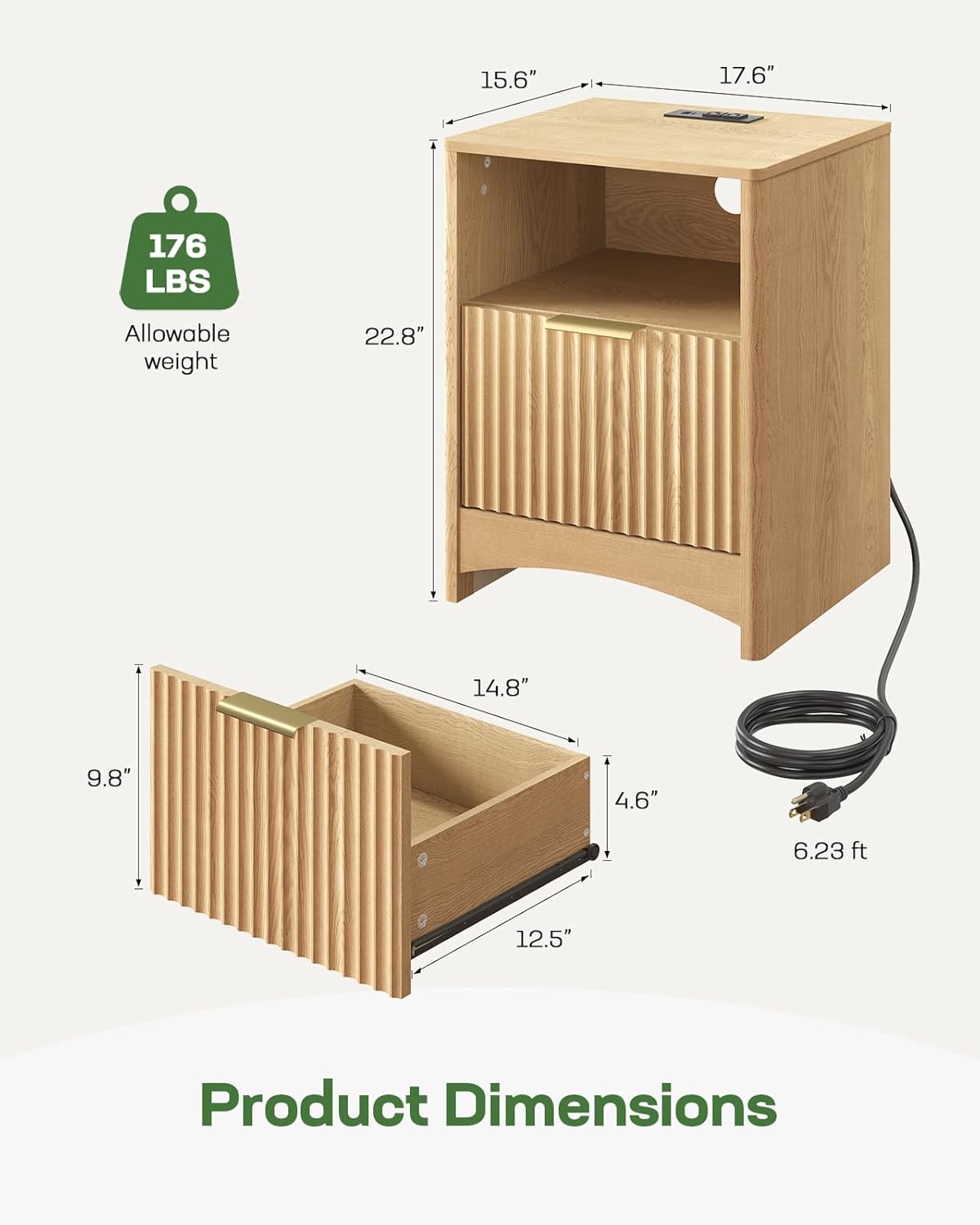
Image: Detailed product dimensions, including height, width, depth, drawer size, and power cord length. Maximum allowable weight is 176 lbs.

Image: The Marsail Nightstand positioned next to a sofa in a living room, demonstrating its versatility as an end table.

Image: A display of the Marsail furniture collection, featuring the nightstand alongside a matching coffee table and TV console.
Setup and Assembly
Before beginning assembly, ensure all parts and hardware are present. Refer to the included assembly guide for detailed step-by-step instructions.
Tools Required:
- Allen Key (usually included)
- Screwdriver (Phillips head recommended)
Assembly Video:
Video: Step-by-step assembly guide for the Marsail Fluted Nightstand. This video demonstrates the process of putting together the nightstand components.
Follow the instructions carefully to ensure proper and secure assembly. Do not overtighten screws.
Operating Instructions
Using the Charging Station:
- Locate the power cord extending from the back of the nightstand.
- Plug the power cord into a standard 125V wall outlet.
- The charging station, located on the top surface, provides two AC outlets, one USB-A port, and one USB-C port.
- Connect your electronic devices to the appropriate ports for charging.

Image: Close-up of the built-in charging station, showing 2 AC outlets, 1 USB-A port, and 1 USB-C port, with devices connected.

Image: The nightstand with a phone and tablet charging on its top surface, demonstrating the convenience of the integrated charging station.
Drawer and Shelf Usage:
- The deep drawer provides enclosed storage for personal items. Pull the metal handle to open and push to close.
- The open shelf offers easy access storage for books, decor, or other bedside essentials.

Image: The nightstand with its drawer open, revealing storage space, and the open shelf displaying items like books and headphones.
Maintenance
- Cleaning: Wipe surfaces with a soft, damp cloth. Avoid harsh chemicals or abrasive cleaners, which can damage the finish.
- Spills: Immediately wipe up any spills to prevent water damage to the engineered wood.
- Placement: Avoid placing the nightstand in direct sunlight or near heat sources to prevent warping or fading.
- Weight Limit: Do not exceed the maximum weight capacity of 176 pounds on the top surface or within the drawer.
- Power Cord: Regularly inspect the power cord for any signs of damage. If damaged, discontinue use and contact customer support.
Troubleshooting
Charging Station Not Working:
- Check Power Connection: Ensure the nightstand's power cord is securely plugged into a functional wall outlet.
- Test Outlet: Try plugging another device into the wall outlet to confirm it is receiving power.
- Device Compatibility: Ensure your device is compatible with the USB-A/USB-C ports or AC outlets.
- Overload: Avoid overloading the charging station with too many high-power devices simultaneously.
Drawer Sticking or Not Sliding Smoothly:
- Check Alignment: Verify that the drawer slides are properly aligned and free from obstructions.
- Lubrication: Apply a small amount of silicone-based lubricant to the drawer slides if they are stiff.
- Weight: Ensure the drawer is not overloaded, which can hinder smooth operation.
Nightstand Wobbles:
- Adjust Leveling Feet: Use the adjustable leveling feet at the bottom of the nightstand to stabilize it on uneven floors.
- Tighten Screws: Check all assembly screws and tighten them if loose. Do not overtighten.
Specifications
| Feature | Detail |
|---|---|
| Brand | Marsail |
| Model Number | VCAMNS02N-V-US-42 |
| Product Dimensions | 15.6"D x 17.6"W x 22.8"H |
| Item Weight | 56 pounds |
| Maximum Weight Recommendation | 176 pounds |
| Frame Material | Engineered Wood |
| Color | Natural Oak |
| Charging Station | 2 AC Outlets (125V/12A), USB-C Port, USB-A Port |
| Power Cord Length | 6.2 feet |
| Number of Drawers | 1 |
| Number of Items (in set) | 2 |
| Tools Recommended For Assembly | Allen Key, Screw Driver |
Warranty and Support
For warranty information or customer support, please refer to the documentation included with your purchase or contact Marsail customer service directly.
You can often find support contact details on the manufacturer's official website or through your retailer.