
Miroir SL3100
Miroir 3.1CH Dolby Atmos Soundbar
Model: SL3100
Brand: Miroir
1. Introduction
Thank you for choosing the Miroir 3.1CH Dolby Atmos Soundbar. This manual provides essential information for the safe and efficient operation of your new home theater system. Please read this manual thoroughly before use and retain it for future reference.
This soundbar system is designed to enhance your audio experience with 3.1 channels, virtual Dolby Atmos surround sound, and a wired subwoofer, delivering powerful and immersive audio for movies, music, and games.
2. Important Safety Information
To reduce the risk of electric shock, fire, or damage to your device, please observe the following precautions:
- Power Source: Use only the power adapter supplied with the unit. Ensure the voltage matches your local power supply.
- Ventilation: Do not block any ventilation openings. Install in accordance with the manufacturer's instructions. Maintain adequate space around the soundbar and subwoofer for proper airflow.
- Water and Moisture: This product is not water resistant. Do not expose the unit to rain, moisture, dripping, or splashing. Do not place objects filled with liquids, such as vases, on the apparatus.
- Heat: Do not install near any heat sources such as radiators, heat registers, stoves, or other apparatus (including amplifiers) that produce heat.
- Cleaning: Unplug the unit from the power outlet before cleaning. Use a dry, soft cloth only. Do not use liquid cleaners or aerosol cleaners.
- Servicing: Do not attempt to service this product yourself. Refer all servicing to qualified service personnel. Opening or removing covers may expose you to dangerous voltage or other hazards.
- Placement: Place the soundbar on a stable, flat surface or mount it securely on a wall using the provided wall-mounting kit. Ensure the subwoofer is placed on a stable surface.
3. What's in the Box
Carefully unpack all components and ensure you have received the following items:
- Soundbar
- Wired Subwoofer
- Power Adapter
- Remote Control (Requires 2 AAA batteries, not included)
- HDMI Cable
- HDMI Adapter
- Digital Optical Cable
- Stereo 3.5mm to 3.5mm Audio Cable
- Wall Mounted Kit (4 screws)
- Wall Brackets (2 pieces)
- User Manual (This document)
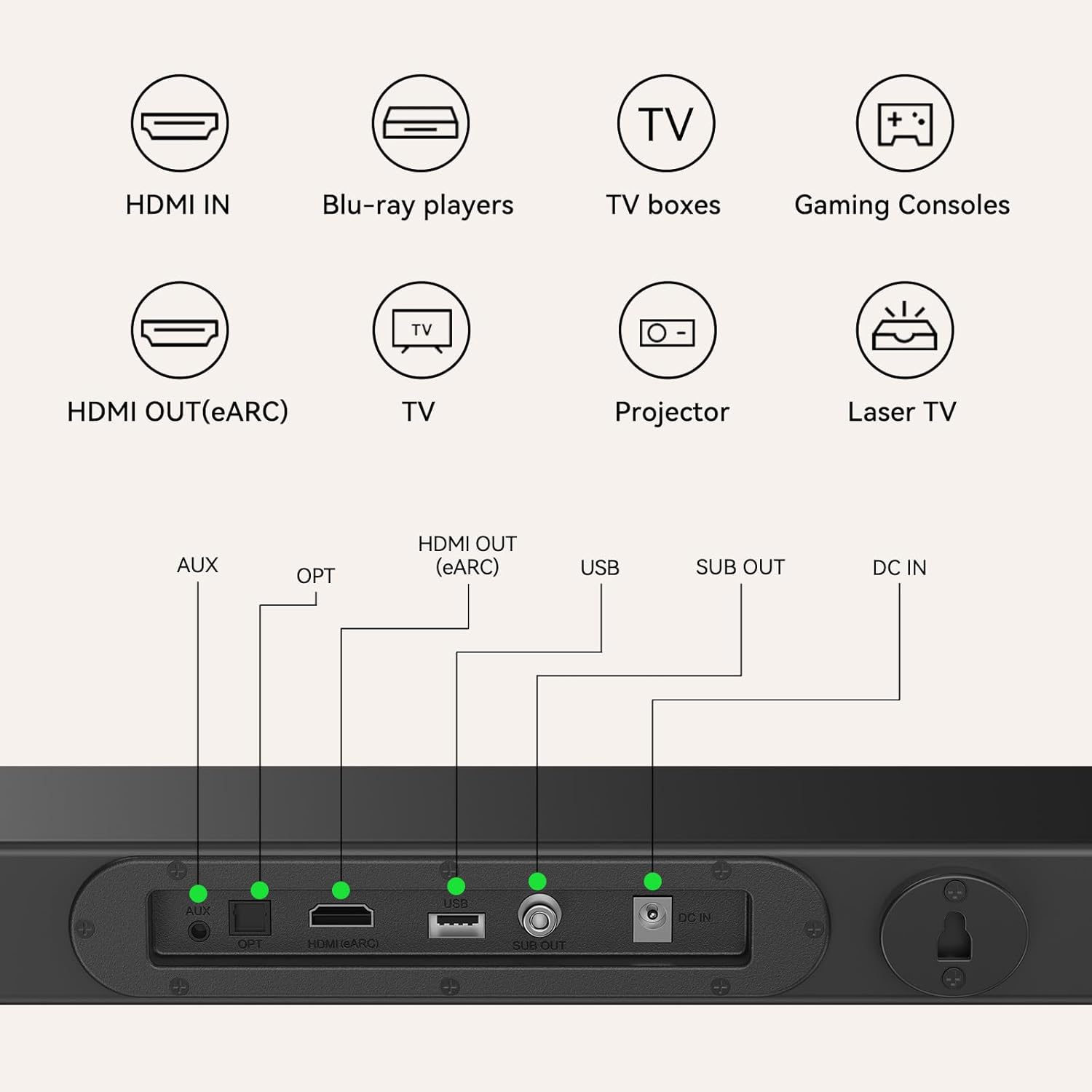
Image: All components included in the Miroir 3.1CH Dolby Atmos Soundbar package.
4. Setup Guide
4.1 Physical Placement
Place the soundbar directly in front of your TV, centered for optimal sound dispersion. The ultra-slim design allows it to fit under most TVs. Ensure the subwoofer is placed on the floor near the soundbar, ideally in a corner for enhanced bass response.
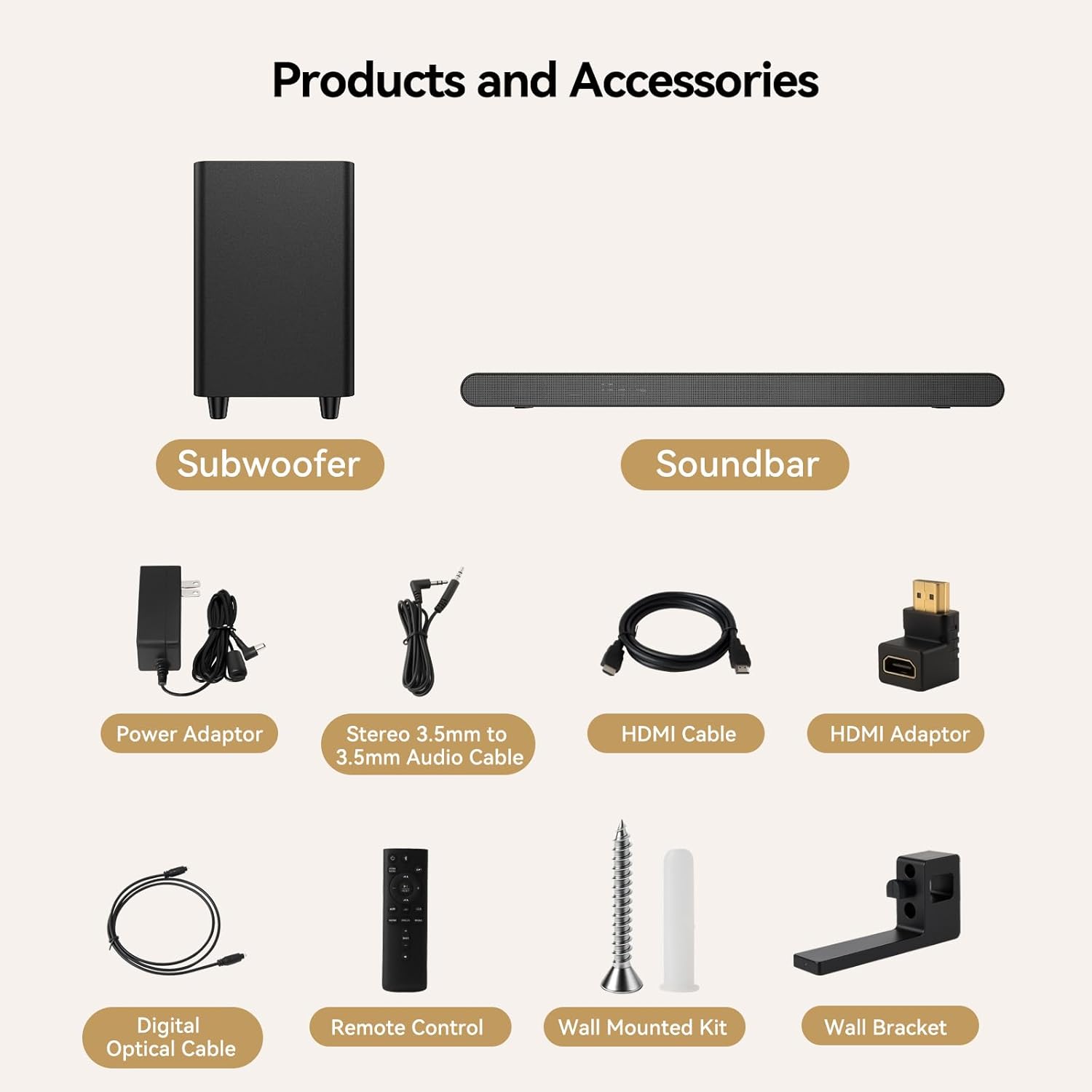
Image: The soundbar and subwoofer positioned in a typical home entertainment setup.
4.2 Wall Mounting (Optional)
If you prefer to wall-mount the soundbar, use the provided wall-mounting kit and brackets. Mark the desired positions on the wall, drill pilot holes, insert wall anchors, and secure the brackets. Then, attach the soundbar to the brackets.
4.3 Connecting the Subwoofer
Connect the wired subwoofer to the soundbar using the dedicated subwoofer output port on the soundbar. Ensure the connection is secure.
4.4 Connecting to Your TV/Audio Source
The soundbar offers multiple connectivity options:
- HDMI (eARC/ARC) (Recommended): Connect the HDMI cable from the soundbar's HDMI OUT (eARC) port to your TV's HDMI (eARC/ARC) port. This allows for high-quality audio transmission and control of the soundbar volume with your TV remote.
- Optical: Connect the Digital Optical Cable from the soundbar's OPT port to your TV's optical digital audio output.
- AUX: Connect the 3.5mm Audio Cable from the soundbar's AUX port to your TV's or device's 3.5mm audio output.
- Bluetooth: For wireless audio streaming from mobile devices, refer to Section 5.3 for Bluetooth pairing instructions.

Image: Rear view of the soundbar illustrating available connection ports.
4.5 Power Connection
Connect the power adapter to the soundbar's DC IN port, then plug the adapter into a wall outlet.
4.6 Remote Control Battery Installation
Open the battery compartment on the back of the remote control and insert two AAA batteries, ensuring correct polarity (+/-). Close the compartment.
5. Operating Instructions
5.1 Basic Operations
- Power On/Off: Press the Power button on the remote control or the soundbar to turn the unit on or off.
- Volume Control: Use the Volume Up (+) and Volume Down (-) buttons on the remote or soundbar to adjust the volume.
- Input Selection: Press the Input/Source button on the remote or soundbar to cycle through available input sources (HDMI, Optical, AUX, Bluetooth). The selected input will be displayed on the soundbar's LED indicator.
- Mute: Press the Mute button on the remote to temporarily silence the sound. Press again to restore sound.
5.2 Sound Modes and Features
- Dolby Atmos: The soundbar supports Dolby Atmos, providing a virtual 3D surround sound experience with overhead and immersive effects.
- 4K HDR Passthrough: When connected via HDMI, the soundbar supports 4K HDR signal passthrough, allowing high-quality video signals from your source device (e.g., PS5, Xbox, Blu-ray player) to pass through to your TV without loss of quality.
- Deep Bass: The 5-inch wired subwoofer delivers powerful low-frequency effects, enhancing explosions and rumbles in movies and providing rich bass for music.

Image: Virtual Atmos technology creates an immersive 3D surround sound experience.

Image: The wired subwoofer provides a powerful bass experience with a frequency response down to 55Hz.

Image: The soundbar supports 4K HDR signal passthrough via HDMI, ensuring high-quality video.
5.3 Bluetooth Pairing
To pair your mobile device with the soundbar via Bluetooth:
- Turn on the soundbar and switch to Bluetooth input mode. The LED indicator will flash, indicating it's in pairing mode.
- Enable Bluetooth on your mobile device (smartphone, tablet, etc.).
- Search for available devices and select "Miroir SL3100" from the list.
- Once connected, the LED indicator on the soundbar will stop flashing and remain solid. You can now stream audio wirelessly.

Image: Bluetooth 5.3 connectivity allows for seamless wireless music streaming.
6. Maintenance
6.1 Cleaning
To clean the soundbar and subwoofer, first unplug the power adapter from the wall outlet. Use a soft, dry, lint-free cloth to wipe down the surfaces. Do not use abrasive cleaners, waxes, or solvents as they may damage the finish.
6.2 Storage
If you plan to store the soundbar for an extended period, disconnect it from the power supply and store it in a cool, dry place, away from direct sunlight and extreme temperatures. It is recommended to keep the original packaging for storage and transport.
7. Troubleshooting
If you encounter issues with your Miroir soundbar, refer to the following common problems and solutions:
| Problem | Possible Cause | Solution |
|---|---|---|
| No power | Power cable not connected; outlet not active. | Ensure the power adapter is securely connected to the soundbar and a working wall outlet. |
| No sound | Incorrect input selected; volume too low; cables loose; TV speakers active. | Select the correct input source. Increase volume. Check all cable connections. Mute or turn off your TV's internal speakers. |
| Distorted sound | Volume too high; poor source quality; cable interference. | Reduce volume. Test with a different audio source. Ensure cables are not near other electronic devices causing interference. |
| Remote control not working | Batteries depleted or incorrectly inserted; obstacle blocking signal. | Replace batteries (2 AAA). Ensure correct polarity. Remove any obstacles between the remote and the soundbar's sensor. |
| Bluetooth pairing issues | Soundbar not in pairing mode; device too far; interference. | Ensure soundbar is in Bluetooth pairing mode (flashing LED). Move device closer to soundbar. Avoid strong Wi-Fi signals or other Bluetooth devices nearby. |
| Audio/Video sync delay (especially with HDMI ARC) | TV audio settings; specific HDMI port. | Ensure your TV's HDMI port is labeled ARC/eARC. Check your TV's audio settings for any audio delay or passthrough options. Try a different HDMI cable if the included one is faulty. |
8. Specifications
| Feature | Specification |
|---|---|
| Model Name | SL3100 |
| Audio Output Mode | Dolby Atmos (Virtual) |
| Speaker Type | Soundbar with Wired Subwoofer |
| Speaker Maximum Output Power | 390 Watts |
| Frequency Response | 20 KHz (Soundbar), 55Hz (Subwoofer) |
| Connectivity Technology | HDMI (eARC), Optical, AUX, Bluetooth 5.3 |
| Product Dimensions (Soundbar) | 24.34"D x 1.56"W x 2.96"H |
| Item Weight | 11.48 pounds (Total package) |
| Material | Plastic ABS |
| Color | Black |
| Mounting Type | Wall Mount, Tabletop |
| UPC | 653998478131 |
| Batteries Required (Remote) | 2 AAA batteries |
9. Warranty and Support
9.1 Limited Warranty
This Miroir product comes with a limited warranty. Please refer to the warranty card included in your package for specific terms and conditions, including the duration and coverage details. The warranty typically covers manufacturing defects under normal use.
9.2 Customer Support
For technical assistance, troubleshooting beyond this manual, or warranty claims, please contact Miroir customer support. Contact information can usually be found on the product packaging, the official Miroir website, or the warranty card.
Related documentsSL3100


Ask a question about this manual
Ask about setup, troubleshooting, compatibility, parts, safety, or missing instructions. Manuals+ will review the question and use this page’s manual context to help answer it.