
ELEMARA XB-1068
ELEMARA XB-1068 Kids Electric Bumper Car Instruction Manual
Model: XB-1068 | Brand: ELEMARA
Safety Information
WARNING: CHOKING HAZARD - Small parts. Not suitable for children under 37 months. The product contains small parts; keep children away when assembling.
General Safety Guidelines:
- Suitable for ages: 3-8 years.
- Keep away from fire.
- Maximum user weight is 66 lbs (30 kg).
- To reduce the risk of injury, adult supervision is required. Do not use in roadways, near motor vehicles, on or near steep inclines or steps, swimming pools, or other bodies of water. Always wear a safety belt.
- Never allow more than 1 rider.
- Read the assembly and operations manual before use.
- Do not wash the vehicle with water; only clean with a damp cloth.
- Check the vehicle periodically for damage by an adult.
- Any damage should be repaired before further use.
Package Contents
Ensure all items are present before assembly:
- Vehicle Body (1)
- Steering Wheel (1)
- Seat (1)
- Faceguard (1)
- Universal Wheels (3)
- Big Wheels (2)
- Wheel Covers (2)
- Remote Control (1)
- Charger (1)
- Socket Wrench (2)
- #4x16 Screws (various quantities)
- M10 Locknuts (2)
- M10 Washers (2)
- DIY Stickers (1 sheet)
- Instruction Manual (1)

Image: Contents of the ELEMARA Bumper Car package, including the car, remote, and DIY stickers.
Setup and Assembly
Follow these steps to assemble your ELEMARA Bumper Car. A detailed assembly video is provided below for visual guidance.
Assembly Video Guide
Video: Step-by-step assembly introduction for the ELEMARA Ride On Bumper Car. This video demonstrates how to attach the universal wheels, big wheels, steering wheel, faceguard, and connect the battery.
Step-by-Step Assembly
- Universal Wheels Assembly:
- Turn the vehicle body upside down.
- Fit the three universal wheels to the designated spots on the vehicle body.
- Insert and tighten four #4x16 screws with a screwdriver for each universal wheel.
- Big Wheels Assembly:
- Unscrew the M10 washers and M10 locknuts from the axle on each side of the vehicle.
- Slide each big wheel onto its respective rear axle, ensuring the gear aligns with the gearbox.
- Slide an M10 washer onto the rear axle, then tighten an M10 locknut to the end of the rear axle using the provided socket wrench. Repeat for the other wheel.
- "Snap" the wheel covers onto the big wheels.
- Steering Wheel Assembly:
- Insert the connector on the steering wheel into the corresponding connector on the vehicle body.
- Hide the plugged connectors into the hole in the body.
- Fit the steering wheel to the body, pushing it until you hear a "click" into place.
- Insert three #4x16 screws into the faceguard and tighten them with a screwdriver.
- Battery Connection:
- Insert the power connector into the battery connector.
- Fit the seat to the body, pushing it down firmly.
- Insert two #4x16 screws into the back of the seat and tighten with a screwdriver.
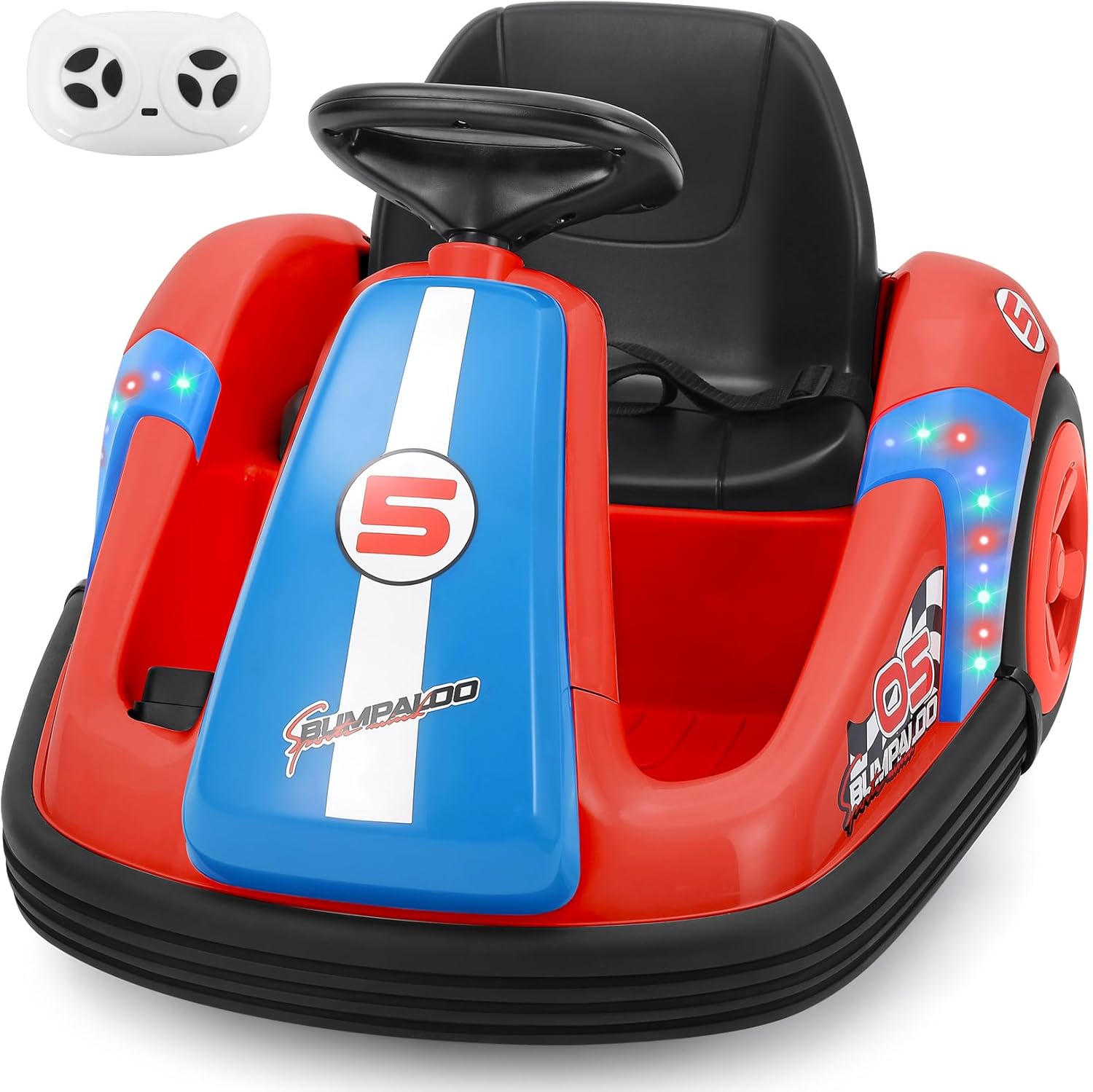
Image: The fully assembled ELEMARA Bumper Car, ready for use.
Operating Instructions
Powering On and Basic Controls
- Power Switch: Locate the power switch (red button) near the seat. Press to turn the car ON.
- Forward/Reverse Switch: Use the green switch to select forward or reverse motion.
- Foot Pedal: The child can press the foot pedal to accelerate the car. Releasing the pedal will stop the car.
- Steering Wheel: The steering wheel allows the child to control the direction of the car. It also features buttons for music and horn sounds.
- LED Lights: Activate or deactivate the LED lights using the dedicated light switch.
Remote Control Operation (Adult Supervision)
The remote control allows an adult to safely guide the car. Ensure the child is properly secured with the seatbelt before operating.
- Matching the Remote: If the remote control cannot be used, hold down the Forward and Backward buttons on the remote for 3 seconds to start the match code process. The first LED on the remote will flicker. Turn on the car's power; the first LED will light up, and the red indicator lights will stop flickering, indicating successful matching.
- Remote Functions: The remote typically includes buttons for Forward, Reverse, Left Turn, Right Turn, Brake, and Speed Selection.
- Speed Settings: The car offers manual control speed of 2.2 mph and remote speeds ranging from 1.6 to 2.2 mph.
Special Features
- 360-Degree Spin: The car is designed to perform 360-degree spins, adding an exciting element to playtime.
- Bluetooth Music & LED Lights: Connect a device via Bluetooth to play music. The integrated LED lights enhance the visual experience.
- DIY Stickers: Personalize the bumper car with the included DIY stickers.
Operation Videos
Video: Demonstrates the ELEMARA Bumper Car with Big Wheels in action, showcasing its movement and features.
Video: Shows the ELEMARA Kids Bumper Car with Big Wheels, highlighting its play modes and features.
Maintenance
Charging the Battery
- Ensure the power switch on the car is in the OFF position when charging.
- Locate the input socket (below the seat).
- Plug the charger port into the input socket on the car.
- Plug the charger into a standard wall outlet.
- The indicator light on the charger will be red when charging and will turn green when fully charged.
- WARNING: This product has Charging Protection. All functions will be cut off when charging.
Cleaning and Storage
- Clean the vehicle with a damp cloth only. Do not use water directly or harsh chemicals.
- Store the bumper car in a dry, cool place away from direct sunlight when not in use.
- Periodically check the vehicle for any loose parts or damage.
Troubleshooting
| Problem | Possible Cause | Solution |
|---|---|---|
| Car does not move. | Battery is low or not connected. Power switch is off. Forward/reverse switch is in neutral. | Charge the battery. Ensure battery connectors are secure. Turn power switch ON. Select forward or reverse. |
| Remote control not working. | Remote not paired with car. Remote battery low. | Follow remote pairing instructions (hold Forward & Backward buttons for 3 seconds). Replace remote batteries. |
| Lights or music not working. | Light/music switch is off. Bluetooth not connected. | Turn on the respective switch. Ensure Bluetooth device is paired and playing. |
| Car moves slowly. | Low battery. Overload (exceeds max weight). Driving on uneven surface. | Charge the battery. Ensure only one child is riding and within weight limit. Move to a smoother surface. |
Specifications
- Brand: ELEMARA
- Model Number: XB-1068
- Product Dimensions: 27 x 21.3 x 18.3 inches
- Item Weight: 16.85 pounds
- Recommended Age: 3 - 5 years
- Maximum User Weight: 66 lbs (30 kg)
- Battery: 12V (included)
- Speed: Manual control 2.2 mph; Remote control 1.6 - 2.2 mph
- Features: Large Wheels, Two Driving Modes (Steering Wheel, Remote Control), DIY Stickers, Bluetooth Music, LED Lights, 360-Degree Spin
Support
For any questions, concerns, or technical assistance, please contact ELEMARA customer support.
Email: officialcssupport@elemara.us
Please have your model number (XB-1068) and purchase information ready when contacting support.
Related documentsXB-1068


Ask a question about this manual
Ask about setup, troubleshooting, compatibility, parts, safety, or missing instructions. Manuals+ will review the question and use this page’s manual context to help answer it.