
Introduction
The Nuoxiange F668 OTG Audio Mixer Sound Card is a versatile audio interface designed for live streaming, gaming, karaoke, and recording. It features a voice changer, RGB lighting, a foldable display screen, and Bluetooth connectivity. This manual provides detailed instructions for setting up, operating, and maintaining your F668 sound card.
Setup
Package Contents
- Nuoxiange F668 Sound Card
- USB Type-C Cable
- 3.5mm Audio Cable (x2)

Image: The Nuoxiange F668 Sound Card with its included USB Type-C cable and two 3.5mm audio cables.
Connecting the Sound Card
- Power Connection: Connect the USB Type-C cable to the sound card's power port and to a power source (e.g., computer USB port, USB wall adapter). The device has a built-in rechargeable battery for portable use.
- Microphone Connection:
- For XLR microphones requiring 48V phantom power, connect them to the dedicated XLR input.
- For dynamic microphones or other 3.5mm microphones, use the appropriate 3.5mm microphone input. The F668 supports two microphone inputs simultaneously.
- Instrument Connection: Connect instruments such as electric guitars or basses to the 3.5mm instrument audio interface.
- Headphone/Headset Connection: Connect your headphones or headset to the designated ports for monitoring audio.
- Device Connection (OTG/Live Streaming):
- OTG/PC Live: Use the USB Type-C cable to connect the sound card to your computer (Windows, macOS) or mobile device (Android, iOS) for digital audio transmission. This connection ensures lossless audio quality.
- Live: Use the 3.5mm audio cables to connect to mobile phones or other devices for analog live streaming.
- Bluetooth Connection: To use wireless accompaniment, activate Bluetooth on your external device and pair it with the F668. The device name will appear as "F668".

Image: The rear and side panels of the F668 sound card, illustrating the various input and output ports for microphones, headphones, instruments, and streaming devices.
Video: An overview of the Nuoxiange F668 sound card, demonstrating its physical features, connections, and the folding screen mechanism. This video highlights the ease of connecting various audio sources and output devices.
Operating Instructions
Power On/Off
Press and hold the power button (usually red) to turn the device on or off. The LED display will illuminate upon power-on.
Adjusting Volume Levels
The F668 features various knobs and sliders for precise audio control:
- Mic Volume: Adjusts the input volume of your microphone.
- Reverb: Controls the amount of reverberation effect applied to your voice.
- Treble, Mid, Bass: Fine-tune the equalization of your microphone audio.
- Accompaniment: Adjusts the volume of background music or accompaniment.
- Monitor: Controls the volume of the audio you hear through your headphones.
Video: A demonstration of the F668 live sound card's digital mixer functions, including adjusting reverb and other audio controls using the sliders and knobs.
Using Sound Effects and Modes
The F668 offers a variety of pre-set sound effects and modes:
- Voice Changer: Buttons for various voice effects (e.g., Male, Female, Child, Monster).
- RGB Lights: Activates the customizable RGB lighting on the device.
- Dodge (Auto-Ducking): Automatically lowers background music volume when you speak, ensuring your voice is clear.
- Purge Original: Eliminates 80-90% of the original singing voice from a track, converting it to an accompaniment.
- Sing Along: Allows you to hear the original singing and accompaniment in your headphones, while the audience only hears the accompaniment and your microphone vocals.
- Customized Modes: Buttons for various audio presets like PRO, POP, MC, KTV, and Electric Sound.
- Special Effects: Buttons for pre-set sound effects such as Laughter, Giggle, and Applause. These effects are not customizable.

Image: The F668 sound card highlighting the 'Purge Original' button and its function for vocal elimination, along with 19 popular tuning options.
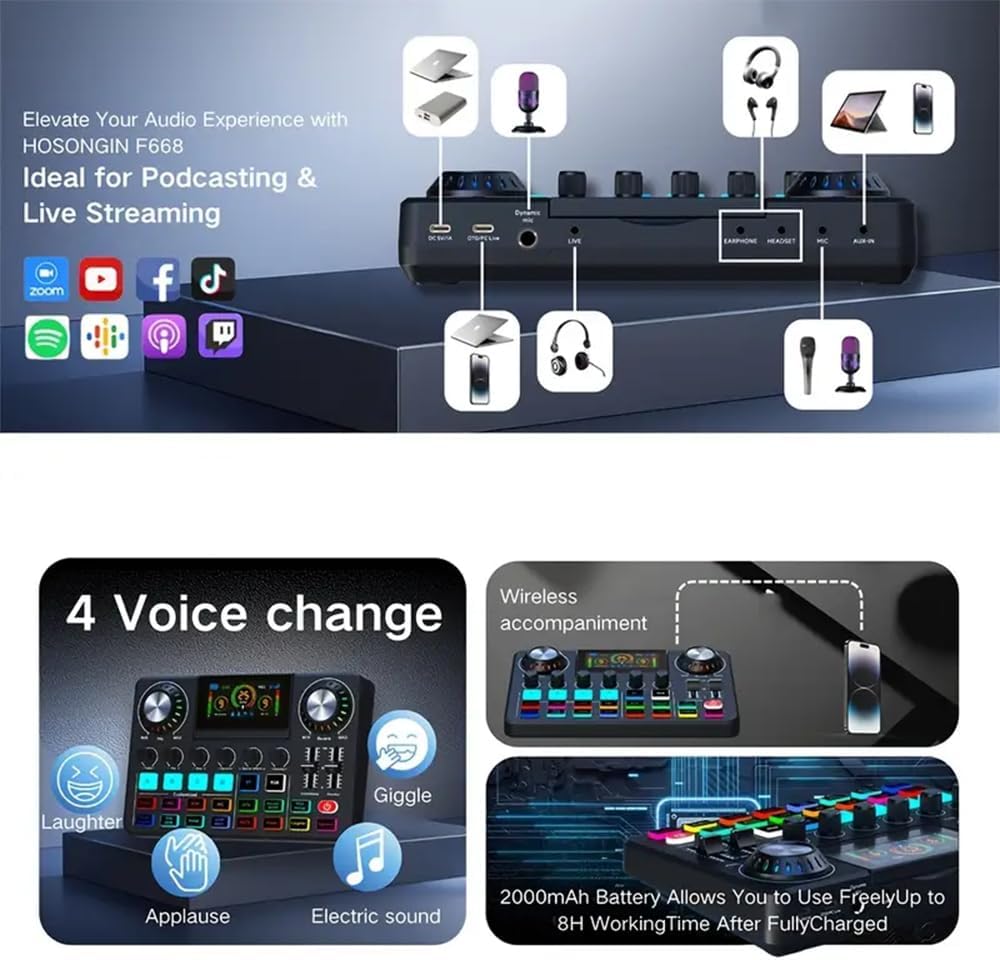
Image: The F668 sound card displaying the 'Sing along' button and explaining the 'Elimination of original sound mode' and 'Follow singing mode' features.

Image: The F668 sound card illustrating the four voice change options, wireless accompaniment via Bluetooth, and the 2000mAh battery providing up to 8 hours of working time.
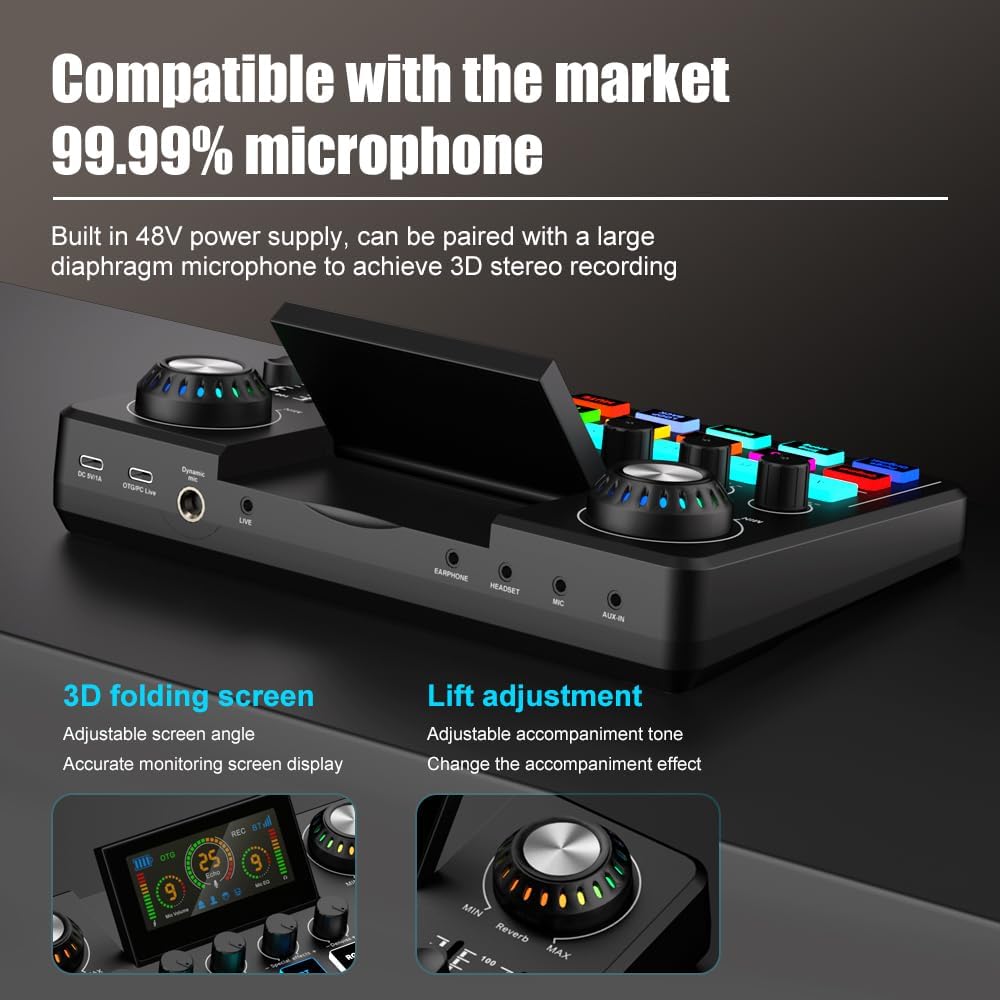
Image: A close-up of the F668 sound card's control panel, detailing buttons for wireless accompaniment (BT), RGB lighting, customized EQ (Treble, Mid, Bass), and the 'Dodge' function for auto-ducking.
Foldable LED Display
The F668 features an 85° adjustable LED screen that provides real-time monitoring of volume levels, battery status, and other operational indicators. Adjust the screen angle for optimal viewing.

Image: The F668 sound card showcasing its 3D foldable HD digital display screen, which can be adjusted up to an 85-degree angle for clear monitoring of various settings.
Features Overview
- Immersive Streaming with Auto-Ducking: The smart "Ducking" function automatically lowers background music when you speak, ensuring your voice remains clear during live streams or podcasts.
- Built-in Rechargeable Battery: Provides portability for outdoor recording or mobile streaming, freeing you from constant power outlet access.
- 48V Phantom Power & Lossless OTG: Supports professional XLR microphones with built-in 48V power. The OTG digital connection transmits audio without static noise, offering clearer sound.
- Foldable LED Display & Intuitive Control: An adjustable 85° LED screen monitors volume and battery levels. Tactile buttons and sliders provide a responsive control experience.
- Dual Mic Inputs for Co-Hosting: Supports two microphone inputs simultaneously, ideal for two-person interviews, co-hosting podcasts, or duet singing without additional complex equipment.
Connections and Compatibility
The Nuoxiange F668 is designed for broad compatibility and flexible connectivity:
- Microphone Inputs: Supports both XLR microphones (with 48V phantom power) and 3.5mm microphones.
- Instrument Input: Features a 3.5mm jack for connecting instruments like electric guitars and basses.
- Output Connectors: Includes 3.5mm Jack, Bluetooth, USB-C, and XLR for versatile output options.
- OTG Digital Connection: Provides lossless audio transmission to compatible devices.
- Bluetooth Connectivity: For wireless accompaniment and audio input from Bluetooth-enabled devices.
- Universal Plug & Play Compatibility: Works with Windows, macOS, Android, and iOS operating systems without requiring special drivers.

Image: The F668 sound card configured for a two-person live streaming setup, demonstrating its dual microphone input capability.

Image: The F668 sound card connected to an electric guitar, illustrating its compatibility with 3.5mm instrument audio interfaces for professional instruments.
Maintenance
To ensure the longevity and optimal performance of your Nuoxiange F668 sound card, follow these maintenance guidelines:
- Cleaning: Use a soft, dry cloth to wipe the surface of the device. Avoid using liquid cleaners or abrasive materials.
- Storage: Store the sound card in a cool, dry place away from direct sunlight and extreme temperatures.
- Handling: Handle the device with care. Avoid dropping it or exposing it to strong impacts.
- Battery Care: For optimal battery life, avoid fully discharging the battery frequently. Charge the device regularly, even if not in use for extended periods.
Troubleshooting
If you encounter issues with your F668 sound card, refer to the following common troubleshooting steps:
- No Sound Output:
- Check all cable connections (microphones, headphones, output to streaming device).
- Ensure volume knobs and sliders on the F668 are not set to minimum.
- Verify that the F668 is selected as the audio input/output device in your computer or mobile device settings.
- Confirm that your headphones or speakers are functioning correctly.
- Microphone Not Working:
- Ensure the microphone is properly connected to the correct input port.
- If using an XLR microphone, confirm it is a 48V phantom power compatible microphone and that the phantom power is enabled on the F668 (if applicable).
- Adjust the microphone gain/volume knob on the F668.
- Test the microphone with another device if possible to rule out microphone issues.
- Bluetooth Connection Issues:
- Ensure Bluetooth is enabled on both the F668 and your pairing device.
- Make sure the F668 is in pairing mode (refer to the display for indicators).
- Move the devices closer to each other to ensure they are within range.
- Try unpairing and re-pairing the devices.
- Device Not Recognized by Computer/Phone:
- Ensure the USB Type-C cable is securely connected to both the F668 and your device.
- Try a different USB port or cable.
- Restart your computer or mobile device.
- For mobile devices, ensure OTG functionality is enabled in your phone's settings if required.
- Battery Not Charging:
- Verify the USB Type-C cable is connected correctly to a working power source.
- Try a different USB Type-C cable or power adapter.
- Check the charging indicator on the F668's display.
Specifications
| Feature | Specification |
|---|---|
| Brand | Nuoxiange |
| Model Number | F668 |
| Number of Channels | 2 |
| Product Dimensions | 6"D x 9"W x 2"H |
| Item Weight | 1.7 Pounds |
| Connectivity Technology | Bluetooth, USB-C |
| Power Source | Battery Powered |
| Output Connector Type | 3.5mm Jack, Bluetooth, USB-C, XLR |
| Audio Input | Condenser Microphone/Guitar/CD Player/Tablet/Mobile Phone, Microphone/Electronic Keyboard/Laptop US8 Input |
| Voltage | 5 Volts |
| UPC | 762949779064 |
Warranty and Support
The Nuoxiange F668 OTG Audio Mixer Sound Card comes with a 30-day return and exchange policy. For any technical support or warranty claims, please refer to the retailer where the product was purchased or visit the official Nuoxiange website for contact information.
Keep your purchase receipt as proof of purchase for warranty purposes.