
Introduction
This manual provides detailed instructions for the installation, operation, and maintenance of your iFreGo M3-11 Single DIN Car Stereo. Please read this manual thoroughly before using the product to ensure proper function and to maximize your user experience. This car stereo features Bluetooth 5.0 for hands-free calling and music streaming, FM radio, multiple media playback options (USB, SD, AUX), 7 adjustable LED colors, quick charging, and a clock display.
Product Overview
Key Features
- Upgraded Bluetooth 5.0: Ensures stable connection for hands-free calls and lossless music streaming.
- FM Radio: High-quality digital stereo FM radio with 18 preset stations (Frequency range: 87.5-108 MHz).
- 7 LED Colors: Adjustable display lighting with options for green, blue, red, yellow, white, turquoise green, and purple.
- Multimedia Player: Supports AUX cable, TF card (up to 32 GB), U-Disc, and Bluetooth for various audio playback methods.
- Fast Charging: USB port with lightning logo provides quick charging for mobile phones.
- Voice Assistant: Short press the '2' button to activate voice assistant (Siri/OK Google) when connected via Bluetooth.
- Car Locator Function: Helps locate your parked car.
- Wireless Remote Control: Includes a standard remote and a steering wheel remote control for convenient operation.
- Wiring Protection: Prevents damage from incorrect power connections.
What's in the Box
- 1x Car Stereo
- 1x Radio Antenna
- 1x Speaker Cable
- 1x Power Cable
- 1x User Manual (English + Español)
- 2x Keys for Installation
- 1x Remote Control (without battery)
- 1x Steering Wheel Remote Control (without battery)
Setup
Dimensions
The installation dimensions for the car stereo are 178 x 50 mm. The dimensions of the housing are 188 x 58 mm.

Image: Front view of the iFreGo M3-11 car stereo with its installation and housing dimensions indicated.
Wiring Diagram
Refer to the following diagram for correct wiring. The unit includes wiring protection to prevent damage from incorrect power connections. Ensure all connections are secure before powering on the device.

Image: Detailed ISO cable wiring diagram showing connections for speakers, power (B+ 12V, GND B, ACC +12V), and antenna. Includes a visual representation of wiring protection.
Operating Instructions
Bluetooth Connectivity
The car stereo features Bluetooth 5.0 for hands-free calling and audio streaming. Your mobile phone should automatically connect once paired. This ensures stable connection and clear sound quality for calls and music.

Image: Dashboard view showing the car stereo with icons indicating Bluetooth hands-free calling, voice navigation, and Bluetooth music playback from a connected smartphone.
FM Radio Operation
Use the FM station search function to find available stations. You can long-press your favorite FM stations to store them for quick access. The radio provides a clear and noiseless listening experience.
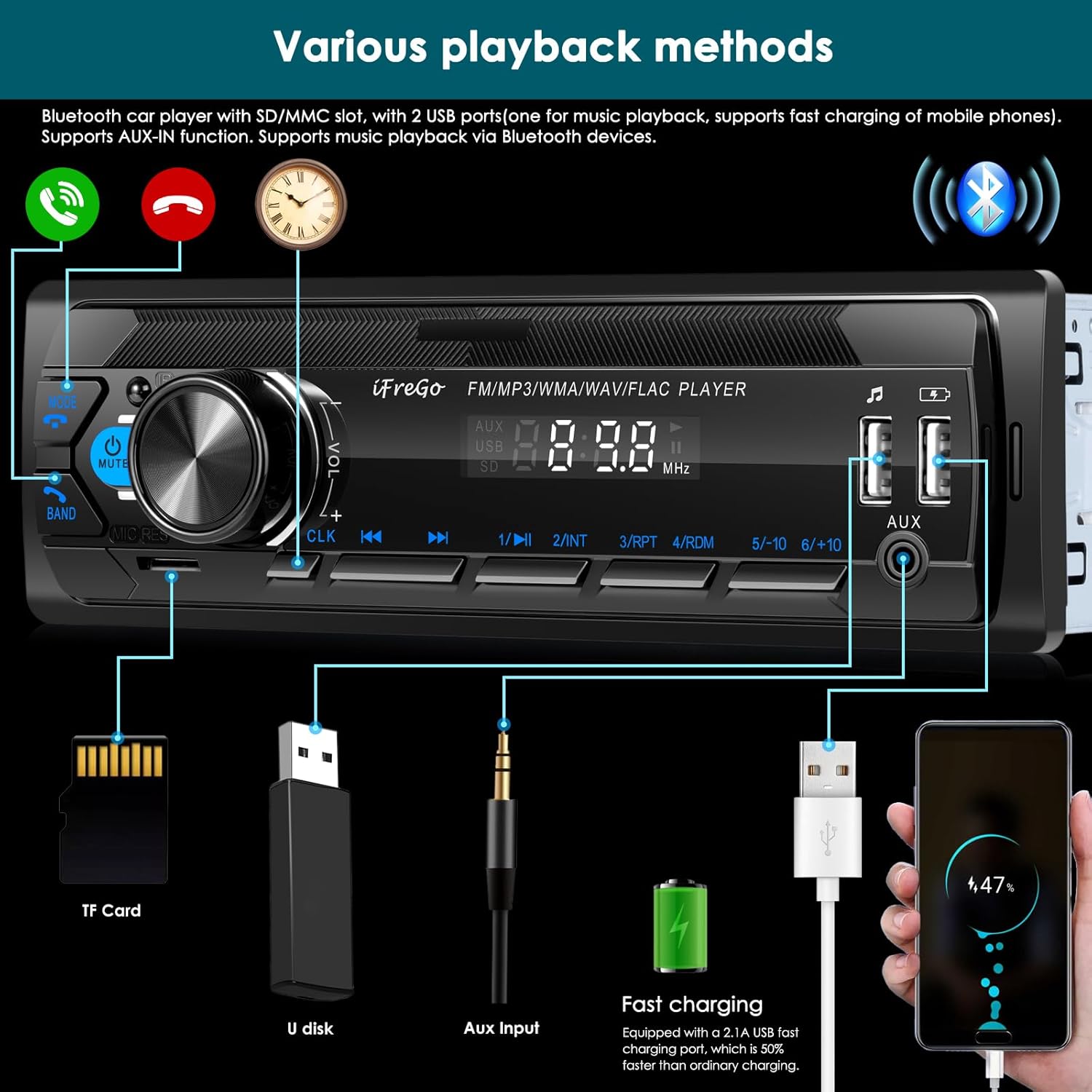
Image: Close-up of the car stereo display showing an FM frequency (87.5 MHz) and icons representing news, hotspot, and music stations. An antenna and speaker setup are also depicted.
Multimedia Playback
The stereo supports various playback methods including AUX cable, TF card (up to 32 GB), U-Disc, and Bluetooth. Supported audio formats include MP3, WMA, WAV, and MPE.

Image: Diagram illustrating the different media input options for the car stereo: TF card slot, U-disk USB port, AUX input, and a dedicated fast-charging USB port for mobile devices.
Fast Charging
The USB port marked with a lightning logo offers a fast-charging function (2.1A) for your mobile phone, which is beneficial during long journeys or when using GPS.
Voice Assistant and Voice Broadcast
Short press the '2' button to activate your phone's voice assistant (Siri or OK Google) after connecting via Bluetooth. The system can also broadcast navigation instructions from your mobile phone's navigation app through the car speakers.

Image: Car interior view showing the stereo and a smartphone displaying a navigation app. Speech bubbles indicate voice prompts like "Sharp bend ahead" and "The road in front of you is congested."
Video: Demonstrates the iFreGo 1 DIN car radio's Bluetooth hands-free calling feature.
Adjusting LED Colors
The car stereo features 7 adjustable LED colors. Briefly press the button several times until 'AUTO' appears on the display, then rotate the volume knob to select your desired color. Press the knob to set the color. 'AUTO' mode cycles through colors automatically.
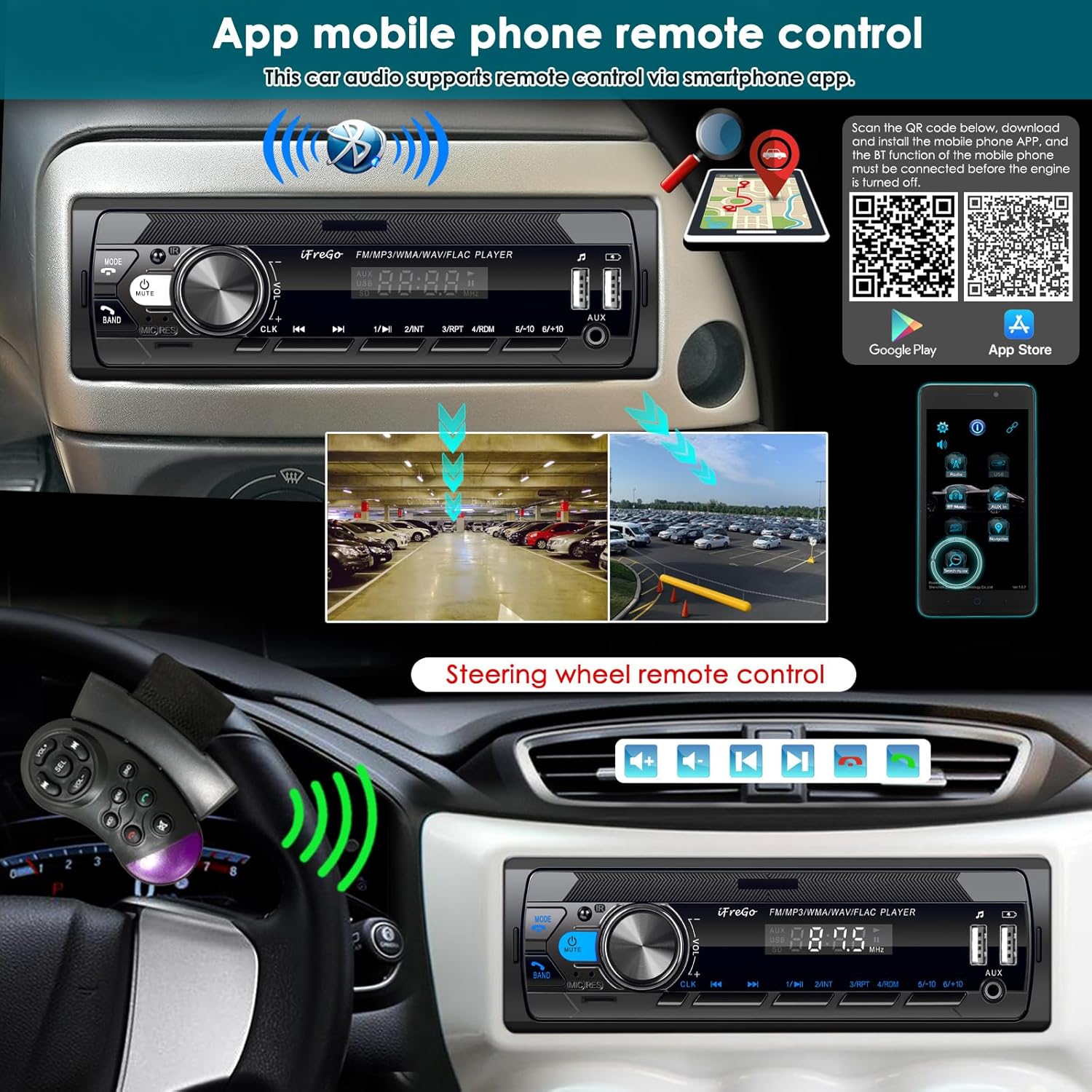
Image: Illustration of the car stereo's 7 adjustable LED colors (Red, Green, Blue, Purple, Turquoise green, Yellow, White) and how to select them using the rotary knob.
Video: Instructions on how to set the LED display color by pressing the VOL button until 'AUTO' appears, then rotating to select and pressing to confirm.
Remote Control and App Control
The car stereo can be controlled using the included wireless remote control or the steering wheel remote control. Additionally, a smartphone app is available for remote control and includes a 'Find a Car' function.
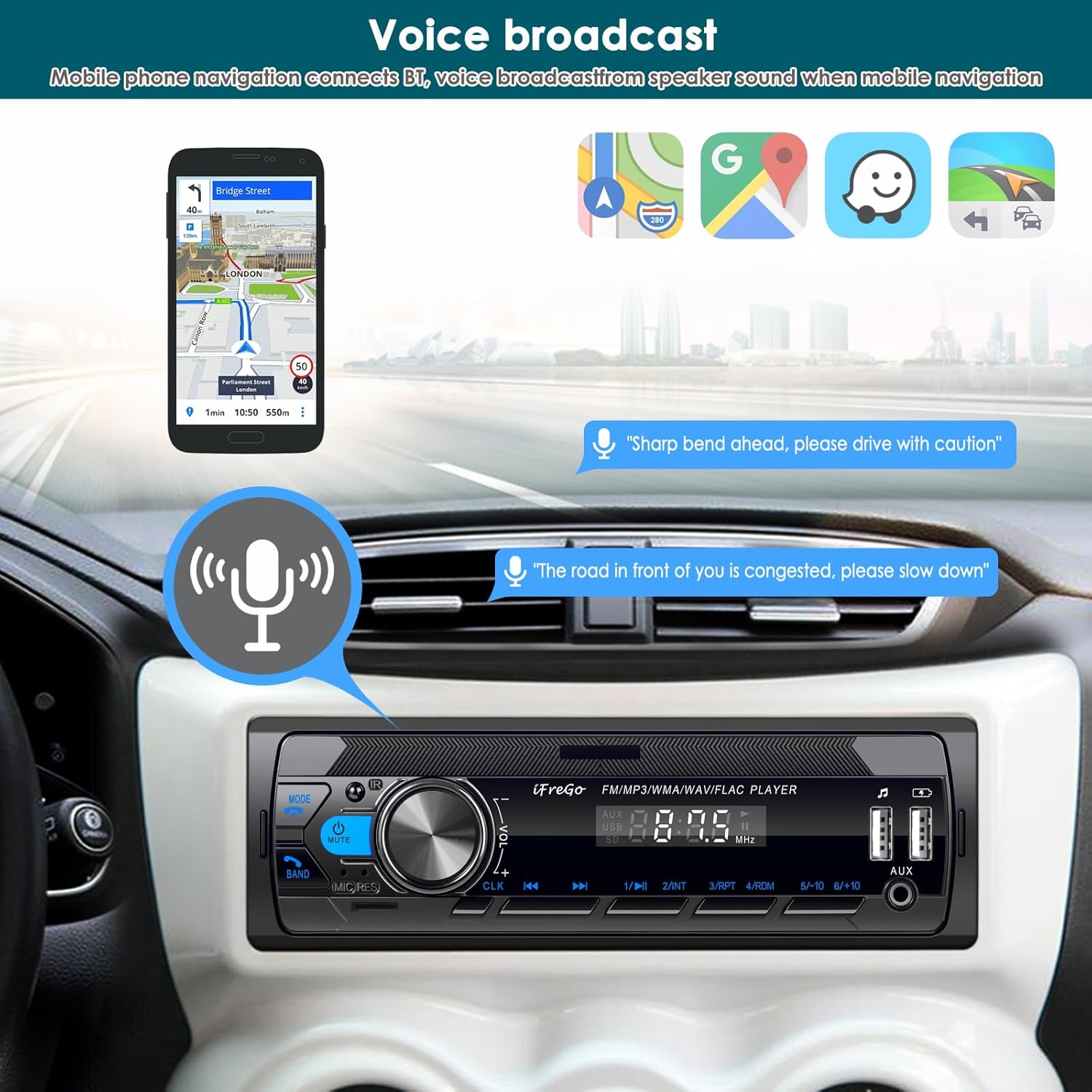
Image: Shows the car stereo, a smartphone with the remote control app interface, QR codes for app download, and the steering wheel remote control in use.
Download the control app:
- Google Play (via Google Drive): Download App (Android)
- App Store: Download App (iOS)
Maintenance
To ensure the longevity and optimal performance of your iFreGo M3-11 car stereo, follow these general maintenance guidelines:
- Cleaning: Use a soft, dry cloth to clean the unit's surface. Avoid abrasive cleaners or solvents.
- Temperature: Do not expose the unit to extreme temperatures or direct sunlight for extended periods.
- Moisture: Keep the unit dry. Avoid exposure to water or excessive humidity.
- Connections: Periodically check all wiring connections to ensure they are secure and free from corrosion.
Troubleshooting
If you encounter issues with your iFreGo M3-11 car stereo, consider the following common troubleshooting steps:
- No Power: Check all power connections (B+ 12V, ACC +12V, GND B) as per the wiring diagram. Ensure the car's fuse is intact.
- No Sound: Verify speaker connections. Check the volume level and mute function. Ensure the correct audio source is selected.
- Bluetooth Connection Issues: Ensure Bluetooth is enabled on your mobile device and the car stereo. Delete previous pairings and try reconnecting. Move your device closer to the stereo.
- Poor FM Reception: Check the antenna connection. Try scanning for stations again. Interference from other electronic devices can affect reception.
- USB/SD Card Not Reading: Ensure the media is formatted correctly (FAT32 is generally recommended). Check for damaged files or unsupported audio formats. Ensure the card/drive is inserted correctly.
- Remote Control Not Working: Check the battery in the remote control. Ensure there are no obstructions between the remote and the stereo's IR receiver.
If problems persist after attempting these steps, please contact customer support.
Specifications
| Brand | iFreGo |
| Model Number | M3-11 |
| Connectivity Technology | Auxiliary, Bluetooth, USB |
| Controller Type | Hand Control |
| Special Features | 7 adjustable LED colors, APP Control, Built-In Bluetooth, FM Tuner, Multifunctional Playback, Fast-charging |
| Compatible Devices | Smartphone, cars |
| Connector Type | 3.5mm Jack, USB |
| Audio Output Mode | Stereo |
| Color | Black |
| Item Weight | 0.51 Kilograms |
| Output Power | 65 Watts |
| Number of Channels | 2 |
| Audio Output Type | Speakers |
| Wireless Technology | Bluetooth |
| Supported Formats | WAV, WMA, MP3, MPE |
Warranty and Support
Your iFreGo M3-11 Car Stereo comes with a 2-year manufacturer's warranty. This warranty covers defects in materials and workmanship under normal use.
For warranty claims, technical assistance, or any product-related inquiries, please contact iFreGo customer support through the retailer where the product was purchased or visit the official iFreGo website for contact information.
Return Policy: A 30-day refund/replacement guarantee is available for defects.