
1. Introduction
The Wisscool WS-523 Dual Digital Manifold Gauge is a professional tool designed for comprehensive analysis and maintenance of HVAC and automotive AC systems. It combines three essential functions: refrigerant filling pressure inspection, vacuum pressure testing, and leak detection. Equipped with a 32-bit digital processing unit and built-in data for 92 types of refrigerants, this gauge provides precise measurements and calculations for overheating and supercooling. Its compact, portable, and durable design ensures reliable performance for both professionals and DIY enthusiasts.
2. Key Features
- Versatile Refrigerant Compatibility: Supports 92 types of refrigerants, including R410A, R454B, R32, R1234yf, and R134a.
- Multi-functional Operation: Integrates refrigerant filling, vacuum pressure testing, and leak detection modes.
- Color LCD & Sight Glass: Features a vibrant color LCD for clear readings and an integrated sight glass for visual refrigerant flow monitoring.
- Fast Leak Detection: Dedicated single-test leak detection mode for quick identification of refrigerant leaks.
- Vacuum & Pressure Dual Functionality: Optimized for AC charging, system evacuation, and performance checks.
- Pro-Grade Accuracy & Portability: Lightweight (less than 1.8 lbs) with a durable brass construction and auto-off function for extended battery life (up to 250 hours).
- Temperature Compensation: Monitors pressure holding and vacuum leakage precisely with temperature compensation.
3. Setup Instructions
3.1. Battery Installation
The device requires 3 AA 1.5V batteries (included). Open the battery compartment on the back of the unit, insert the batteries according to the polarity markings, and close the compartment securely.
3.2. Connecting Temperature Clamps
Attach the temperature clamps to the appropriate lines of the AC system (e.g., suction and liquid lines) to measure low and high pressure temperatures. Ensure a secure connection for accurate readings.
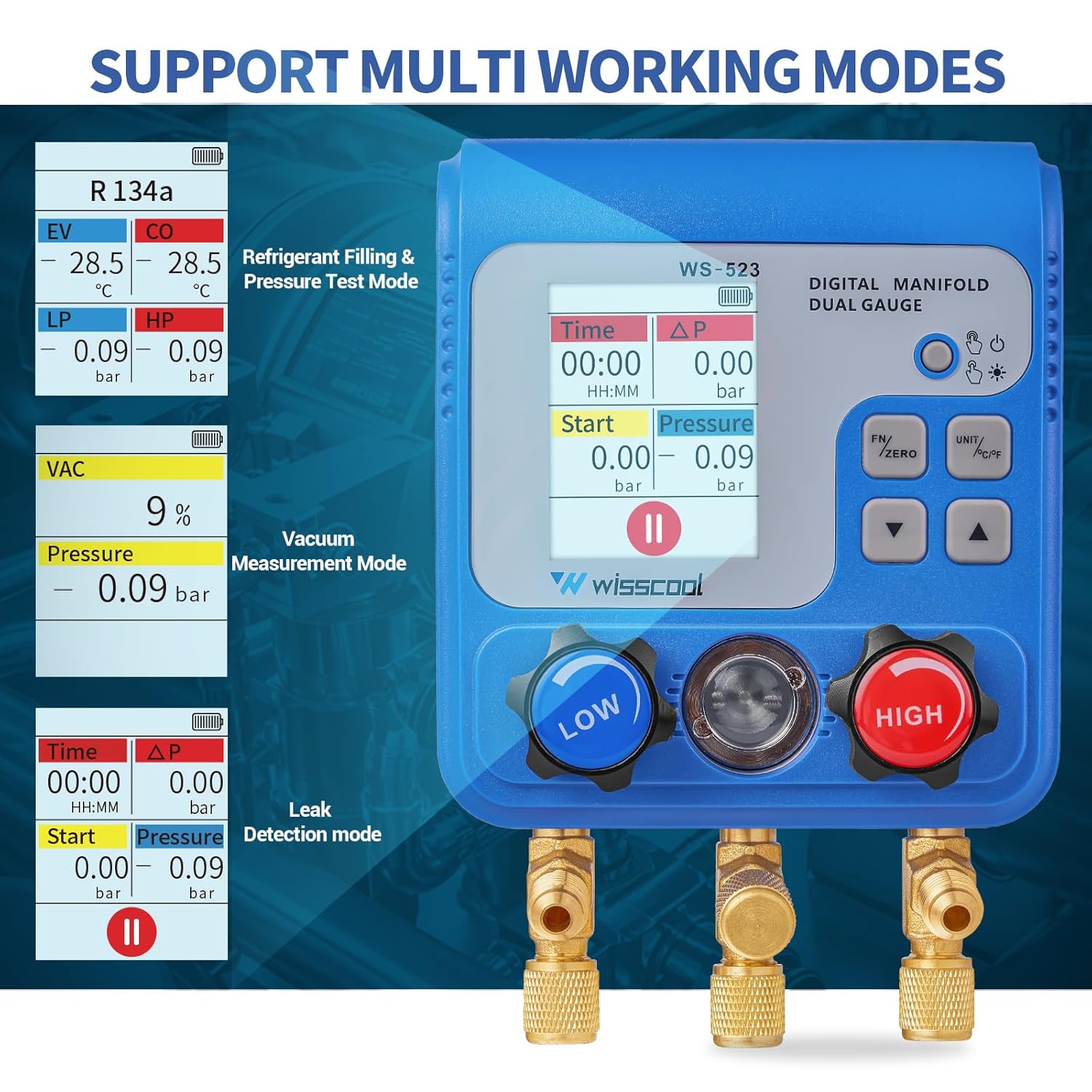
Image: Temperature clamps attached to AC lines for measurement.
3.3. Connecting Refrigerant Hoses
Connect the refrigerant hoses to the corresponding low (blue) and high (red) pressure ports on the manifold gauge. Ensure all connections are tight to prevent leaks. The central yellow hose is typically used for vacuum pump or refrigerant tank connections.

Image: Detailed view of the manifold gauge showing low and high pressure valves, refrigerant inlets, and control buttons.
Video: Demonstrates connecting refrigerant hoses and operating valves.
Video: This video demonstrates the process of connecting temperature clamps and refrigerant hoses to the manifold gauge, along with operating the valves.
4. Operating Instructions
4.1. Power On/Off and Backlight
Short press the Power Button (usually located on the right side of the display) to turn on/off the backlight. Long press the Power Button to power the unit on or off.
4.2. Selecting Refrigerant Type
Use the 'R+' and 'R-' buttons to cycle through the available refrigerants (e.g., R11, R134a, R410A). The selected refrigerant type will be displayed on the screen.
Video: Shows how to select different refrigerant types on the digital manifold gauge.
Video: This video illustrates the selection of refrigerant types and various display functions of the digital manifold gauge.
4.3. Understanding Display Modes
The gauge supports multiple working modes, clearly displayed on the color LCD screen:
- Refrigerant Filling & Pressure Test Mode: Displays EV (Evaporation Temperature), CO (Condensation Temperature), LP (Low Pressure), and HP (High Pressure).
- Vacuum Measurement Mode: Shows vacuum percentage and pressure readings.
- Leak Detection Mode: Monitors pressure changes over time to detect leaks, displaying start pressure, current pressure, and time elapsed.

Image: Close-up of the gauge display, highlighting refrigerant type, evaporation and condensation temperatures, and low/high pressures.
4.4. Unit Conversion
Short press the 'UNIT / °C/°F' button to switch between different pressure units (psi, kPa, MPa, bar) and temperature units (°F/°C).
4.5. Zeroing Readings
Use the 'ZERO' button to reset the pressure readings to zero when necessary, ensuring accurate measurements.
4.6. Valve Operation
The blue and red valves control the flow of refrigerant through the low and high pressure lines, respectively. Rotate the valves to open or close them as required for charging, evacuation, or testing procedures.
Video: Illustrates the connection of the temperature sensor and refrigerant pipes, along with various display functions.
Video: This video demonstrates connecting the temperature sensor and refrigerant pipes, and shows the gauge's display for various measurements and unit conversions.
5. Maintenance
5.1. Cleaning
Wipe the unit with a soft, damp cloth. Do not use abrasive cleaners or solvents. Ensure the display and buttons are free from dirt and debris.
5.2. Storage
Store the manifold gauge in its protective case in a cool, dry place when not in use. Remove batteries if storing for extended periods to prevent leakage.
5.3. Battery Replacement
When the battery indicator shows low power, replace the 3 AA batteries promptly to ensure continuous and accurate operation.
6. Troubleshooting
- No Display/Power: Check battery installation and ensure batteries are not depleted. Replace if necessary.
- Inaccurate Readings: Verify all hose connections are tight and free from leaks. Ensure the correct refrigerant type is selected. Perform a zero calibration if needed.
- Temperature Sensor Issues: Ensure the temperature sensor is securely plugged into the unit and properly clamped to the pipe.
- Leak Detection Fails: Double-check all system connections for potential leaks. Ensure the system is properly sealed before initiating a leak test.
7. Specifications
| Feature | Detail |
|---|---|
| Model Number | WS-523 |
| Batteries | 3 AA batteries required (included) |
| Product Dimensions | 10.92 x 5.33 x 15.49 cm |
| Item Weight | 498.95 g (1.1 Pounds) |
| Manufacturer | WISSCOOL |
| Material | Brass, Plastic |
| Included Components | AA batteries, 1x color dual digital gauge, 1x detailed manual |
8. Warranty and Support
For warranty information, technical support, or any inquiries regarding your Wisscool WS-523 Dual Digital Manifold Gauge, please refer to the contact details provided in the product packaging or visit the official Wisscool website. Keep your purchase receipt for warranty claims.