
Introduction
This manual provides essential information for the safe and effective operation, maintenance, and troubleshooting of your TOOLIOM 4-in-1 MIG Welder 180A (Model: TL-MIG-180M). Please read this manual thoroughly before using the welder to ensure proper function and to prevent injury or damage.
The TOOLIOM TL-MIG-180M is a versatile multi-process welding machine capable of Gas MIG, Flux MIG, Stick (MMA), and Lift TIG welding. It operates on both 110V and 220V power supplies.
Safety Information
Always prioritize safety when operating welding equipment. Failure to follow safety precautions can result in serious injury or death.
- Wear appropriate personal protective equipment (PPE), including a welding helmet with proper shade, welding gloves, protective clothing, and safety shoes.
- Ensure adequate ventilation to avoid inhaling welding fumes.
- Protect bystanders from arc rays and hot metal. Use welding screens if necessary.
- Never weld near flammable materials or in explosive atmospheres.
- Ensure the welding machine is properly grounded.
- Disconnect power before performing any maintenance or changing accessories.
- Do not touch live electrical parts.
- Keep children and unauthorized personnel away from the welding area.
Package Contents
Verify that all components are present in the package:
- TOOLIOM TL-MIG-180M Welder Unit
- MIG Gun with Consumables
- Work Clamp (Ground Clamp)
- Electrode Holder (for Stick welding)
- Lift TIG Torch with Consumables
- Power Cord Adapter (110V/220V)
- Gas Hose
- Wire Feed Roller
- E71T-GS 1LB .030" Welding Wire (Flux Core)

Figure 1: Included Accessories
Setup
1. Power Connection
- The welder supports both 110V and 220V input. Use the appropriate power cord adapter for your power supply.
- Ensure the power source is capable of providing sufficient amperage for welding operations.
2. Wire Installation (MIG/Flux MIG)
- Open the wire feed compartment.
- Place the wire spool onto the spindle, ensuring it rotates freely.
- Thread the welding wire through the wire feed roller and into the MIG gun liner.
- Ensure the correct wire feed roller size is installed for your wire diameter (e.g., 0.030" or 0.035" for flux core/solid wire).

Figure 2: Wire Spool and Feed Roller Installation
Video: MIG Welding Wire Installation
This video demonstrates the process of installing welding wire into a MIG welder, including threading the wire through the feed mechanism. (Source: ANDELI Official Store US)
3. Gas Connection (Gas MIG)
- Connect the gas hose to the gas inlet on the rear of the welder and to your shielding gas cylinder (e.g., Argon for MIG, Argon/CO2 mix for steel).
- Ensure all connections are secure and leak-free.
- Adjust the gas flow rate using a regulator on the gas cylinder.
4. Connecting Welding Cables
- MIG/Flux MIG: Connect the MIG gun to the positive (+) terminal and the work clamp to the negative (-) terminal.
- Stick (MMA): Connect the electrode holder to the positive (+) terminal and the work clamp to the negative (-) terminal for most electrodes (DC+). Consult electrode manufacturer specifications for polarity.
- Lift TIG: Connect the Lift TIG torch to the negative (-) terminal and the work clamp to the positive (+) terminal.
Operating Instructions
The TOOLIOM TL-MIG-180M features an intelligent LCD panel for easy mode selection and parameter adjustment.

Figure 3: Synergic and Manual MIG Modes on LCD Panel
1. Mode Selection
Use the control knob and buttons on the front panel to select your desired welding process:
- Gas MIG: For welding with shielding gas and solid wire.
- Flux MIG: For welding with flux-cored wire without external shielding gas.
- Stick (MMA): For welding with coated electrodes.
- Lift TIG: For TIG welding with a Lift TIG torch and shielding gas (requires separate gas cylinder for TIG).
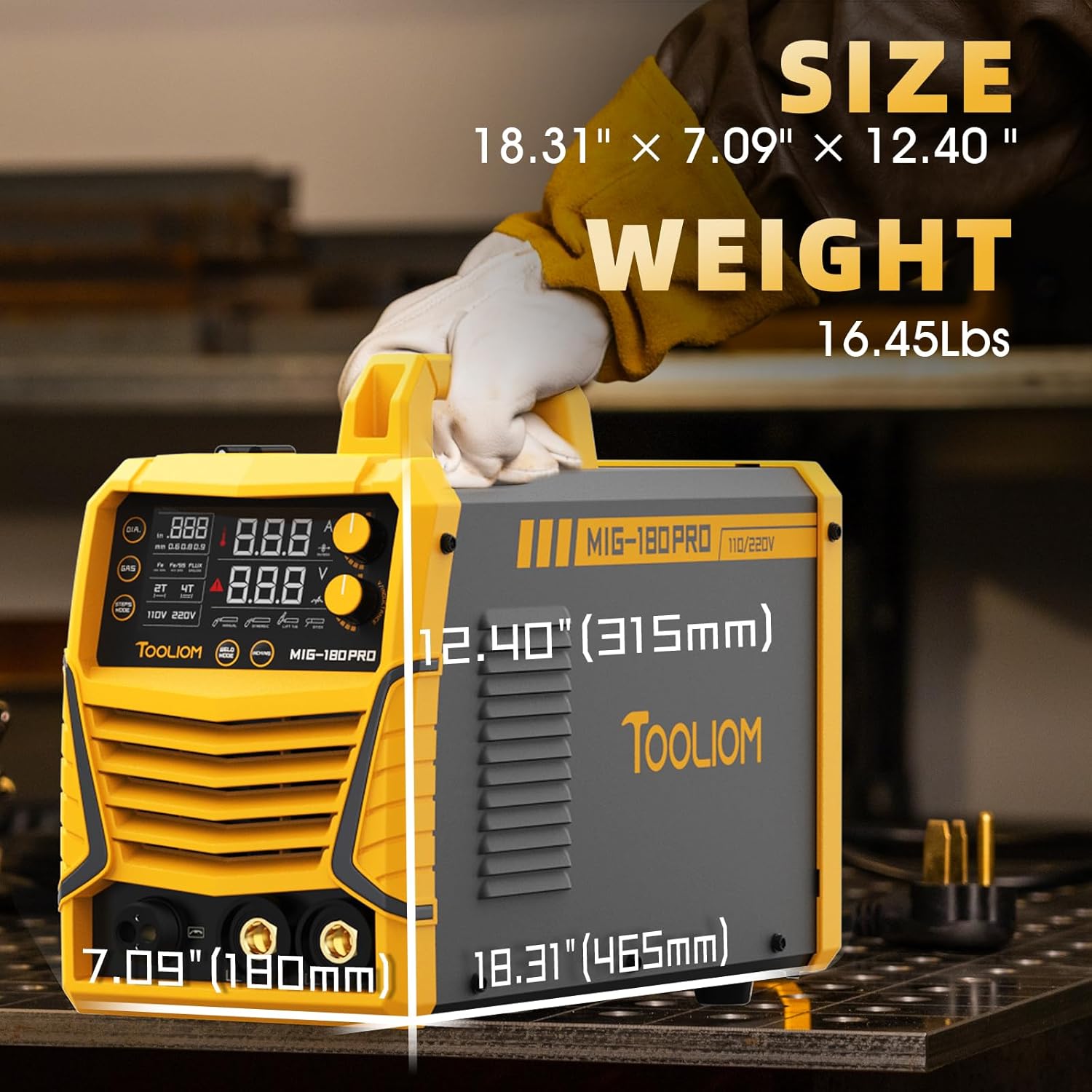
Figure 4: Welding Modes and Connections
2. Parameter Adjustment
- Synergic MIG: This mode automatically sets optimal voltage and wire feed speed based on the selected wire diameter and material thickness. Ideal for beginners.
- Manual MIG: Allows independent adjustment of voltage and wire feed speed for experienced users to fine-tune settings.
- Stick/Lift TIG: Adjust amperage according to the electrode or material thickness.
- The LCD display provides clear data for monitoring and precise operation.
3. Welding Techniques
- MIG Welding: Maintain a consistent travel speed and stick-out. Push or pull technique depending on the application.
- Stick Welding: Maintain a consistent arc length and travel speed. Use a slight weaving motion for wider beads.
- Lift TIG Welding: Initiate the arc by gently touching the tungsten electrode to the workpiece and lifting it slightly. Maintain a short arc length and feed filler rod manually.
Video: Flux MIG Welding Demonstration
This video provides an overview and demonstration of Flux MIG welding, including switching to 4T mode and explaining 2T/4T operation. (Source: ANDELI Official Store US)
Maintenance
Regular maintenance ensures the longevity and optimal performance of your welder.
- Cleaning: Regularly clean the welder's exterior with a dry, soft cloth. Use compressed air to blow out dust and debris from inside the machine, especially around cooling vents.
- MIG Gun Maintenance:
- Inspect and clean the contact tip, nozzle, and diffuser regularly. Replace worn-out parts.
- Check the MIG gun liner for kinks or blockages. Replace if necessary to ensure smooth wire feeding.
- Work Clamp and Electrode Holder: Ensure connections are clean and tight for good electrical contact.
- Wire Feed System: Keep the wire feed rollers clean and free of debris. Ensure the correct roller size is used for the wire.
- Gas Hose: Check for any signs of wear, cracks, or leaks in the gas hose.
Troubleshooting
| Problem | Possible Cause | Solution |
|---|---|---|
| No power to welder | Power cord unplugged, circuit breaker tripped, faulty power switch | Check power connections, reset breaker, contact service if switch is faulty. |
| No arc (MIG/Stick) | Poor ground connection, incorrect polarity, wrong settings, worn consumables | Ensure work clamp is on clean metal, check polarity, adjust settings, replace contact tip/electrode. |
| Wire feeding issues | Kinked liner, incorrect drive roller tension, wrong drive roller size, tangled wire spool | Inspect and replace liner, adjust tension, use correct roller, untangle wire. |
| Poor weld quality | Incorrect settings (voltage/WFS), insufficient gas flow (MIG), contaminated workpiece, improper technique | Adjust settings, check gas flow/leaks, clean workpiece, practice technique. |
| Overheating protection activated | Exceeded duty cycle, blocked cooling vents | Allow welder to cool down, ensure proper ventilation, clear any obstructions. |
Specifications
| Feature | Detail |
|---|---|
| Model | TL-MIG-180M |
| Welding Processes | Gas MIG, Flux MIG, Stick (MMA), Lift TIG |
| Input Voltage | 110V/220V Dual Voltage |
| MIG Output Current | 180A (Max) |
| Wire Compatibility | 2-10 lb rolls; Flux Core: 0.030"/.035"; Solid Wire: 0.023"/.030"/.035" |
| Dimensions (L x W x H) | 18.31 x 12.40 x 7.09 inches (approx. 46.51 x 31.5 x 18.01 cm) |
| Weight | Approx. 14.06 kg (31 lbs) |
| Manufacturer Part Number | TL-MIG-180-PRO |

Figure 5: Key Features and Specifications

Figure 6: Welder Dimensions and Weight
Warranty and Support
For warranty information and technical support, please refer to the documentation included with your purchase or contact TOOLIOM customer service directly.
Keep your purchase receipt as proof of purchase for warranty claims.
