
1. Introduction
Thank you for choosing the OFFSIR C100 RGB Computer Speakers. These 2.0 channel stereo speakers are designed to enhance your audio experience with rich sound and dynamic full-screen RGB lighting. This manual provides essential information for proper setup, operation, and maintenance of your speakers.
2. Safety Information
- Do not expose the speakers to water or excessive moisture.
- Avoid placing the speakers near heat sources or in direct sunlight.
- Use only the provided USB cable for power.
- Keep out of reach of children.
- Do not attempt to disassemble or repair the speakers yourself. Contact customer support for assistance.
3. Package Contents
- OFFSIR RGB Computer Speakers (2 units)
- USB Power/Audio Cable with Control Unit
- Removable Bases (2 units)
- Warranty Card
4. Product Overview
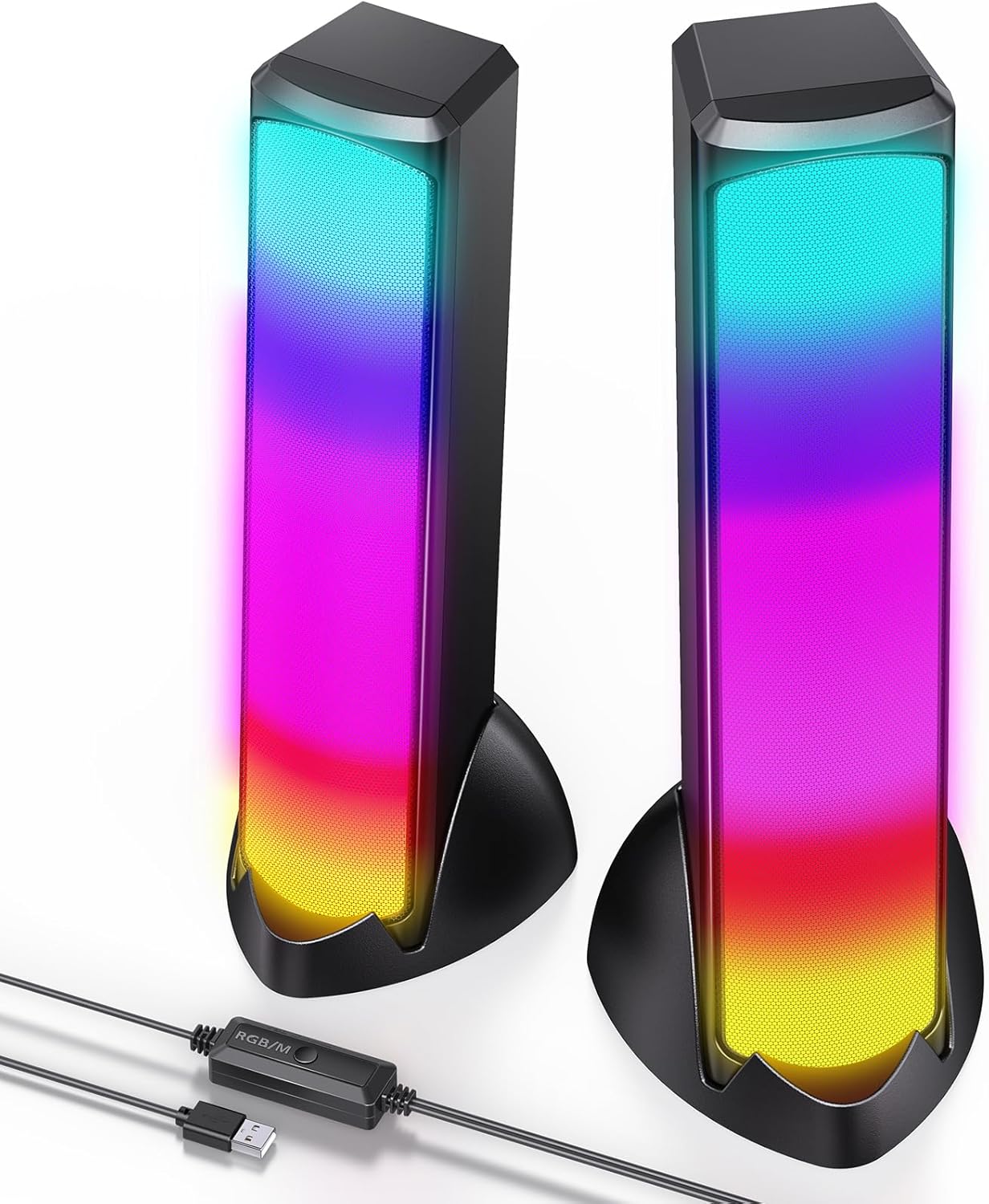
The OFFSIR C100 speakers feature a sleek design with full-screen RGB lighting and dual 5W drivers for clear stereo sound. The integrated control unit allows for easy management of volume and lighting effects.

5. Setup Instructions
5.1 Physical Setup
- Attach the removable bases to the bottom of each speaker unit for stable vertical placement. The bases can be removed if you prefer to lay the speakers horizontally.
- Place the speakers on either side of your computer monitor or laptop, ensuring the cables can reach your device's USB port. The extended cable length is designed for wide-screen setups.
- Ensure the anti-slip silicone pads are attached to the bases to prevent sliding and maintain a tidy workspace.

5.2 Connecting to Your Computer
The OFFSIR C100 speakers are designed for plug-and-play convenience via a single USB connection.
- Locate an available USB port on your desktop, laptop, or monitor.
- Plug the USB connector from the speaker cable into the USB port. No additional 3.5mm audio jack or driver installation is required.
- Your computer should automatically detect the speakers as an audio output device. If not, navigate to your operating system's sound settings and select the 'USB Audio Device' or similar option as your primary output.

6. Operating Instructions
The inline control unit provides easy access to essential functions.

6.1 Power On/Off
The speakers power on automatically when connected to a powered USB port. To turn off the lights, press the button on the control unit. To turn the lights back on, press the button again.
6.2 Volume Control
Adjust the volume using the roller wheel on the inline control unit. Roll up to increase volume, and roll down to decrease volume. You can also control the volume through your computer's operating system.
6.3 RGB Lighting Modes
The speakers feature 4 dynamic lighting modes. Press the button on the control unit to cycle through the modes:
- Rainbow Breathing: Colors fade in and out in a rainbow sequence.
- Rainbow Rhythm: Colors change and react to audio input.
- Solid Color Rhythm: A single solid color changes and reacts to audio input.
- Solid Color Breathing: A single solid color fades in and out.

Video 1: Demonstration of the OFFSIR C100 RGB Computer Speakers' full-screen lighting and sound synchronization, showcasing the immersive atmosphere for gaming.
7. Maintenance
- Clean the speaker surfaces with a soft, dry cloth. Do not use liquid cleaners or abrasive materials.
- Keep the speaker grilles free from dust and debris to ensure optimal sound quality.
- Store the speakers in a cool, dry place when not in use for extended periods.
8. Troubleshooting
8.1 No Sound
- Ensure the USB cable is securely connected to both the speakers and your computer.
- Check your computer's sound settings to confirm that the 'USB Audio Device' (or similar) is selected as the output device.
- Verify that the volume on the inline control unit and your computer is not muted or set too low.
- Try connecting the speakers to a different USB port or another computer to rule out port or computer-specific issues.
8.2 RGB Lights Not Working
- Ensure the speakers are receiving power via the USB connection.
- Press the button on the inline control unit to cycle through the lighting modes. The lights may be turned off or set to a static mode.
8.3 Distorted Sound
- Reduce the volume on both the speakers and your computer.
- Ensure the audio source is of good quality.
- Check for any physical obstructions or damage to the speaker cones.
9. Specifications
| Model Name | Gaming Speaker |
| Item Model Number | C100 |
| Brand | OFFSIR |
| Speaker Type | Soundbar (2 units) |
| Connectivity Technology | USB |
| Audio Output Mode | Stereo (2.0 Channel) |
| Speaker Maximum Output Power | 10 Watts (5W*2) |
| Power Source | Corded Electric (USB Powered) |
| Special Feature | Full-screen RGB lighting, Removable base |
| RGB Lighting Modes | 4 types (Rainbow Breathing, Rainbow Rhythm, Solid Color Rhythm, Solid Color Breathing) |
| Control Method | Touch (via inline control unit) |
| Compatible Devices | Desktop, Laptop, Monitor, PC, Computer |
| Material | Acrylonitrile Butadiene Styrene (ABS), Plastic |
| Product Dimensions | 3.94"D x 11.02"W x 3.94"H |
| Item Weight | 2.25 pounds |
| Water Resistance Level | Not Water Resistant |
10. Warranty and Support
The OFFSIR C100 RGB Computer Speakers come with a Lifetime Warranty. For any product inquiries, technical support, or warranty claims, please refer to the contact information provided on your Warranty Card or visit the official OFFSIR website.