
Introduction
This manual provides essential instructions for the safe and efficient use of your G-TiDE Smartwatch S6 PRO. Please read this manual thoroughly before using the device to ensure proper operation and to understand its features and functions. Keep this manual for future reference.
Product Overview
The G-TiDE Smartwatch S6 PRO is designed to integrate seamlessly into your daily life, offering advanced features for communication, health monitoring, and personal assistance. It features a vibrant AMOLED display and a durable design.
Package Contents
- G-TiDE Smartwatch S6 PRO
- Magnetic Charging Cable
- Interchangeable Silicone Strap (22mm)
- Additional Interchangeable Straps (Total of three straps included)
- User Manual (this document)
Device Components
Familiarize yourself with the main components of your smartwatch:

Image: Front view of the G-TiDE Smartwatch S6 PRO, displaying the AMOLED screen with a digital watch face showing time, date, weather, heart rate, and other metrics. The watch has a silver-colored casing and a green strap.
- AMOLED Touchscreen Display: 1.95-inch, 466 x 466 pixel resolution for clear visuals and interactive control.
- Functional Buttons: Two physical buttons on the side for navigation and quick access to features.
- Heart Rate Sensor: Located on the back for continuous heart rate monitoring.
- Charging Contacts: Magnetic contacts on the back for charging.
- Speaker & Microphone: For calls and voice functions.
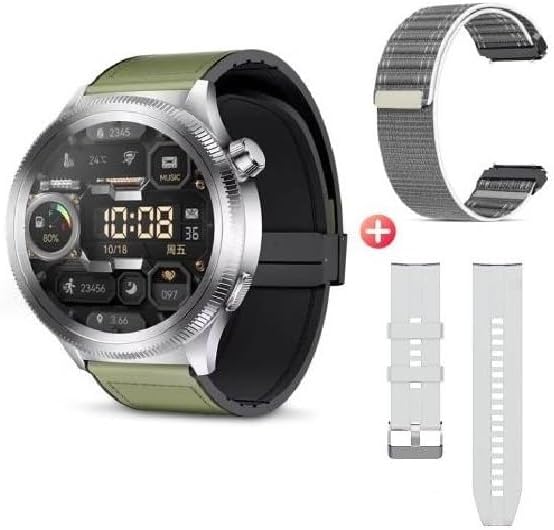
Image: The G-TiDE Smartwatch S6 PRO shown alongside two additional interchangeable straps. The watch itself has a green strap, and a grey fabric strap and a white silicone strap are displayed separately, highlighting the customization options.
Setup
1. Charging the Smartwatch
Before first use, fully charge your smartwatch. Connect the magnetic charging cable to the charging contacts on the back of the watch and plug the USB end into a power adapter (not included) or a computer's USB port.
- A full charge typically takes approximately 2 hours.
- The watch display will indicate charging status.
- Important: Do not charge the watch if it is wet. Ensure the charging contacts are dry before connecting the charger.
2. App Installation (Wearfit Pro)
To unlock the full functionality of your G-TiDE Smartwatch S6 PRO, you need to install the Wearfit Pro application on your smartphone.
- Scan the QR code provided in the watch's packaging or search for "Wearfit Pro" in your smartphone's app store (Google Play Store for Android, Apple App Store for iOS).
- Download and install the application.
- Ensure your smartphone meets the compatibility requirements: iOS 9.0 or higher, or Android 4.4 or higher.
3. Pairing with Your Smartphone
After installing the Wearfit Pro app, follow these steps to pair your smartwatch:
- Enable Bluetooth on your smartphone.
- Open the Wearfit Pro app and create an account or log in.
- Follow the in-app instructions to add a new device. The app will search for available smartwatches.
- Select "S6 PRO" or the corresponding device name from the list.
- Confirm the pairing request on both your smartphone and the smartwatch.
- Once paired, the app will synchronize data with your watch.
Operating Instructions
Basic Navigation
- Touchscreen: Swipe left, right, up, or down to navigate through menus and features. Tap to select an item.
- Functional Buttons: Use the physical buttons for specific actions, such as returning to the home screen or accessing the app menu.
- Wake Screen: Lift your hand to automatically turn on the screen (motion sensor feature).
- Menu Styles: The watch supports 6 fluid menu styles; customize this in settings.
Calls and Notifications
- Making/Answering Calls: Once paired, you can make and answer calls directly from your smartwatch. Ensure Bluetooth calling is enabled in the Wearfit Pro app.
- Contact Synchronization: Synchronize contacts from your smartphone to the watch via the Wearfit Pro app.
- Social Media Notifications: Receive notifications from apps like Facebook, WhatsApp, and Instagram directly on your watch. Enable specific app notifications in the Wearfit Pro app settings.
Health Monitoring
The G-TiDE Smartwatch S6 PRO offers comprehensive health tracking features:
- Heart Rate (HR) Monitoring: Continuous 24/7 tracking of your heart rate. View real-time data on the watch or detailed history in the Wearfit Pro app.
- Blood Oxygen (SpO2) Monitoring: Measure your blood oxygen levels.
- Breathing Exercises: Guided breathing exercises to help manage stress and improve relaxation.
- Sleep Tracking: Monitors your sleep patterns, including deep sleep, light sleep, and wake times.
Sport Modes
Select from various sport modes to track your workouts accurately:
- Available modes include Walking, Running, Cycling, Mountaineering, Basketball, Football, and more.
- During a workout, the watch tracks metrics such as distance, steps, heart rate, and calories burned.
AI Features (Wearfit Pro App Dependent)
- Real-time Translator: Translate words and sentences directly from your watch.
- AI Chat (Wearfit GPT): Interact with an advanced AI assistant.
- AI Watch Face Generation: Describe your desired watch face, and the AI can generate it.
Other Features
- Music Storage & Control: Store your favorite songs on the watch and control music playback from your smartphone.
- E-book Storage: Carry electronic books on your smartwatch for convenient access.
- Voice Recorder: Record audio directly from your watch.
- Camera Remote: Control your smartphone's camera remotely.
- Timer & Chronograph: Built-in timing functions.
- Calculator: Perform basic calculations.
- Alarm: Set alarms directly on the watch.
- Find Phone: Locate your smartphone by triggering an alarm from your watch.
- Games: Includes two pre-installed games.
Maintenance
Cleaning
- Wipe the watch screen and body with a soft, lint-free cloth.
- For stubborn smudges, slightly dampen the cloth with water. Avoid harsh chemicals or abrasive materials.
- Clean the charging contacts regularly to ensure proper connection.
Water Resistance (IP67)
The G-TiDE Smartwatch S6 PRO has an IP67 water resistance rating. This means it is protected against dust ingress and can withstand immersion in water up to 1 meter for 30 minutes.
- It is suitable for daily use and can withstand splashes, rain, and brief immersion.
- Important: It is not recommended for swimming, showering with hot water, or prolonged immersion. Do not expose to salt water or chlorinated water.
- Ensure the watch is completely dry before charging.
Battery Care
- Avoid fully discharging the battery frequently.
- Charge the watch using the provided magnetic cable.
- Store the watch in a cool, dry place when not in use for extended periods.
Troubleshooting
Watch Not Turning On
- Ensure the watch is fully charged. Connect it to the charger for at least 30 minutes.
- Press and hold the power button for several seconds.
Cannot Pair with Smartphone
- Ensure Bluetooth is enabled on your smartphone.
- Make sure the Wearfit Pro app is open and searching for devices.
- Bring the watch and smartphone closer together.
- Restart both the watch and your smartphone.
- Check if the watch is already paired with another device. Disconnect if necessary.
Notifications Not Appearing
- Verify that the watch is successfully paired with your smartphone.
- Check notification settings within the Wearfit Pro app and your smartphone's system settings to ensure permissions are granted.
- Ensure the Wearfit Pro app is running in the background.
Inaccurate Health Data
- Ensure the watch is worn snugly on your wrist, not too tight or too loose.
- Clean the sensor on the back of the watch.
- Environmental factors and individual physiology can affect sensor accuracy.
Specifications
| Model | S6 PRO |
| Display | 1.95-inch AMOLED Touchscreen |
| Resolution | 466 x 466 pixels |
| Storage Capacity | 128 MB |
| Battery Capacity | 300 mAh |
| Average Battery Life | Up to 4.5 days (typical usage) |
| Connectivity | Bluetooth |
| Water Resistance | IP67 |
| Compatibility | Android 4.4+ / iOS 9.0+ |
Warranty and Support
For warranty information and customer support, please refer to the warranty card included with your product or visit the official G-TiDE website. You can also contact G-TiDE customer service through the Wearfit Pro app or the contact details provided on the brand's official channels.
Online Support: Visit the G-TiDE Store on Amazon


