
ARCCAPTAIN CUT55 MP
Contents
ARCCAPTAIN iControl CUT55 MP Plasma Cutter Machine User Manual
Model: CUT55 MP
Brand: ARCCAPTAIN
1. Safety Information
Operating a plasma cutter involves significant risks. Always adhere to safety guidelines to prevent injury or damage. This machine is equipped with multiple safety features, but user vigilance is paramount.
- Personal Protective Equipment (PPE): Always wear appropriate welding helmet with proper shade, flame-resistant clothing, welding gloves, and safety shoes. Protect eyes and skin from arc rays and sparks.
- Ventilation: Ensure adequate ventilation to remove fumes and gases produced during cutting. Work in a well-ventilated area or use fume extraction equipment.
- Fire Hazards: Keep flammable materials away from the cutting area. Sparks and hot metal can cause fires. Have a fire extinguisher readily available.
- Electrical Safety: Ensure the machine is properly grounded. Do not operate in wet conditions. Inspect cables and connections for damage before each use.
- Workpiece Safety: Secure the workpiece to prevent movement during cutting. Be aware of hot metal after cutting.
- Machine Protections: The ARCCAPTAIN CUT55 MP includes built-in protections for over-voltage, over-current, overload, overheating, and high/low air pressure. The machine will alert and automatically shut down in fault conditions to prevent damage and ensure safety.
2. Product Overview
The ARCCAPTAIN iControl CUT55 MP is a versatile 55Amp plasma cutter featuring a non-high-frequency (Non-HF) blowback pilot arc start, designed for clean and efficient cutting of various metals. It offers advanced control through a smartphone application and supports multiple cutting functions.

Image: ARCCAPTAIN CUT55 MP Plasma Cutter highlighting its Non-HF start for safer cutting.
Key Features:
- Non-HF Blowback Pilot Arc: Provides a stable arc start without high-frequency interference, ideal for cutting rusty or painted surfaces without direct contact.
- High Cutting Capacity: Capable of smooth cuts up to 1 inch (26mm) thick on steel, stainless steel, and copper at 240V (18-26mm) and 12-15mm at 120V.
- Smart APP Control: Remotely adjust cutting current, monitor air pressure, receive error alerts, and track work status via your smartphone.
- Multi-Function Cutting: Includes modes for expanded metal cutting, rust removal, and plasma gouging.
- Real-Time Air Pressure Detection: Digital monitoring system with LED display and alerts for optimal cutting performance and consumable life.
- Flexible Trigger Options: Supports PA (Pilot Arc), PT (Post Time), 2T (press-and-hold), and 4T (press-to-start/press-to-stop) modes.
- Full Safety Protection System: Integrated protections against over-voltage, over-current, overload, overheating, and air pressure issues.

Image: Benefits of Non-HF technology, including reduced interference and improved arc stability.
Product Video:
Video: Official ARCCAPTAIN overview of the Non-HF Plasma Cutter CUT55 MP with APP Control, demonstrating its features and capabilities.
3. What's in the Box
Carefully unpack your ARCCAPTAIN CUT55 MP and ensure all components are present:
- 1 x ARCCAPTAIN CUT55 MP Plasma Cutter Machine
- 1 x IPT60 Cutting Torch (10FT)
- 1 x Earth Clamp (10FT)
- 1 x 120/240V Power Adapter
- 1 x Air Hose (3m / 10FT)
- 1 x Set of Cutting Consumables
- 1 x Dust Cover
- 1 x Shoulder Strap
- 1 x User Manual (this document)

Image: Visual representation of all items included in the ARCCAPTAIN CUT55 MP package.
4. Setup
4.1 Power Connection
The CUT55 MP supports dual voltage input (120V/240V). Use the provided power adapter to connect the machine to a suitable power outlet. Ensure the outlet can supply the necessary amperage for safe operation.
4.2 Air Hose Connection
Connect the provided air hose to the air inlet fitting on the rear of the plasma cutter. Ensure a secure connection to prevent air leaks. Connect the other end of the air hose to your compressed air supply. The recommended air pressure for optimal cutting is 0.3–0.55 MPa (approximately 43.5–79.8 PSI), with 0.4 MPa (57.5 PSI) being ideal.

Image: Quick and secure air hose connection to the plasma cutter.
4.3 Torch and Earth Clamp Connection
Connect the IPT60 cutting torch to the designated port on the front panel of the machine. Connect the earth clamp cable to the ground terminal and securely attach the clamp to the workpiece or work table, ensuring good electrical contact.
4.4 APP Control Setup
Download the ARCCAPTAIN app from your smartphone's app store. Power on the plasma cutter. Open the app and follow the on-screen instructions to pair your device via Bluetooth. Once connected, you can remotely monitor and adjust settings.

Image: Smartphone app interface for controlling the plasma cutter.
5. Operating Instructions
5.1 Power On/Off
Flip the main power switch located on the rear panel to turn the machine ON. The LED display will illuminate. To turn OFF, flip the switch back to the OFF position.
5.2 Adjusting Settings
Use the control knob and buttons on the front panel or the ARCCAPTAIN app to adjust cutting current (Amps) and monitor air pressure (PSI/MPa). The upgraded LED display provides real-time feedback on all key parameters.

Image: Upgraded LED display showing real-time monitoring of cutting parameters.
5.3 Cutting Modes (2T/4T, PA/PT)
- 2T (Two-Touch) Mode: Press and hold the torch trigger to start the arc and cut. Release the trigger to stop. Suitable for short cuts.
- 4T (Four-Touch) Mode: Press and release the trigger to start the arc. Press and release again to stop. Ideal for longer cuts, reducing hand fatigue.
- PA (Pilot Arc) Mode: The pilot arc is active, allowing cutting without touching the workpiece.
- PT (Post Time) Mode: Adjusts the duration the air flows after the arc stops, cooling the torch and extending consumable life.

Image: Explanation of 2T and 4T trigger functions for comfort and control.
5.4 Special Functions
- Expanded Metal Cutting: This mode ensures a continuous arc when cutting mesh or perforated materials, preventing arc restarts and improving efficiency.
- Rust Removal: Utilize the pilot arc for non-contact cleaning of rust or coatings from metal surfaces.
- Plasma Gouging: For leveling surfaces, stripping paint, or preparing welds. Note: Replace the standard cutting nozzle with a gouging nozzle when using this function.
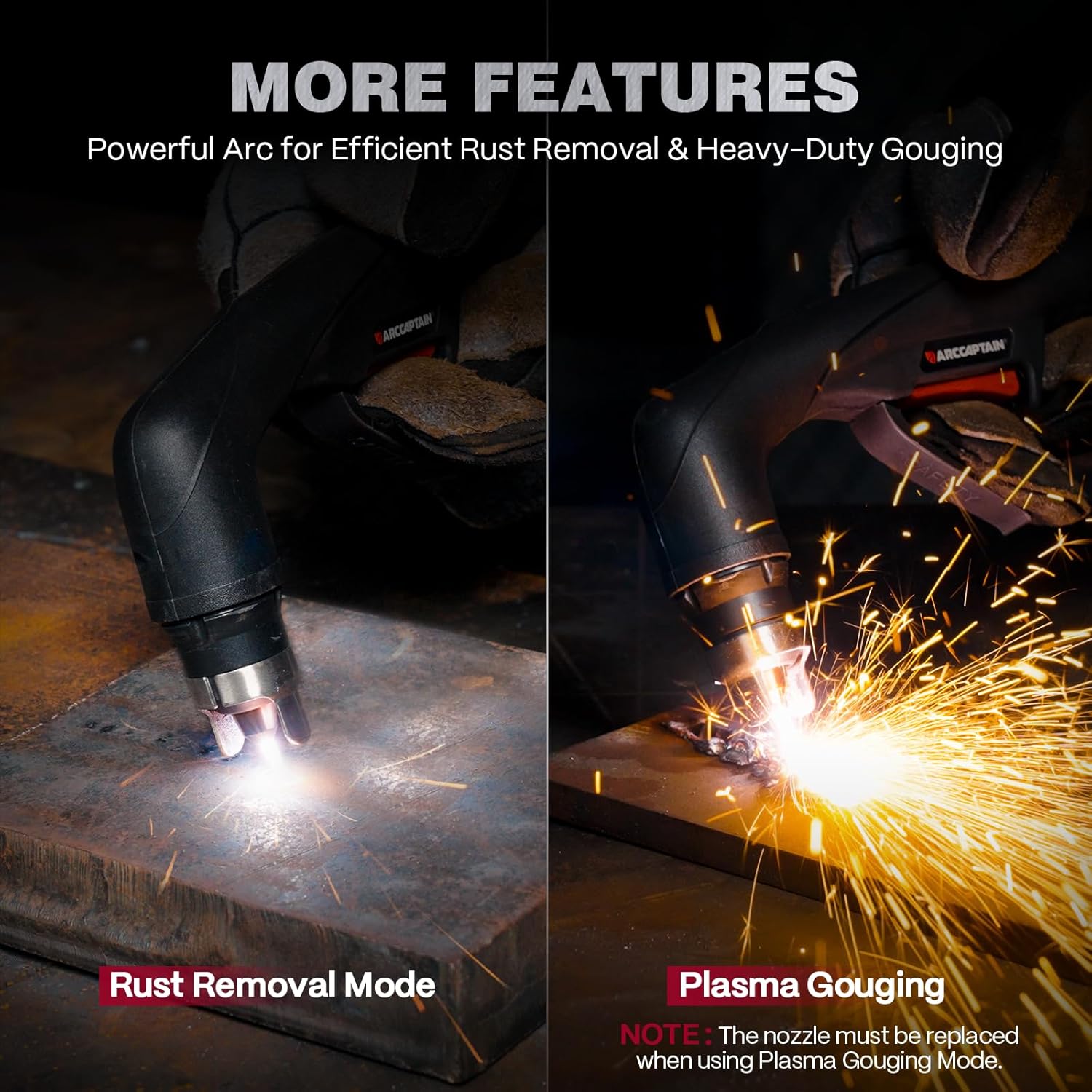
Image: Demonstrations of Rust Removal and Plasma Gouging capabilities.
5.5 Cutting Guidelines
The following table provides recommended settings for various materials and thicknesses. These are starting points and may require fine-tuning based on specific conditions and desired cut quality.

Image: Recommended cutting parameters for different materials and thicknesses.
6. Maintenance
Regular maintenance ensures the longevity and optimal performance of your plasma cutter.
- Consumable Replacement: Regularly inspect the torch consumables (nozzle, electrode, swirl ring, shield cup). Replace them when they show signs of wear or damage to maintain cut quality and prevent torch damage. Always replace the nozzle when switching to plasma gouging mode.
- Cleaning: Keep the machine clean and free from dust and metal particles. Use compressed air to blow out internal components periodically, ensuring the cooling vents are clear.
- Air System: Ensure your air compressor and air lines are free of moisture and oil. Use an air filter/dryer if necessary to prevent contamination of the plasma cutter's internal components.
- Cable Inspection: Periodically inspect all cables (power, torch, earth clamp) for cuts, abrasions, or loose connections. Replace damaged cables immediately.
7. Troubleshooting
The CUT55 MP features a smart protection system that displays error codes on the LED panel to help diagnose issues.
| Error Code | Description | Possible Solution |
|---|---|---|
| E10 | Over Current Protection | Reduce cutting current, check for short circuits, ensure proper consumables. |
| E60 | Over Heating Protection | Allow machine to cool down, ensure proper ventilation, check duty cycle. |
| E31 | Under Voltage Protection | Check input power supply, ensure stable voltage. |
| E34 | Low IGBT Drive Voltage | Contact customer support. |
| E80 | Air Pressure < 0.2MPa (30Psi) | Increase air pressure from compressor, check for air leaks. |
| E81 | Air Pressure > 0.55MPa (80Psi) | Reduce air pressure from compressor. |

Image: Visual representation of various error codes for smart protection.
If you encounter an issue not listed here or cannot resolve a problem, please contact ARCCAPTAIN customer support.
8. Specifications
| Feature | Detail |
|---|---|
| Model | CUT55 MP |
| Manufacturer | ARCCAPTAIN |
| Input Voltage | 120V / 240V (Dual Voltage) |
| Cutting Current Range | 55 Amp (Max) |
| Max Cutting Thickness (240V) | 1 inch (26mm) |
| Clean Cutting Thickness (240V) | 18mm |
| Max Cutting Thickness (120V) | 15mm |
| Clean Cutting Thickness (120V) | 12mm |
| Recommended Air Pressure | 0.3–0.55 MPa (43.5–79.8 PSI), ideal 0.4 MPa (57.5 PSI) |
| Item Weight | 20.5 pounds |
| Package Dimensions | 19.92 x 12.99 x 11.02 inches |
| Material | Iron |
| Power Source | DC |

Image: Detailed electrical specifications from the product label.
9. Warranty and Support
The ARCCAPTAIN CUT55 MP Plasma Cutter Machine comes with a 3-YEAR warranty from the date of purchase, covering defects in materials and workmanship under normal use.
For warranty claims, technical support, or any questions regarding your product, please contact ARCCAPTAIN customer service through the official ARCCAPTAIN website or your purchase platform. Please have your model number and purchase details ready when contacting support.
Ask a question about this manual
Ask about setup, troubleshooting, compatibility, parts, safety, or missing instructions. Manuals+ will review the question and use this page’s manual context to help answer it.