
1. Introduction
This manual provides essential information for the safe and efficient operation, maintenance, and troubleshooting of your Powerhorse 8000W Dual Fuel Inverter Generator, Model D8000i DF. Please read all instructions carefully before using the generator to ensure proper function and to prevent injury or damage.
The Powerhorse D8000i DF is a versatile inverter generator designed for quiet power delivery, featuring dual fuel capability (gasoline or propane) and an electric start. It is suitable for emergency home backup, RVs, outdoor events, and sensitive electronics.
2. Safety Information
WARNING: Generators produce carbon monoxide, a colorless, odorless, poisonous gas. Using a generator indoors CAN KILL YOU IN MINUTES. Always use generators outdoors and far away from windows, doors, and vents.
- Carbon Monoxide Hazard: Never operate the generator inside any building, garage, shed, or other enclosed space. Ensure adequate ventilation when operating outdoors.
- Fire Hazard: Gasoline and propane are highly flammable. Refuel only when the engine is off and cool. Do not smoke near the generator. Store fuel in approved containers in a well-ventilated area.
- Electrical Shock Hazard: Do not operate the generator in wet conditions. Ensure all electrical connections are secure and dry. Never connect the generator directly to a building's electrical system without a transfer switch installed by a qualified electrician.
- Hot Surfaces: The generator's engine and muffler become very hot during operation and remain hot for some time after shutdown. Avoid contact to prevent burns.
- Hearing Protection: Wear appropriate hearing protection when operating the generator for extended periods.
- Children and Pets: Keep children and pets away from the generator at all times.
3. Product Features and Components
The Powerhorse D8000i DF generator is designed with user convenience and safety in mind. Below are key features and a diagram of its main components.

Figure 3.1: Overall view of the Powerhorse 8000W Dual Fuel Inverter Generator.
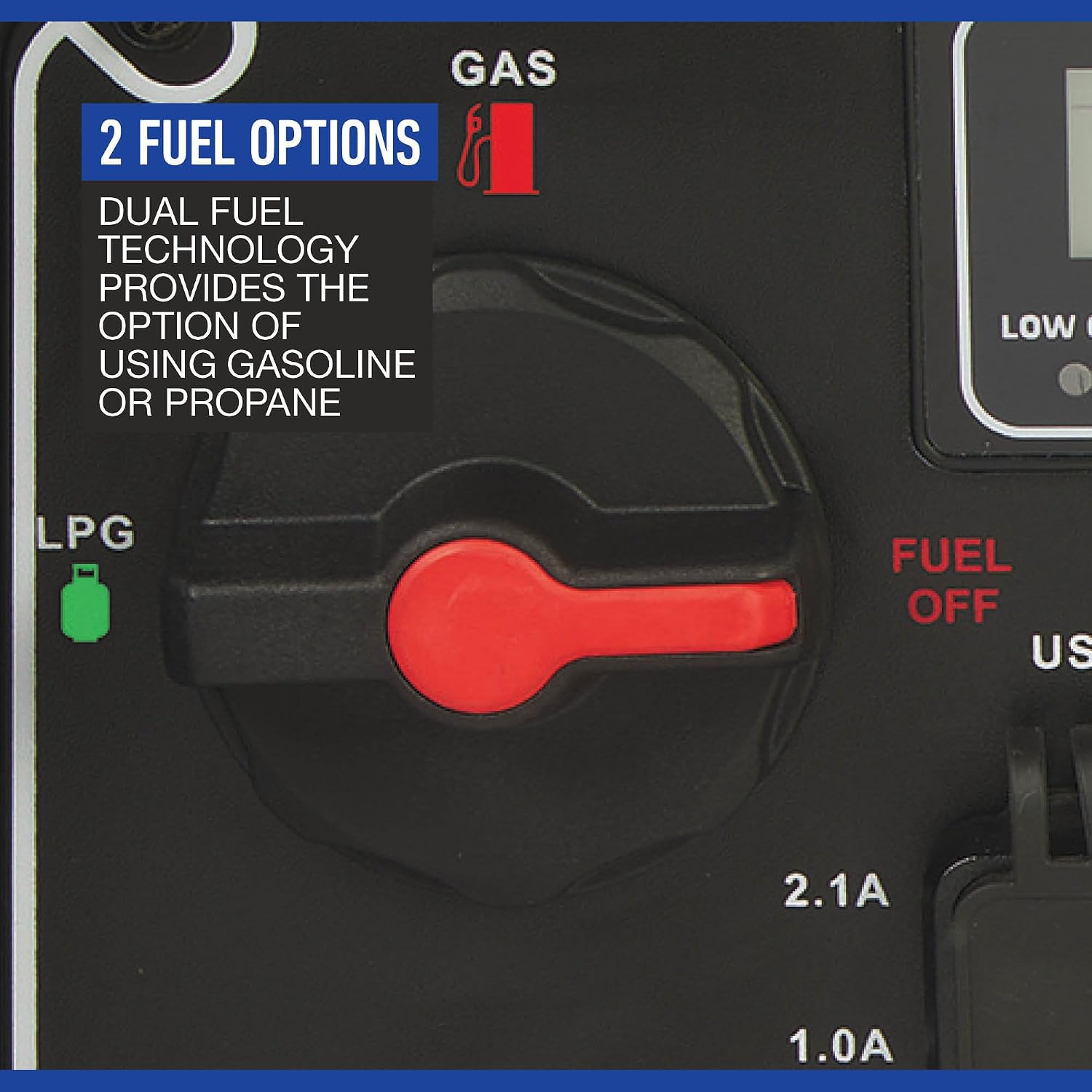
Figure 3.2: Control Panel and Key Components.
- 3.96-gallon gasoline tank: Provides fuel storage for gasoline operation.
- Premium 100% copper-wound generator head: Ensures durability and efficient power generation.
- Convenient pushbutton start/stop with remote included: Allows for easy starting and stopping of the generator.
- Extendable handle and integrated wheels: Facilitates easy maneuverability and transport.
- Low oil indicators: Alerts the user when oil levels are critically low, preventing engine damage.
- CO detection: Carbon monoxide monitoring system with automatic shut-off for enhanced safety.
- Parallel-ready design: Allows connection of two inverter generators for increased power output (cables sold separately).
- Control panel illumination: Provides visibility for easy operation at night.
Additional features include:
- Dual Fuel Technology: Operates on either gasoline or propane.
- Quiet Operation: Produces less than 62dB noise at 1/4 load.
- Clean Electricity: Less than 3% Total Harmonic Distortion (THD) for safely powering sensitive electronics.
4. Setup
Before initial use, perform the following setup steps:
- Unpacking: Carefully remove the generator from its packaging. Inspect for any shipping damage.
- Add Engine Oil: The generator is shipped without engine oil. Place the generator on a level surface. Remove the oil fill cap/dipstick. Slowly add the recommended oil (refer to specifications for type and capacity) until it reaches the upper mark on the dipstick. Do not overfill. Securely replace the cap.
- Add Fuel (Gasoline): Ensure the generator is off and cool. Open the fuel cap and carefully pour fresh, unleaded gasoline into the fuel tank. Do not fill above the red indicator ring inside the tank. Securely close the fuel cap.
- Connect Propane (LPG): If using propane, connect the propane regulator and hose (included) to a standard 20-lb. propane tank and to the generator's LPG inlet. Ensure all connections are tight.
- Battery Connection: Connect the battery cables to the generator's battery terminals. Ensure correct polarity (red to positive, black to negative).
- Wheel and Handle Assembly: Attach the wheels and extendable handle as per the assembly instructions provided in the separate assembly guide.
5. Operating Instructions
5.1 Starting the Generator
Ensure the generator is on a level, outdoor surface, away from any enclosed areas, and at least 15 feet from any windows or doors.

Figure 5.1: Dual Fuel Selector.
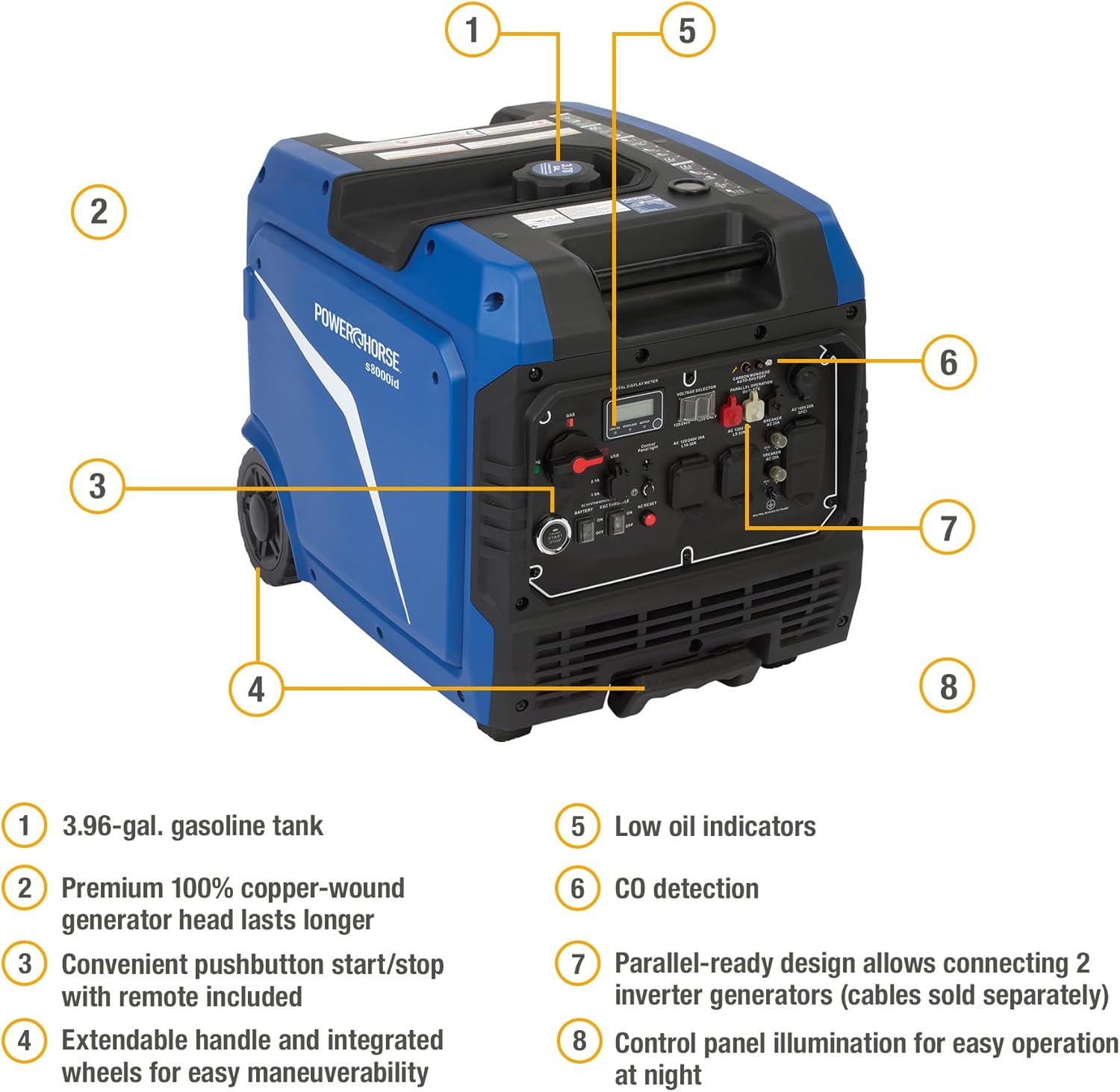
Figure 5.2: Engine Start/Stop Button.
- Select Fuel Type: Turn the fuel selector switch to either "GAS" for gasoline or "LPG" for propane.
- Turn on Battery Switch: Locate the battery switch on the control panel and turn it to the "ON" position.
- Start Engine:
- Electric Start: Press and hold the "ENGINE START/STOP" button for a few seconds until the engine starts.
- Remote Start: Use the provided wireless remote control to start the generator.
- Recoil Start: If the battery is low or for manual starting, pull the recoil starter handle firmly and smoothly until the engine starts.
- Connect Loads: Once the engine is running smoothly, you can connect your electrical devices to the appropriate outlets. Do not overload the generator.
5.2 Stopping the Generator
- Disconnect Loads: Unplug all electrical devices from the generator outlets.
- Stop Engine: Press the "ENGINE START/STOP" button or use the remote control to shut down the generator.
- Turn off Battery Switch: Turn the battery switch to the "OFF" position.
- Close Fuel Valve: If using propane, close the valve on the propane tank. If using gasoline, turn the fuel selector to the "OFF" position to run the carburetor dry for storage.
6. Maintenance
Regular maintenance ensures the longevity and reliable performance of your generator. Always perform maintenance when the engine is off and cool.
6.1 Maintenance Schedule
| Item | Every Use | Every 25 Hours / Monthly | Every 100 Hours / Annually |
|---|---|---|---|
| Engine Oil | Check Level | Change | |
| Air Filter | Clean | Replace | |
| Spark Plug | Inspect/Clean | Replace | |
| Fuel Filter | Inspect/Replace | ||
| Battery | Check Terminals |
6.2 Storage
For long-term storage (over 30 days), prepare the generator as follows:
- Drain the gasoline from the fuel tank and carburetor, or use a fuel stabilizer.
- Remove the spark plug and pour a small amount of engine oil into the cylinder. Pull the recoil starter a few times to distribute the oil, then reinstall the spark plug.
- Clean the generator exterior.
- Store in a clean, dry, well-ventilated area.
7. Troubleshooting
If your generator experiences issues, consult the following table for common problems and solutions.
| Problem | Possible Cause | Solution |
|---|---|---|
| Engine will not start | No fuel / Incorrect fuel type Low engine oil Spark plug faulty Battery low (for electric start) Fuel selector in wrong position | Add fresh fuel / Use correct fuel Add oil to correct level Clean or replace spark plug Charge battery / Use recoil start Set fuel selector to GAS or LPG |
| No power output | Circuit breaker tripped Overload ECO throttle engaged (low RPM) | Reset circuit breaker Reduce connected load Disengage ECO throttle or ensure sufficient load |
| Engine runs rough | Stale fuel Dirty air filter Spark plug fouled | Drain and replace with fresh fuel Clean or replace air filter Clean or replace spark plug |
| Generator shuts down unexpectedly | Low oil shutdown Overload shutdown CO sensor activated | Check and add engine oil Reduce load and restart Move generator to a well-ventilated area, allow to cool, then restart |
If the problem persists after attempting these solutions, contact customer support.
8. Specifications
Detailed technical specifications for the Powerhorse 8000W Dual Fuel Inverter Generator, Model D8000i DF.

Figure 8.1: Fuel Performance Overview.
| Specification | Value |
|---|---|
| Brand | Powerhorse |
| Model Name | Inverter Generator |
| Model Number | D8000i DF |
| Starting Wattage (Gasoline) | 8000 watts |
| Running Wattage (Gasoline) | 6000 watts |
| Starting Wattage (Propane) | 7200 watts |
| Running Wattage (Propane) | 5400 watts |
| Engine Type | Internal Combustion Engine, 298cc |
| Fuel Type | Gasoline, Propane |
| Fuel Tank Capacity | 3.96 gallons (Gasoline) |
| Run Time (Gasoline @ 1/4 load) | 13 hours |
| Run Time (Propane @ 1/4 load) | 12 hours (with 20-lb. tank) |
| Noise Level | 62dB @ 1/4 load |
| Ignition System Type | Electric start, Recoil start, Remote start |
| Total Power Outlets | 3 AC outlets, 2 USB-A ports |
| Product Dimensions (L x W x H) | 27.2" x 20.3" x 21.7" |
| Item Weight | 146 pounds |
| Frequency | 60 hertz |
| Material Type | Metal, Plastic |
| UPC | 840321763983 |
9. Warranty and Support
9.1 Warranty Information
This Powerhorse generator comes with a 2-year limited warranty. This warranty covers defects in materials and workmanship under normal use and service. Please retain your proof of purchase for warranty claims.
For specific warranty terms, conditions, and exclusions, refer to the warranty card included with your product or visit the official Powerhorse website.
9.2 Customer Support
If you have questions about your generator, require technical assistance, or need to order replacement parts, please contact Powerhorse customer support. You can typically find contact information on the manufacturer's website or in the documentation included with your purchase.
When contacting support, please have your generator's model number (D8000i DF) and serial number readily available.


