
1. Introduction
This manual provides detailed instructions for the installation, operation, and maintenance of your MekedeTech DUDUAUTO DUDU7 2K Touch Screen Car Radio Stereo Head Unit. This unit is specifically designed for Audi TT models manufactured between 2006 and 2012, offering a modern upgrade to your vehicle's infotainment system.
The DUDU7 model (specifically DUDU7-6-64 with 6GB RAM and 64GB ROM) features an Android 13 operating system, a 9.5-inch 2K touch screen, and advanced connectivity options including Wireless CarPlay, Android Auto, Bluetooth 5.0, 4G LTE, and Wi-Fi. It also incorporates a powerful 8-core UIS7870 processor and high-quality audio components for an enhanced in-car experience.
2. Setup and Installation
The MekedeTech DUDUAUTO DUDU7 head unit is designed for direct integration into Audi TT 2006-2012 vehicles. Professional installation is recommended to ensure proper fitment and functionality.
2.1 Pre-Installation Overview
Before beginning installation, ensure your vehicle's original stereo system is powered off and disconnected. Familiarize yourself with the existing dashboard layout and the components of your new DUDU7 unit.
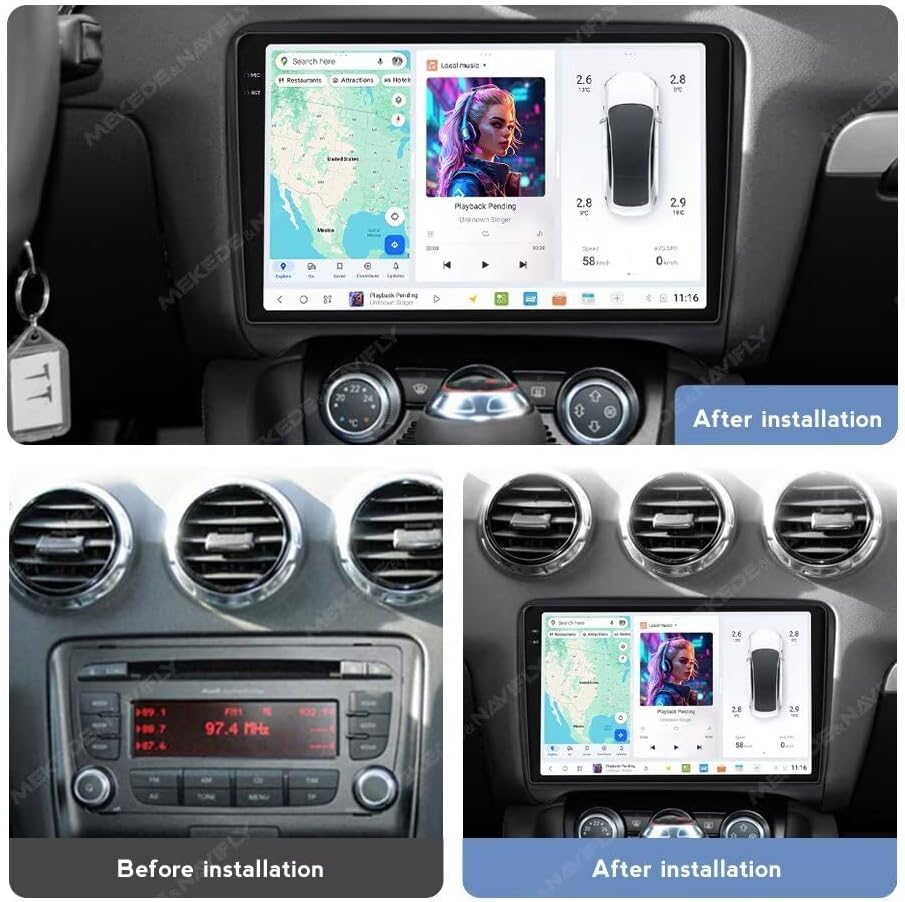
Image: Comparison of the Audi TT dashboard before and after the installation of the DUDUAUTO DUDU7 head unit. The top image shows the DUDU7 installed, displaying navigation and media. The bottom left shows the original Audi TT radio, and the bottom right shows the DUDU7 installed in the same vehicle.
2.2 Connecting the Unit
The DUDU7 unit features various ports for essential connections. Refer to the diagram below for port identification and ensure all cables are securely connected.
- Power Cable (G): Connects to the vehicle's power supply.
- Protocol Serial (C): Used with Can-bus for vehicle communication.
- 4Pin USB (E) & 6Pin USB (D): For USB devices and data transfer.
- Reverse Video Cable (F): For connecting a reversing camera.
- RCA Cable (A): Includes 4G Card Slot for external connectivity.
- 360° Panoramic Device (B): For optional 360-degree camera systems.
- Radio Antenna (8): Connects to the vehicle's radio antenna.
- WIFI (7): Internal Wi-Fi antenna.
- GPS Antenna (6): Connects to the external GPS antenna for navigation.
- 4G Antenna (4): Connects to the external 4G antenna for mobile data.
- MIC (0): Connects to the external microphone for voice commands and calls.
- Cooling Fan (8): Integrated cooling system.
- Type-C (8): USB 3.2 GEN1 port.
- Coaxial Optical Audio Out: For modified amplifier connections.

Image: Detailed diagram of the DUDU7 head unit's rear panel, illustrating all connection ports and their corresponding labels (A-G, 0, 4, 6, 7, 8). Insets show individual cables and antennas for MIC, 4G Antenna, GPS Antenna, RCA Cable, and Reversing Camera.
3. Operating Instructions
The DUDUAUTO DUDU7 operates on a user-friendly Android 13 system, offering a wide range of features accessible via its 9.5-inch 2K touch screen.
3.1 Basic Operation
- Power On/Off: Press and hold the power button (if available) or turn on your vehicle's ignition.
- Touch Screen Navigation: Swipe, tap, and pinch to navigate through menus, applications, and maps.
- Volume Control: Adjust volume using the on-screen controls or steering wheel buttons (if integrated).
3.2 Connectivity Features
- Wireless CarPlay & Android Auto: Connect your iPhone or Android smartphone wirelessly for seamless access to navigation, music, messages, and calls. Follow the on-screen prompts to pair your device.
- Bluetooth 5.0: The Qualcomm 3031 chip ensures stable and high-quality audio streaming and hands-free calling. Pair your phone via the Bluetooth settings menu.
- 4G LTE & Wi-Fi: Insert a SIM card into the designated slot for 4G internet access, or connect to a Wi-Fi hotspot for online services, app downloads, and real-time traffic updates.
3.3 Audio and Sound
The DUDU7 features AKM7739 DSP Velvet Audio Technology and a TDA7808 digital AB type power amplifier for superior sound quality.
- DSP Settings: Access the Digital Sound Processor (DSP) settings to customize equalization, sound stage, and other audio parameters to your preference.
- Digital Noise Cancelling Mic: The integrated microphone utilizes advanced noise reduction algorithms for clear voice transmission during calls and voice commands, even in noisy environments.

Image: Illustration highlighting the AKM7739 DSP Velvet Audio Technology and TDA7808 amplifier components within the DUDU7 unit. The image emphasizes the audio quality and enhanced sound experience provided by these technologies.
3.4 DUDU OS Interface
The DUDU OS offers intuitive and streamlined operation with various modes and customization options.

Image: Screenshots showcasing various interfaces and features of DUDU OS 3.5, including navigation, media playback, vehicle settings, and file management. The design focuses on intuitive operation and powerful functionality.

Image: Multiple screenshots demonstrating the DUDU OS 3.0 interface, including system settings, media player, and various dynamic wallpaper options for daytime, light mode, dark mode, and night mode, allowing for personalized visual themes.
4. Maintenance
To ensure the longevity and optimal performance of your DUDUAUTO DUDU7 head unit, follow these maintenance guidelines:
- Screen Cleaning: Use a soft, lint-free cloth specifically designed for electronics screens. Gently wipe the screen to remove dust and fingerprints. Avoid abrasive cleaners or harsh chemicals.
- Software Updates: Periodically check for system software updates. Updates can improve performance, add new features, and enhance security. Follow the on-screen instructions for any available updates.
- Environmental Conditions: Avoid exposing the unit to extreme temperatures, direct sunlight for prolonged periods, or excessive moisture.
- Connection Checks: Occasionally check all cable connections (USB, power, antennas) to ensure they are secure and free from damage.
5. Troubleshooting
If you encounter issues with your DUDUAUTO DUDU7, refer to the following common troubleshooting steps:
- Unit Does Not Power On:
- Check the power cable connection to ensure it is securely plugged in.
- Verify the vehicle's ignition is on.
- Inspect vehicle fuses related to the stereo system.
- No Sound:
- Check the volume level.
- Ensure audio output settings are correctly configured.
- Verify speaker connections.
- Touch Screen Unresponsive:
- Restart the unit by turning off and on the vehicle's ignition.
- Ensure the screen is clean and free from debris.
- GPS Signal Issues:
- Ensure the GPS antenna is properly connected and has a clear view of the sky.
- Check GPS settings within the DUDU OS.
- Bluetooth/Wi-Fi Connectivity Problems:
- Ensure Bluetooth/Wi-Fi is enabled in the settings.
- Restart the unit and your connected device.
- Forget and re-pair Bluetooth devices.
For persistent issues, please refer to the support section.
6. Specifications
The MekedeTech DUDUAUTO DUDU7 (Model DUDU7-6-64) offers the following technical specifications:
- Operation System: Android 13
- CPU: 8 Core UIS7870 Customized version A76 2.7Ghz 6nm processor
- Memory Type: UFS 3.1 (Read data 1700M+)
- RAM: 6GB
- ROM: 64GB
- Display Resolution: 2000x1200
- Display Type: OLED, Capacitive Touch Screen
- Screen Size: 9.5 inches
- GPS: Dual Band 6 mode L1 L5 B1 B2a E1 E5a
- MIC: Digital Noise Cancellation Microphone
- USB: USB 3.2 GEN1*1 (TYPE-C), USB 2.0*3
- Power Amplifier: TDA7808 Digital AB type
- DSP: AKM7739 Velvet Audio Technology
- Bluetooth Chip: Qualcomm 3031, Supports aptx HD protocol, BT5.0
- Audio Output: Optical + Coaxial, RCA 5.1 Channel Outputs
- WiFi Type: 802.11a/b/g/n/ac Support 5G WIFI
- Radio IC: TDA7708
- Work Voltage: 9V~16V
- Special Features: Wired and Wireless CarPlay, Android Auto, 360 panorama chip (default)
- Human Interface Input: Buttons, Keyboard, Microphone, Touchscreen
- Map Type: Worldwide

Image: A comparison table detailing specifications across different DUDU series models (DUDU4, DUDU5, DUDU6, DUDU7). The DUDU7 column highlights its advanced features including 6GB/64GB or 12GB/256GB/512GB RAM/ROM, UIS7870 CPU, UFS 3.1 memory, Dual Band GPS, Digital Noise Cancelling MIC, USB 3.2 Gen1, TDA7808 amplifier, AKM7739 DSP, Qualcomm 3031 Bluetooth 5.0, Optical + Coaxial audio output, 5G WiFi, and 2K 2000x1200 screen resolution.

Image: Visual representation of the A7870 (UIS 7870) 8-core, 6nm processor, highlighting its 2.7GHz speed, 204% CPU boost, and 240% GPU boost. A comparison chart shows the UIS 7870's performance against other mainstream chips. Additionally, a graphic illustrates the 7x read speed improvement with UFS 3.1 storage, showing reading speeds of 1908 MB/s and writing speeds of 1705 MB/s for the 12+256GB memory chip.
7. Warranty Information
The MekedeTech DUDUAUTO DUDU7 head unit comes with a 1-Year Warranty from the date of purchase. This warranty covers manufacturing defects and malfunctions under normal use. Please retain your proof of purchase for warranty claims.
The warranty does not cover damage caused by improper installation, misuse, accidents, unauthorized repairs, or normal wear and tear.
8. Support
For further assistance, technical support, or warranty inquiries, please contact MekedeTech customer service. You can typically find contact information on the official MekedeTech website or through the retailer where you purchased the product.
When contacting support, please have your product model (DUDU7) and proof of purchase readily available to expedite the process.