
1. Product Overview
The ENOMIR Smart Watch for Kids is designed to provide children aged 3-16 with a fun and functional wearable device. It features a 1.83" HD touchscreen, health monitoring capabilities, interactive games, and various utility functions. This watch can be used standalone or connected to a smartphone app for enhanced features and parental control.
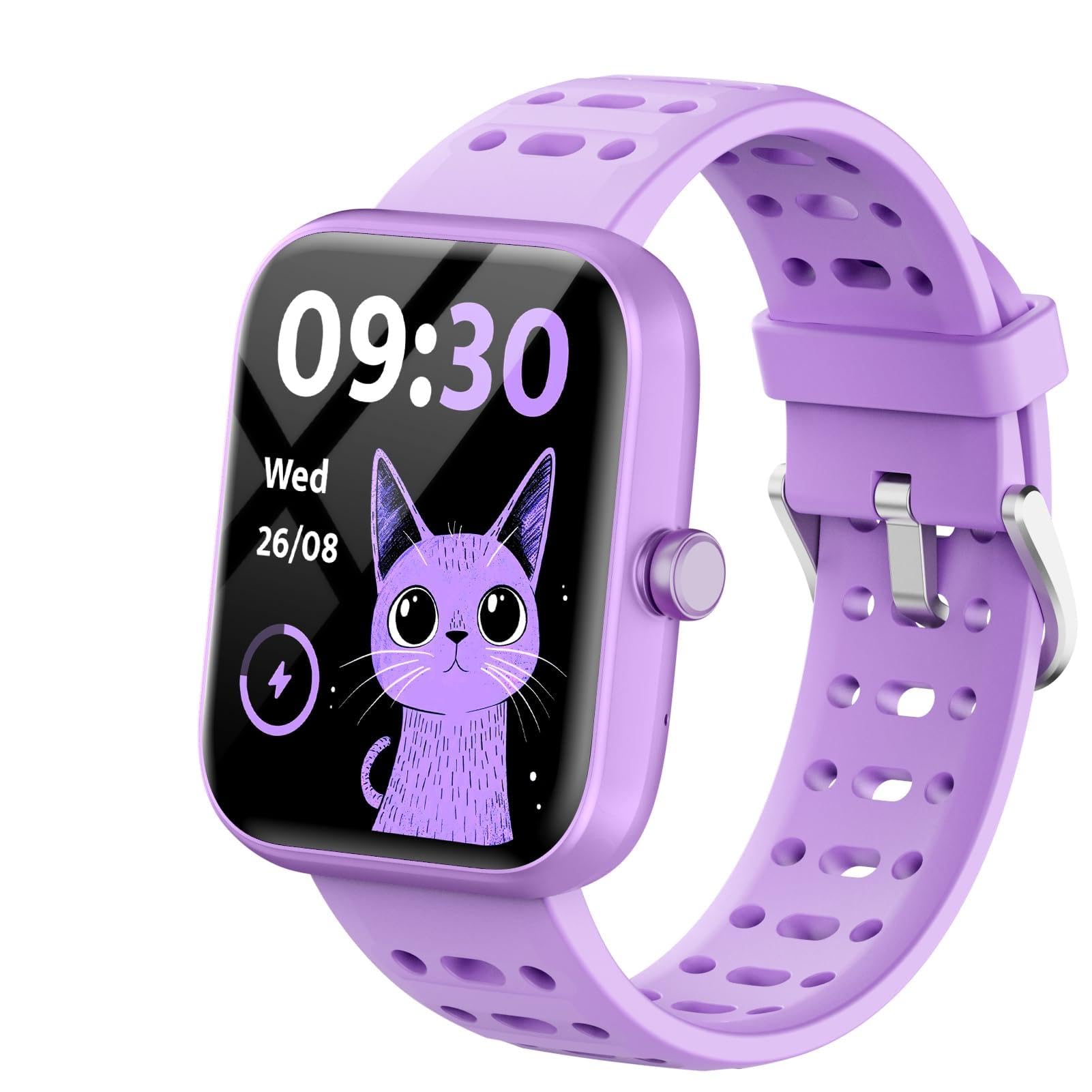
Figure 1: ENOMIR Smart Watch for Kids, showcasing its vibrant purple design.
2. What's in the Box
- ENOMIR Smart Watch (Model: Bright)
- Charging Cable
- User Manual (this document)

Figure 2: Packaging and contents of the ENOMIR Smart Watch, including the watch and charging cable.
3. Setup Guide
3.1 Initial Charging
Before first use, fully charge your ENOMIR Smart Watch. Connect the provided magnetic charging cable to the charging port on the back of the watch and plug the USB end into a compatible power adapter (not included).
- Charging Time: Approximately 2 hours for a full charge.
- Battery Life: Up to 5-7 days of usage, 30 days standby.

Figure 3: The ENOMIR Smart Watch connected to its magnetic charging cable, illustrating the ease of charging.
3.2 Wearing the Watch
The watch features an adjustable silicone band designed to fit wrists from 4.33 inches to 7.48 inches. Ensure the watch is snug but comfortable on the wrist for accurate health monitoring.

Figure 4: A child wearing the ENOMIR Smart Watch, demonstrating its comfortable and adjustable fit.
3.3 Initial Device Settings
Upon first power-on or after a reset, you may need to set the date, time, and user profile (gender, age, height) directly on the watch. Navigate through the settings menu using the touchscreen.
Video 1: Official product video demonstrating the initial setup and basic navigation of the ENOMIR Smart Watch.
4. Operating Instructions
4.1 Navigation
The watch features a 1.83" HD color touchscreen. Swipe left/right or up/down to navigate through menus and tap icons to select functions.
4.2 Health Monitoring
The watch provides 24-hour real-time tracking for several health metrics:
- Heart Rate: Monitors heart rate and alerts for abnormalities.
- Blood Oxygen (SpO2): Automatic detection of blood oxygen levels.
- Sleep Monitor: Measures sleep quality and duration (deep sleep, light sleep, awake time).

Figure 5: Visual representation of the watch's health monitoring features, including heart rate, blood oxygen, and sleep tracking.
4.3 Activity Tracking
Track daily activities and set goals to encourage healthy habits:
- 80+ Exercise Modes: Real-time recording of calories, steps, and distance for various sports.
- Pedometer: Counts daily steps.
- Calorie Tracker: Monitors calories burned.
- Distance Tracker: Records distance covered.

Figure 6: The activity tracker interface on the ENOMIR Smart Watch, displaying steps, calories, and a selection of over 80 sports modes.
4.4 Entertainment & Learning
- 5 Puzzle Games: Engage children's thinking, calculation, and reaction skills.
- Customizable Dials: Choose from 100+ dials or create custom ones.
- Alarm Clock: Helps children develop independence and goal-setting habits.
- Flashlight: A convenient built-in light.
- Stopwatch & Timer: Useful tools for various activities.
- Camera & Video: Capture photos and videos directly from the watch.
- Music Player: Listen to music (requires connection to app for content transfer).
- Recorder: Record audio.
- Calculator & Calendar: Basic utility tools.
- Learning Cards: Educational flashcards for learning to read and numbers.

Figure 7: The ENOMIR Smart Watch screen showing a selection of its 5 built-in puzzle games.

Figure 8: A collage of customizable watch dials available for the ENOMIR Smart Watch, allowing children to personalize their device.
4.5 App Connection & Parental Control (Optional)
The ENOMIR Smart Watch can be used standalone. For extended features and parental control, connect it to the companion app (compatible with Android 6.0+ and iOS 9.0+ smartphones).
- Parental Control: Limit game usage time or lock games entirely.
- Daily Habits: Set hydration reminders, sedentary alerts, and wake-up/bedtime alarms.
- Data Storage: View detailed health and activity data.
- Notifications: Receive call and message notifications on the watch when connected to a smartphone.

Figure 9: The companion app interface, illustrating parental control options for setting daily habits and managing watch features.
Video 2: Official product video demonstrating the full features of the ENOMIR Kids Smart Watch, including optional app connectivity.
5. Maintenance
5.1 Waterproofing
The watch is IP68 rated, making it sweatproof and waterproof. It can withstand splashes, hand washing, rain, and even bathing without issue. However, it is not recommended for prolonged submersion or hot water activities.

Figure 10: Two children playing by a pool, highlighting the IP68 waterproof feature of the ENOMIR Smart Watch.
5.2 Cleaning
Wipe the watch and band regularly with a soft, damp cloth. Avoid using harsh chemicals or abrasive materials that could damage the device.
6. Troubleshooting
- Watch not turning on: Ensure the watch is fully charged.
- Inaccurate readings: Ensure the watch is worn snugly on the wrist.
- App connectivity issues: Check Bluetooth connection on your smartphone and ensure the app is updated.
If you encounter any problems, please refer to the detailed instructions in the included manual or contact customer service.
Customer Service: ENOMIR offers 24-hour customer service to assist with any product issues.
7. Specifications
| Feature | Detail |
|---|---|
| Brand | ENOMIR |
| Model Number | Bright |
| Screen Size | 1.83 Inches |
| Display Type | HD TouchScreen |
| Waterproof Rating | IP68 |
| Battery Capacity | 300 Milliamp Hours |
| Battery Life (Normal Use) | 5-7 Days |
| Standby Time | 30 Days |
| Connectivity | Bluetooth |
| Operating System Compatibility | Android 6.0+ & iOS 9.0+ |
| Health Features | Heart Rate Monitor, Blood Oxygen (SpO2), Sleep Monitor |
| Activity Features | 80+ Exercise Modes, Pedometer, Calorie Tracker, Distance Tracker |
| Entertainment Features | 5 Puzzle Games, Customizable Dials, Camera, Video, Music Player, Recorder |
| Utility Features | Alarm Clock, Flashlight, Stopwatch, Timer, Calculator, Calendar |
| Item Weight | 5.6 ounces |
| Wrist Fit | 4.33 inches - 7.48 inches |
8. Warranty & Support
8.1 Return Policy
This product is eligible for a refund or replacement within 30 days of purchase.
8.2 Customer Support
For any questions, concerns, or technical assistance, please contact ENOMIR customer service. Our dedicated team is available 24 hours to help resolve any issues you may encounter.

