
1. Product Overview
The VTOMAN Jump 1800 is a versatile portable power station designed to provide reliable power for various applications, including camping, RV travel, home backup, and emergency situations. It features a robust 1548Wh LiFePO4 battery and delivers a pure sine wave 1800W AC output, with a surge capacity of 3600W. This unit is equipped with multiple output ports and advanced safety features to ensure efficient and secure operation.
Key Features:
- SuperSafe LIFEBMS Battery Management System: Provides comprehensive protection against over-charge, over-discharge, over-voltage, over-current, and more.
- LiFePO4 Battery Technology: Offers enhanced heat resistance, safety, and a longer lifespan of over 3,000 cycles to 80% capacity.
- Expandable Capacity: Base capacity of 1548Wh, expandable up to 3096Wh with an optional VTOMAN Jump 1500 extra battery (sold separately).
- 1800W Constant-Power Output (V-Beyond Technology): Capable of powering appliances rated over 1800W by maintaining a constant 1800W output, providing an emergency solution for devices up to 3600W.
- Multiple Output Ports: Includes 3x 110V/1800W AC outlets, 2x Regulated 12V/10A DC5521 outputs, 1x Regulated 12V/10A car port, 4x USB-A outputs (including 1x QC 3.0 18W max), and 2x Type-C PD 100W outputs.
- Fast Recharging Options: Supports recharging via wall charger (approx. 3 hours to 80%), 12V car outlet (approx. 8 hours), or up to 400W solar panels (approx. 5-8 hours).
- 12V Car Jump Start Function: Integrated capability to jump start vehicles.
- Pass-Through Charging: Allows the unit to charge devices while being recharged itself.
- Integrated LED Light: Provides illumination for emergency situations or low-light environments.

2. Important Safety Instructions
Please read and understand all safety instructions before operating the VTOMAN Jump 1800 Portable Power Station. Failure to follow these instructions may result in electric shock, fire, or serious injury.
- Do not disassemble, repair, or modify the unit. Incorrect reassembly may cause fire or electric shock.
- Keep the unit away from fire, heat sources, and direct sunlight. Store in a cool, dry, and well-ventilated area.
- Do not expose the unit to water or other liquids. Avoid using in humid environments.
- Ensure proper ventilation during use and charging. Do not block ventilation openings.
- Use only VTOMAN-approved accessories and charging cables.
- Keep out of reach of children and pets.
- In case of fire, use a dry powder fire extinguisher. Water may cause electric shock.
- Dispose of the unit and its battery according to local regulations. Do not dispose of in household waste.
3. Package Contents
Verify that all items are present in your package:
- 1x VTOMAN Jump 1800 Portable Power Station
- 1x AC Adapter & Charging Cable
- 1x Car Charging Cable
- 1x Type-C to Type-C Cable
- 1x USB-A to Type-C Cable
- 1x User Manual
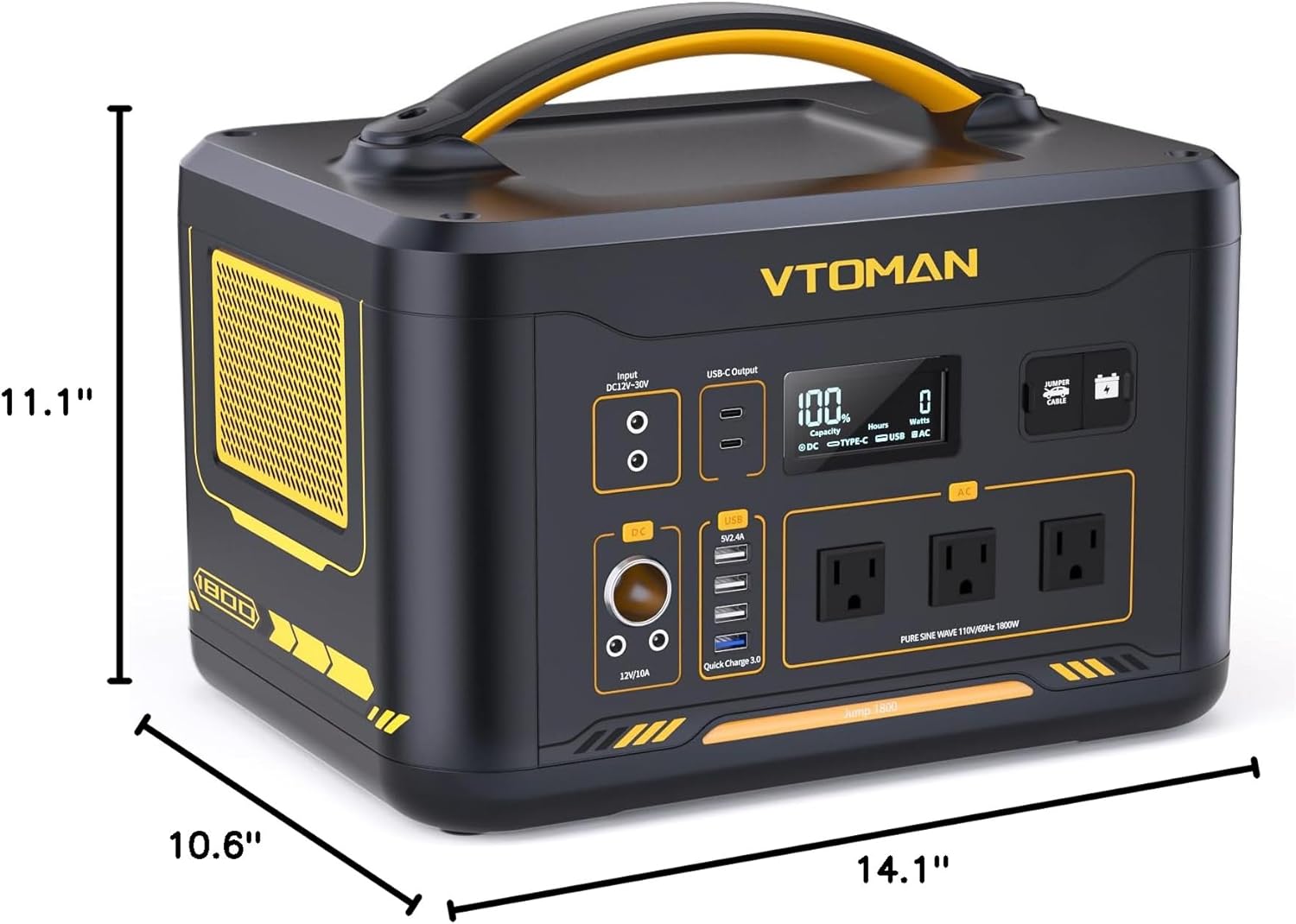
4. Product Layout and Ports
Familiarize yourself with the various input and output ports on your Jump 1800 power station.

- Input DC12V-30V: For charging the power station via AC adapter, car charger, or solar panels.
- USB-C Output (PD100W): Two Type-C ports for fast charging compatible devices.
- Display Screen: Shows battery level, input/output wattage, and remaining runtime.
- Jumper Cable Port: Dedicated port for connecting car jump starter cables.
- Add-on Battery Port: For connecting an optional VTOMAN Jump 1500 extra battery.
- 12V/10A DC Output: Two DC5521 ports and one car cigarette lighter port for 12V devices.
- USB-A Output: Four USB-A ports, including one Quick Charge 3.0 port.
- AC Outlets (110V/1800W): Three standard AC outlets for household appliances.
5. Setup Guide
5.1 Initial Charging
Before first use, it is recommended to fully charge your VTOMAN Jump 1800. Connect the provided AC adapter to the DC input port and plug it into a wall outlet. The display screen will indicate charging status. A full charge via wall outlet typically takes approximately 3 hours to reach 80% capacity.
6. Operating Instructions
6.1 Turning On/Off
To turn on the power station, press and hold the main power button for a few seconds until the display screen illuminates. To turn off, press and hold the power button again until the display turns off.
6.2 Using AC Outputs
Press the AC power button to activate the AC outlets. Plug your appliances into the 110V AC outlets. Ensure the total wattage of connected devices does not exceed 1800W. For devices exceeding 1800W, the V-Beyond Technology may provide constant 1800W output (see section 6.7).
6.3 Using DC Outputs (12V/10A, Car Port)
Press the DC power button to activate the 12V DC5521 ports and the car cigarette lighter port. These ports provide a regulated 12V/10A output, suitable for devices like car refrigerators, CPAP machines, and portable tire inflators. The total maximum output for all DC ports is 120W.
6.4 Using USB Outputs (Type-C PD 100W, USB-A)
The USB outputs are typically active when the unit is on. The two Type-C ports support Power Delivery (PD) up to 100W for fast charging laptops and other compatible devices. The USB-A ports include one Quick Charge 3.0 port (18W max) and three standard USB-A ports (12W max).
6.5 Car Jump Start Function
The Jump 1800 can be used to jump start a 12V vehicle battery. Connect the jumper cables (sold separately) to the dedicated jumper cable port on the power station, then connect the clamps to your vehicle's battery terminals (red to positive, black to negative). Follow the specific instructions provided with your jumper cables for safe operation. Ensure the power station has sufficient charge before attempting a jump start.

6.6 Charging the Power Station
The Jump 1800 offers multiple charging methods:
- AC Wall Outlet: Connect the AC adapter to the DC input port. Recharges to 80% in approximately 3 hours.
- Car Charger: Use the provided car charging cable to connect to your vehicle's 12V outlet. Full recharge takes approximately 8 hours.
- Solar Panels: Connect compatible solar panels (up to 400W max input) to the DC input ports. Recharging time is approximately 5-8 hours, depending on sunlight conditions and panel wattage. The unit features a built-in MPPT controller for efficient solar charging.

6.7 Expandable Capacity
The Jump 1800's capacity can be expanded by connecting a VTOMAN Jump 1500 extra battery (sold separately). This increases the total capacity from 1548Wh to 3096Wh, providing extended power duration for your needs. Refer to the Jump 1500 extra battery manual for connection instructions.

6.8 V-Beyond Technology (Constant Power Output)
The Jump 1800 features V-Beyond Technology, which allows it to power resistive loads exceeding its rated 1800W output by maintaining a constant 1800W output instead of shutting down. This provides an emergency solution for appliances up to 3600W, such as water heaters, space heaters, and ovens. Note that this feature is primarily for resistive loads and may not apply to all high-wattage inductive appliances.
6.9 LED Light Function
The integrated LED light can be activated by pressing the dedicated light button. It provides convenient illumination for various situations, including power outages or outdoor activities.

7. Maintenance and Storage
7.1 Battery Care
The Jump 1800 utilizes a LiFePO4 battery, known for its durability and long cycle life (over 3,000 cycles to 80% capacity). To maximize battery lifespan:
- Avoid fully discharging the battery frequently.
- Recharge the unit at least once every 3-6 months if not in regular use.
- Store the unit with a charge level between 50% and 80%.

7.2 Cleaning and Storage
- Clean the unit with a dry, soft cloth. Do not use abrasive cleaners or solvents.
- Store the power station in a cool, dry place, away from direct sunlight and extreme temperatures.
- Ensure the unit is turned off before storing for extended periods.
8. Troubleshooting
If you encounter issues with your VTOMAN Jump 1800, refer to the following common problems and solutions:
- Unit not turning on: Check the battery level on the display. Ensure the main power button is pressed and held for a few seconds. If the battery is completely depleted, connect to an AC charger for initial power.
- AC output not working: Verify that the AC power button is pressed and its indicator light is on. Check if the appliance wattage exceeds the unit's 1800W rated output. If using V-Beyond Technology for higher wattage devices, ensure it's a resistive load.
- DC/USB output not working: Confirm that the respective DC or USB power buttons are activated. Check all cable connections for secure fit.
- Slow charging: For AC charging, ensure the original adapter is used. For solar charging, verify solar panel output, optimal positioning towards the sun, and clean panel surfaces.
- Car Jump Start failure: Ensure the jumper cables are correctly connected to both the power station and the vehicle battery (red to positive, black to negative). Check that the power station has sufficient charge for jump starting.
- Overload warning: If an overload warning appears, disconnect some devices to reduce the load. The unit may automatically shut down to prevent damage.
If the problem persists, please contact VTOMAN customer support.
9. Technical Specifications
| Feature | Specification |
|---|---|
| Model Name | Jump 1800 |
| Battery Type | LiFePO4 |
| Capacity | 1548Wh (Expandable to 3096Wh) |
| AC Output | 3x 110V/1800W (Pure Sine Wave, Surge 3600W) |
| DC Output | 2x DC5521 (12V/10A), 1x Car Port (12V/10A) - Total 120W Max |
| USB-A Output | 3x 12W, 1x QC 3.0 (18W Max) |
| USB-C Output | 2x PD 100W Max |
| Input (DC) | DC12V-30V, 200W Max (Total 400W Max) |
| Charging Time (AC) | Approx. 3 hours to 80% |
| Charging Time (Solar) | Approx. 5-8 hours (with 400W solar input) |
| Charging Time (Car) | Approx. 8 hours |
| Dimensions (L x W x H) | 14.1" x 10.6" x 11.1" |
| Weight | 38.6 lbs |
| Operating Temperature | 14°F to 104°F (-10°C to 40°C) |
10. Warranty and Customer Support
10.1 Warranty Information
The VTOMAN Jump 1800 Portable Power Station comes with a 2-Year Warranty from the date of purchase. This warranty covers defects in materials and workmanship under normal use. It does not cover damage caused by misuse, accidents, unauthorized modifications, or natural disasters.
10.2 Customer Support
For technical assistance, warranty claims, or any questions regarding your VTOMAN Jump 1800, please contact VTOMAN customer support through their official channels. You can find more information and contact details on the VTOMAN Brand Store on Amazon or their official website.


