
1. Introduction
This manual provides comprehensive instructions for the Anpviz 4MP PoE Outdoor IP Camera, model IPC-D3243W-S. This camera is designed for outdoor security surveillance, offering advanced features such as smart human detection, intelligent color night vision, and a built-in microphone. Please read this manual thoroughly before installation and operation to ensure proper use and optimal performance.
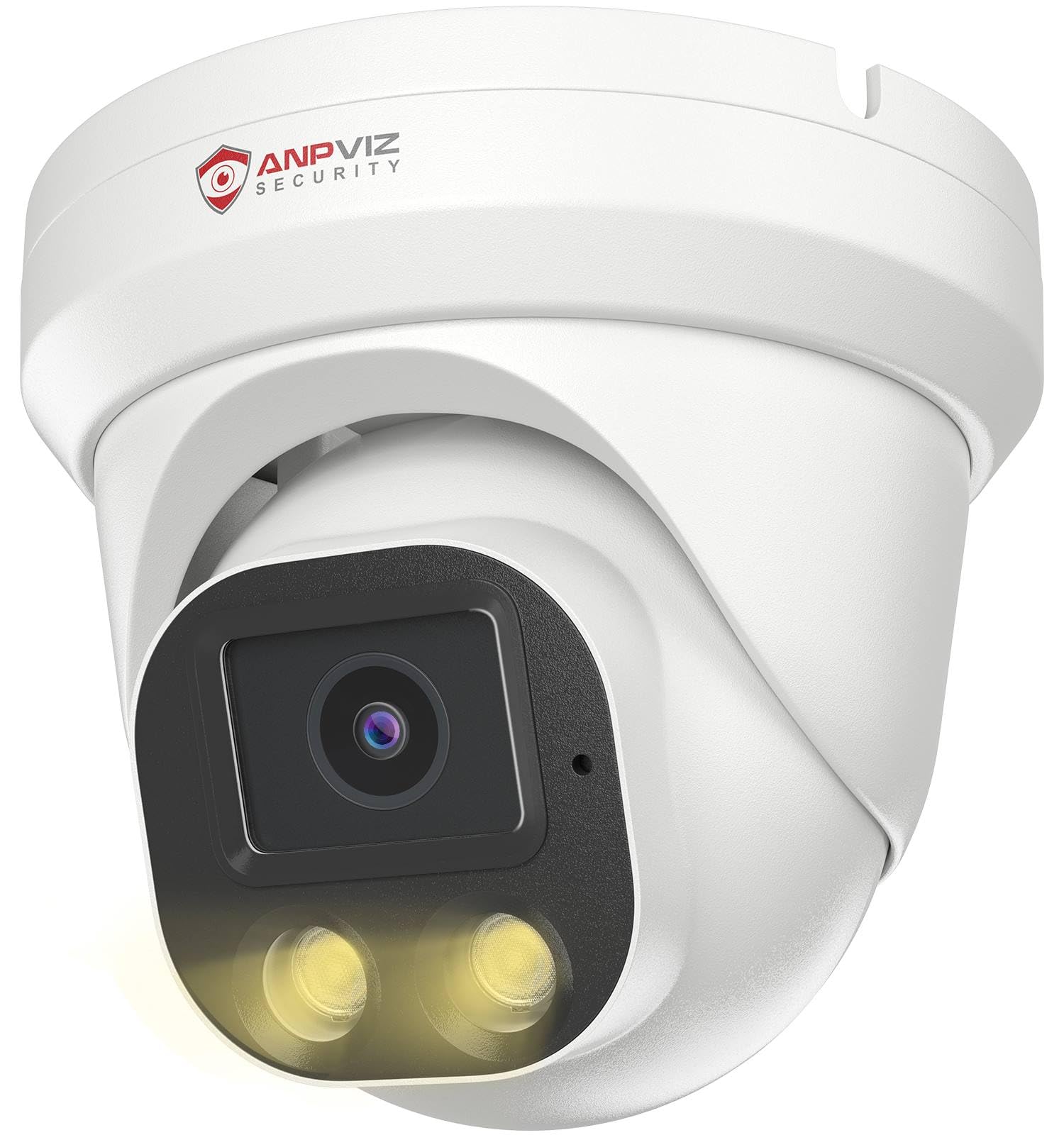
Figure 1: Anpviz 4MP PoE Outdoor IP Camera (Model: IPC-D3243W-S)
2. Package Contents
Verify that all items are present in your package:
- 1 x Anpviz 4MP PoE Camera
- 1 x Waterproof Cover
- 1 x User Manual
- 1 x Warranty Card
- 1 x Mounting Screw Kit

Figure 2: Package Contents (Box, Camera, Manual, Waterproof Cover, Screws, Warning Sticker)
3. Product Features
3.1 Smart Human Detection
This PoE outdoor surveillance camera features intelligent motion and human detection technology. It sends instant alerts only when a person is detected, significantly reducing false alarms caused by environmental factors like swaying trees, falling leaves, raindrops, or light changes. It also includes a built-in microphone for audio capture.

Figure 3: Smart Human Detection in action, distinguishing people from vehicles.
3.2 Intelligent Color Night Vision
The 4MP PoE outdoor camera provides clear, full-color images during live streaming and playback, even at night. When an intruder is detected, the camera's spotlights activate automatically to deter them. You can also manually activate the spotlights. The camera offers three night vision modes: Smart Color Night Vision, 24/7 Color Night Vision, and Infrared Night Vision.

Figure 4: Intelligent Dual Light Color Night Vision operation.
3.3 Built-in Microphone
The camera includes a built-in microphone for one-way audio capture, allowing you to hear sounds from the surveillance area. This feature enhances security by providing auditory context to visual events.

Figure 5: Built-in microphone capturing audio.
3.4 Wide-Angle Lens
Equipped with a 2.8mm ultra-wide-angle lens, the camera offers a 108° field of view. This wide angle allows for broader coverage of your surveillance area, securing more essential elements with a single camera.
3.5 Durable Design (IP66 Weatherproof & Metal Housing)
The camera features an IP66 weatherproof rating and an all-metal housing, ensuring durability against various weather conditions (rain, snow, sun) and temperatures ranging from -20°C (-4°F) to 60°C (140°F). This robust construction makes it suitable for continuous outdoor use.

Figure 6: IP66 Weatherproof and temperature resistance.
4. Installation
4.1 Camera Details
Familiarize yourself with the camera's components before installation:
- Metal Housing: IP66 Weatherproof enclosure.
- 2.8mm Lens: 110° Wide Angle.
- Built-in Microphone: For one-way audio.
- 2pcs IR LEDs & Spotlights: For Smart Color Night Vision.
- Network Cable: For data and PoE power.
- Power Supply (Optional): Connector for external power adapter if not using PoE.
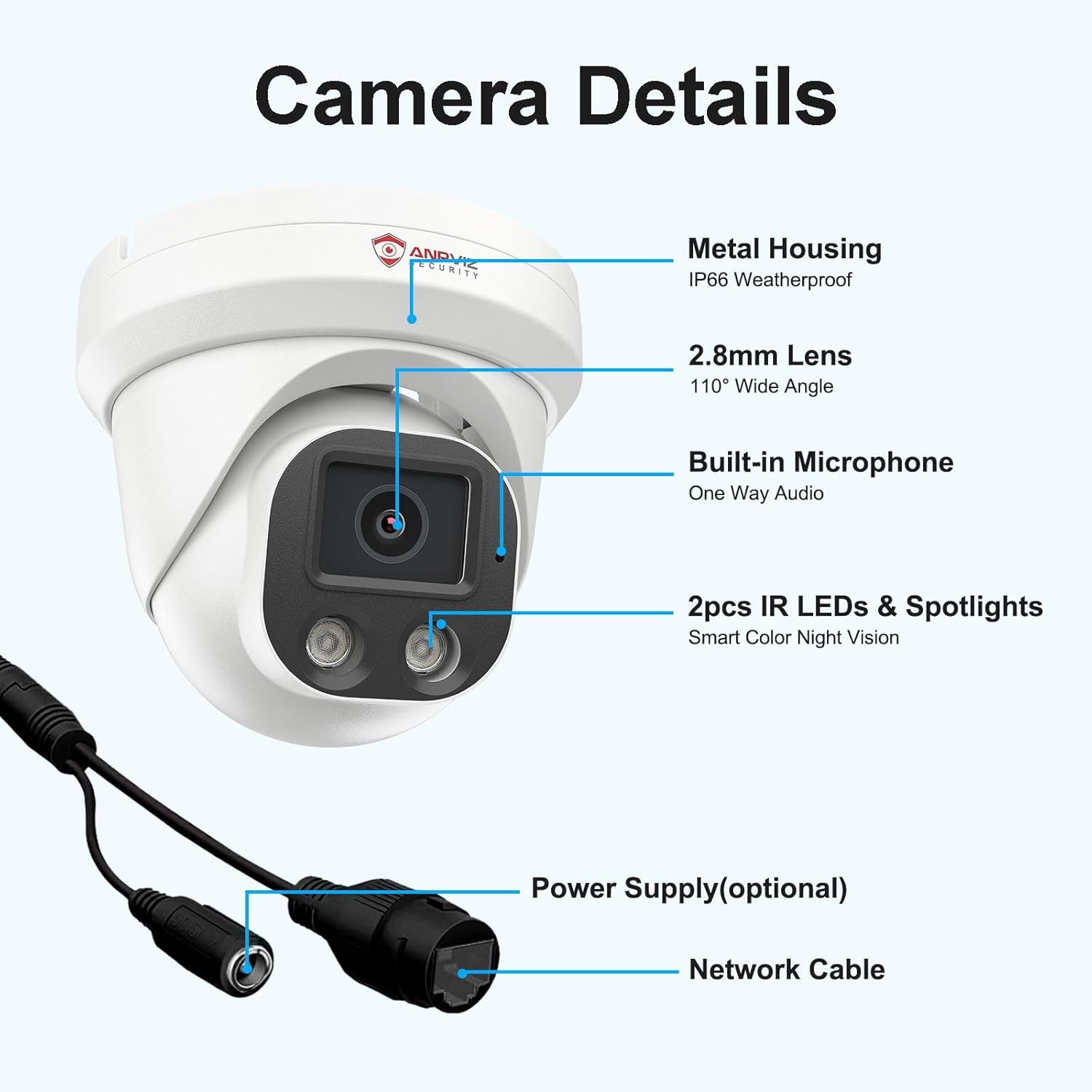
Figure 7: Camera Components and Connections.
4.2 Mounting
The camera is designed for outdoor use and can be mounted on a ceiling or wall. Use the provided mounting screw kit for secure installation. Ensure the camera is positioned to cover the desired surveillance area. Remove the outer ring when mounting with screws.
4.3 Connection Methods
The Anpviz PoE camera offers flexible connection options:
- Plug & Play with PoE NVR: Connect the camera directly to a PoE Network Video Recorder (NVR) for both power and data transmission. This is the simplest method for integrated systems.
- Connect to a PoE Switch: Use a PoE switch to provide power and network connectivity to the camera. The switch then connects to your router.
- Powered by Power Adapter (Optional): If a PoE NVR or switch is not available, the camera can be powered by a separate 12V DC power adapter (not included) and connected to your network via an Ethernet cable to your router.
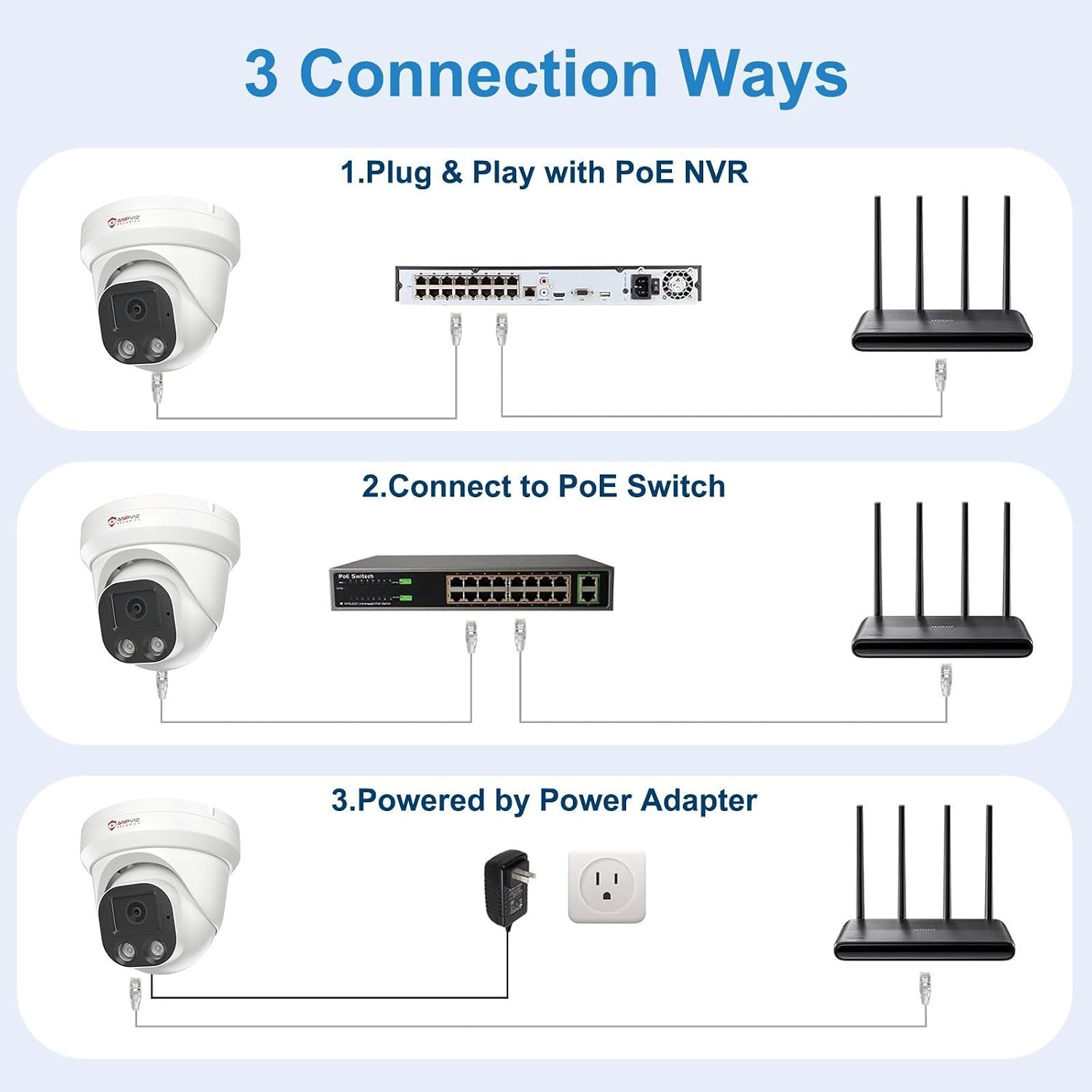
Figure 8: Three ways to connect your PoE camera.
5. Operation
5.1 Initial Setup
Refer to the included user manual for detailed instructions on initial setup, including network configuration and accessing the camera's web interface. This typically involves connecting the camera to your network and using a PC or mobile device to discover and configure it.
5.2 Remote Access
Access your camera feed remotely using the VideoLink mobile app (available on Google Play and Apple App Store) or the LMS PC Client software. The LMS PC Client can be downloaded from the Anpviz Security website. This allows you to monitor your property from anywhere with an internet connection.

Figure 9: Remote access via mobile app and PC client.
5.3 Smart Human Detection Configuration
Configure human detection settings through the camera's interface or associated software to receive alerts only for human presence, minimizing false alarms. You can often define specific detection zones and sensitivity levels.
5.4 Night Vision Modes
The camera supports intelligent color night vision. You can configure it to automatically switch between infrared and color modes based on detection events or ambient light conditions. Consult the software settings for customization options.
5.5 Compatibility
The camera works seamlessly with Anpviz NVRs and other third-party On-vif PoE NVRs. It is compatible with various surveillance software such as ISpy, Blue-Iris, and Mile-stone. It also supports Synology NAS (NFS) and QNAP for storage solutions. Easy viewing is available via popular web browsers like IE, Edge, Firefox, and Chrome.
6. Maintenance
Proper maintenance ensures the longevity and optimal performance of your Anpviz camera.
- Cleaning: Periodically clean the camera lens and housing with a soft, dry cloth to ensure clear image quality. Do not use harsh chemicals or abrasive materials.
- Firmware Updates: Regularly check the official Anpviz Security website for the latest firmware updates. Keeping your camera's firmware updated ensures access to new features, performance improvements, and security patches.
- Environmental Protection: While the camera is IP66 weatherproof, ensure its mounting location minimizes direct exposure to extreme conditions if possible, to further extend its lifespan.
7. Troubleshooting
If you encounter issues with your Anpviz camera, refer to the following common troubleshooting steps:
- No Image/Video:
- Ensure the camera is properly powered and connected to the network. Check all cable connections for looseness or damage.
- Verify that your NVR or viewing software is correctly configured to detect the camera.
- Restart the camera and your NVR/router.
- Poor Image Quality:
- Clean the camera lens with a soft, dry cloth.
- Check network bandwidth. Insufficient bandwidth can affect video quality, especially for 4MP resolution.
- Adjust camera settings (resolution, frame rate) if necessary through the camera's web interface or software.
- False Alarms:
- Adjust the sensitivity of the human detection feature in the camera settings.
- Define specific detection zones to exclude areas with frequent non-human movement (e.g., swaying trees, shadows, pets).
- Remote Access Issues:
- Ensure your camera has an active internet connection and your router's port forwarding (if required) is correctly set up.
- Verify that the VideoLink app or LMS PC Client is correctly configured and updated to the latest version.
- Check firewall settings on your router or network that might be blocking access.
- Audio Issues:
- Ensure the built-in microphone is enabled in the camera settings.
- Check audio settings on your viewing device (smartphone, PC, NVR).
If these steps do not resolve your issue, please contact Anpviz customer support.
8. Specifications
| Feature | Specification |
|---|---|
| Brand | Anpviz |
| Model Name | IPC-D3243W-S |
| Connectivity Technology | Wired (PoE) |
| Usage | Outdoor |
| Resolution | 4MP (2560x1440) @ 25fps |
| Lens | 2.8mm, 108° Wide Angle |
| Night Vision | Intelligent Color Night Vision, 100ft range |
| Audio | Built-in Microphone (one-way audio) |
| Weather Resistance | IP66 Waterproof |
| Housing Material | Metal |
| Operating Temperature | -20°C to 60°C (-4°F to 140°F) |
| Mounting Type | Ceiling, Wall (Screw-in) |
| Alarm Type | Motion, Human Detection |
| Compatible Devices | Desktop computers, Laptops, Smartphones, Tablets |
| Connectivity Protocol | Blue-Iris, ISpy, ONVIF |
| Video Capture Format | MP4 |
| Item Dimensions | 12 x 12.5 x 12.5 cm |
9. Warranty and Support
This product includes a warranty card. Please refer to the warranty card for details regarding coverage and duration. For technical support, firmware updates, or further assistance, please visit the official Anpviz Security website or contact their customer service through the provided contact information on the warranty card or website.


