1. Introduction
Thank you for choosing the SonixForce SMX4 4-Channel Audio Mixer. This professional mixer is designed to provide high-quality audio control for various applications, including live streaming, podcasting, studio recording, and DJ performances. This manual will guide you through the setup, operation, and maintenance of your new audio mixer.
2. Product Features
- 4-Channel Mixing Capability: Features 2 studio-grade combo XLR/TRS jacks for microphones and instruments, plus 2 dedicated stereo line inputs for versatile audio setups.
- Premium OEM Design: Constructed with a durable aluminum alloy shell, high-quality audio chips for minimal distortion, and a universal 110V-240V power board. The ergonomic 30-degree angled design enhances visibility and control.
- Seamless Connectivity: Supports direct audio playback from smartphones or tablets via Bluetooth. Offers two USB port connections for computer audio interfaces or direct USB flash drive/MP3 playback. Includes an independent headphone output for monitoring.
- 48V Phantom Power: Provides one-touch 48V phantom power for condenser microphones, ensuring pristine vocal capture.
- Direct Recording: Connects directly to your computer via USB for recording/streaming. Also supports direct recording to a USB flash drive by switching to 'MODE' recording.
- 99 DSP Effects & EQ Control: Each input channel features a dedicated 3-band EQ. Apply 99 professional DSP effects for depth and dimension. A global Master EQ allows for overall output tuning.
3. Panel Controls Explained
Familiarize yourself with the layout and functions of the mixer's control panel.
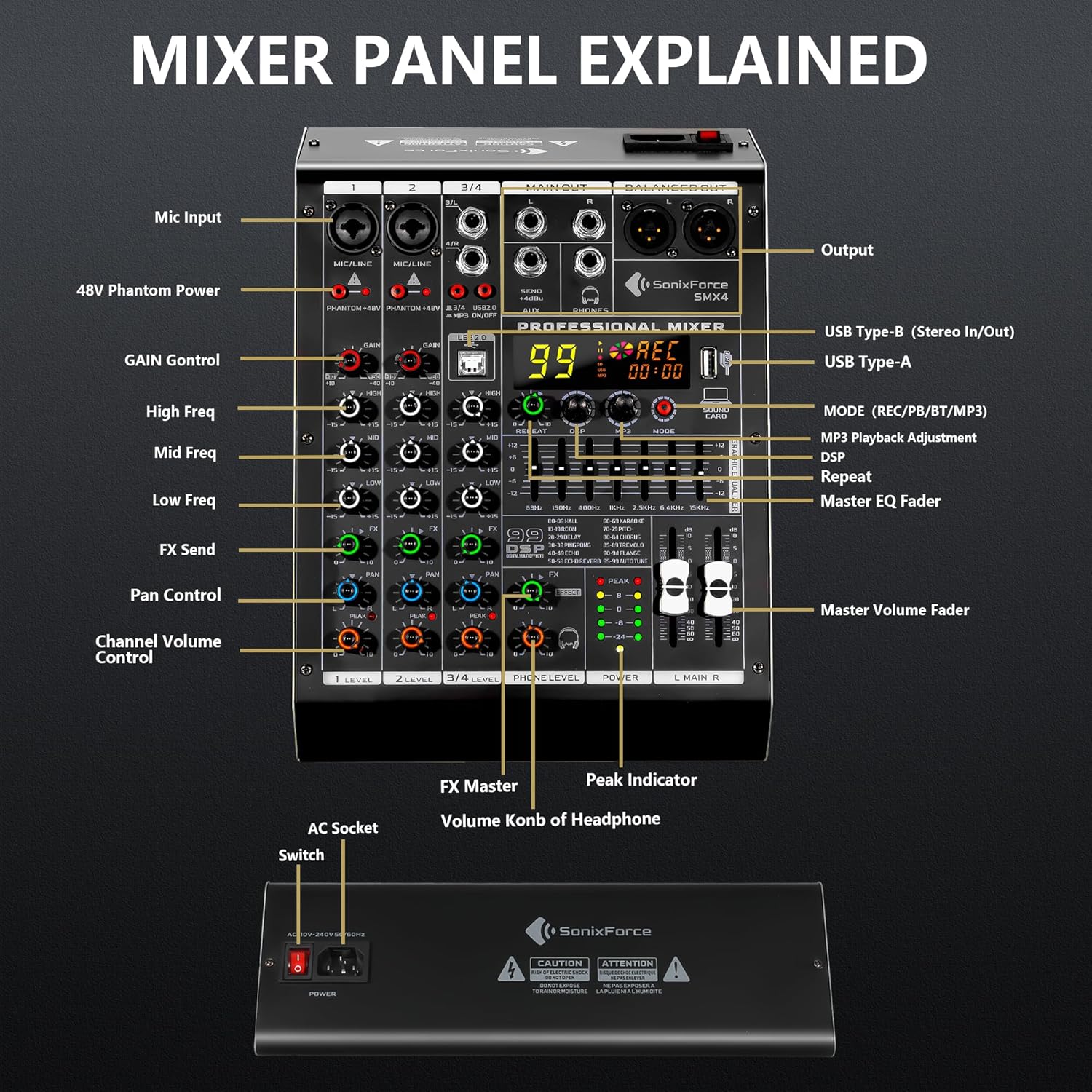
Figure 1: Overview of the SonixForce SMX4 mixer's front panel controls and connections.
Key Controls:
- Mic Input (XLR/TRS Combo Jack): Connect microphones or line-level instruments.
- 48V Phantom Power Button: Activates +48V power for condenser microphones.
- GAIN Control: Adjusts the input sensitivity for each channel.
- High/Mid/Low Freq (3-Band EQ): Controls the treble, midrange, and bass frequencies for each channel.
- FX Send: Adjusts the amount of signal sent to the internal DSP effects processor.
- PAN Control: Adjusts the stereo positioning (left/right) of the channel's signal.
- Channel Volume Control (LEVEL): Adjusts the output volume of individual channels.
- USB Type-B (Stereo In/Out): Connects to a computer for audio interface functions.
- USB Type-A: For USB flash drive/MP3 playback and direct recording.
- MODE (REC/PB/BT/MP3): Selects the operating mode (recording, playback, Bluetooth, MP3).
- MP3 Playback Adjustment: Controls MP3 playback functions.
- DSP (Digital Signal Processor): Selects and adjusts the 99 built-in effects.
- REPEAT: Adjusts the repetition of delay/echo effects.
- Master EQ Fader (Graphic Equalizer): 7-band equalizer for overall tone shaping of the main output.
- Master Volume Fader (L MAIN R): Controls the overall output volume.
- Peak Indicator: Lights up to indicate signal clipping on channels.
- Phone Level: Adjusts the headphone output volume.
- AC Socket & Switch: Power input and on/off switch.
4. Setup and Connections
Properly connecting your audio sources and outputs is crucial for optimal performance.

Figure 2: Diagram illustrating various input and output connections for the SMX4 mixer.
Input Devices:
- Microphones: Connect dynamic or condenser microphones to the XLR/TRS combo jacks (channels 1-2). For condenser microphones, activate 48V Phantom Power.
- Instruments: Connect guitars, keyboards, or other instruments to the TRS inputs (channels 1-2) or stereo line inputs (channels 3/4).
- External Audio Sources: Use the USB Type-A port for USB flash drives or the USB Type-B port for computer audio. Bluetooth connectivity allows wireless streaming from mobile devices.
Output Devices:
- Main Output (XLR/TRS): Connect to powered speakers, amplifiers, or recording interfaces.
- Headphones: Connect headphones to the dedicated 1/4" jack for monitoring.
- AUX Send: Connect to external effects processors or monitor systems.
5. Operating Instructions
5.1 Powering On/Off
- Connect the provided power cord to the AC socket on the rear panel and then to a power outlet.
- Flip the red POWER switch to the 'ON' position. The power indicator will illuminate.
- To power off, flip the POWER switch to the 'OFF' position.
5.2 Using 48V Phantom Power
For condenser microphones, 48V phantom power is required.

Figure 3: Activating 48V Phantom Power for condenser microphones.
- Connect your condenser microphone to an XLR/TRS combo jack.
- Press the 'PHANTOM +48V' button corresponding to the channel. The indicator light will turn red.
- Ensure all volume levels are low before activating/deactivating phantom power to prevent damage to equipment.
Video 1: Demonstration of activating the 48V Phantom Power on the SonixForce SMX4 mixer.
5.3 Adjusting Channel Levels and EQ
- Use the GAIN knob to set the input level for each microphone or instrument. Adjust until the 'PEAK' LED flashes only occasionally.
- Utilize the HIGH, MID, and LOW knobs to sculpt the tone of each channel.
- Adjust the LEVEL knob for each channel to balance the mix.
5.4 Using DSP Effects
The SMX4 features 99 built-in DSP effects for enhancing your audio.

Figure 4: Display showing the selection of DSP effects on the SMX4 mixer.
- Turn the DSP knob to select from the 99 available effects (e.g., Hall, Room, Delay, Echo, Reverb, Karaoke, Pitch, Chorus, Tremolo, Flange, Auto Tune).
- Press the DSP knob to confirm your selection.
- Adjust the FX knob on each channel to send the desired amount of signal to the effects processor.
- Use the FX MASTER knob to control the overall level of the applied effects.
Video 2: Demonstrates the 7-Band EQ for precise tone shaping on the SonixForce SMX4 mixer.
Video 3: Highlights the professional audio capabilities and sound quality of the SonixForce SMX4 mixer.
5.5 USB & Bluetooth Connectivity
The SMX4 offers flexible options for playing and recording audio digitally.

Figure 5: Connecting external devices for playback and recording via USB and Bluetooth.
- Bluetooth Playback: Press the 'MODE' button until 'BT' appears on the display. Search for 'BT-AUDIO' on your smartphone or tablet and connect. You can then stream background music or other audio wirelessly.
- USB Flash Drive Playback/Recording: Insert a USB flash drive into the USB Type-A port. Use the 'MODE' button to select playback or recording. For recording, switch to 'REC' mode and press the MP3 knob to start/pause recording.
- Computer Connection (Audio Interface): Connect the mixer to your computer using a USB cable via the USB Type-B port. The mixer will function as an audio interface for recording and streaming.
Video 4: Overview of the SonixForce Audio Mixer's features and connectivity options.
6. Troubleshooting
6.1 No Sound from Microphone Line
If you are experiencing no sound from a microphone input:
- Check all physical connections to ensure they are secure.
- Verify that the 'GAIN' knob for the respective channel is turned up.
- If using a condenser microphone, ensure the 'PHANTOM +48V' button is pressed and its indicator light is on.
- If using USB/Bluetooth, ensure the correct 'MODE' is selected and the MP3 knob is activated.
7. Specifications
| Feature | Specification |
|---|---|
| Model Number | SMX4 |
| Number of Channels | 4 |
| Phantom Power | 48V (switchable) |
| DSP Effects | 99 Presets |
| Equalizer | 3-Band per channel, 7-Band Graphic Master EQ |
| Connectivity Technology | USB, Bluetooth |
| Power Source | Corded Electric (AC 110V-240V, 50/60Hz) |
| Item Weight | 4.63 pounds |
| Product Dimensions | 11.81 x 8.15 x 3.74 inches |
8. Package Contents
The SonixForce SMX4 Audio Mixer package includes:

Figure 6: Contents included in the SonixForce SMX4 mixer package.
- 1 x SonixForce SMX4 4-Channel Audio Mixer
- 1 x IEC C13 Power Cord
- 1 x USB-A to USB-B Cable
- 1 x Dust-proof Storage Bag
- 1 x Instruction Manual (this document)
9. Safety Information
Please read and follow these safety guidelines to ensure safe operation and prevent damage to the device:
- Electrical Shock Hazard: Do not open the mixer casing. Refer all servicing to qualified personnel.
- Moisture Protection: Do not expose the device to rain or moisture. Keep away from liquids.
- Ventilation: Ensure adequate ventilation around the unit to prevent overheating.
- Power Supply: Use only the provided power cord and ensure the voltage matches your local power supply (110V-240V).
- Placement: Place the mixer on a stable, flat surface. Avoid placing it near heat sources or in direct sunlight.

Figure 7: Rear panel showing power input and safety warnings.
10. Warranty and Support
SonixForce products are designed for durability and performance. For any issues or questions regarding your SMX4 Audio Mixer, please contact our 24/7 customer support. Refer to your purchase documentation for specific warranty details.
Contact Support: Please refer to the contact information provided with your product or visit the official SonixForce website for assistance.